
If you’re a gamer, streamer, or content creator looking for a single USB microphone that can handle almost any recording situation, the HyperX QuadCast 2 is built to be that one mic. It’s a condenser microphone with 24-bit/96 kHz capture, four switchable polar patterns, and controls right on the mic — so you can go from solo streaming to a two-person interview to a group roundtable without changing gear or opening software.
This review focuses on the question that matters most for this product: is the added versatility of four polar patterns and on-mic controls worth the premium over a simpler USB mic? We’ll cover what’s new versus the original QuadCast, how it performs in real use, its genuine limitations, and which buyers should look elsewhere.
The QuadCast 2 is aimed at gamers and creators who want a flexible, attractive, plug-and-play mic that covers multiple use cases. As a condenser, it’s best suited to reasonably quiet spaces — a key trade-off to weigh against dynamic alternatives.
Quick Verdict
- Best for: gamers, streamers, and content creators who want one versatile USB mic for solo streaming, interviews, group recordings, and meetings — with everything controllable from the mic itself.
- Main strengths: 24-bit/96 kHz capture; four selectable polar patterns; intuitive on-mic controls (tap-to-mute, multifunction knob, status LED); a redesigned removable shock mount; and the iconic customizable HyperX red lighting.
- Main limitations: as a condenser, it picks up more room noise than a dynamic; the premium price is above entry-level USB mics; lighting customization requires NGENUITY software; and it’s USB-only with no XLR output.
- Value assessment: as a versatile, self-contained USB mic, it’s competitively positioned — you’re paying for four patterns plus onboard controls that normally require software or multiple mics. It’s a weaker value if you only ever record solo in a noisy room where a dynamic would serve you better.
- Verdict: worth strong consideration for creators who’ll use its flexibility. Whether it’s the best deal right now depends on the current price, so check the Amazon listing for the latest figure before deciding.
Shop Now
As an Amazon Associate we earn from qualifying purchases.
Key Specifications
| Specification | Details |
|---|---|
| Model | HyperX QuadCast 2 (Black / Frost) |
| Microphone type | Condenser (three 14 mm electret capsules) |
| Polar patterns | Cardioid, omnidirectional, bidirectional, stereo |
| Frequency response | 20 Hz–20 kHz |
| Sensitivity | −7.5 dB (1 V/Pa at 1 kHz) |
| Signal-to-noise ratio | ≥ 100 dB (A-weighted) |
| Self-noise (RMS) | ≤ −77 dBV (A-weighted) |
| Sample rates / bit depth | 44.1 / 48 / 96 kHz; 16-bit / 24-bit |
| Connectivity | USB-C (USB 2.0 Type-A via adapter); 3.5 mm headphone output |
| Power | 5 V / 240 mA (all lights on) |
| On-mic controls | Multifunction knob (mic gain, playback volume, monitoring volume, polar pattern), tap-to-mute sensor, status LED |
| Lighting | HyperX red, customizable via NGENUITY |
| Shock mount | Removable, spring-loaded pins, universal-mount compatible (55 mm) |
| Weight | Mic 335 g; shock mount + stand 137 g; stand 273 g; total ~819 g |
| Included | Mic, USB-C to USB-C cable (3 m), USB-C to USB-A adapter, 3/8″→5/8″ adapter, quick-start guide |
| Warranty | 2 years |
| Compatibility | PC, Mac, PS4, PS5, Nintendo Switch, Steam Deck |
Design and Build Quality
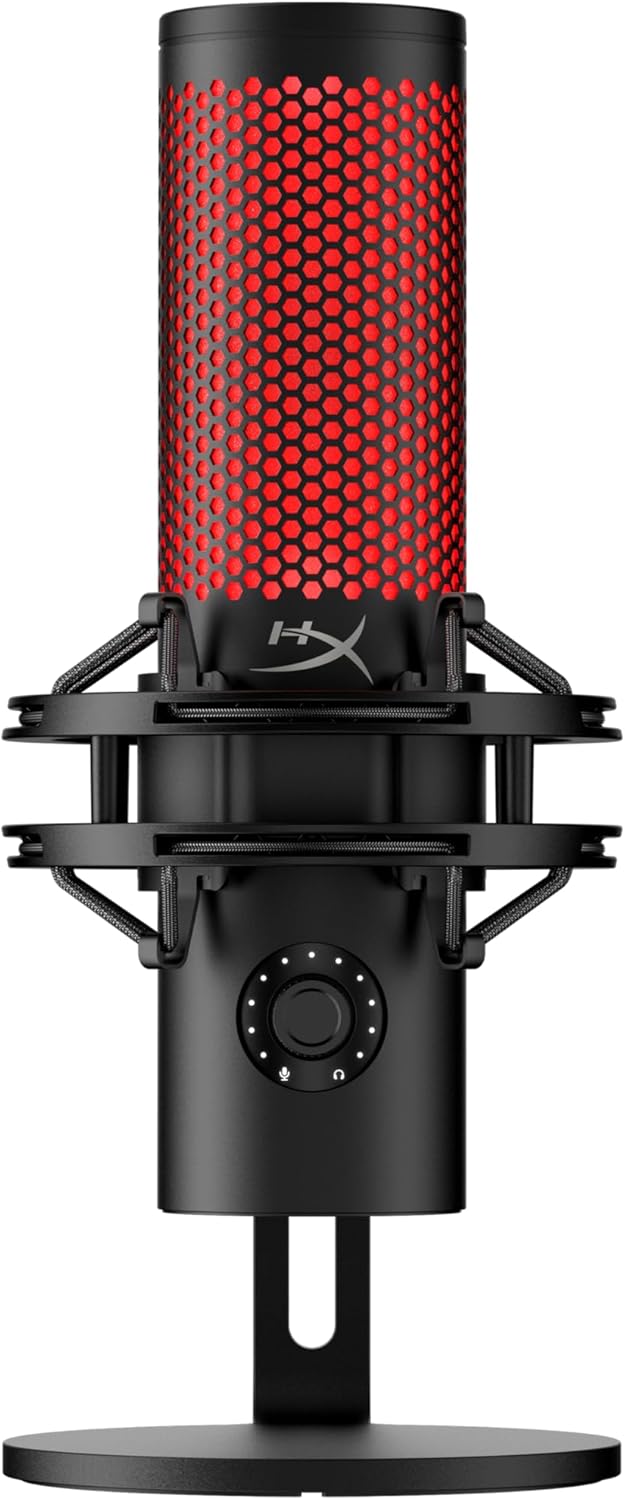
The QuadCast 2 keeps the distinctive, chunky look of the original but is now wrapped in a full-aluminum silhouette, giving it a sleeker, more premium feel than its mostly-plastic predecessor. It comes in black and frost finishes, with the signature HyperX red lighting accent on the grille. Reviews describe the build as robust and attractive — fitting for a desk-centerpiece gaming mic.
The redesign brings two notable upgrades:
- A redesigned removable shock mount. It uses spring-loaded pins so the mic detaches easily, and the mount joint is compatible with 3/8″ and 5/8″ threading, letting you use universal shock mounts or boom arms. The included desktop stand and shock mount are both in the box.
- A multifunction knob. In response to user feedback, the QuadCast 2 adds a knob on the mic that cycles through microphone gain, playback volume, and monitoring volume, and can also switch polar patterns — so you don’t need to alt-tab into software mid-setup.
One practical note: this is a fairly large, upright mic. Plan desk space and a stable surface; the included stand is solid, but a boom arm is a good upgrade for closer positioning.
Features and Technology
24-bit/96 kHz capture. The QuadCast 2 records at up to 96 kHz / 24-bit, a step above the 48 kHz standard of many budget mics. In practice this gives more headroom and detail for post-processing, though for voice content the practical difference over 48 kHz is modest.
Four selectable polar patterns. This is the headline versatility feature: cardioid (solo streaming/voice), omnidirectional (group roundtables), bidirectional (interviews, two people opposite each other), and stereo (capturing ambient/left-right width). Being able to switch without swapping mics or digging into software is the core value proposition.
Tap-to-mute sensor. Tap the top of the mic to mute instantly — a streamer favorite for avoiding “audio accidents” on the air. The status LED makes it obvious when you’re live.
Multifunction knob and status LED. The knob manages gain, playback volume, monitoring volume, and polar patterns; the LED confirms mic status at a glance, without opening software.
HyperX NGENUITY software. Used to customize lighting effects and tune microphone monitoring. Note that NGENUITY is not required to use the mic — it’s optional for lighting/refinement. The HP review confirms you can use the QuadCast 2 without it.
Headphone monitoring. A 3.5 mm headphone output gives you latency-free monitoring of your signal.
What it lacks. There is no XLR output — this is a USB-only mic. It’s also a condenser, so it captures more room ambiance than a dynamic in untreated spaces, and the software is optional but needed for lighting personalization.
These feature claims are a mix of manufacturer documentation and independent review confirmations; the build, the tall footprint, and room-sensitivity observations come specifically from hands-on editorial reviews.
Performance and Real-World Use
Independent reviews are positive. PCWorld called the QuadCast 2 “a brilliant USB microphone [that] gets even better,” great for streaming gameplay, recording a podcast, or sounding professional in a video meeting. TechRadar described it as “great audio with zero hassle.” SIFTER praised its recording quality across microphone modes and its easy-to-use mute, while noting the RGB lighting options are slim.
Three practical points from editors:
- Condenser sensitivity. As a condenser, the QuadCast 2 captures more background noise than a dynamic mic. For clean voice, use cardioid mode and keep the mic close — a boom arm helps.
- Polar-pattern flexibility is the point. Testers highlight that switching patterns on the mic is genuinely useful for interviews (bidirectional) and group recordings (omnidirectional), which is rare at this price without software.
- A “do-it-all” mic. The consensus is that it’s a great all-rounder for streaming, podcasts, and meetings — though for dedicated music or pro studio work, an XLR setup remains the better tool.
Because there are no standardized lab benchmarks for a consumer microphone, these observations come from editorial reviews rather than controlled measurements — treat them as real-world impressions, not lab data.
Compatibility and Installation
The QuadCast 2 is plug-and-play over USB-C and works as a standard USB audio device on PC, Mac, PS4, PS5, Nintendo Switch, and Steam Deck — the official list adds PS4 and Steam Deck beyond the “PC, Mac, PS5 & Switch” in the supplied description. It includes a USB-C to USB-A adapter for older ports.
Checklist before you buy:
- USB port: USB-C (or USB-A via the included adapter).
- Console/handheld: works via USB on PS4, PS5, Switch, and Steam Deck; NGENUITY lighting/software features are PC/Mac-oriented.
- Software: optional; use NGENUITY for lighting customization and mic tuning. Not required for basic use.
- Mounting: desktop stand and shock mount included; a boom arm or universal shock mount (55 mm) also works via the spring-loaded pins.
- Monitoring: any 3.5 mm headphones plug into the mic’s output.
Mandatory vs. recommended: USB connectivity and a quiet-ish environment are the practical requirements; NGENUITY is optional, and a boom arm is recommended for close-in voice capture.
Advantages and Disadvantages
Pros
– 24-bit/96 kHz capture with clean SNR.
– Four switchable polar patterns — rare flexibility without software.
– Intuitive on-mic controls: tap-to-mute, multifunction knob, status LED.
– Redesigned removable shock mount, universal-mount compatible.
– Full-aluminum build and customizable HyperX red lighting.
– Broad compatibility: PC, Mac, PS4, PS5, Switch, Steam Deck.
Cons
– Condenser picks up room noise in untreated spaces.
– Premium price above entry-level USB mics.
– Lighting customization requires optional NGENUITY software.
– USB-only, no XLR output.
– Large, upright footprint needs desk space.
Price and Value for Money
The QuadCast 2’s value story is about versatility in one box. You’re paying for four polar patterns, onboard controls, and a premium build in a single USB mic — normally you’d either buy multiple mics or manage everything through software. For a creator who switches between solo streaming, interviews, and group recordings, that convenience is the core justification.
Weigh that against what you give up: a condenser’s room sensitivity, a premium price, and no XLR path. If you mostly stream solo in a noisy room, a dynamic mic may serve you better for less; if you never need more than one polar pattern, a simpler USB condenser likely suffices.
As with most premium peripherals, the balance shifts with Amazon’s price and availability. Amazon prices fluctuate and stock comes and goes. Check the product listing on Amazon for the latest price and current availability before purchasing.
Best Alternatives and Comparisons
| Alternative | Why it’s relevant | Main advantage | Trade-off |
|---|---|---|---|
| HyperX QuadCast (original) | The predecessor with the same family look | Lower cost; same four-pattern concept and tap-to-mute | Usually 48 kHz capture; older design; less refined shock mount |
| Elgato Wave:3 MK.2 | A premium streaming condenser with onboard DSP | Onboard DSP + Wave Link mixing; polished plug-and-play | No polar-pattern switching (cardioid only); software ecosystem required for full value |
| Rode X XDM-100 | A premium dynamic USB mic with UNIFY software | Dynamic capsule rejects room noise; UNIFY mixer + APHEX processing included | Single cardioid pattern; software-first experience; premium price |
| SteelSeries Alias | A competing gaming USB mic | Gaming-focused design with broadcast sound | Fewer polar patterns; check current feature set and price |
Choose the original QuadCast on a budget if you want the same concept for less. Choose the Elgato Wave:3 MK.2 if you want onboard DSP and a mixing app over polar-pattern flexibility. Choose the Rode X XDM-100 if room noise is your enemy and you want a dynamic with virtual-mixer software. Choose the SteelSeries Alias if you prefer its gaming design. Compare current pricing on each listing — prices and availability change.
Who Should Buy It?
- Gamers and streamers: the four patterns and tap-to-mute make it flexible for live broadcast.
- Podcasters: cardioid for solo, bidirectional for interviews, omnidirectional for roundtables.
- Remote workers / video meetings: a professional-sounding upgrade from headset and laptop mics.
- Content creators who want one do-it-all mic: avoids buying separate mics for different scenarios.
Who Should Consider Something Else?
- Anyone in a noisy or untreated room: a dynamic mic (e.g., Rode X XDM-100) will reject more background noise.
- Budget-conscious buyers: if you only need cardioid, a simpler USB mic covers the same ground for less.
- Studio or music-focused users: an XLR setup remains the better tool for serious production.
- Those who want DSP/mixing baked in: the Elgato Wave:3 MK.2 or a UNIFY-based dynamic may suit a software-driven workflow better.
Final Verdict
The HyperX QuadCast 2’s strongest selling point is versatility without software. Four polar patterns, tap-to-mute, a multifunction knob, and a premium aluminum build in a single USB mic make it one of the more flexible plug-and-play options for creators — and the 24-bit/96 kHz capture is a genuine step up from entry-level mics.
Its most significant limitations are the condenser’s room sensitivity, the premium price, the USB-only design, and the need for NGENUITY if you want lighting customization. Those are real trade-offs, but they fit a versatile, gamer-friendly all-rounder.
Buy the QuadCast 2 if you’ll actually use its multiple patterns and on-mic controls in a reasonably quiet space. Compare alternatives if you stream solo in a noisy room, want DSP/mixing software, or want to keep your budget lower. And because value here rides on the current price, check the Amazon listing for the latest price and availability before you commit.
Check the Latest Price on Amazon
Amazon prices and availability can change, so confirm current pricing before purchasing.