
A PC case is easy to treat as an afterthought — but it shapes almost every other decision in a build. It decides which motherboard, graphics card, CPU cooler, and power supply will fit. It determines how much heat your components can shed and how loud the finished PC is. It sets the bar for cable management and future upgrades. And it’s the only part you’ll look at every day.
Choosing a case is not about picking one that “looks right.” The best case for you depends on the components you plan to install, the workload you’ll run, and the space you have. This guide walks through what matters, the different case types, and specific models that work well in 2026 — so you can make an informed decision.
Shop Now
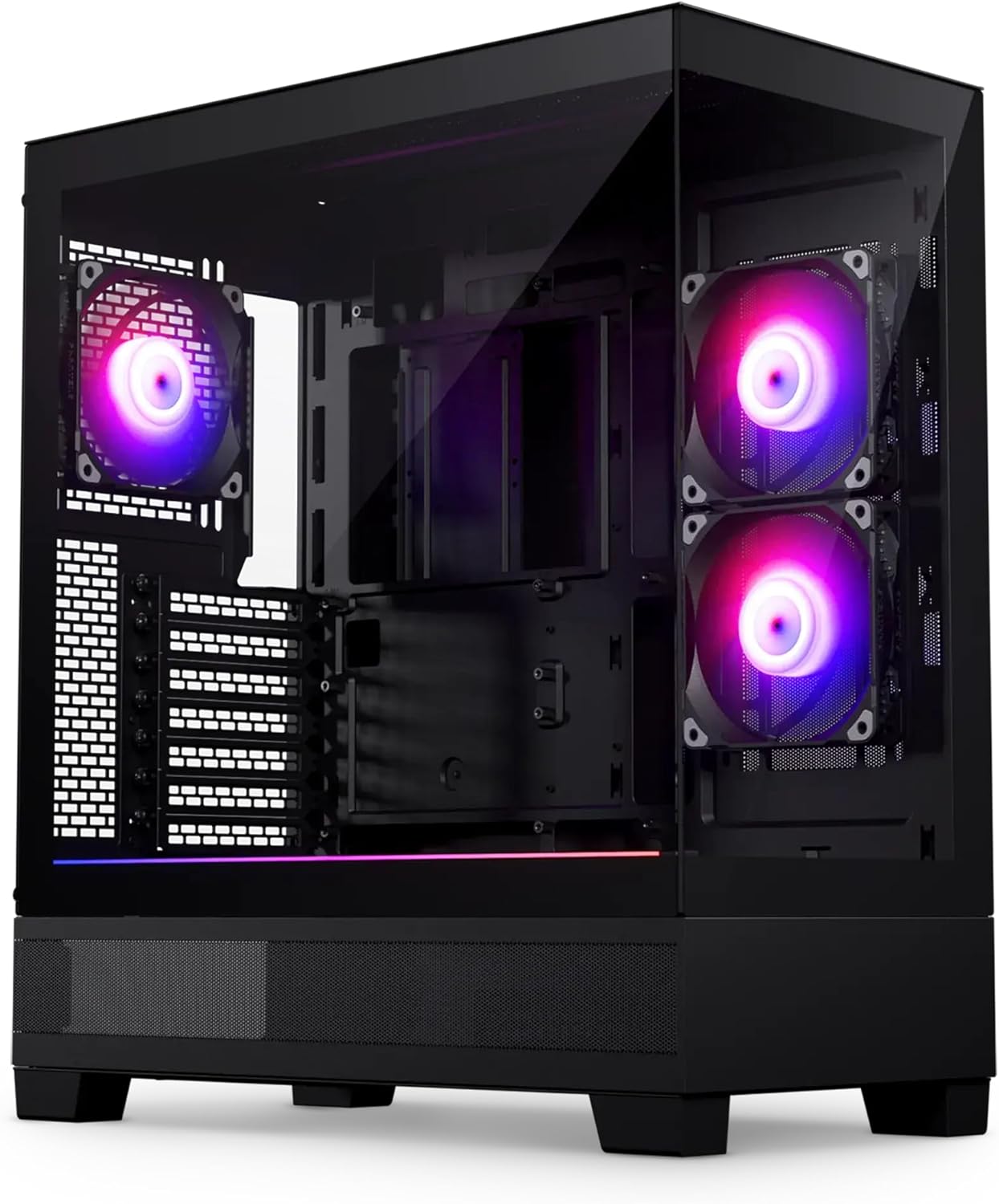
Phanteks XT View
3× M25-120 D-RGB
Shop Now on Amazon

Lian Li Lancool 217
5 fans
Shop Now on Amazon

Fractal Design Torrent Compact RGB
2× 180 mm Prisma
Shop Now on Amazon
What to Consider Before Buying a PC Case
Form Factor and Motherboard Compatibility
Motherboard size is the first compatibility gate. The common standards are:
- Mini-ITX — the smallest mainstream board, with limited expansion slots and usually two RAM slots.
- Micro-ATX (mATX) — smaller than ATX, with up to four expansion slots and typically four RAM slots.
- ATX — the standard full-size desktop layout with up to seven expansion slots.
- E-ATX / EEB — larger workstation boards, supported only by cases that explicitly list them.
Motherboard compatibility must be checked against the exact case specification, not the category name. An “ATX case” from one brand may not fit every ATX board: some cases list a width limit such as “E-ATX up to 280 mm wide.” Always compare your board’s width to the case’s limit, especially for E-ATX and EEB boards.
GPU Clearance and Component Dimensions
Three dimensions matter most:
- Maximum graphics card length — measure from the back bracket to the card’s far end.
- CPU cooler height — tower coolers are often the tallest component.
- Maximum PSU length — especially relevant in compact cases.
Crucially, nominal GPU clearance can change depending on how you configure cooling. If you install a radiator and fans at the front, the usable space for a graphics card shrinks. Many cases list a maximum GPU length “without front fans” and a shorter one “with front fans” (and shorter still with a front radiator). Always subtract the depth of your planned front cooling from the card’s length.
Airflow and Cooling Design
Airflow works along a path: cool air enters (usually the front and bottom), passes over the components, and exits (top and rear). Design choices that matter:
- Mesh panels allow air to enter directly and generally cool better than solid or glass fronts.
- Glass-front designs restrict intake, so they rely on side or bottom vents.
- Fan positions and count determine how much air moves and whether pressure is positive or negative.
- Dust filters on intake paths reduce buildup but can restrict flow if not cleaned.
A case with several glass panels is not automatically a poor cooler — what matters is the actual intake and exhaust design.
Liquid Cooling and Radiator Compatibility
Radiators come in standard sizes: 120 mm, 240 mm, 280 mm, 360 mm, and larger. Compatibility is not just a label — it depends on:
- Mounting positions — top, front, side, or bottom, depending on the case.
- Radiator thickness and fan configuration — a thick radiator with push-pull fans needs more clearance.
- Component clearance — a front radiator reduces GPU room; a top radiator may clash with tall RAM or a tall CPU cooler.
Always confirm which sizes fit where, and account for thickness.
Storage and Expansion
Check where drives mount and how many you can fit:
- 2.5-inch SSD trays — common, and they don’t require much space.
- 3.5-inch HDD bays — fewer cases carry these as builds go M.2-only.
- Expansion slots — determine how many add-in cards fit, and whether a vertical GPU mount is possible.
Consider future storage needs — a case that barely fits today’s drives may force an early upgrade.
Build Quality, Cable Management and Ease of Assembly
A case’s construction affects how pleasant the build is. Look for:
- Panel materials — steel and aluminum with tempered glass are typical.
- Cable routing channels and grommets — keep the build tidy.
- Tool-less features and removable brackets — speed up installation.
- Working space — room behind the motherboard tray and around the PSU.
A case with generous interior space and good cable paths is easier to build in and to maintain.
Front Panel Connectivity
Front-panel I/O varies a lot between models. Common connectors include:
- USB-A ports — still standard on most cases.
- USB-C ports — increasingly common, with varying speeds.
- Audio jacks — some cases omit a headphone/mic combo, which is worth checking.
Know which front ports you need before you buy.
Size, Aesthetics and Desk Space
Cases range from compact to full-tower, and from plain to panoramic glass:
- Compact cases — save desk space but impose stricter component limits.
- Mid-tower cases — the mainstream balance of size and capacity.
- Full-tower cases — maximum room for large boards, GPUs, and radiators.
- Dual-chamber designs — separate the PSU and cabling into a rear chamber for a clean look.
There is a direct trade-off between appearance, footprint, and internal space. A large glass showcase case looks impressive but takes up desk space and may have less airflow than a mesh-front tower.
PC Case Types Explained
- Mini-ITX cases — fit only Mini-ITX boards. They are the most compact but demand careful parts selection (SFX power supply, low-profile cooler, GPU-size checks).
- Micro-ATX cases — take mATX (and usually Mini-ITX) boards. They are compact but often accept full-size GPUs.
- Mid-tower cases — the standard size for ATX boards, with room for most hardware. Despite the name, dimensions vary widely between brands.
- Full-tower cases — the largest, with room for E-ATX/EEB boards, giant GPUs, and large radiators. They need desk space.
- Dual-chamber cases — a layout (often mid- or full-tower) that isolates the PSU and cabling in a second chamber, usually behind the motherboard tray.
These are practical categories, not strict standards. Cases within a single category differ in dimensions and compatibility, so always check the individual specs.
Recommended PC Cases to Consider in 2026
| Product | Case category | Supported motherboards | Cooling / airflow | Main advantage | Best suited for |
|---|---|---|---|---|---|
| Montech XR | Mid-tower (panoramic glass) | ATX, mATX, Mini-ITX | 3× 120 mm ARGB PWM; top 360 mm radiator | Panoramic look with a complete lit fan layout | Budget builds and first-time builders |
| Phanteks XT View | Mid-tower (panoramic glass) | E-ATX (≤280 mm), ATX, mATX, Mini-ITX | 3× M25-120 D-RGB; top 360 mm, side 240 mm | True clearance and back-connect support at a value price | Builders who want glass plus room for large GPUs |
| Lian Li Lancool 217 | Mid-tower | E-ATX (≤280 mm), SSI-EEB, ATX, mATX, Mini-ITX | 5 fans; top 360 mm | Five included fans and a hub with strong stock cooling | Premium all-round mid-tower builds |
| Cooler Master HAF II 500 | Large ATX (high-airflow) | E-ATX (≤310 mm), ATX, mATX, Mini-ITX | 2× 220 mm + 1× 180 mm; top/front 360 mm | Very high airflow and large component clearances | Workstation and high-TDP air-cooled builds |
| Fractal Design Torrent Compact RGB | Compact ATX | E-ATX (≤274 mm), ATX, mATX, Mini-ITX | 2× 180 mm Prisma; front 360 mm, bottom 280 mm | Air-cooling layout with a GPU-focused intake | Air-cooled builds with GPUs up to ~330 mm |
| NZXT H9 Flow | Dual-chamber mid-tower | E-ATX (≤277 mm), ATX, mATX, Mini-ITX | 4 fans; top & front 420 mm, bottom 360 mm | Room for two 420 mm radiators in a glass showcase | Showcase high-end builds |
| Lian Li Lancool 207 | Compact ATX | ATX (≤244 mm), mATX, Mini-ITX | 4 fans; top 360 mm | Compact footprint with a front-mounted PSU and good stock cooling | Space-efficient ATX builds |
| Cooler Master Cosmos Alpha | Full-tower (workstation) | EEB, E-ATX, ATX, mATX, Mini-ITX | 2× 200 mm + 1× 120 mm; side 420 mm | Sliding motherboard tray and EEB support | Workstation and high-end builds with space |
No prices are shown because they change frequently — check the Amazon listing for current pricing and availability. All clearances are the maximum the manufacturer rates; measure your exact components and subtract clearance taken by fans/radiators.
Montech XR
The Montech XR is a budget mid-tower that brings the panoramic tempered-glass look and a complete lit fan layout out of the box. It ships with three 120 mm ARGB PWM fans — two reverse-blade side intakes and a rear exhaust — so you get working cooling and lighting without extra purchases.
Compatibility: ATX, micro-ATX, and Mini-ITX boards; GPU up to ~420 mm; CPU cooler up to ~175 mm; PSU up to ~230 mm; up to nine 120 mm fan locations; a 360 mm top radiator fits. Front I/O includes USB-C and two USB 3.0 ports.
Cooling and airflow: The three included fans give a solid stock configuration for typical gaming hardware. High-end parts benefit from adding fans or a top AIO. TechPowerUp reviewed the case with Editor’s Choice and Budget awards, noting the three-fan layout and solid build.
Strengths: panoramic glass at a low price; three included ARGB fans; USB-C front; generous clearances; magnetic filters.
Limitations: stock fan wiring is messy; a top AIO blocks access to the top motherboard edge, so route CPU power and top headers first; the underside magnetic filter can detach.
Who should consider it: first-time and budget builders who want the showcase look and a ready, lit cooling setup.
Phanteks XT View
The Phanteks XT View delivers the panoramic “fish-tank” look at a value price without skimping on clearance. It ships with three M25-120 D-RGB fans (two reverse-blade side intakes and a rear exhaust) and supports back-connect motherboards such as ASUS BTF, MSI Project Zero, and Gigabyte Project Stealth.
Compatibility: E-ATX up to 280 mm wide, ATX, micro-ATX, and Mini-ITX; GPU up to ~415 mm; CPU cooler up to ~184 mm; PSU up to ~270 mm; up to nine 120 mm fan locations; top 360 mm and side 240 mm radiators; 7 PCI slots with optional vertical GPU bracket.
Cooling and airflow: A full mesh pattern feeds the three included fans, and three optional midplate fan locations sit directly beneath the GPU. For a mid-range build the stock layout is comfortable; high-end parts benefit from extra fans or a top AIO.
Strengths: panoramic glass at a value price; large GPU/cooler/PSU clearances; three included RGB fans plus a controller; back-connect support.
Limitations: no GPU anti-sag bracket is included; the included fan cables are messy to route; the front panel has a single USB-A port.
Who should consider it: builders who want the glass showcase look and strong value, especially with large graphics cards.
Lian Li Lancool 217
The Lancool 217 is a well-rounded mid-tower that ships with five PWM fans — two 170 mm front intakes, two 120 mm reverse-blade fans above the PSU shroud, and a 140 mm rear exhaust — plus an ARGB/fan hub. It pairs that with a tool-free build and wood accents on the front I/O panel.
Compatibility: ATX, E-ATX up to 280 mm wide, SSI-EEB up to 330 mm, micro-ATX, and Mini-ITX; GPU up to ~380 mm; CPU cooler up to ~180 mm; PSU up to ~220 mm standard / ~180 mm rotated; top 360 mm radiator; front I/O with dual power buttons, two USB 3.0, USB-C, and audio.
Cooling and airflow: The mesh front and five fans give strong out-of-the-box cooling. TechPowerUp awarded it Editor’s Choice and noted it “cools extremely well”; GamersNexus validated the airflow, with the bottom fans feeding the GPU. Two caveats: the fans are loud at full speed, and the included fans are not ARGB-lit.
Strengths: five included fans plus a hub; strong independently reviewed thermals; spacious E-ATX support; wood accents; dual power buttons and dual PSU orientations.
Limitations: loud at full fan speed; no ARGB fan lighting; no filter over the lower intake vents.
Who should consider it: builders who want a premium all-round mid-tower with no extra fan purchases and room for high-end GPUs.
Cooler Master HAF II 500
The HAF II 500 is Cooler Master’s flagship high-airflow case, built around three oversized fans: two 220 mm Mighty40 F220 front intakes and a 180 mm Mighty40 V180 rear exhaust. Cooler Master presents it as an ATX case (ATX/E-ATX motherboard support) rather than a conventional full tower, sized for very large builds.
Compatibility: E-ATX up to 310 mm wide, ATX, micro-ATX, and Mini-ITX; GPU up to 430 mm; CPU cooler up to 221 mm (Intel) / 220 mm (AMD); PSU up to 210 mm; top and front radiators up to 360 mm via the MasterRail system (top and front are not simultaneous); front I/O with USB 3.2 Gen 2×2 Type-C, two USB 3.0, and audio.
Cooling and airflow: The front intake is engineered to move exceptional volumes of air — each Mighty40 F220 is rated to up to 203.8 CFM, and Modders-Inc measured roughly 413 CFM at the front intake with a flow meter. The airflow path runs front-to-back and out the top. The huge fans deliver strong cooling at modest speeds.
Strengths: enormous intake airflow supported by an independent measurement; massive GPU and cooler clearance; dual-GPU bracket; tool-free MasterRail.
Limitations: large chassis footprint; top and front radiators cannot run simultaneously; some minor build niggles (non-captive thumbscrews, sharp plastic edges).
Who should consider it: workstation and enthusiast builders running hot components who prefer air cooling and have room for a large chassis.
Fractal Design Torrent Compact RGB
The Torrent Compact is Fractal’s compact take on the Torrent airflow design, built around two custom 180×38 mm Prisma ARGB PWM intake fans. It pairs an open front grille with a full-length bottom intake that feeds cool air straight to the GPU.
Compatibility: E-ATX up to 274 mm wide, ATX, micro-ATX, Mini-ITX, and SSI-CEB; GPU up to 330 mm with the front fans installed (368 mm with them removed); CPU cooler up to 174 mm; ATX PSU up to 210 mm mounted at the top; front 360/280 mm and bottom 280 mm radiators, with no top radiator mount; 9-port PWM fan hub.
Cooling and airflow: The top-mounted PSU frees the lower front for a direct GPU intake. This is an air-cooling case first. Radiator thickness, fan configuration, and neighboring components can reduce practical radiator clearance.
Strengths: superb air-cooling potential with two 180 mm fans; premium build; bundled PWM fan hub and GPU support bracket; USB-C 20 Gbps front port.
Limitations: no top radiator mount; GPU capped at 330 mm with front fans; tight cable management and limited storage.
Who should consider it: air-cooling enthusiasts with a compact mid- or upper-midrange build who don’t plan a liquid-cooling loop.
NZXT H9 Flow
The H9 Flow (2025) is a large dual-chamber mid-tower built as a glass showcase. It wraps the main compartment in panoramic tempered glass, isolates the PSU and cabling in a rear chamber, and is big enough for two 420 mm radiators.
Compatibility: E-ATX up to 277 mm, ATX, micro-ATX, and Mini-ITX; GPU up to 459 mm (with slim front fans) or 410 mm (with a 56 mm-thick 420 mm AIO plus fans); CPU cooler up to 165 mm; PSU up to 200 mm; included fans 3× F140Q Airflow (front) + 1× F120Q (rear); top and front radiators up to 420 mm, bottom up to 360 mm; front fan support up to three 120/140 mm on the front-right, top, and bottom, plus one 120 mm rear.
Cooling and airflow: The dual-chamber design keeps cabling out of the airflow path, and reviewers praise the cable management — PC Gamer called it “insane-level cable management” on the same H9 Flow platform, and Custom PC highlights the enlarged rear chamber for hiding cabling. The case shines when filled with fans or large radiators.
Strengths: dual-chamber glass showcase; room for two 420 mm radiators; excellent cable management; back-connect ATX support.
Limitations: large and heavy; no RGB or hub on the base trim; GPU length drops with a front 420 mm AIO.
Who should consider it: enthusiasts who want a large glass flagship and plan to fit their own fans and a big AIO.
Lian Li Lancool 207
The Lancool 207 packs a full ATX build into a compact ~45.5-liter chassis with a front-mounted PSU, a recessed motherboard tray, and two fans mounted directly below the graphics card. It ships with four fans — two 140 mm ARGB front intakes and two 120 mm PWM fans above the PSU shroud.
Compatibility: standard ATX up to 244 mm wide, micro-ATX, and Mini-ITX; GPU up to ~375 mm; CPU cooler up to 180 mm; PSU (ATX) under 160 mm, front-mounted; top 360/280/240 mm radiator, no front radiator; included adjustable GPU anti-sag bracket.
Cooling and airflow: The four included fans give strong out-of-the-box cooling; independent testing (PCMag, GamersNexus) praised the stock thermals, with the bottom fans feeding the GPU. The stock fans are loud at full speed.
Strengths: compact full-ATX footprint; four included fans; clever front-mounted PSU; included anti-sag bracket; strong out-of-the-box thermals.
Limitations: PSU length capped at 160 mm; no front radiator; sparse dust filtration.
Who should consider it: builders who want a space-efficient ATX case with strong stock cooling and a top AIO.
Cooler Master Cosmos Alpha
The Cosmos Alpha revives Cooler Master’s flagship Cosmos line under the FreeForm 2.0 philosophy. It is a massive ~31 kg full-tower with a sliding, removable motherboard tray, EEB enterprise motherboard support, and radiators up to 420 mm on the side.
Compatibility: Mini-ITX, micro-ATX, ATX, E-ATX, and EEB; CPU cooler up to 186 mm; GPU up to 400 mm; ATX PSU up to 240 mm; side radiators up to 420 mm, top and bottom up to 360 mm; included fans 2× 200 mm front (non-ARGB) + 1× Mobius 120 mm rear; an ARGB/PWM fan hub is included.
Cooling and airflow: Two large 200 mm front intake fans drive strong airflow, and the case supports up to 15 fan positions for large custom loops. The included fans are non-RGB; lighting is a separate ARGB underglow.
Strengths: EEB/E-ATX support; sliding/removable motherboard tray; up to 420 mm side radiators; huge cooling headroom; premium build.
Limitations: very heavy and deep (~31 kg); the complex front I/O (dual USB-C + four USB-A) needs several internal motherboard headers; storage specifications are inconsistent (the official table lists two drive bays, while the manufacturer’s page cites tool-free bays for up to seven drives).
Who should consider it: workstation and enthusiast builders with serious hardware who have the space and effort budget for a flagship chassis.
How to Choose the Right PC Case for Your Build
- Budget gaming PC: the Montech XR bundles a panoramic look with three included ARGB fans at a low cost, leaving budget for other components.
- High-performance gaming PC: the Lian Li Lancool 217 offers strong stock cooling and room for high-end GPUs; the NZXT H9 Flow suits builds that want two large radiators.
- Workstation or productivity PC: the Cooler Master HAF II 500 and Cosmos Alpha handle E-ATX/EEB boards, large GPUs, and sustained loads; the Cosmos Alpha adds the sliding tray for custom layouts.
- Compact desktop build: the Lian Li Lancool 207 fits a full ATX build in a small footprint; the Fractal Design Torrent Compact RGB is a strong compact air-cooler.
- High-airflow build: the Cooler Master HAF II 500 and the Torrent Compact RGB emphasize airflow, the former for very large builds and the latter for compact ones.
- Showcase build with lighting: the Phanteks XT View, Montech XR, and NZXT H9 Flow provide panoramic glass and visible components.
Common PC Case Buying Mistakes
- Buying before checking GPU clearance — measure your card against the case’s rated length in the configuration you plan to use.
- Ignoring CPU cooler height — a tall tower cooler can exceed the case’s limit.
- Forgetting radiator and fan thickness — thick radiators and push-pull fans affect clearance in top and front mounts.
- Choosing aesthetics over airflow — a glass-front case may force a smaller, hotter build.
- Underestimating cable management — small cases and poor routing channels make builds messier.
- Ignoring front-panel connectivity — you may need specific USB-A/USB-C ports or an audio jack.
- Assuming every ATX case fits every ATX motherboard — E-ATX boards and some ATX boards have width limits.
How to choose: How to Choose a PC Case (2026 Buyer's Guide)
Step-by-step decision guide: How to Choose a PC Case (2026 Buyer's Guide).
Motherboard size is the first compatibility gate. The common standards are:
- Mini-ITX — the smallest mainstream board, with limited expansion slots and usually two RAM slots.
- Micro-ATX (mATX) — smaller than ATX, with up to four expansion slots and typically four RAM slots.
- ATX — the standard full-size desktop layout with up to seven expansion slots.
- E-ATX / EEB — larger workstation boards, supported only by cases that explicitly list them.
Three dimensions matter most:
- Maximum graphics card length — measure from the back bracket to the card's far end.
- CPU cooler height — tower coolers are often the tallest component.
- Maximum PSU length — especially relevant in compact cases.
Airflow works along a path: cool air enters (usually the front and bottom), passes over the components, and exits (top and rear). Design choices that matter:
- Mesh panels allow air to enter directly and generally cool better than solid or glass fronts.
- Glass-front designs restrict intake, so they rely on side or bottom vents.
- Fan positions and count determine how much air moves and whether pressure is positive or negative.
- Dust filters on intake paths reduce buildup but can restrict flow if not cleaned.
Radiators come in standard sizes: 120 mm, 240 mm, 280 mm, 360 mm, and larger. Compatibility is not just a label — it depends on:
- Mounting positions — top, front, side, or bottom, depending on the case.
- Radiator thickness and fan configuration — a thick radiator with push-pull fans needs more clearance.
- Component clearance — a front radiator reduces GPU room; a top radiator may clash with tall RAM or a tall CPU cooler.
Check where drives mount and how many you can fit:
- 2.5-inch SSD trays — common, and they don't require much space.
- 3.5-inch HDD bays — fewer cases carry these as builds go M.2-only.
- Expansion slots — determine how many add-in cards fit, and whether a vertical GPU mount is possible.
A case's construction affects how pleasant the build is. Look for:
- Panel materials — steel and aluminum with tempered glass are typical.
- Cable routing channels and grommets — keep the build tidy.
- Tool-less features and removable brackets — speed up installation.
- Working space — room behind the motherboard tray and around the PSU.
Front-panel I/O varies a lot between models. Common connectors include:
- USB-A ports — still standard on most cases.
- USB-C ports — increasingly common, with varying speeds.
- Audio jacks — some cases omit a headphone/mic combo, which is worth checking.
Cases range from compact to full-tower, and from plain to panoramic glass:
- Compact cases — save desk space but impose stricter component limits.
- Mid-tower cases — the mainstream balance of size and capacity.
- Full-tower cases — maximum room for large boards, GPUs, and radiators.
- Dual-chamber designs — separate the PSU and cabling into a rear chamber for a clean look.
Note: Prices and availability change frequently. Always verify the latest price and configuration on the Amazon product page before purchasing.
Frequently Asked Questions
Final Thoughts
The right PC case balances component compatibility, cooling requirements, and intended use — not just looks. Start with your motherboard size and GPU length, then confirm your CPU cooler and PSU fit, then think about airflow, radiator support, and cable management. If you plan ahead, a good case will serve several builds.
For our ranked shortlist and side-by-side comparison, see Best PC Cases for 2026.
For help planning the rest of your build, use the ComponentCrate PC Builder. And when you’re ready to connect everything, see our dock and hub buyer’s guide, our external storage buyer’s guide, and our budget laptop buyer’s guide.