
Shop Now

Lian Li Lancool 217
Best overall
Check Current Price on Amazon

Fractal Design Torrent Compact RGB
Best airflow
Check Current Price on Amazon
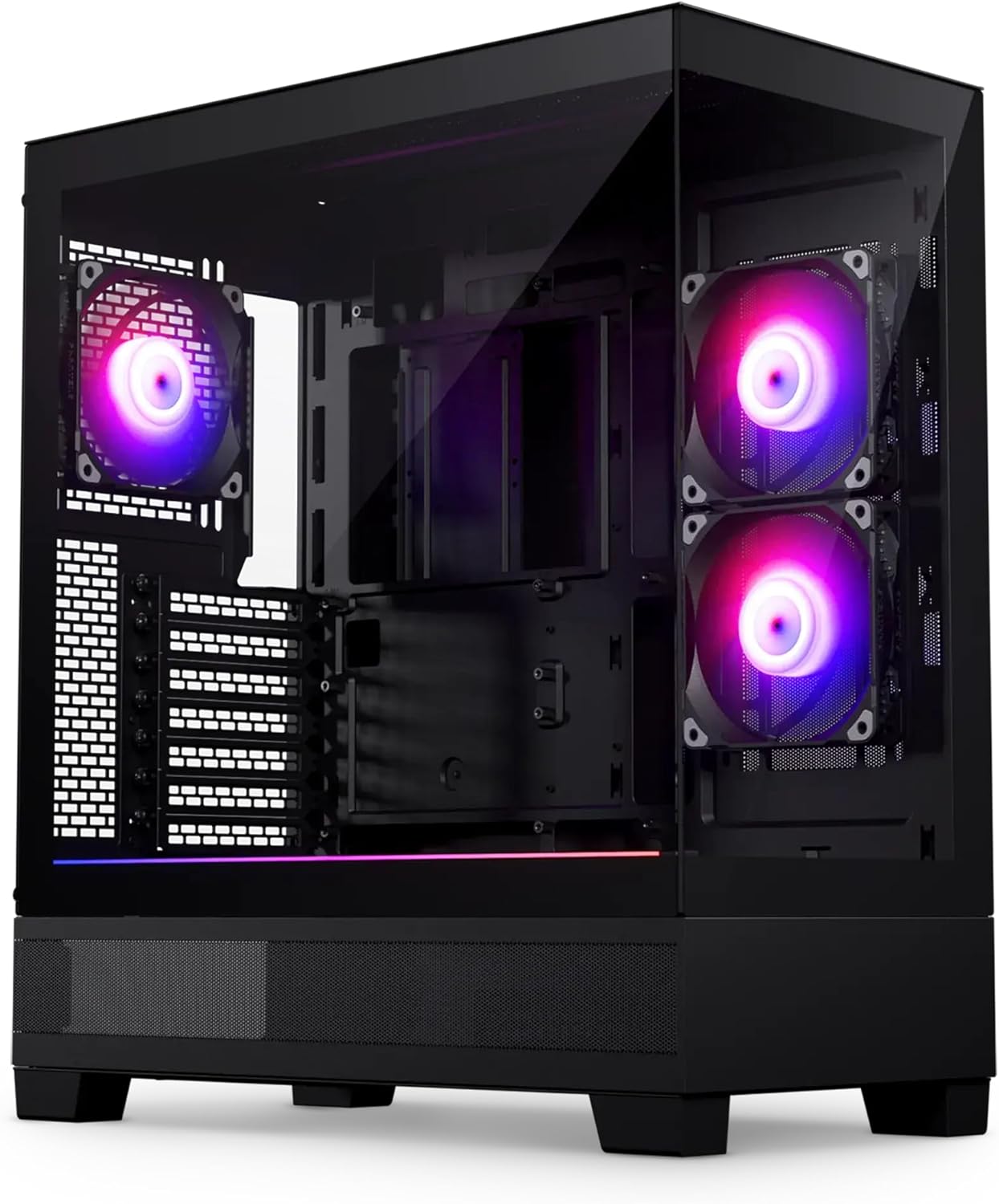
Phanteks XT View
Best value
Check Current Price on Amazon

Montech XR
Best budget
Check Current Price on Amazon

NZXT H9 Flow
Best showcase / dual-chamber
Check Current Price on Amazon

Lian Li Lancool 207
Best compact ATX
Check Current Price on Amazon

Cooler Master HAF II 500
Best large high-airflow
Check Current Price on Amazon
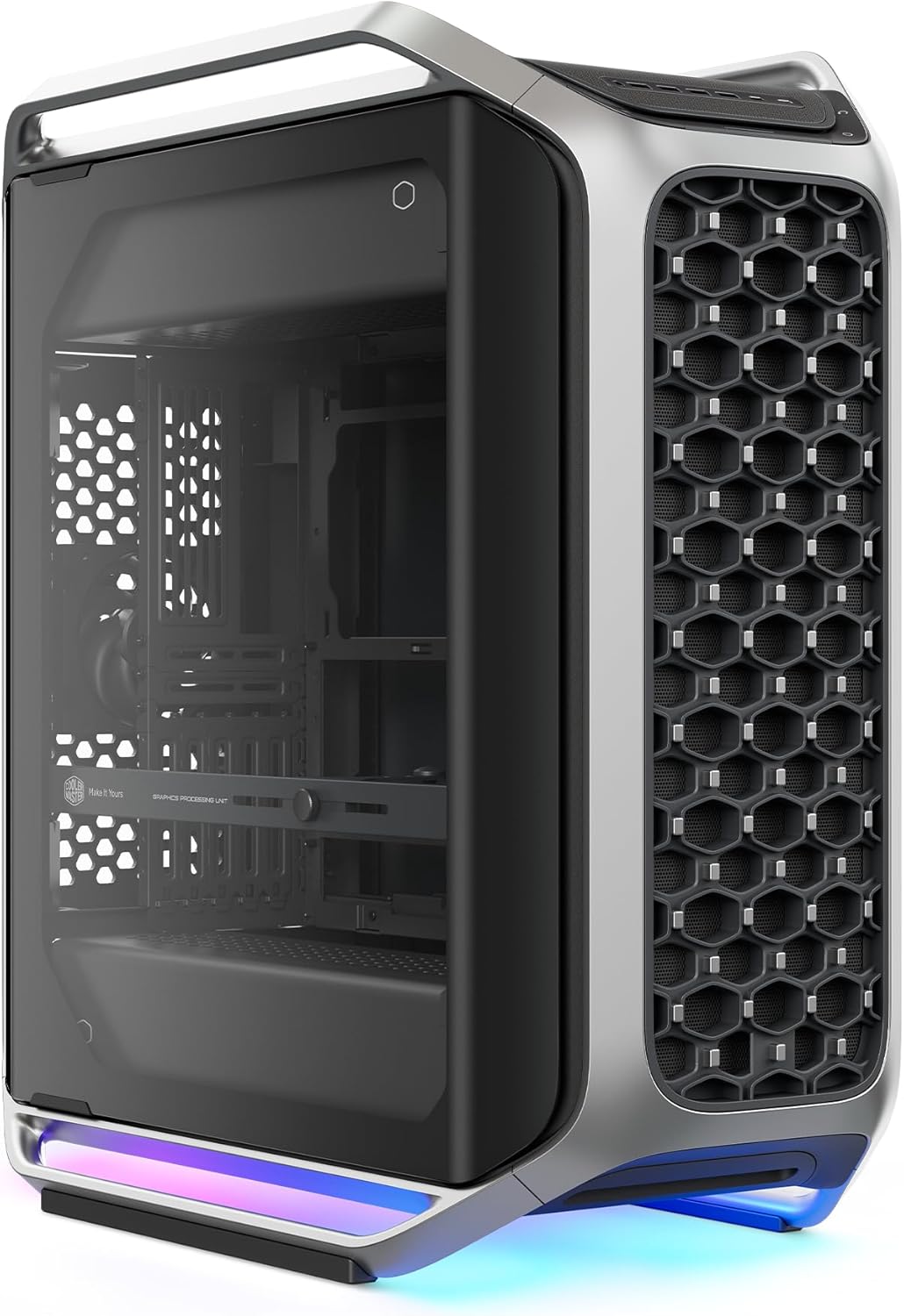
Cooler Master Cosmos Alpha
Best high-end / workstation
Check Current Price on Amazon

Fractal Design Terra Jade
Best SFF
Check Current Price on Amazon

NZXT H3 Flow
Best micro-ATX value
Check Current Price on Amazon
Best PC Cases for 2026: Airflow, SFF and Value
The PC case is the one component you’ll live with for years, and it shapes everything else: how much heat your build can shed, how big a graphics card and cooler you can install, how easy the build is, how much noise and dust reach your desk, and how the finished PC looks in your space. Choosing a case is about far more than appearance — get the size and airflow wrong and you’ll fight every future upgrade.
This guide is our comparison of the best PC cases for 2026. We cover high-airflow towers, compact ATX and micro-ATX cases, a small-form-factor (SFF) build, and genuine value options. We do not test cases ourselves; every specification is drawn from official manufacturer documentation and independent professional reviews, and we call out the practical limits behind each headline number.
Quick Comparison: Best PC Cases for 2026
| Product | Best for | Motherboard support | Included fans | Max GPU length | Radiator support | Main advantage |
|---|---|---|---|---|---|---|
| Lian Li Lancool 217 | Best overall | ATX, E-ATX (≤280mm), SSI-EEB, mATX, ITX | 5 (2×170mm, 2×120mm, 1×140mm) | ~380 mm | Top 360 mm | Five fans, wood accents, strong thermals out of the box |
| Fractal Design Torrent Compact RGB | Best airflow | ATX, E-ATX (≤274mm), mATX, ITX | 2×180mm Prisma ARGB | 330 mm (368 mm w/o front fans) | Front 360 mm, bottom 280 mm (no top) | Two 180mm fans and a GPU-focused intake |
| Phanteks XT View | Best value | ATX, E-ATX (≤280mm), mATX, ITX | 3× M25-120 D-RGB | ~415 mm | Top 360 mm, side 240 mm | Panoramic glass with true clearance at a low price |
| Montech XR | Best budget | ATX, mATX, ITX | 3×120mm ARGB PWM | ~420 mm | Top 360 mm | Showcase look with a complete lit fan layout |
| NZXT H9 Flow | Best showcase / dual-chamber | ATX, E-ATX (≤277mm), mATX, ITX | 4 (3×F140Q + 1×F120Q) | 459 mm (410 mm w/ front AIO) | Top & front 420 mm, bottom 360 mm | Dual-chamber glass, room for two 420mm radiators |
| Lian Li Lancool 207 | Best compact ATX | ATX (≤244mm), mATX, ITX | 4 (2×140mm ARGB + 2×120mm) | ~375 mm | Top 360 mm | 45.5L footprint, front-mounted PSU, four fans |
| Cooler Master HAF II 500 | Best large high-airflow | ATX, E-ATX (≤310mm), mATX, ITX | 3 (2×220mm + 1×180mm) | 430 mm | Top/front 360 mm (MasterRail) | Giant fans and very large interior |
| Cooler Master Cosmos Alpha | Best high-end / workstation | EEB, E-ATX, ATX, mATX, ITX | 3 (2×200mm + 1×120mm) | 400 mm | Side 420 mm, top/bottom 360 mm | Sliding tray, EEB support, 420mm side rads |
| Fractal Design Terra Jade | Best SFF | Mini-ITX only | None | 322 mm (spine-dependent) | 120 mm side (heavy limits) | 10.4L aluminum-walnut build with a sliding spine |
| NZXT H3 Flow | Best micro-ATX value | mATX, Mini-ITX | 1× rear F120Q | 377 mm (352 mm w/ fans) | Front 280 mm, top 240 mm | Compact mesh mATX case with full-size GPU room |
No prices are shown because they change frequently — check the Amazon listing for current pricing and availability. All GPU, cooler, PSU, and radiator figures are the highest the manufacturer rates; measure your exact components and account for fan/radiator placement, which can reduce clearance.
Lian Li Lancool 217 — Best Overall PC Case
The Lancool 217 is the most complete all-round mid-tower we cover in 2026. It ships with five PWM fans — two large 170mm front intakes, two 120mm reverse-blade fans above the PSU shroud, and a 140mm rear exhaust — plus an ARGB/fan hub, so a full cooling layout is in the box. It pairs that with a clean, tool-free build and real wood accents on the front I/O panel.
Key specs: 482 × 238 × 503 mm (D×W×H); ATX, E-ATX (≤280mm wide), SSI-EEB (≤330mm), micro-ATX, Mini-ITX; GPU up to ~380mm; CPU cooler up to ~180mm; PSU up to ~220mm standard / ~180mm rotated; fans 2×170mm front + 2×120mm reverse-blade + 1×140mm rear; radiator top up to 360mm; front I/O dual power buttons, 2× USB 3.0, USB-C, audio; removable magnetic filters (front + bottom).
Airflow & cooling: The mesh front and five fans give strong out-of-the-box cooling. TechPowerUp awarded the case Editor’s Choice and concluded it “cools extremely well”; GamersNexus validated the airflow, noting the bottom intake fans feed the GPU directly. Two caveats: the fans are loud at full speed (among the loudest in some test groups), and the included fans are not ARGB-lit.
Building experience & compatibility: Tool-less, adjustable front fans let you raise them toward the CPU or keep them low for balanced CPU/GPU cooling — though TechPowerUp found little real difference between the two modes. Back-connect motherboard support (ATX/micro-ATX) is included. Note: the front-panel connector cable is short for micro-ATX/ITX builds, and there is no filter over the lower intake vents.
Pros: five included fans plus a hub; strong thermals verified by independent testing; spacious E-ATX support; wood accents; dual power buttons and dual PSU orientations.
Cons: loud at full fan speed; no ARGB fan lighting; no lower-intake filter.
Who should buy it: Builders who want a premium all-round mid-tower with no extra fan purchases and strong cooling headroom for high-end GPUs.
Fractal Design Torrent Compact RGB — Best Airflow PC Case
The Torrent Compact is Fractal’s compact take on the legendary Torrent airflow design, and it’s built around two custom 180×38mm Prisma ARGB PWM intake fans. It pairs an open front grille with a full-length bottom intake that feeds cool air straight to the GPU — a layout several reviewers call among the best for air-cooled builds.
Key specs: 450 × 222 × 467 mm (D×W×H); E-ATX (up to 274mm wide), ATX, mATX, Mini-ITX, SSI-CEB; GPU up to 330mm with front fans installed (368mm with them removed); CPU cooler up to 174mm; ATX PSU up to 210mm, mounted at the top; included fans 2×180×38mm Prisma AL-18 ARGB PWM; 9-port PWM fan hub; front I/O USB 3.2 Gen 2×2 Type-C (20Gbps), 2× USB 3.0, audio.
Airflow & cooling: The unusual top-mounted PSU frees the entire lower front for a direct GPU intake, and the two 180mm Prisma fans are Fractal’s biggest stock intakes. This is an air-cooling case first; there is no top radiator mount because the PSU occupies the top. Front radiators up to 360mm (or 280mm) and a bottom 280mm radiator fit, but radiator thickness, fan configuration, and neighboring components can reduce practical clearance.
Building experience & compatibility: CPU cooler clearance is a generous 174mm and the bundled GPU support bracket prevents sag. But the layout has real trade-offs: cable management is tight (about 20mm behind the motherboard tray), storage is limited to one 3.5″ bay plus three 2.5″ trays, and no rear exhaust fan is included.
Pros: superb air-cooling potential with the two 180mm fans; premium build with wood/aluminum details; bundled PWM fan hub and GPU support bracket; USB-C 20Gbps front port.
Cons: no top radiator mount; GPU capped at 330mm with the front fans; tight cable management and limited storage.
Who should buy it: Air-cooling enthusiasts with a compact mid- or upper-midrange build (GPU up to ~330mm) who care most about cooling and don’t plan a liquid-cooling loop.
Phanteks XT View — Best Value PC Case
The XT View delivers the panoramic “fish-tank” look — tempered glass front and side — at a value price, without skimping on clearance. It ships with three M25-120 D-RGB fans (two reverse-blade side intakes and a rear exhaust) and supports back-connect motherboards like ASUS BTF, MSI Project Zero, and Gigabyte Project Stealth.
Key specs: 440 × 230 × 500 mm (D×W×H); E-ATX (up to 280mm wide), ATX, micro-ATX, Mini-ITX; GPU up to ~415mm; CPU cooler up to ~184mm; PSU up to ~270mm; included fans 3× M25-120 D-RGB; up to nine 120mm fan locations; radiators top 360mm, side 240mm, rear 120mm; front I/O USB-C 3.2 Gen2, USB 3.0, mic/headphone combo, D-RGB buttons; 7 PCI slots (vertical GPU via optional bracket).
Airflow & cooling: An all-around mesh pattern feeds the three included fans, and three optional fan locations on the midplate sit directly beneath the graphics card for GPU cooling. For a typical mid-range build the stock layout is comfortable; high-end parts benefit from adding fans or a top AIO.
Building experience & compatibility: Clearances are generous — up to ~415mm GPU, ~184mm cooler, and ~270mm PSU. Two honest compromises: there are no rubber grommets on the cable openings, and no GPU anti-sag bracket is included.
Pros: panoramic glass at a value price; large GPU/cooler/PSU clearances; three included RGB fans plus a controller; back-connect support.
Cons: no anti-sag bracket; included fan cables are messy to route; front panel has one USB-A.
Who should buy it: Builders who want the glass showcase look and strong value without paying flagship prices, especially with large graphics cards.
Montech XR — Best Budget PC Case
The Montech XR is the budget pick that still delivers the panoramic glass look, a complete lit fan layout, and generous clearances. It ships with three 120mm ARGB PWM fans — two reverse-blade side intakes and a rear exhaust — so you get a working, lit cooling setup out of the box.
Key specs: ATX, micro-ATX, Mini-ITX; GPU up to ~420mm; CPU cooler up to ~175mm; PSU up to ~230mm; included fans 3×120mm ARGB PWM (2 reverse-blade side intake + 1 rear); radiator top up to 360mm; up to nine fans total; front I/O USB-C + 2× USB 3.0; magnetic filters top/side/bottom.
Airflow & cooling: TechPowerUp reviewed the XR and gave it Editor’s Choice and Budget awards, noting the included three-fan layout and solid build. The design is well suited to typical gaming hardware; high-end builds should add fans or a top AIO.
Building experience & compatibility: 420mm GPU clearance clears virtually all current cards, and a 360mm top radiator fits. TechPowerUp notes the top AIO blocks access to the top motherboard edge, so connect your CPU power and top headers before fitting the radiator.
Pros: panoramic glass at a budget price; three included ARGB fans (two reverse-blade); USB-C front; spacious clearances; magnetic filters.
Cons: stock fan wiring is messy; top AIO blocks the top motherboard edge; underside magnetic filter can detach.
Who should buy it: First-time and budget builders who want the showcase look and a ready, lit cooling setup without buying extra fans.
NZXT H9 Flow — Best Showcase / Dual-Chamber Case
The H9 Flow (2025) is a large dual-chamber mid-tower built to be the centerpiece of a high-end build. It wraps the main compartment in panoramic tempered glass, isolates the PSU and cabling in a rear chamber, and is big enough for two 420mm radiators — a rare capability.
Key specs: 506 × 315 × 481 mm (H×W×D); weight 12.46kg; E-ATX (up to 277mm), ATX, micro-ATX, Mini-ITX; GPU up to 459mm (with slim front fans) / 410mm (with a 56mm 420mm AIO + fans); CPU cooler up to 165mm; PSU up to 200mm; included fans 3× F140Q Airflow (front) + 1× F120Q (rear); radiators top and front up to 420mm, bottom up to 360mm, rear 120mm; front I/O 2× USB 3.2 Type-A, USB 3.2 Gen 2×2 Type-C, headset jack; 7 expansion slots (vertical GPU kit compatible).
Airflow & cooling: The dual-chamber design keeps cabling out of the main airflow path, and reviewers praise the cable management — PC Gamer called it “insane-level cable management” on the same H9 Flow platform, and Custom PC highlights the enlarged rear chamber for hiding cabling. With up to ten fan positions (nine 140mm plus a 120mm rear), the case shines when filled with fans or big radiators. The base trim’s four stock fans provide decent out-of-the-box airflow but can be loud at default settings.
Building experience & compatibility: Back-connect support is ATX-only (not E-ATX). GPU clearance drops from 459mm to 410mm if you mount a thick 420mm AIO at the front — check your card against that. The case is large and heavy (12.46kg).
Pros: dual-chamber glass showcase; room for two 420mm radiators; excellent cable management; back-connect ATX support; ten fan positions.
Cons: large and heavy; no RGB or hub on the base trim; GPU length drops with a front 420mm AIO; stock fans can be loud.
Who should buy it: Enthusiasts who want a large glass-panorama flagship and plan to fit their own fans and a big AIO (or two).
Lian Li Lancool 207 — Best Compact ATX Case
The Lancool 207 packs a full ATX build into a compact 45.5-liter chassis with a clever front-mounted PSU, a recessed motherboard tray, and two fans mounted directly below the graphics card. It ships with four fans — two 140mm ARGB front intakes and two 120mm PWM fans above the PSU shroud.
Key specs: 455.6 × 219 × 456 mm (D×W×H); standard ATX (≤244mm wide), micro-ATX, Mini-ITX; GPU up to ~375mm; CPU cooler up to 180mm; PSU ATX under 160mm, front-mounted; included fans 2×140mm ARGB front + 2×120mm PWM; radiator top 360/280/240mm (no front radiator); front I/O 2× USB 3.0, USB 3.1 Gen 2 Type-C, audio; included adjustable GPU anti-sag bracket.
Airflow & cooling: The four included fans give strong out-of-the-box cooling — independent testing (PCMag, GamersNexus) praised the stock thermals, with the bottom fans feeding the GPU directly. The stock fans are loud at full speed.
Building experience & compatibility: The front-mounted PSU must be under 160mm (GamersNexus recommends ~150mm and modular units); the recessed bottom fans block the 24-pin area, so back-connector PSUs aren’t compatible. There is no front radiator support — AIOs go on top. Dust filtration is sparse (bottom filter only).
Pros: compact full-ATX footprint; four included fans; clever front-mounted PSU; included GPU anti-sag bracket; strong out-of-the-box thermals.
Cons: PSU length capped at 160mm; no front radiator; sparse dust filtration; loud stock fans at full speed.
Who should buy it: Builders who want a space-efficient ATX case with strong stock cooling and a top AIO, and who can live with the PSU-size constraint.
Cooler Master HAF II 500 — Best Large High-Airflow Case
The HAF II 500 is Cooler Master’s flagship high-airflow case, built around three oversized fans: two 220mm Mighty40 F220 front intakes and a 180mm Mighty40 V180 rear exhaust. Cooler Master presents it as an ATX case (ATX/E-ATX motherboard support) rather than a conventional full tower, sized for very large builds.
Key specs: 557 × 262 × 548 mm (D×W×H); Mini-ITX, micro-ATX, ATX, E-ATX (up to 310mm wide); GPU up to 430mm; CPU cooler up to 221mm (Intel) / 220mm (AMD); PSU up to 210mm (east-west) / 150mm (north-south); included fans 2×220mm front + 1×180mm rear; radiators top up to 360mm and front up to 360mm via the MasterRail system (top and front are not simultaneous); front I/O USB 3.2 Gen 2×2 Type-C, 2× USB 3.0, audio; pre-installed fan/ARGB hub.
Airflow & cooling: The front intake is engineered to move exceptional volumes of air: each Mighty40 F220 is rated to up to 203.8 CFM, and Modders-Inc measured roughly 413 CFM moving through the front intake using a flow meter. The airflow path runs front-to-back and out the top, with a solid, non-perforated side panel. The huge fans deliver strong cooling at modest speeds.
Building experience & compatibility: A MasterRail mounting system lets radiators and fans mount on adjustable rails in the top or the front. Only one set of rails ships and the top and front share the fixture, so you can fit a large radiator in either the top or the front — not in both positions at the same time; top radiator support depends on your configuration, and front radiator mounting requires the MasterRail setup. A swiveling dual-GPU bracket targets workstation builds. As a large ATX chassis, it needs desk space.
Pros: enormous intake airflow supported by an independent measurement; massive GPU (430mm) and cooler (221mm) clearance; dual-GPU bracket; tool-free MasterRail.
Cons: large chassis footprint; top and front radiators cannot run simultaneously; some minor build niggles (non-captive thumbscrews, sharp plastic edges).
Who should buy it: Enthusiasts and workstation builders running hot components — large GPUs, high-TDP CPUs, or dual-GPU rendering/AI workloads — who prefer air cooling and have room for a large ATX chassis.
Cooler Master Cosmos Alpha — Best High-End / Workstation Case
The Cosmos Alpha revives Cooler Master’s flagship Cosmos line under the FreeForm 2.0 philosophy. It’s a massive ~31kg full-tower with a sliding, removable motherboard tray, support for EEB enterprise motherboards, and radiators up to 420mm on the side.
Key specs: 669 × 330 × 639 mm (L×W×H, incl. protrusions); ~31kg; Mini-ITX, micro-ATX, ATX, E-ATX, EEB; CPU cooler up to 186mm; GPU up to 400mm; PSU ATX up to 240mm; included fans 2×200mm front (non-ARGB) + 1× Mobius 120mm rear; radiators side up to 420mm, top and bottom up to 360mm; front I/O dual USB-C 3.2 Gen 2×2 + four USB-A 3.2 Gen 1 + audio; sliding motherboard tray with BTF back-connector support; included fan/ARGB controller + GPU support bracket.
Airflow & cooling: TweakTown gave it 96% (Editor’s Choice), recording strong results that they attributed mainly to the two 200mm front intake fans. The case supports up to 15 fan positions and can hold substantial custom loops. The included fans are non-RGB; the lighting is a separate ARGB underglow in the chassis.
Building experience & compatibility: The sliding tray is a genuine differentiator for custom cooling layouts, and BTF support enables hidden cable runs. Two real caveats: the complex front I/O (dual USB-C + four USB-A) demands multiple internal motherboard headers — NoisyPixel notes this can exceed what some boards provide — and the case is very heavy and deep (669mm), making it a two-person build.
Pros: EEB/E-ATX support; sliding/removable motherboard tray; up to 420mm side radiators; huge cooling headroom; premium build.
Cons: ~31kg and 669mm deep; front I/O needs many internal headers; storage spec is inconsistent (official table lists two drive bays, while Cooler Master’s page cites tool-free bays for up to seven drives — confirm before buying); premium price.
Who should buy it: Enthusiast and workstation builders with serious hardware (EEB boards, giant GPUs, custom loops) who want a flagship showpiece and have the space and effort budget for it.
Fractal Design Terra Jade — Best SFF Case
The Terra is a genuine small-form-factor case: a 10.4L aluminum-and-walnut Mini-ITX build with a clever sliding “spine” that trades space between your graphics card and CPU cooler. It ships with a PCIe 4.0 riser cable so the GPU mounts vertically.
Key specs: ~10.4L (excluding feet); 343 × 153 × 218 mm (with protrusions); ~3.1kg; Mini-ITX only; GPU up to 322mm long, width/thickness depends on spine position; CPU cooler up to 77mm (max CPU config) or 48mm (max GPU config); PSU SFX/SFX-L up to 130mm; no fans included; one optional 120mm bottom fan (SFX PSU only); 120mm side radiator mount (severely limits GPU length); front I/O USB-C 20Gbps + USB-A 5Gbps, no audio jack.
Airflow & cooling: No fans are included; the case relies on natural flow plus component fans. GamersNexus found the GPU side is the weaker link — without chassis fans to push warm air out, temperatures rise — though opening the gull-wing doors lowered GPU core temperature by about 8°C in their test. This is a capable case for an upper-midrange build, not an ultra-high-end water-cooling platform.
Building experience & compatibility: The sliding spine is simple to adjust (numbered points 1–7), and build quality is exceptional. Because it’s Mini-ITX-only, you must choose a small motherboard, an SFX/SFX-L PSU, a low-profile cooler, and verify GPU thickness against your spine position. There is no front audio jack, and storage is limited to two 2.5″ drives.
Pros: genuinely compact 10.4L footprint; premium anodized aluminum and walnut; clever sliding spine; included PCIe 4.0 riser; USB-C 20Gbps front.
Cons: no fans included; Mini-ITX-only; no front audio jack; very limited storage; premium price; not practical for AIO/water cooling.
Who should buy it: SFF builders who want a compact, premium, air-cooled Mini-ITX showcase for an upper-midrange build and don’t need water cooling or lots of storage.
NZXT H3 Flow — Best Micro-ATX Value Case
The H3 Flow is NZXT’s first dedicated micro-ATX tower and a modernized successor to the H210. At about 35 liters with mesh on five of six panels, it fits full-sized GPUs, tall air coolers, and up to a 280mm front radiator, plus back-connect micro-ATX motherboards — at a very accessible price.
Key specs: 400 × 225 × 389 mm (H×W×D); 4.8kg; micro-ATX, Mini-ITX; back-connect (BTF/Project Zero) support on micro-ATX; GPU up to 377mm (no front fans), 352mm (with fans), 317mm (with front radiator + fans); CPU cooler up to 170mm; PSU ATX up to 185mm; included fans 1× rear F120Q; fan support front 2×120/140, top 2×120/140, bottom 2×120, rear 1×120; radiators front up to 280mm, top up to 240mm; front I/O USB 3.2 Type-A + USB 3.2 Gen 2×2 Type-C, no audio jack; 4 horizontal expansion slots.
Airflow & cooling: Five mesh panels make this a genuinely high-airflow design. PCGamesN found the single included rear fan handles a Ryzen 7 9800X3D + RTX 5070 Ti at 81°C CPU — within limits — and that adding two front fans dropped that to 72°C. Plan to add front fans for high-TDP builds.
Building experience & compatibility: A 377mm GPU clears without front fans, and a 170mm CPU-cooler height fits almost any tower cooler. Two caveats: there are no rubber grommets on the cable openings, and the bottom PSU chamber has no floor vent, so the PSU must face up toward the GPU.
Pros: excellent value; strong mesh airflow; fits full-sized GPUs and 280mm radiators; back-connect support; clean, easy to build in.
Cons: only one fan included; no front audio jack; basic cable management; restrictive bottom PSU chamber.
Who should buy it: Value-conscious micro-ATX builders who want a compact tower with strong airflow and full-size GPU support at a low price, and who will add a couple of front fans.
How to Choose the Right PC Case in 2026
1. Choose the right case size
Case labels are not perfectly standardized — a “mid-tower” from one brand can differ from another’s by several liters. Focus on actual dimensions and compatibility rather than marketing categories. Broadly:
- Full Tower: the largest; maximum GPU, cooler, radiator, and storage room (e.g., HAF II 500, Cosmos Alpha).
- Mid-Tower: the mainstream size; fits standard ATX boards and most hardware (e.g., Lancool 217, XT View, H9 Flow).
- Micro-ATX: compact towers for smaller boards (e.g., H3 Flow). Often still fit full-sized GPUs.
- Mini-ITX / SFF: the smallest; Mini-ITX boards, SFX PSUs, and careful component selection (e.g., Terra).
2. Understand motherboard compatibility
Most cases support ATX, micro-ATX, and Mini-ITX. Larger boards (E-ATX, EEB, SSI-EEB) fit only in cases that explicitly support them, and often with a width limit (e.g., “E-ATX up to 280mm wide”). Measure your board’s width against the case spec — not every E-ATX board fits every “E-ATX-ready” case.
3. Check GPU clearance before buying
GPU length is the headline figure, but thickness, power-connector clearance, and radiator/fan placement matter too. A case might claim a long GPU maximum while losing that clearance when a front radiator or fan assembly is installed. Always measure your card and the space your planned cooling occupies. On the GPU side of the build, account for the power cable, especially stiff 12VHPWR connectors in tight SFF cases.
4. Understand airflow
Airflow is about a path: cool air in (usually via the front and bottom), over the components, and hot air out (top and rear). Positive pressure (more intake than exhaust) reduces dust ingress; negative pressure tends to pull dust through unfiltered gaps. Mesh panels allow more flow than glass; a glass-front case relies on side/bottom intakes. A case with several glass panels isn’t automatically bad — evaluate the actual intake and exhaust design.
5. Choose the right cooling configuration
Air cooling needs CPU-cooler height clearance and unobstructed intake. Liquid cooling needs radiator mounts in the right positions and thickness clearance. Top-mounted radiators are most common; front radiators reduce GPU clearance; some cases (like the Torrent Compact) have no top mount because of a top-mounted PSU. Know which radiator sizes fit where before you commit.
6. Consider PSU and cable management
Check PSU length (ATX units vary), orientation, and whether the design imposes limits (e.g., the Lancool 207 requires a PSU under 160mm). Modern GPUs may need two or more 8-pin or 12VHPWR connectors — plan for that power and the cable routing space behind/around the motherboard tray.
7. Think about noise and dust
The included fans’ quality, speed, and acoustics set your baseline noise. Mesh panels improve airflow but let sound escape; some cases have acoustic or glass panels that are quieter. Look for removable dust filters on the intake paths, and plan for periodic filter cleaning.
8. Consider future upgrades
GPU clearance, radiator support, storage expansion, and motherboard compatibility determine how long a case lasts. A case that fits today’s card but not tomorrow’s larger GPU or a future AIO will force another purchase. Buy for your planned and likely upgrades.
Frequently Asked Questions
Final Verdict
- Overall versatility: Lian Li Lancool 217 — five included fans, strong thermals, and E-ATX support.
- Airflow: Fractal Design Torrent Compact RGB (compact) and Cooler Master HAF II 500 (large ATX).
- Value: Phanteks XT View; on a tighter budget, Montech XR.
- Compact dimensions: Lian Li Lancool 207 (ATX) and NZXT H3 Flow (micro-ATX).
- Small-form-factor: Fractal Design Terra Jade.
- High-end gaming / workstation: Cooler Master Cosmos Alpha.
- Showcase aesthetics: NZXT H9 Flow.
Before you buy, confirm the current price and availability on Amazon and re-check your exact components against the case’s clearance. For help planning the rest of your build, use the ComponentCrate PC Builder, browse our PC case buying guide, and — when you’re ready to connect everything — see our dock and hub buying guide, our external storage buying guide, and our budget laptop buying guide.