
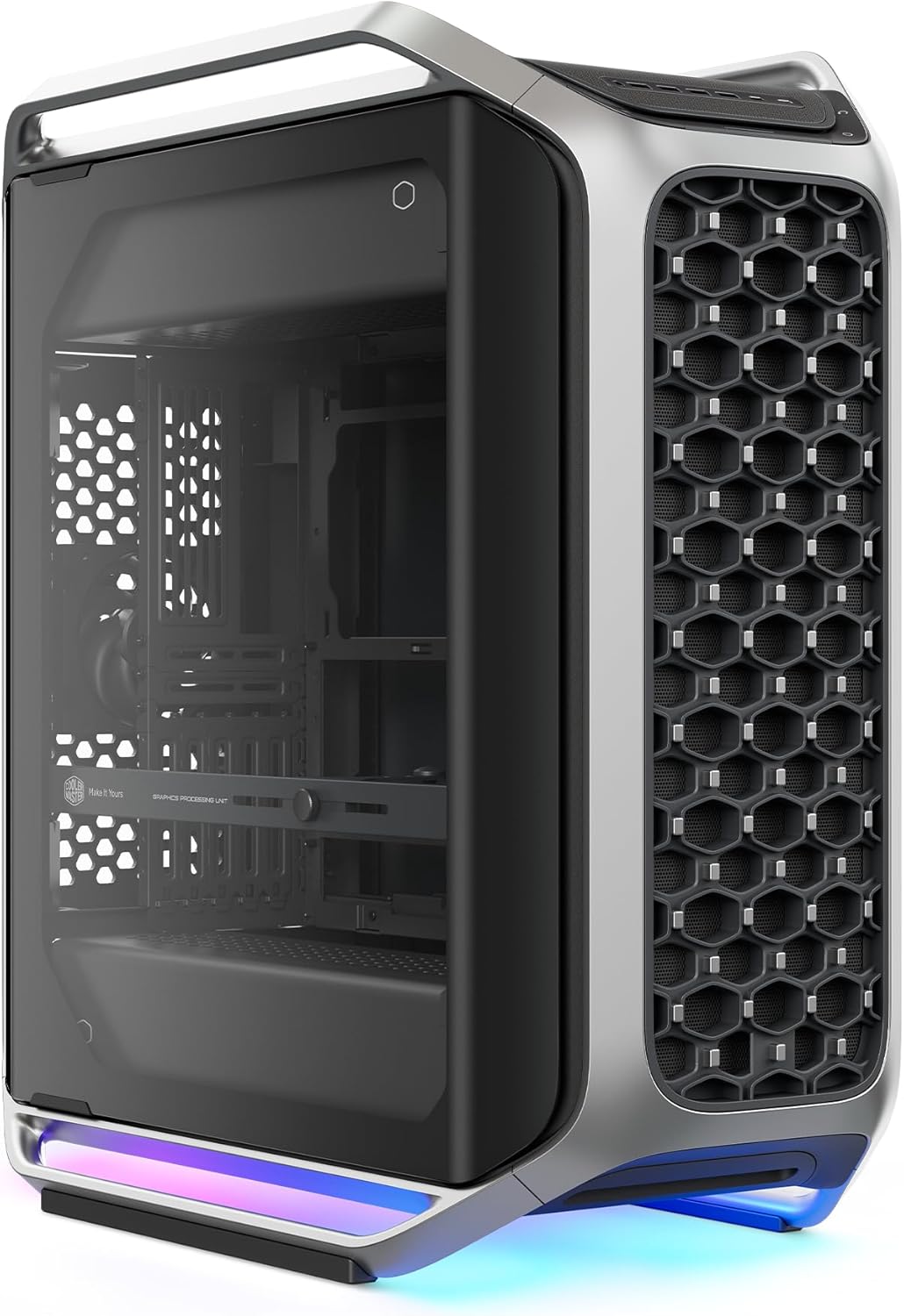
Cooler Master Cosmos Alpha
The Cooler Master Cosmos Alpha is the modern revival of one of the industry’s longest-running flagship case families. Launched as a full-tower “halo” chassis built around Cooler Master’s FreeForm 2.0 philosophy, it’s designed for enthusiasts and modders who want maximum flexibility, extreme scale, and a build that looks like a centerpiece. It’s big — about 140 liters with panels and feet — and it’s heavy, weighing roughly 31 kg.
This review covers the Cosmos Alpha (model C700-KGNN-S00, Black). It targets builders who want a flagship platform that can hold an EEB (enterprise) motherboard, very large GPUs, dual power supplies, and extreme liquid-cooling loops — and who are willing to pay premium prices and invest serious effort in the build. The central questions: does this colossus justify its size and price, what is it really like to build inside, and who should choose it over more conventional flagships? We verify the specs against official documentation, attribute independent results correctly, and help you decide.
Quick Verdict
- Best for: Enthusiast and workstation builders who want a premium, ultra-flexible full-tower showpiece — supporting EEB motherboards, dual PSUs, up to 420mm side radiators, and a sliding motherboard tray for custom cooling layouts.
- Main strengths: Massive, flexible platform with EEB/E-ATX support; sliding/removable motherboard tray and BTF (back-connector) support; up to 420mm side radiators and huge overall cooling headroom; dual-PSU capability; three fans included plus a fan/ARGB controller; striking ARGB underglow and premium metal-and-glass construction.
- Main limitations: Very large and heavy (~31kg); premium price; complex, involved build process; front I/O needs multiple board headers (dual USB-C + four USB-A); officially only two drive bays; no inverted-layout support.
- Value assessment: This is a luxury, showcase-positioned case whose value is about scale, modularity, and the freedom to build an extreme rig — not raw value per dollar. It’s a strong pick for a flagship “no-compromise” build, and a poor pick for anyone who just wants a roomy mid-tower. Check the Amazon listing for the latest price and availability.
- Verdict: A compelling choice for the specific enthusiast/showcase buyer, provided you understand the size, cost, and build effort. Not a sensible buy for typical desktop builders.
Key Specifications
| Specification | Detail |
|---|---|
| Model | Cooler Master Cosmos Alpha — C700-KGNN-S00 (Black / Silver) |
| Form factor | Full-tower (approx. 140L with panels/protrusions/feet) |
| Motherboard support | Mini-ITX, Micro-ATX, ATX, E-ATX, EEB |
| Dimensions (L×W×H) | 669 × 330 × 639 mm (incl. protrusions) |
| Weight | Approx. 31 kg (~68.3 lb) |
| Materials | SGCC steel, plastic, tempered glass, metal frame |
| CPU cooler clearance | Up to 186 mm |
| GPU clearance | Up to 400 mm |
| PSU support | ATX, up to 240 mm; dual-PSU capable |
| Pre-installed fans | 2× 200mm front (non-ARGB) + 1× Mobius 120mm rear (non-ARGB) |
| Fan positions | Front 3× 120/140 or 2× 200; top 3× 120 or 2× 140/180/200; rear 3× 120; bottom 3× 120 or 2× 140/180/200; side 3× 120/140 or 2× 180/200 (up to 15 in 120mm configs) |
| Radiator support | Side up to 420mm or 3× 360mm (80mm max thickness); top/bottom up to 360mm (93mm); front 360/280mm; rear 120mm |
| I/O panel | 2× USB 3.2 Gen 2×2 Type-C, 4× USB 3.2 Gen 1 Type-A, 1× combo 3.5mm audio |
| Expansion slots | 8 |
| Drive bays | 2× 2.5″/3.5″ (with CPU cooler under 165mm) |
| Included accessories | Fan/ARGB controller (4-port PWM hub), GPU support bracket, cable covers |
| Warranty | 2 years |
Specifications are from Cooler Master’s official documentation and corroborated by independent reviews. Independent measurements are noted in the Performance section.
Design and Build Quality
The Cosmos Alpha is unmistakably premium. Its most striking feature is the curved, die-cast metal frame that wraps the chassis, finished in the black (or silver) colorway, with steel body panels and a thick, dark-tinted tempered-glass side panel. It’s not subtle: at 669mm deep and roughly 31 kg, this is a statement piece that needs a sturdy surface and serious patience to move.
The exterior carries the Cosmos family’s signature oversized handles and a broad honeycomb mesh front grille, with a full-length slide-out magnetic dust filter beneath the lower grille. Both side panels hinge outward, which TweakTown noted adds to the premium feel. Behind the glass, the front is dominated by two large 200mm intake fans.
Inside, the defining engineering is the sliding, removable motherboard tray. It can be repositioned to free up space or to fine-tune GPU-to-side-panel distance, and it can be removed entirely for easier access when installing the CPU cooler or routing cables. The rear of the tray supports BTF (back-connector / reverse-connector) motherboards for clean, hidden cable runs. Independent reviewers (TechPowerUp, TweakTown) highlight this flexibility as a genuine strength.
The trade-offs are real. Reviewers describe the build as involved: multiple removable panels and cover plates add steps to nearly every task, and the recessed tray introduces some flex during component installation. NoisyPixel found motherboard installation trickier than expected and tool access tight in places. In short, it looks phenomenal finished, but getting there is a project.
Features and Technology
Sliding, removable motherboard tray. The tray slides and can be fully removed, letting you reconfigure between air and liquid-cooling layouts and fine-tune GPU placement. It also supports BTF (back-connector) motherboards for hidden cabling. This is a hallmark FreeForm 2.0 feature and a genuine differentiator.
Extreme cooling headroom. The case supports up to 15 fan positions (in 120mm configurations) and radiators up to 420mm on the side, or three 360mm radiators on the side panel; the top and bottom each accept up to 360mm. Combined, this allows very thick push-pull or triple-radiator custom loops. Three fans are included: two 200mm front intakes and one Mobius 120mm rear exhaust. Note the included fans are non-RGB; the lighting is a separate ARGB underglow built into the chassis.
ARGB underglow. A strip of addressable RGB light spills onto the surface below the case, adding a subtle premium glow. It’s controlled via the included fan/ARGB controller (a 4-port PWM hub) or motherboard RGB software. NoisyPixel noted the physical case RGB button didn’t work in their Asus build until lighting was driven through motherboard software.
Dual PSU capability. The Cosmos Alpha can accommodate a second power supply, which broadens its appeal for workstation or extreme builds that need more power or redundancy.
Front I/O. The top panel has two USB 3.2 Gen 2×2 Type-C ports (20G) and four USB 3.2 Gen 1 Type-A ports, plus a combo audio jack and power/lighting controls. Important caveat: powering all of these needs multiple internal motherboard headers (two USB-C and two USB 3.0) — even some premium boards lack enough, and NoisyPixel reported half the ports unusable without splitters.
GPU support bracket. An adjustable bracket (secured with screws and a center knob for fine adjustment) supports large GPUs and prevents sagging.
Performance and Real-World Use
Independent testing shows the Cosmos Alpha delivers strong cooling, especially given its scale and the two 200mm front intakes.
TechPowerUp awarded the Cosmos Alpha Editor’s Choice and Innovation awards, calling it “a great basis to build a flagship system.” They emphasized the metal frame, the sliding cooling mounts, the thick liquid-cooling potential (ceiling/floor/side), and the ARGB underglow, while noting it’s “not a sensible buy” — it’s geared to extreme, flagship builds rather than value.
TweakTown gave it 96% (Editor’s Choice). In their thermal stress test (Ryzen 7 7700X cooled by a 360mm AIO in the roof, with a ZOTAC RTX 3090 Trinity), the CPU averaged 77.9°C with a 82.2°C maximum, and the GPU reached a maximum of 80°C (average 78.6°C) — strong results they attributed mainly to the two 200mm front intake fans. They called it “a high-performance workstation and watercooling dream that justifies its footprint and cost.”
PCMag described it as a striking super-tower flagship with massive flexibility that “dazzles as a showpiece PC chassis,” with “a few minor design quirks” tempering an otherwise premium experience.
NoisyPixel was more guarded (65%), praising the premium materials, underglow, and included hub, but highlighting the heavy weight and a frustrating build process: many removable panels, a recessed tray with some flex, tight screwdriver access, and the front-I/O header requirements.
What this means for you. Cooling headroom is excellent out of the box and exceptional when you populate it. The main “cost” is the build experience and physical handling. If you enjoy complex, custom, showcase builds, the effort pays off; if you want a straightforward assembly, this case will frustrate.
Compatibility and Installation
Before buying, check:
- Weight and space. At ~31kg and 669mm deep, confirm your desk/floor can support it and you have room. Moving it is a two-person job.
- Motherboard. Supports Mini-ITX through EEB. If you’re using a back-connector (BTF) board, the tray supports it. There is no inverted-layout option.
- CPU cooler. Max 186mm clearance — almost any tower cooler fits.
- GPU. Up to 400mm. The front fans/radiator placement can limit very long cards; verify against your specific GPU and fan config.
- PSU. ATX up to 240mm; dual-PSU config supported. Confirm your PSU orientation and cable lengths.
- Front I/O headers. The two USB-C and four USB-A ports need multiple internal headers. Check your motherboard’s internal USB headers; you may need adapters, and splitters can reduce bandwidth.
- Radiators. Side up to 420mm (or 3× 360mm), top/bottom up to 360mm, front 360/280mm, rear 120mm. Confirm thickness clearances (80mm side, 93mm top/bottom).
- Storage. Officially two 2.5″/3.5″ bays on the drive plate (with the CPU-cooler-under-165mm caveat). Plan if you need more drives.
Advantages and Disadvantages
Pros
– Ultra-flexible flagship platform: EEB/E-ATX support, sliding/removable motherboard tray, BTF support, dual PSUs.
– Enormous cooling headroom: up to 15 fan positions and side radiators up to 420mm.
– Three fans included plus a fan/ARGB controller.
– Premium metal-and-glass construction with striking ARGB underglow.
– Strong thermal performance in independent testing, especially from the two 200mm front intakes.
– Easy-swing side panels, adjustable GPU support bracket, cable covers.
Cons
– Very large and heavy (~31kg) — impractical to move and space-hungry.
– Premium price; a “luxury” positioning.
– Complex, involved build process with many removable panels and tight tool access.
– Front I/O requires multiple motherboard headers; some ports may be unusable without splitters on boards with fewer headers.
– Officially only two drive bays.
– Included fans are non-RGB (underglow is separate).
– No inverted-layout support.
Price and Value for Money
We don’t publish prices here because Amazon prices and availability change; check the listing for the current price. That said, the Cosmos Alpha sits at the very premium end of the full-tower segment. Independent reviews place its official launch MSRP at a level comparable to other flagship showcase cases, and some note the current street price has moved above that launch figure.
What justifies the cost for the right buyer:
– The scale and dual-chamber-style flexibility, with EEB support, dual-PSU capability, and a sliding motherboard tray.
– The cooling headroom for extreme custom loops (up to 420mm side radiators).
– The premium metal-and-glass construction and ARGB underglow.
What can weaken the value for you:
– If you don’t need EEB, dual PSUs, or 420mm radiators, a conventional mid-tower or smaller full-tower costs much less and builds far more easily.
– The build complexity and physical weight are real costs.
– Check your motherboard’s internal USB headers so the front I/O isn’t half-unusable.
For a flagship, no-compromise showcase build, the Cosmos Alpha is a compelling choice. For almost anyone else, it’s expensive and oversized. Confirm the current Amazon price and availability before deciding.
Best Alternatives and Comparisons
- Lian Li O11 Dynamic EVO XL. A large, glass-forward showcase case that also supports big radiators and high-end builds, often at a lower price. Advantage: more conventional, established dual-chamber layout with excellent looks and cooling, typically less expensive. Trade-off: less motherboard-format reach (no EEB) and no sliding motherboard tray or dual-PSU capability. Consider it if you want a premium showcase case without the Cosmos’s EEB/extreme-flex features.
- Corsair 7000D Airflow. A large full-tower with strong airflow, excellent support, and a more conventional build experience. Advantage: easier to build in, strong cooling, well-established ecosystem, and typically lower price. Trade-off: less extreme flexibility (no EEB, no sliding tray, no dual PSUs). Consider it if you want a big, airflow-focused full-tower without the Cosmos’s complexity.
- Cooler Master Cosmos C700M (previous flagship). The predecessor flagship in the same family. Advantage: similar scale and premium DNA, sometimes available at a different price point. Trade-off: older design without the FreeForm 2.0 sliding tray and updated features. Consider it if you want the Cosmos heritage at a possibly different price/availability.
- Lian Li Lancool 207 / 216. Mainstream value mid-towers with excellent airflow and four included fans at a fraction of the price. Advantage: far cheaper, easier builds, still strong out-of-the-box cooling. Trade-off: no EEB, far less radiator/cooling headroom, standard layout. Consider these if your priority is value and practical airflow rather than flagship showpiece scale.
Comparisons are qualitative based on verified positioning; confirm specs and pricing on each listing before purchase.
Who Should Buy It?
- Enthusiast and modder builders who want an ultra-flexible, premium showcase chassis for extreme or custom-loop builds.
- Workstation builders with EEB/server motherboards who need a full-tower home with dual-PSU capability.
- Anyone who will use the sliding motherboard tray and BTF support for a clean, hidden-cable flagship build.
- Showpiece builders who want the striking ARGB underglow and metal-and-glass aesthetic.
- Liquid-cooling enthusiasts who want up to 420mm side radiators and huge overall headroom.
Who Should Consider Something Else?
- Value-focused builders — a mainstream mid-tower or smaller full-tower delivers far more value per dollar.
- Builders who want an easy, straightforward assembly — the Cosmos Alpha is an involved build (NoisyPixel rated it frustrating).
- Users with limited space or who need to move their PC often — ~31kg and 669mm deep is impractical.
- Builders who don’t need EEB, dual PSUs, or 420mm radiators — you’re paying for headroom you won’t use.
- Boards with limited internal USB headers — the front I/O may not fully work without splitters.
Final Verdict
The Cooler Master Cosmos Alpha is a genuinely impressive flagship full-tower: a 31kg, EEB-capable showpiece with a sliding motherboard tray, BTF support, dual-PSU capability, ARGB underglow, and enough cooling headroom for up to 420mm side radiators. Independent reviewers award it high marks for flexibility, materials, and cooling — TechPowerUp and TweakTown both gave it Editor’s Choice honors — while also noting it’s not a “sensible” purchase for typical builders.
Its strongest selling point is the combination of scale, modularity, and cooling freedom. Its most significant limitations are the premium price, the physical weight, the complex build process, and the motherboard-header requirements for the front I/O.
Deciding factor: if you’re building a flagship, no-compromise showpiece and will use the EEB/dual-PSU/large-radiator headroom, the Cosmos Alpha is a top-tier choice. If not, you’ll pay a premium for capabilities you won’t use. Confirm your motherboard’s USB headers and measure your space, then check the Amazon listing for the current price and availability before purchasing.
Check the Latest Price on Amazon →
Related guides