
Welcome to our keyboard reviews hub, where you’ll find every keyboard we’ve tested — from magnetic Hall Effect gaming boards and full-size mechanical wireless options to low-profile TKL boards and comfortable office keyboards. Each card below links to a full review with specs, connectivity notes and a verdict; the market overview sorts the range by intended use so you can jump straight to the category that fits your gaming, typing or ergonomic needs.
As an Amazon Associate, I earn from qualifying purchases.
Latest Reviews
Keychron K2 HE
A feature-dense 75% magnetic Hall Effect board whose adjustable actuation, Rapid Trigger and analog input shine for competitive gamers — provided you use the software and accept magnetic-only switches.
Keychron V6 Ultra 8K
A full-size wireless mechanical board that pairs a complete number pad with 8K polling in 2.4GHz mode, though its non-shine-through keycaps mean the RGB doesn’t light the legends.
Logitech ERGO K860
A proven split ergonomic pick for long typing days, offering genuine wrist comfort and a full-size layout — but the split is fixed and the keys are membrane-style rather than mechanical.
Logitech G515 LIGHTSPEED TKL
A slim low-profile wireless TKL gaming board that delivers most of the G915 experience in a slimmer design — just decide on tactile or linear at purchase since the switches are soldered.
Logitech MX Keys S
A quiet, comfortable low-profile productivity keyboard with smart backlighting and Smart Actions automation — best if you’ll use Logi Options+ and don’t need mechanical switches.
The 2026 Keyboard Market at a Glance
| Segment | Reviewed products | Best For | Reviewed? |
|---|---|---|---|
| Magnetic Gaming Keyboards | Keychron K2 HE | Competitive and enthusiast gamers who want adjustable actuation, Rapid Trigger and analog-style input in a compact wireless board. | Review |
| Mechanical Gaming Keyboards | Keychron V6 Ultra 8K | Gamers and professionals who want a full-size layout with a number pad plus low-latency wireless polling and hot-swap switches. | Review |
| Wireless TKL Keyboards | Logitech G515 LIGHTSPEED TKL | Gamers and hybrid work/play users who want a slim, desk-friendly tenkeyless wireless board without flagship hardware. | Review |
| Office and Ergonomic Keyboards | Logitech ERGO K860, Logitech MX Keys S | Long-hours typists, office and remote workers who prioritize comfort, quiet typing and multi-device flow over gaming features. | Review · Review |
Note on classification: this table groups each keyboard by its primary intended use. The Keychron K2 HE is a magnetic Hall Effect board aimed at competitive gaming. The Keychron V6 Ultra 8K is a mechanical full-size board marketed for gaming and office use, classified here for its mechanical switches and gaming-focused 8K wireless polling. The Logitech G515 is a low-profile wireless TKL gaming keyboard, grouped by its tenkeyless form factor and wireless design. The Logitech ERGO K860 and Logitech MX Keys S are office, ergonomic and productivity keyboards — they are not gaming keyboards, even though they offer wireless connectivity, programmable functions or backlighting. Being usable for gaming is not the same as being designed as a gaming keyboard, and these two are not positioned or specified for competitive play.
Not Sure Which Keyboard to Buy?
If you’re still deciding, our keyboard buying guide explains layouts, switch types, connectivity, typing feel and ergonomic considerations so you can match a board to your setup. For gamers specifically, our best gaming keyboards pillar compares keyboards designed for competitive play — magnetic, mechanical and low-profile options. The office and ergonomic keyboards in this hub (the ERGO K860 and MX Keys S) serve different priorities, so use the gaming pillar for gaming selection and these guides for productivity and comfort. The five full reviews above provide detailed product-level findings and limitations.
Shop Now
Keychron K2 HE
Shop Now on Amazon
Product image unavailable in the reviewed sources.
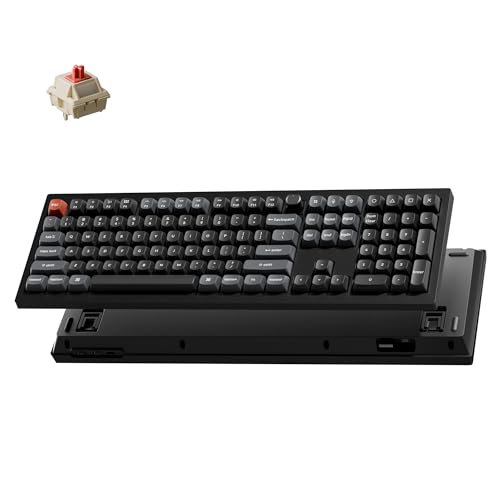
Keychron V6 Ultra 8K
Shop Now on Amazon

Logitech ERGO K860
Shop Now on Amazon

Logitech G515 LIGHTSPEED TKL
Shop Now on Amazon

Logitech MX Keys S
Shop Now on Amazon
As an Amazon Associate we earn from qualifying purchases.