
Mechanical keyboards are a bottomless pit — switch types, layouts, connection methods, keycap materials — but once you understand four real decisions, buying one takes ten minutes. This guide walks through the choices that actually matter, using the specific keyboards ComponentCrate has reviewed: the Keychron K2 HE, the Keychron V6 Ultra 8K, the Logitech G515 LIGHTSPEED TKL, the Logitech ERGO K860, and the Logitech MX Keys S. We do not rank every keyboard on the market, and we do not publish prices.
Before we get into the sections, one distinction drives everything in 2026: a mechanical keyboard is not automatically a gaming keyboard, and an office keyboard is not automatically a mechanical keyboard. The right choice depends on what you will use it for, the technology inside it, and the features you actually need.
1. Wired, Wireless, or Both?
Connectivity is the first practical decision, and it is mostly about latency versus convenience.
- Wired (USB-C): zero battery concern and a direct connection. It remains the default for competitive gaming and desktop setups where the cable is manageable.
- 2.4 GHz wireless: the modern sweet spot for most buyers. A dedicated USB receiver provides responsive wireless operation that is well suited to gaming on keyboards that support a suitable low-latency mode. The Logitech G515 LIGHTSPEED TKL is a good example of a 2.4 GHz board designed for gaming. Wireless performance depends on the specific implementation, not just on the presence of a wireless label.
- Bluetooth: convenient for pairing with laptops, tablets, and multiple devices, and useful for office and everyday workflows. It generally involves different latency and connection behavior than a dedicated 2.4 GHz receiver. Bluetooth is fine for office work, but it is not the best choice for competitive gaming.
Rule of thumb: if you will mostly use it at a fixed desk, pay a little extra for a good 2.4 GHz option. The desk-cleanliness alone is worth it, and you keep the option to go wired when you want the lowest-latency connection. Do not assume a wireless keyboard is automatically good for gaming just because it is wireless — check which connection mode the gaming features rely on.
2. Size: Full, TKL, or 75%
Layout determines how much desk space the keyboard takes, which keys are dedicated, and how it feels to reach for everything. The percentage labels are a practical shorthand, not a precise universal measurement — manufacturers vary in how they implement a given layout.
- 75% (around 84 keys): more compact than a full-size board while retaining a practical selection of function and navigation keys, depending on the layout. It is a favorite for saving desk space without sacrificing too many dedicated keys. The Keychron K2 HE is a 75% board.
- TKL / Tenkeyless (around 87 keys): removes the dedicated numeric keypad while preserving the main typing and navigation areas, giving a smaller footprint than full-size. The Logitech G515 is a TKL, and it is also a low-profile keyboard — remember that layout and switch profile are two separate characteristics.
- Full-size (around 104 keys): includes the numeric keypad. It is useful for spreadsheets, data entry, and anyone who regularly uses the number pad, and it needs more desk space. The Keychron V6 Ultra 8K is a full-size board.
If you have never owned one, start with TKL or 75%. You can live without a numpad; few people can live with wasted desk space. But if you work in spreadsheets or enter numbers all day, the full-size layout pays for itself.
Shop Now
Keychron K2 HE Wireless Magnetic Switch Custom Keyboard (75% compact)
Shop Now on Amazon
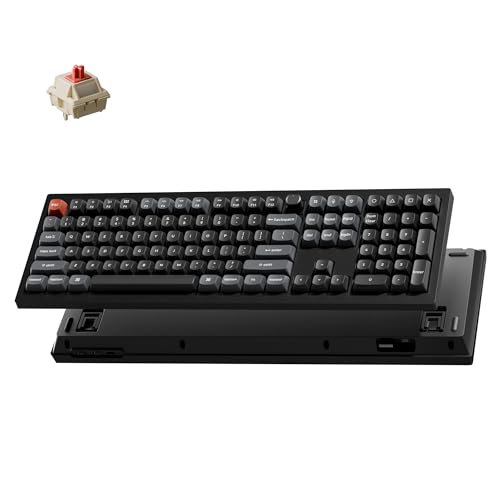
Keychron V6 Ultra 8K Wireless Mechanical Keyboard
Shop Now on Amazon

Logitech Ergo K860 Wireless Ergonomic Split Keyboard with Wrist Rest
Shop Now on Amazon

Logitech G515 Lightspeed TKL Wireless Gaming Keyboard (Tactile) – Black
Shop Now on Amazon

Logitech MX Keys S Wireless Keyboard Low Profile Fluid Precise – Pale Grey
Shop Now on Amazon
As an Amazon Associate we earn from qualifying purchases.
3. Switches: Traditional Mechanical vs Magnetic Hall Effect
Switches are the only part that actually matters long-term. In 2026, there are two fundamentally different technologies: traditional mechanical contact switches and magnetic Hall Effect switches. They feel different, they offer different features, and they are not interchangeable.
Traditional mechanical contact switches. A physical switch mechanism registers a keypress when the switch stem compresses a spring and closes the electrical contacts. The switch stem, spring, and contacts define the feel. The three common families are:
- Linear — smooth, straight travel with no tactile bump. Fast and quiet enough for offices, and a safe default for gaming.
- Tactile — a physical bump mid-travel to signal the actuation point. Best for typing-heavy users who want feedback without noise.
- Clicky — an audible click on actuation. Great if you are alone in the room, terrible otherwise.
Traditional mechanical keyboards are not automatically equipped with adjustable actuation or Rapid Trigger. The physical switch type influences feel, sound, and typing experience, and not all mechanical switches have identical construction, travel, or sound. These are normal mechanical switches, not magnetic ones.
Magnetic Hall Effect switches. Instead of a physical contact closing, a magnetic switch uses a sensor to detect the position of a magnet as the key moves. Because there is no conventional electrical contact registering the press, the keyboard can measure how far the key is pressed continuously. This is what enables features you do not get on a standard mechanical board, but only on compatible boards — the keyboard’s controller, firmware, software, and switch implementation determine which functions are actually available. Not every magnetic keyboard has the same features.
The Keychron K2 HE is our main real-world example. It is a 75% Hall Effect board with Gateron Double-Rail Magnetic Nebula switches. It offers adjustable actuation, Rapid Trigger, and other magnetic-specific features, all configured through Keychron’s Launcher software.
Key travel and adjustable actuation. Total key travel is the full distance a key moves from rest to bottomed out. The actuation point is where an input registers, and the reset point is where it un-registers. On a compatible Hall Effect keyboard, you can choose how far a key must move before the input registers — this is adjustable actuation. On the K2 HE, the actuation point is adjustable from 0.2mm to 3.8mm in 0.1mm increments. A shorter actuation point makes inputs register with less movement; a longer one can help reduce accidental presses for some users. Extremely sensitive settings can increase accidental activation. A shorter actuation point does not automatically make every user faster or more accurate, and changing the actuation point does not change the keyboard’s total mechanical travel.
Rapid Trigger. Rapid Trigger changes how a key resets. On a conventional keyboard, a key resets when it returns to a fixed reset point. With Rapid Trigger, a key can reset as soon as it moves upward by the configured amount — so you can re-trigger a key without fully releasing it. This is useful in certain competitive games where rapid repeated inputs and strafing matter, because the input can fire again sooner.
Critical: Rapid Trigger is not universal. Rapid Trigger is generally associated with compatible Hall Effect magnetic keyboards. A conventional mechanical contact keyboard should not be assumed to support it, and not every Hall Effect keyboard necessarily implements it. Support, configuration options, and behavior depend on the exact keyboard, firmware, and software. The K2 HE includes Rapid Trigger (and a Dynamic Rapid Trigger mode), but that does not mean every keyboard does. And Rapid Trigger does not guarantee better gaming performance — it is a tool, not a win button.
Hot-swap: magnetic switches vs MX-style switches. Hot-swap compatibility must be checked carefully, because there are two different standards.
- MX-style mechanical hot-swap: a compatible hot-swap socket lets you replace supported mechanical switches without soldering. Switch compatibility depends on the PCB socket and switch design; not every MX-style switch fits every hot-swap board. The Keychron V6 Ultra 8K is hot-swappable with standard 3-pin or 5-pin MX-style switches.
- Magnetic Hall Effect hot-swap: replacing magnetic switches is a different compatibility question, because the magnetic sensing and the keyboard’s PCB implementation matter. Hall Effect switches are not automatically interchangeable with conventional MX-style contact switches, and magnetic switch compatibility may be restricted to specific keyboard platforms or manufacturers. The Keychron K2 HE is hot-swappable with magnetic switches only (Gateron Double-Rail magnetic for V1; Keychron Ultra-Fast Lime for V2) — standard mechanical switches will not work. A mechanical hot-swap socket is not proof of magnetic switch compatibility.
Note that not every keyboard is hot-swappable at all. The Logitech G515 uses soldered GL switches, so you choose tactile or linear at purchase and cannot swap them later.
4. Polling Rate: 1,000 Hz vs 8,000 Hz
Polling rate is how often the keyboard reports key states to your computer. A standard keyboard reports at 1,000 Hz, which corresponds to roughly one report per millisecond. An 8,000 Hz polling rate reports up to eight times more often, which lowers input latency in theory.
The Keychron V6 Ultra 8K advertises an 8,000 Hz polling rate in its 2.4 GHz wireless and wired modes. This is a manufacturer specification; independent measured latency figures were not available at review time, so it should be treated as an advertised maximum rather than a verified real-world result. A higher polling rate does not automatically translate into a noticeable improvement for every user — the difference between 1,000 Hz and 8,000 Hz is small and mostly relevant to competitive gaming. It also depends on host system compatibility, connection mode, USB implementation, software and firmware support, and it can carry some CPU or system overhead. There is also a distinction between a manufacturer’s advertised maximum polling rate and the rate actually maintained in a particular setup.
Do not equate 8,000 Hz with “eight times faster” in real gameplay, and do not confuse polling rate with switch actuation speed, key travel, or a full-system response-time test. Polling rate is one factor in responsiveness, not the whole story.
5. Keycaps and PBT
Look for PBT double-shot keycaps: they do not shine over time, and legends do not fade. ABS legends on cheap boards look washed out after a year — this is the simplest thing to upgrade later. PBT keycaps are also more resistant to oil and wear, which matters on a board you type on every day.
6. Ergonomics and Noise
Comfort is about more than switches. Keyboard height and wrist position, desk and chair alignment, key spacing and layout familiarity, wrist rests and keyboard angle, and switch feel and typing force all influence long-term comfort. Noise comes from the switches, keycaps, stabilizers, and the keyboard case itself.
Two of the reviewed keyboards illustrate the office-versus-gaming divide.
The Logitech ERGO K860 is a split ergonomic keyboard designed for typing and productivity — not a conventional mechanical gaming keyboard. It uses a split, curved keyframe with an integrated palm rest and a full-size layout with a number pad. It is a membrane-style (“Perfect Stroke”) keyboard, not a mechanical one, with a softer, less tactile feel and no backlighting. Use it to understand ergonomic design: the split layout encourages a more neutral wrist and forearm position, and the deep palm rest provides support. We are not going to claim an ergonomic keyboard prevents injury or guarantees a medically beneficial posture — those are comfort-oriented designs, not medical devices. The split layout also has a learning curve if you are used to a flat keyboard.
The Logitech MX Keys S is a quiet, low-profile office keyboard for productivity and everyday typing — again, not a conventional mechanical gaming keyboard. Its spherically-dished keys and scissor mechanism produce a noticeably quieter typing experience than most mechanical boards, which suits shared workspaces and video calls. It is quieter, not silent — you will still hear key presses, and we will not describe it as silent because the source supports quieter rather than completely silent operation. It also adds Smart backlighting and multi-device support.
The key point: office keyboards and gaming mechanical keyboards solve different problems. If you type all day and want comfort and quiet, an ergonomic or low-profile office keyboard like the ERGO K860 or MX Keys S is worth considering. If you want the customizability and feel of a mechanical board, or gaming features like adjustable actuation, you are looking at a different category entirely.
What to Buy First
For most readers: a 75% or TKL wireless keyboard with the switch technology that matches your needs. If you game and want adjustable actuation and Rapid Trigger, a Hall Effect board like the Keychron K2 HE is the feature-forward pick — but confirm the hot-swap limitation (magnetic switches only) fits your plans. If you want standard switch compatibility and high polling, the Keychron V6 Ultra 8K pairs a full-size layout with 8K polling and MX-style hot-swap. If you want a slim, low-profile wireless board for work and play, the Logitech G515 is a strong option — just note its switches are fixed. If your priority is comfort and quiet over mechanical feel, look at the ERGO K860 or MX Keys S. See the Best Gaming Keyboards guide for specific gaming recommendations.
For a quick overview of the reviewed models, here is the lineup: the Keychron K2 HE (75%, magnetic Hall Effect, adjustable actuation and Rapid Trigger, tri-mode wireless), the Keychron V6 Ultra 8K (full-size, 8K polling, MX-style hot-swap), the Logitech G515 (TKL, low-profile, fixed switches), the Logitech ERGO K860 (split ergonomic membrane, for typing), and the Logitech MX Keys S (quiet low-profile office board).
Related guides
- How to Choose a Mouse (2026 Buyer’s Guide)
- PC Builder — Compatibility-Checked Builds
- Keyboards, mice and peripherals guide
How to choose: How to Choose a Mechanical Keyboard (2026 Buyer’s Guide)
Step-by-step decision guide: How to Choose a Mechanical Keyboard (2026 Buyer’s Guide).
- Decide how you will connect the keyboard: wired, a dedicated 2.4 GHz receiver, or Bluetooth. Check which mode the gaming features actually rely on.
- Choose a layout: 75%, tenkeyless, or full-size with a numpad. Match it to the keys you use and the desk space you have.
- Choose the switch technology: traditional mechanical contact switches, or magnetic Hall Effect switches with adjustable actuation and Rapid Trigger where supported.
- Check hot-swap compatibility. MX-style sockets and magnetic switch sockets are different standards; not every keyboard is hot-swappable.
- Treat high polling rates as manufacturer specifications, then check keycaps, ergonomics and noise before you decide.
- Compare the reviewed keyboards and the gaming selection guide before committing to a configuration.
Note: Prices and availability change frequently. Always verify the latest price and configuration on the Amazon product page before purchasing.