
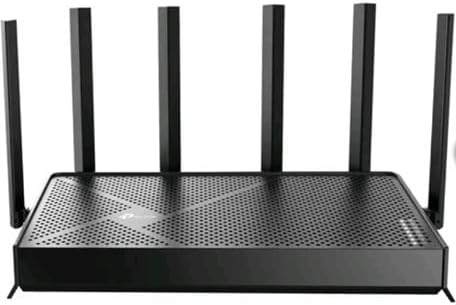
The TP-Link Archer BE9500 is the fully-loaded version of TP-Link’s Wi-Fi 7 lineup. Where budget Wi-Fi 7 routers make compromises — dual-band radios, no 6GHz, gigabit-only ports — the BE9500 aims for the complete package: a tri-band radio including the 6GHz band, wide 320MHz channels, a 10-gigabit wired port, and Multi-Link Operation (MLO) across all three bands. It’s positioned squarely at enthusiasts, gamers, and large homes that want the full next-generation experience.
The central question this review answers is straightforward: is the premium step up to the BE9500 worth it compared with more affordable Wi-Fi 7 routers? The answer depends heavily on whether you can actually use what it offers — a 6GHz radio, 10G wired connectivity, and the capacity to drive dozens of fast devices at once. Here’s what the specs and independent testing tell us.
Quick Verdict
Best for: Enthusiasts and large-home users who want the complete Wi-Fi 7 experience — the 6GHz band, wide channels, and multi-gigabit wired speeds — and have the devices and budget to use them.
Main strengths:
- True tri-band Wi-Fi 7 including the 6GHz band with up to 320MHz channels.
- A 10G WAN/LAN port — rare and genuinely future-proof for multi-gigabit ISP tiers and 10G internal networking.
- Multi-Link Operation (MLO) across all three bands for faster, lower-latency connections with Wi-Fi 7 clients.
- Six antennas with beamforming and high-power FEM for strong, broad coverage; EasyMesh for expansion.
Main limitations:
- Premium price — a significant step above budget/dual-band Wi-Fi 7 routers.
- “9.5 Gbps” is theoretical; real-world throughput is lower and client-dependent.
- Many of the headline benefits (6GHz, MLO, 320MHz) require Wi-Fi 7 clients to be realized.
- The 10G port is only useful if you have multi-gigabit broadband or 10G-capable devices.
Value assessment: The BE9500 delivers the most complete feature set in TP-Link’s Wi-Fi 7 range, and its 10G port and 6GHz radio position it at the top of the consumer tier. Whether that’s good value depends on your needs: if you have 6GHz Wi-Fi 7 devices and multi-gigabit internet or a 10G NAS/PC, the premium is justified. If not, a dual-band Wi-Fi 7 router gives you most of the everyday benefit for much less. Check the current price and availability on Amazon before deciding.
Verdict: The Archer BE9500 is a top-tier Wi-Fi 7 router that earns its premium for buyers who can use its full capability — 6GHz devices, 10G wired networking, and large, busy homes. For everyone else, it’s more router than they need. Buy it if you fit the power-user profile; otherwise, compare more affordable Wi-Fi 7 options.
Key Specifications
| Specification | Detail |
|---|---|
| Model | TP-Link Archer BE9500 |
| Wi-Fi standard | Wi-Fi 7 (802.11be), BE9500 class |
| Bands | Tri-band: 2.4GHz, 5GHz, 6GHz |
| Max wireless speed (theoretical) | 6GHz: 5765 Mbps; 5GHz: 2722 Mbps; 2.4GHz: 1032 Mbps (802.11be) |
| Wired ports | 1× 10G WAN/LAN, 1× 2.5G WAN/LAN, 1× 2.5G LAN, 2× 1G LAN (per V1.6 datasheet) |
| USB | 1× USB 3.0 |
| Antennas | 6× external, with beamforming and high-power FEM |
| Wi-Fi 7 features | MLO, 320MHz channels, 4K-QAM, Multi-RU, OFDMA, MU-MIMO |
| Software | TP-Link Tether app, HomeShield (Premium incl. year 1), VPN client/server |
| Mesh | EasyMesh compatible |
| Working modes | Router mode, Access Point mode |
| Security | WPA2/WPA3, WPA/WPA2-Enterprise (802.1x), SPI firewall |
Note: wireless speeds are theoretical physical rates; real-world throughput is lower. Port configuration per the official V1.6 datasheet; marketing materials describe “10G + multi-gigabit ports” — confirm the exact port set on the specific listing.
Design and Build Quality
The Archer BE9500 has a more substantial, premium presence than TP-Link’s budget routers. It’s a larger chassis with six external antennas (fixed) and a matte, black finish designed to sit as a centerpiece of a home network setup. It’s clearly built for performance and cooling rather than compactness — this is a desktop router meant to be placed centrally for coverage.
On the rear, the port layout is the standout: a 10G WAN/LAN port sits alongside multi-gigabit and gigabit LAN ports, plus a USB 3.0 port and the power input. There are physical buttons for power, WPS, and the LED/Wi-Fi toggle. Setup and management are done through the TP-Link Tether app or a web browser; there’s no display on the unit.
Build quality feels appropriately solid for the premium tier. There’s no wall-mount option mentioned, so plan for shelf or desk placement. The six antennas can be positioned to optimize coverage, and the high-power front-end module is designed to push a strong signal.
Features and Technology
Tri-band Wi-Fi 7 with 6GHz. This is the defining difference from budget Wi-Fi 7 routers. The BE9500 includes a 6GHz radio with up to 320MHz channels — the widest, cleanest spectrum Wi-Fi 7 offers. For a Wi-Fi 7 client that supports 6GHz (e.g., a recent laptop or phone), this delivers the highest speeds and least congestion. Without a 6GHz device, you won’t see this benefit.
Multi-Link Operation (MLO). MLO lets a Wi-Fi 7 client transmit across multiple bands at once (e.g., 6GHz + 5GHz) for higher throughput and lower latency. TP-Link claims this delivers faster speeds and lower latency than Wi-Fi 6/6E. It’s a genuine benefit, but it requires both the router and the client to support MLO.
10G wired port. The 10G WAN/LAN port is the other headline feature. As a WAN port, it fully supports multi-gigabit ISP tiers (2.5G, 5G, even 10G broadband) without bottlenecking. As a LAN port, it lets you connect a 10G-capable PC or NAS for very fast internal transfers. If you don’t have multi-gigabit internet or 10G devices, this port sits idle — but it does future-proof the router.
Six antennas with beamforming. Beamforming concentrates signal toward connected devices, and the high-power front-end module boosts transmission power. TP-Link rates coverage for large homes. Real-world coverage depends heavily on layout and placement; EasyMesh lets you add compatible nodes to fill dead zones.
HomeShield. TP-Link’s security platform provides baseline protection, and this listing includes one year of HomeShield Premium (advanced security and parental controls). After year one, Premium requires a subscription; the base tier remains free.
VPN client and server. The router supports VPN as both a client and a server, letting you route specified devices through a VPN or access your home network remotely — a useful feature for privacy-minded users.
Quad-core-class performance. A powerful CPU (TP-Link describes a “powerful CPU” for congestion-free multi-device handling) keeps a busy household — laptops, TVs, game consoles, smart-home gadgets — running smoothly.
Performance and Real-World Use
The Archer BE9500 is designed for the heaviest home use cases: 8K streaming, high-speed downloading, online gaming, video conferencing, and many simultaneous devices. Its tri-band design with a dedicated 6GHz radio gives it a clear advantage over dual-band Wi-Fi 7 routers when used with 6GHz clients, which is where its fastest speeds and lowest latency live.
As with all Wi-Fi routers, the headline “9.5 Gbps” is a theoretical aggregate across all three bands; no single client hits that figure, and real-world throughput is lower and varies with distance, interference, and client capability. Independent lab testing of the TP-Link BE9500 was not located in this research pass (most published reviews cover TP-Link’s budget models or other vendors’ BE9500-class gear), so performance claims here are based on TP-Link’s official specifications and the general characteristics of tri-band Wi-Fi 7 hardware — not on independent benchmarks.
For a large home with Wi-Fi 7 devices and a fast internet plan, the BE9500 will comfortably handle everything thrown at it. For a smaller home or mostly older devices, its extra capability will go largely unused — the practical difference versus a cheaper dual-band Wi-Fi 7 router will be small.
Compatibility and Installation
Compatibility:
- Works with all Wi-Fi generations and internet service providers (per TP-Link).
- Wi-Fi 7 features (6GHz, MLO, 320MHz) require compatible Wi-Fi 7 clients to be realized. Older devices connect normally using their own standards.
- The 10G WAN port supports multi-gigabit broadband; it’s backward compatible with gigabit and slower plans.
- The 10G LAN port needs a 10G-capable device/NIC to reach 10G speeds; a gigabit device negotiates at 1G.
- The 6GHz band availability can vary by region, so check your local regulations and client support.
Installation:
- Setup is via the TP-Link Tether app or a browser — no CD required.
- Connect your modem/gateway to the WAN port (use the 10G port for multi-gigabit plans).
- Place the router centrally, elevated, and away from thick walls and large metal objects.
- After setup, update firmware and confirm the hardware revision; TP-Link ships multiple revisions, and the correct firmware matters.
Advantages and Disadvantages
Pros:
- Complete tri-band Wi-Fi 7 including the 6GHz band and 320MHz channels.
- 10G WAN/LAN port — rare, future-proof wired connectivity.
- Multi-Link Operation across all three bands.
- Six antennas with beamforming and high-power FEM for strong coverage.
- EasyMesh for whole-home expansion; HomeShield Premium included for year 1.
- VPN client and server; robust security (WPA3).
Cons:
- Premium price — a major step above budget Wi-Fi 7 routers.
- “9.5 Gbps” and coverage claims are theoretical/marketing; real-world results are lower.
- Headline benefits need Wi-Fi 7 (and ideally 6GHz) clients to matter.
- 10G port is only useful with multi-gigabit broadband or 10G devices.
- HomeShield Premium becomes a subscription after year one.
Price and Value for Money
The Archer BE9500 sits at the premium end of the consumer Wi-Fi 7 market. Its value is tied directly to whether you can use its distinguishing features: the 6GHz band, 10G wired connectivity, and high multi-device capacity.
For a buyer with Wi-Fi 7 devices that support 6GHz, multi-gigabit internet, and/or a 10G NAS or PC, the BE9500 is a legitimate top-tier choice — the 10G port alone justifies it for anyone with 10G-capable gear. For a buyer on a standard gigabit plan with mostly Wi-Fi 5/6 devices, the premium buys capability that goes unused, and a dual-band Wi-Fi 7 router (or even a good Wi-Fi 6 router) delivers better value per dollar.
Because this is a high-end purchase with changing prices and availability, check the current price on the Amazon listing before deciding. This is a “buy if you fit the power-user profile” product, not a universal recommendation.
Best Alternatives and Comparisons
TP-Link Archer BE550. The BE550 is a tri-band Wi-Fi 7 router that includes the 6GHz band, but with 2.5G ports rather than a 10G port, and at a notably lower price. Choose the BE550 if you want 6GHz and tri-band without paying for a 10G port; choose the BE9500 if the 10G port and top-tier throughput justify the premium.
TP-Link Archer BE230 (BE3600). The budget dual-band Wi-Fi 7 router: no 6GHz band and gigabit-level wired (with two 2.5G ports). It’s dramatically more affordable and is the right choice if you just want an entry into Wi-Fi 7 without the premium cost. The BE9500’s 6GHz, tri-band radio, and 10G port are the trade-offs you pay for.
ASUS RT-BE92U (tri-band Wi-Fi 7). A comparable premium tri-band router with a 10G port and strong software (ASUS). It’s a direct competitor for buyers who want 6GHz plus 10G but prefer ASUS’s interface and ecosystem. Compare feature sets and current pricing on the relevant listings.
A high-end Wi-Fi 6E or Wi-Fi 6 router. If you don’t have Wi-Fi 7 devices, a well-reviewed Wi-Fi 6E router with a 6GHz band delivers most of the everyday speed at a lower price. Wi-Fi 7’s gains (MLO, 320MHz, 4K-QAM) need Wi-Fi 7 clients to be visible.
Who Should Buy It?
- Wi-Fi 7 early adopters with 6GHz-capable laptops, phones, and tablets who want the fastest wireless speeds.
- Multi-gigabit internet subscribers who need a router whose WAN port won’t bottleneck their plan.
- Home network enthusiasts with a 10G NAS or PC who want fast wired transfers.
- Large, busy households with many devices needing capacity and strong coverage.
- Gamers and streamers who want low latency and headroom for the heaviest use.
Who Should Consider Something Else?
- Budget-conscious buyers who don’t have Wi-Fi 7 or multi-gigabit gear — a dual-band Wi-Fi 7 router like the Archer BE230 is better value.
- Buyers who only need 6GHz without 10G — the Archer BE550 covers this at a lower price.
- Small homes or light users — the premium capability will go unused; a mid-range router suffices.
- Anyone with mostly older Wi-Fi 5/6 devices — Wi-Fi 7’s benefits won’t be visible, so a Wi-Fi 6/6E router may be the better spend.
Final Verdict
The TP-Link Archer BE9500 is one of the most complete Wi-Fi 7 routers you can buy: tri-band with a real 6GHz radio, wide 320MHz channels, a 10G port, and Multi-Link Operation. Its strongest selling point is completeness — it’s future-proof on both the wireless and wired fronts. Its most significant limitation is that it’s a premium product whose headline capabilities only pay off with Wi-Fi 7 clients and multi-gigabit gear.
It’s the right buy for a power user with 6GHz Wi-Fi 7 devices, multi-gigabit internet, or a 10G home network who wants no-compromise performance. For everyone else, more affordable Wi-Fi 7 options deliver most of the everyday benefit for far less. Check the current price and availability on Amazon before deciding.
Check the Latest Price on Amazon →
Amazon prices and availability can change. Check the product listing on Amazon for the latest price and current availability before purchasing.
Frequently Asked Questions
Related Guides and Categories
- Routers & Wi-Fi category — every router and mesh review we have published
- Essential Tech Setup — monitors, docks, storage and networking
- Computers & Laptops category
- Best Wi-Fi 7 Routers in 2026 — compare this model with our current Wi-Fi 7 picks
- How to Choose a Router in 2026