Essential Tech Setup

Affiliate Disclosure: ComponentCrate participates in the Amazon Associates Program. As an Amazon Associate, I earn from qualifying purchases. We may receive a commission when you purchase through qualifying links, at no additional cost to you. Full disclosure

Category: Essential Tech Setup

The Kingston XS2000 1TB is a pocket-sized portable SSD that advertises transfer speeds up to 2,000 MB/s — roughly double what most USB portable drives manage. It achieves this with the latest USB 3.2 Gen 2×2 interface, which uses both lanes of a USB-C connection to move data at 20 Gbps. For content creators, data hoarders, and anyone moving large video and photo files, that promise is attractive.

There is one critical catch, and it defines this review: the XS2000 only hits its headline speed when plugged into a USB 3.2 Gen 2×2 port. Very few PCs include one, and no Apple product supports it — so on many machines, this drive runs at half speed (~1,000 MB/s), where it’s merely a good, compact SSD rather than an exceptional one.

The central question: is the XS2000 the right fast portable SSD for your hardware? We break down what the drive actually delivers in the real world, what it costs in trade-offs, and who should buy it versus a rival.

Quick Verdict

  • Best for: PC users with a USB 3.2 Gen 2×2 port who want near-Thunderbolt performance in a tiny, durable, affordable drive; content creators offloading large files on a compatible desktop or laptop.
  • Main strengths:
  • Very fast sequential performance — up to ~2,000 MB/s on a compatible Gen 2×2 host, confirmed by independent tests.
  • Tiny, light pocket-sized design (about 69.5 × 32.6 × 13.5 mm, ~29 g) that fits in a keychain-sized footprint.
  • IP55 water/dust resistance and included rubber sleeve for shock absorption.
  • Five-year limited warranty with free technical support.
  • Main limitations:
  • Full speed requires a USB 3.2 Gen 2×2 port; on Thunderbolt/USB4 Macs and most older PCs it runs at ~1,000 MB/s.
  • No hardware encryption — data isn’t protected if the drive is lost or stolen.
  • Sustained write speeds drop sharply once the SLC cache fills (after roughly 100 GB of continuous writing on the 1 TB model).
  • Weak random/4K read performance due to the DRAM-less design.
  • Value assessment: Among 20 Gbps portable SSDs, the XS2000 is competitively positioned — independent reviewers describe it as an excellent value for a very fast, compact drive, provided you have the right port. Without a Gen 2×2 host, you’re paying for speed you may not fully use. Because Amazon prices and availability change, check the current price on the listing before deciding.

Verdict: Consider it if you have (or will have) a USB 3.2 Gen 2×2 port and want the fastest practical USB storage without paying Thunderbolt prices. If you’re on a Mac or a PC without Gen 2×2, a 10 Gbps drive like the Samsung T7 Shield may serve you as well at a lower cost. Check current Amazon pricing before purchasing.

Key Specifications

Attribute Detail
Model Kingston XS2000 1TB (SXS2000/1000G)
Storage type External SSD, 3D NAND (M.2-based controller)
Capacity 1 TB (usable capacity slightly lower after formatting)
Interface USB 3.2 Gen 2×2 (20 Gbps), USB Type-C; backward compatible at reduced speeds
Rated speed Up to 2,000 MB/s read / 2,000 MB/s write (manufacturer-rated)
Dimensions 69.5 × 32.6 × 13.5 mm
Weight ~28.9 g
Casing Metal + plastic
Included Rubber sleeve, 12 in USB-C to USB-C cable
Durability IP55 dust/water rating (with sleeve); shock-absorbing sleeve
Encryption None (no hardware encryption)
Operating temp. 0–40°C
Warranty Limited 5-year + free technical support
Compatibility Windows 11/10/8.1, macOS 10.14+, Linux 2.6+, Chrome OS, Android, iOS/iPadOS 13+, gaming consoles

Note: the 2,000 MB/s figure is a manufacturer rating. Independent measured results are discussed in the Performance section and depend heavily on the host port.

Design and Build Quality

The XS2000 is genuinely tiny — about the size of a key fob — and extremely light at under 30 grams. The casing is a mix of metal and plastic, and it ships with a removable rubber sleeve that provides grip, shock absorption, and the IP55 rating. Kingston states the sleeve offers drop protection up to about 6 feet and that the drive is tested to withstand water flow and limited dust contact per IP55. That’s a “light rain and splashes” level of protection, not submersion.

One practical note: the IP55 rating is only guaranteed when the sleeve is attached. Without it, the drive is less protected, so keep the sleeve on for field use. At this size, there’s no fan and no noise — it’s passively cooled and runs bus-powered from the USB port.

Thermals are fine in normal use. Tom’s Hardware reported a cool surface (~36°C) even after a large sustained transfer, with no throttling observed — the limit is the write cache, not heat.

Features and Technology

USB 3.2 Gen 2×2 (20 Gbps). This is the headline feature. It uses both data lanes of a USB-C connection for 20 Gbps, letting the drive approach Thunderbolt-level throughput. The practical benefit: large file transfers complete in a fraction of the time of a 10 Gbps drive — but only on a host that supports Gen 2×2. On Thunderbolt 3/4 or USB4 hosts (including all Macs), the connection falls back to 10 Gbps Gen 2, roughly halving speed. This is a hardware limitation of the host, not the drive.

SLC cache. Like most consumer NVMe-style SSDs, the XS2000 uses a portion of its NAND as a fast write cache (a “pseudo-SLC” cache). On the 1 TB model, independent tests show it sustains about 1,700–1,900 MB/s for roughly 100 GB of writes, then drops to around 200 MB/s as the cache fills. The cache recovers during idle time. For typical backups and media offloading, this is rarely an issue; for sustained multi-hundred-gigabyte writes, it’s a real consideration.

IP55 with rubber sleeve. Water/dust resistance and shock absorbance make it suited for on-location shoots and backpack life — though it’s not a fully ruggedized tank like some competitors.

No encryption. Kingston ships no hardware encryption or password protection on the XS2000. If you need at-rest data protection, you’ll need separate software or a drive that offers it.

Performance and Real-World Use

How fast is it really? The answer depends on where you plug it in.

On a USB 3.2 Gen 2×2 host: The drive delivers close to its rating. StorageReview measured ~1,987 MB/s read and ~1,792 MB/s write in four-threaded 2 MB sequential tests; TweakTown reported over 2,000 MB/s sequential read in CrystalDiskMark; TechAdvisor measured ~2,092 MB/s read / ~1,881 MB/s write with a Gen 2×2 card; UnbxTech saw ~1,980/1,740 MB/s. These are genuinely excellent, near-Thunderbolt numbers.

On a Thunderbolt 4 or Gen 2 (10 Gbps) host: You get roughly half — around 1,000 MB/s. TechRadar, testing on a Thunderbolt 4 mini PC (which cannot run Gen 2×2), measured about 1,062 MB/s read / 999 MB/s write. That’s still a good portable drive, but no better than a typical 10 Gbps SSD.

Sustained writes: The 1 TB model’s SLC cache fills after roughly 100 GB of continuous writing (Tom’s Hardware: ~103 GB at ~1,890 MB/s, then ~214 MB/s; UnbxTech: ~96 GB cache, then ~200 MB/s). If you regularly write very large amounts in one sitting, the cache recovery matters — it recovers partially within minutes and fully within about half an hour of idle time.

Random performance: Due to the DRAM-less architecture, 4K/random read performance is modest (StorageReview: ~14,000 IOPS read in 4-thread). This doesn’t matter much for sequential bulk transfers but does for some database-like or small-file workloads.

Real-world verdict: For offloading camera cards, moving video projects, and fast backups on a compatible PC, the XS2000 is excellent. For read-heavy workloads it shines; for sustained write-heavy workloads it’s less impressive than drives with better sustained-write behavior (e.g., the SanDisk Extreme Pro V2 or WD Black P50).

Compatibility and Installation

Before you buy, verify your host port:
– Full speed requires a USB 3.2 Gen 2×2 Type-C port. Few motherboards and laptops include one; many require a PCIe expansion card. Kingston’s own support confirms this requirement.
– Apple devices / Thunderbolt / USB4 ports do NOT provide Gen 2×2. They operate at USB 3.2 Gen 2 (10 Gbps), so the drive runs at roughly half speed. This includes Macs.
– Backward compatibility: The drive works with USB 3.2 Gen 1/2, USB 3.0/2.0, and USB4/Thunderbolt ports at reduced speeds.
– Software: No drivers are needed on Windows, macOS, Linux, or Chrome OS. It mounts like any external drive.
– Mobile: Compatible with Android and iOS/iPadOS via USB-C, though an additional OTG cable may be needed (not included).
– Format: The drive works out of the box; format it as needed for your OS (exFAT for cross-platform). No special software required.

If your PC lacks Gen 2×2 and you want the full speed, factor in the cost of a USB 3.2 Gen 2×2 expansion card (or choose a 10 Gbps drive instead).

Advantages and Disadvantages

Pros
– Near-Thunderbolt sequential speeds (~2,000 MB/s) on a compatible host.
– Extremely compact and light pocket-sized design.
– IP55 water/dust resistance with included shock-absorbing sleeve.
– Five-year limited warranty with free technical support.
– Backward compatible with older USB standards.

Cons
– Headline speed only on USB 3.2 Gen 2×2 ports; halves on Macs/Thunderbolt/USB4.
– No hardware encryption or password protection.
– Sustained write speed drops sharply after ~100 GB of continuous writing (SLC cache).
– Modest random/4K read performance (DRAM-less design).

Price and Value for Money

Value hinges on two things: your host hardware and your workload.

If you have a USB 3.2 Gen 2×2 port, the XS2000 delivers near-Thunderbolt speed in a tiny, durable package at a price independent reviewers call very attractive for the category — a strong value for a fast portable SSD. If you don’t have that port, you’ll be paying a premium for speed you won’t fully realize, and a 10 Gbps drive may give you the same real-world results for less.

For read-heavy and media-offload workflows, it’s excellent. For sustained write-heavy work (very large single-session transfers), drives with better sustained-write performance justify their premium.

Because Amazon prices and availability change, check the product listing on Amazon for the current price and availability before deciding. Don’t buy purely on the headline number if your hardware can’t feed it.

Best Alternatives and Comparisons

Drive Interface Main advantage over XS2000 Main trade-off Best for
SanDisk Extreme Pro Portable SSD V2 USB 3.2 Gen 2×2 Slightly better sustained writes and random performance; also 20 Gbps Usually a higher cost for the same capacity PC users wanting top sustained-write performance
Samsung T7 Shield USB 3.2 Gen 2 (10 Gbps) Rugged construction with IP65, hardware encryption (AES 256-bit) Half the interface speed (~1,000 MB/s) Mac users and those needing encryption + durability
ADATA Elite SE880 USB 3.2 Gen 2×2 Fast, compact 20 Gbps competitor Slightly different performance profile; no major edge Users comparing 20 Gbps options
WD_Black P50 USB 3.2 Gen 2×2 Excellent sustained writes, gaming-oriented Larger, pricier Gamers / sustained large transfers

SanDisk Extreme Pro Portable SSD V2 is the closest direct rival at the same 20 Gbps interface. Independent tests show it edges the XS2000 on sustained writes and random performance, while the XS2000 counters with a smaller footprint, a five-year warranty, and typically strong value. Choose it if sustained write throughput matters most.

Samsung T7 Shield is the smart pick if you’re on a Mac or a 10 Gbps host, or if you want hardware encryption and a tougher IP65-rated shell. It tops out around 1,000 MB/s, but on hardware that can’t do Gen 2×2, you lose nothing — and you gain encryption and ruggedness.

ADATA Elite SE880 and WD_Black P50 round out the 20 Gbps field, with the WD Black favored for sustained writes/gaming and the ADATA as a compact alternative.

The right choice depends on your host port, whether you need encryption, and whether sustained writes dominate your workflow — check current prices on Amazon for each before deciding.

Who Should Buy It?

  • PC users with a USB 3.2 Gen 2×2 port who want maximum practical USB speed without Thunderbolt cost.
  • Content creators and videographers who offload large photo/video files and edit from a fast drive on a compatible machine.
  • Data hoarders transferring large archives who need a compact, fast, durable travel drive.
  • Anyone wanting a genuinely pocket-sized SSD they can carry everywhere, with IP55 peace of mind.

Who Should Consider Something Else?

  • Mac users — the XS2000 won’t hit full speed on Apple hardware (Thunderbolt/USB4). A Samsung T7 Shield or a 10 Gbps drive gives you the same practical speed, often with encryption.
  • Users on PCs without Gen 2×2 who don’t want to buy an expansion card — a 10 Gbps drive is the better value.
  • Anyone needing encryption — the XS2000 has none; look at the Samsung T7/T7 Shield.
  • Sustained large-write workloads — if you regularly write several hundred GB in one session, a drive with better sustained-write behavior (SanDisk Extreme Pro V2, WD Black P50) may suit you better.

Final Verdict

The Kingston XS2000 1TB is an excellent, fast, pocket-sized portable SSD — within a clear set of conditions. Its strongest point is raw sequential performance on a USB 3.2 Gen 2×2 host, where it rivals Thunderbolt at a fraction of the system cost. Its most significant limitation is that same requirement: on Macs, Thunderbolt, and most older PCs, it runs at half speed, and it lacks hardware encryption.

If you have (or will add) a Gen 2×2 port and your work is mostly fast sequential transfers, this drive is an easy recommendation. If you’re on a Mac, need encryption, or mostly do sustained large writes, weigh the alternatives above — including the Samsung T7 Shield and SanDisk Extreme Pro V2 — before deciding. As always, check the current price on the Amazon listing, since prices and availability change.

Check the Latest Price on Amazon →

Frequently Asked Questions

Is the Kingston XS2000 1TB worth buying?

It’s worth buying if you have a USB 3.2 Gen 2×2 port and want very fast portable storage, since it delivers near-Thunderbolt speeds at a favorable price. If your computer lacks that port — including all Macs — you’ll only get about half speed, and a 10 Gbps drive may be better value.

Who is the Kingston XS2000 1TB best suited for?

It suits PC users with a USB 3.2 Gen 2×2 port, content creators offloading large photo/video files, and anyone wanting a tiny, durable, fast travel drive. It’s less ideal for Mac users or those who need hardware encryption.

What are the main limitations of the Kingston XS2000 1TB?

Full speed requires a USB 3.2 Gen 2×2 port, which few systems have; on Thunderbolt/USB4 Macs it runs at about half speed. It has no hardware encryption, and its sustained write speed drops to roughly 200 MB/s after about 100 GB of continuous writing when the SLC cache fills.

Is the Kingston XS2000 1TB compatible with Mac?

Yes, it mounts and works with macOS 10.14 and later. However, Macs and Thunderbolt/USB4 ports do not support USB 3.2 Gen 2×2, so performance is limited to roughly 1,000 MB/s rather than the advertised 2,000 MB/s.

What port do I need for full speed on the Kingston XS2000?

You need a USB 3.2 Gen 2×2 (20 Gbps) Type-C port on your host device, using the included cable. Few motherboards and laptops include one; many require a PCIe expansion card. Without it, the drive runs at reduced speeds.

How does the Kingston XS2000 compare with the Samsung T7 Shield?

The XS2000 is faster (20 Gbps vs 10 Gbps) on compatible hardware, but the T7 Shield has hardware encryption and a tougher IP65 rating. On a Mac or a 10 Gbps host, the practical speed can be similar, making the T7 Shield the better choice there.

Does the Kingston XS2000 support hardware encryption?

No. Kingston does not include hardware encryption or password protection on the XS2000. If you need to secure data at rest, you’ll need to use separate encryption software or choose a drive with built-in encryption.

What should buyers check before purchasing the Kingston XS2000 1TB?

Check whether your computer has a USB 3.2 Gen 2×2 port (for full speed) or whether you’re willing to add an expansion card. Also consider your workload: sustained very large writes will trigger the slower cache-saturated speeds, and if you need encryption, this drive lacks it.

Does the Kingston XS2000 1TB offer good value for money?

On a compatible Gen 2×2 host, reviewers describe it as excellent value for a very fast, compact SSD. On hardware that can’t feed 20 Gbps, you’re paying for speed you won’t fully use, and a 10 Gbps drive may be better value.

Where can buyers check the current price of the Kingston XS2000 1TB?

Amazon prices and availability change frequently. Check the product listing on Amazon for the latest price and current availability before purchasing, since the displayed price can differ from other sellers or vary over time. —

Related Guides and Categories

Category: Essential Tech Setup

The Crucial X10 Pro sits at the top of Crucial’s portable-SSD lineup: a USB 3.2 Gen 2×2 drive rated for up to 2,100 MB/s reads and 2,000 MB/s writes. That’s roughly double the throughput of the popular 10Gbps portable drives, which makes the X10 Pro an obvious candidate for video editors, photographers, and content creators who move large files and want to edit directly from external storage.

But as with every 20Gbps-class drive, the headline number depends on your hardware. The X10 Pro only reaches its rated speed on a host that exposes a native USB 3.2 Gen 2×2 port — and there’s a wrinkle: some USB4/Thunderbolt ports don’t negotiate that mode, which can leave the drive running at 10Gbps. This review of the 2TB model (CT2000X10PROSSD9) evaluates the X10 Pro around that reality: how fast it genuinely is, what it’s like to carry and use, how its IP55 durability and 5-year warranty stack up, and who should buy it instead of a rugged or Thunderbolt alternative.

Quick Verdict

Best for: Creative professionals and power users with a native USB 3.2 Gen 2×2 port who want a small, fast, hardware-encrypted portable SSD with a 5-year warranty.

Main strengths:
– Fast for the USB class: rated up to 2,100 MB/s reads, with independent reviews recording near-rated throughput on native Gen 2×2 ports.
– Compact and light: 65 × 50 × 10 mm, roughly 42 g — noticeably smaller and lighter than the Samsung T9.
– IP55 dust/water resistance and 2-meter drop resistance in a pocket-sized metal-and-rubber body; includes a lanyard hole.
– AES 256-bit hardware encryption and a 5-year limited warranty.

Main limitations:

  • Full speed requires a native USB 3.2 Gen 2×2 host; some USB4/Thunderbolt ports won’t negotiate Gen 2×2, leaving the drive at 10Gbps.
  • IP55 is lighter protection than the IP65/IP67 ratings on rugged rivals; heavy water exposure is not covered.
  • No 4TB-plus “one drive fits all” headroom beyond the lineup’s largest capacity in this tier, and it’s priced at a premium over the 10Gbps X9 Pro.

Value assessment: The X10 Pro is a strong value if your host can use Gen 2×2: you get near-2,000 MB/s real-world transfers in a very small, durable package with a 5-year warranty and hardware encryption. If your machine only offers 10Gbps USB, the drive is no faster than the cheaper X9 Pro, and the premium is wasted. Amazon prices and availability can change, so check the current listing before deciding.

Verdict: A serious contender for the fastest-and-smallest portable SSD in the mainstream 20Gbps class, and an excellent match for creators with Gen 2×2-capable PCs. Verify your host’s USB capability first; if it caps at 10Gbps, the X9 Pro is the better buy. Check the Amazon listing for current pricing.

Key Specifications

Specification Detail
Model / variant Crucial X10 Pro 2TB (CT2000X10PROSSD9; Amazon variant CT2000X10PROSSD902)
Capacity 2TB
Interface USB 3.2 Gen 2×2 (20Gbps), Type-C
Rated transfer speed Sequential read up to 2,100 MB/s; write up to 2,000 MB/s
Durability IP55 water/dust resistance; drop-resistant up to 7.5 ft (2 m)
Encryption AES 256-bit hardware encryption
Dimensions 65 × 50 × 10 mm
Weight ~42 g (drive only; ~54 g including cable)
Included accessories USB-C to C cable; quick start guide
Compatibility Windows, macOS, Android, iPad, Linux via USB-C; PS5/PS4/Xbox per retailer listing
Warranty Limited 5-year

Note: Transfer speed and durability figures are Crucial’s rated, manufacturer-verified values. Full speed requires a native USB 3.2 Gen 2×2 host port.

Design and Build Quality

The X10 Pro is remarkably small: 65 × 50 × 10 mm and about 42 g — one of the smallest and lightest drives in its speed class, noticeably more compact than the Samsung T9. The body is anodized aluminum on top with a rubberized base for grip, plus a lanyard hole so you can attach it to a camera bag or keychain. It feels premium and pocketable.

Durability is a highlight, but it’s a specific kind. The drive is IP55-rated for dust and water resistance (protected against limited dust ingress and low-pressure water jets) and drop-resistant up to 7.5 feet (2 meters). That’s real protection for field work and travel, but it’s a step below the IP65/IP67 ratings on rugged rivals like the SanDisk Extreme PRO or LaCie Rugged SSD Pro — so heavy rain or submersion is out of scope. The rubber base adds shock absorption and grip, but the drive is not designed to survive being crushed or intentionally soaked.

Features and Technology

  • USB 3.2 Gen 2×2 (20Gbps) interface. What it does: doubles the bandwidth of 10Gbps portable drives. Practical benefit: 4K/8K project files transfer roughly twice as fast, and you can edit directly from the drive with less stutter. Limitation: your host must expose a native Gen 2×2 port (or a USB4 port that negotiates it); otherwise the drive runs at 10Gbps.
  • Rated sequential speeds of up to 2,100 MB/s read / 2,000 MB/s write. The NVMe controller sustains high throughput for large files. Real-world figures on compatible hosts approach these ratings in independent testing.
  • IP55 and 7.5-ft drop resistance. Practical benefit: safe for travel, outdoor shoots, and bag handling against dust and splashes. Limitation: not submersible; lighter than IP65/IP67 rugged rivals.
  • AES 256-bit hardware encryption. Protects data at rest if the drive is lost or stolen, with no practical speed penalty. Limitation: you enable a password via software; it doesn’t ship locked by default.
  • 5-year limited warranty. A genuine, verifiable differentiator that matches the best 20Gbps competitors and exceeds many budget drives.

Performance and Real-World Use

Independent reviews — Tom’s Hardware, StorageReview, and PCinQ — confirm the X10 Pro reaches near its rated speed on a native USB 3.2 Gen 2×2 port, with sequential reads around the ~2,000 MB/s mark in real-world testing. In practice, a large 4K project folder transfers in a fraction of the time a 10Gbps drive would take, and editing directly from the drive is workable for most 4K and even some 8K timelines.

Three practical caveats matter here:

  1. Host support is everything. If your laptop or desktop only has USB 3.2 Gen 2 (10Gbps) ports, the X10 Pro will run at roughly half its rated speed — equal to a cheaper X9 Pro or T7. Worse, PCinQ’s testing found that their USB4/Thunderbolt controllers did not negotiate Gen 2×2 mode, capping the drive at 10Gbps even on modern hosts. This means you cannot assume a USB4/TB port delivers full speed; ideally, confirm your specific host’s Gen 2×2 support.
  2. Sustained writes. Like most consumer SSDs, very large continuous writes can eventually slow once the drive’s internal caching is saturated. For typical creator workloads (file transfers, project editing) sustained throughput stays strong; it’s only extreme single-transfers that expose throttling.
  3. Consoles and tablets. On PS5/Xbox and tablets, the drive works as external storage, but the console’s port standard, not the drive, becomes the speed ceiling.

Compatibility and Installation

Before buying, confirm:

  • Host interface (the big one): you need a native USB 3.2 Gen 2×2 port to hit ~2,000 MB/s. Check your laptop/dock/motherboard spec sheet; if it lists only “USB 3.2 Gen 2” (10Gbps) or “Thunderbolt/USB4,” verify that Gen 2×2 is actually supported (it isn’t on some implementations).
  • OS: Windows, macOS, Android, iPadOS, and Linux are supported via USB-C. Ships preformatted (readable across platforms); some devices may require reformatting.
  • Power: bus-powered — no adapter needed.
  • Cable: use the included USB-C to C cable or an equivalent; a low-quality cable can cap throughput.
  • Software: no driver install needed; Crucial offers simple drive management/encryption utilities.

Advantages and Disadvantages

Pros:

  • Very fast on compatible hosts — near 2,000 MB/s real-world, confirmed by independent reviews.
  • Exceptionally small and light for a 20Gbps drive.
  • IP55 dust/water resistance plus 2-meter drop resistance and a lanyard hole.
  • AES 256-bit hardware encryption and a 5-year warranty.
  • Strong value when Gen 2×2 is available: a durable speed update over the 10Gbps X9 Pro.

Cons:

  • Requires a native USB 3.2 Gen 2×2 host; some USB4/TB ports don’t provide it, halving speed.
  • IP55 is less than the IP65/IP67 on rugged rivals; not submersible.
  • Priced at a premium over the 10Gbps X9 Pro.
  • Some community reports of mounting/firmware quirks (anecdotal, not representative).

Price and Value for Money

The X10 Pro commands a premium over Crucial’s own 10Gbps X9 Pro — PCinQ measured that gap at roughly 30% — which is the core value question. You’re paying for two things: the 20Gbps interface (which only matters if your host can use it) and IP55 durability with a 5-year warranty. If your PC has a native Gen 2×2 port and you move large files daily, the premium buys a real, measurable speed doubling, plus a warranty that protects the investment. On a 10Gbps-only machine, the premium buys nothing you can actually use, and the X9 Pro is the better value.

Against 20Gbps rivals like the Samsung T9 and SanDisk Extreme PRO, the X10 Pro competes on size, price, and warranty; the specific day’s price decides which is the best deal. Amazon prices and availability can change, so check the current listing and compare before committing — and remember the buying recommendation depends on your host’s USB capability.

Best Alternatives and Comparisons

Crucial X10 Pro Samsung T9 LaCie Rugged SSD Pro Crucial X9 Pro
Interface USB 3.2 Gen 2×2 (20Gbps) USB 3.2 Gen 2×2 (20Gbps) Thunderbolt 3 (40Gbps) USB 3.2 Gen 2 (10Gbps)
Rated read speed up to 2,100 MB/s up to 2,000 MB/s up to 2,800 MB/s up to ~1,050 MB/s
Durability IP55, 2 m drop no IP, 3 m drop IP67, 3 m drop, crush-resistant IP55, 2 m drop
Dimensions / weight 65×50×10 mm / ~42 g 88×60×14 mm / 122 g 98×65×17 mm / ~100 g ~65×50×10 mm / light
Warranty 5 years 5 years 5 years + Rescue services 5 years
  • Samsung T9 — The closest mainstream 20Gbps rival. Similar speeds and a 5-year warranty, but larger and heavier (122 g) and, no IP rating. Choose the X10 Pro for smaller size and IP55; choose the T9 if you prefer Samsung’s ecosystem or find it cheaper on the day.
  • LaCie Rugged SSD Pro — The premium rugged Thunderbolt alternative. Much faster on Thunderbolt 3 (up to 2,800 MB/s), with a true IP67 rating, 3-meter drop tolerance, and crush resistance, plus a 5-year warranty with data-recovery services. It’s larger, heavier, and typically pricier, and it primarily targets Mac/Thunderbolt workflows. Choose it if you need maximum ruggedness and have Thunderbolt.
  • Crucial X9 Pro — The value sibling. Same family and IP55 durability, but 10Gbps (up to ~1,050 MB/s) at a lower price. Choose it if your host caps at 10Gbps or you don’t need 20Gbps speed.
  • SanDisk Extreme PRO V2 — A rugged 20Gbps-class alternative with an IP65 rating and drop protection, matching the X10 Pro’s speed class and warranty length. Choose it if you want both high speed and stronger water/dust protection than IP55.

Who Should Buy It?

  • Video editors and photographers with a Gen 2×2-capable PC: the X10 Pro delivers a real speed doubling for 4K/8K project transfers and direct editing, in the smallest package in its class.
  • Creators who value a long warranty and encryption: the 5-year coverage and AES-256 hardware encryption protect both the drive and its data.
  • Traveling professionals: IP55, the 2-meter drop rating, and the lanyard hole make it an easy, reassuring pocket drive for field work.
  • Users upgrading from a 10Gbps drive whose host supports 20Gbps USB.

Who Should Consider Something Else?

  • Owners of 10Gbps-only laptops: if your machine caps at USB 3.2 Gen 2, the X10 Pro won’t be faster for you than the cheaper X9 Pro.
  • Buyers who need a USB4/Thunderbolt guarantee: if you’re on a Mac/Thunderbolt setup and want guaranteed high throughput, verify Gen 2×2 support — or consider a Thunderbolt drive like the LaCie Rugged SSD Pro.
  • Field/outdoor users in wet or dusty conditions: if heavy exposure is routine, step up to an IP65/IP67 rugged drive (SanDisk Extreme PRO, LaCie Rugged SSD Pro).
  • Budget-focused buyers: if you move large files only occasionally, the 20Gbps premium isn’t justified; a 10Gbps drive delivers most of the benefit for less.

Final Verdict

The Crucial X10 Pro 2TB’s strongest selling point is a compelling combination of speed, size, and warranty: on a native USB 3.2 Gen 2×2 host, it delivers near-2,000 MB/s real-world transfers in one of the smallest, lightest drives in its class, backed by a 5-year warranty and hardware encryption. Its most significant limitation is that this speed is conditional — it requires a Gen 2×2 host, and some USB4/Thunderbolt ports won’t provide it, leaving the drive at 10Gbps.

Its intended buyer is the creative professional with a Gen 2×2-capable PC who wants fast, durable, encrypted external storage they can carry in a pocket. The key factor that should determine your purchase is your host’s USB capability: if it supports native Gen 2×2 and you work with large media, the X10 Pro is an excellent, well-warrantied choice. If not, buy the X9 Pro instead. Amazon prices and availability change, so check the current listing and compare against the Samsung T9 before deciding.

Check the Latest Price on Amazon →

Frequently Asked Questions

Is the Crucial X10 Pro worth buying?

Yes, if your host supports native USB 3.2 Gen 2×2. On a compatible PC it delivers a genuine speed doubling over 10Gbps drives, in a very small package with a 5-year warranty. On a 10Gbps-only machine it’s no faster than the cheaper X9 Pro.

Who is the Crucial X10 Pro best suited for?

Video editors, photographers, and creators with a Gen 2×2-capable PC who want fast, durable, encrypted external storage. It’s less ideal for owners of 10Gbps-only laptops or users who need a rugged IP65/IP67 rating for heavy wet/dusty field work.

What are the main limitations of the Crucial X10 Pro?

Full speed requires a native USB 3.2 Gen 2×2 host, and some USB4/Thunderbolt ports don’t negotiate that mode, capping the drive at 10Gbps. It also carries only an IP55 rating (not submersible) and is priced above the 10Gbps X9 Pro.

Is the Crucial X10 Pro compatible with Mac, PC, and consoles?

Yes. It works with Windows, macOS, Android, iPadOS, and Linux via USB-C, and with consoles including PS5, PS4, and Xbox per the retailer listing. Note that the port standard on your device determines whether you get full 20Gbps speed.

Does the Crucial X10 Pro actually hit 2,100 MB/s?

On a native USB 3.2 Gen 2×2 port, close to it — independent reviews record near-rated throughput around the 2,000 MB/s mark in real-world testing. On a 10Gbps port, it runs at roughly half that speed.

How does the Crucial X10 Pro compare with the Samsung T9?

Both are 20Gbps-class drives with similar speeds and 5-year warranties. The X10 Pro is smaller and lighter (~42 g vs 122 g) with an IP55 rating, while the T9 has no IP rating but a 3-meter drop rating. Choose based on size/durability preference and current pricing.

How does the Crucial X10 Pro compare with the LaCie Rugged SSD Pro?

The LaCie is faster on Thunderbolt 3 (up to 2,800 MB/s) and far more rugged (IP67, 3-meter drop, crush-resistant), with data-recovery services. But it’s larger, heavier, and pricier, and it primarily targets Mac/Thunderbolt workflows. Choose LaCie for maximum ruggedness and Thunderbolt; choose the X10 Pro for compact USB portability.

What should buyers check before purchasing the Crucial X10 Pro?

Confirm your laptop, dock, or motherboard has a native USB 3.2 Gen 2×2 port — verify Gen 2×2 support rather than assuming USB4/Thunderbolt provides it. Use the included USB-C cable, and review current pricing on Amazon since it varies and changes.

Does the Crucial X10 Pro offer good value for money?

Good value if you can use its speed — on a Gen 2×2 host, the faster transfers, IP55 build, and 5-year warranty justify the premium over the X9 Pro. If your host caps at 10Gbps, a cheaper 10Gbps drive is the better value.

Where can I check the current price of the Crucial X10 Pro?

Check the Crucial X10 Pro listing on Amazon, which hosts the latest price and availability. Amazon prices and availability change frequently, so verify the current figure before buying. —

Related Guides and Categories

Category: Essential Tech Setup

The TP-Link Archer BE550 is the company’s value-focused tri-band Wi-Fi 7 router, and it quietly solves a problem most budget Wi-Fi 7 routers get wrong. It includes the full three-band setup — 2.4GHz, 5GHz, and the new 6GHz band — so you get Wi-Fi 7’s cleanest spectrum and its headline features like Multi-Link Operation (MLO) and 320MHz channels. Just as importantly, every one of its wired ports runs at 2.5Gbps, which is rare at this price tier and makes the BE550 genuinely future-proof for multi-gigabit broadband and wired networks.

TP-Link sells this same BE9300-class platform under two names — Archer BE550 and Archer BE9300 — and they differ mainly in their port layout. The BE550 is the version with five 2.5G ports; it’s the one reviewed here. This review assesses the BE550 on its own merits, drawing on TP-Link’s official documentation and independent testing, and clarifies the BE550/BE9300 question so you buy the right variant.

Quick Verdict

Best for: Home users who want tri-band Wi-Fi 7 with the 6GHz band and multi-gigabit wired ports at a mid-range price, in apartments and single-story or medium homes.

Main strengths:

  • Includes the 6GHz band plus Wi-Fi 7 features that use it (MLO, 320MHz, 4K-QAM).
  • Five 2.5Gbps ports (one WAN + four LAN) — full multi-gigabit wired connectivity, uncommon at this price.
  • Fast tri-band top speeds, verified by independent reviewers as excellent for a multi-gigabit connection.
  • Very good single-floor coverage and good multi-level range; EasyMesh-compatible for expansion.

Main limitations:

  • Tall, bulky design; not wall-mountable.
  • Theoretical “9.2 Gbps” figure is marketing; real-world throughput is lower and client-dependent.
  • Advanced HomeShield security and parental controls require the paid Pro subscription.
  • Range is good but not class-leading at very long distance; the “2,000 sq. ft.” claim is an ideal-case estimate.

Value assessment: The Archer BE550 delivers the 6GHz band and a full bank of 2.5G ports at a mid-range price, which puts it among the best value tri-band Wi-Fi 7 routers for a household with faster-than-gigabit broadband or a wired 2.5G network. Its main trade-off is physical size rather than performance. Check the current price on Amazon before deciding, since pricing and availability change.

Verdict: The Archer BE550 is a strong mid-range recommendation for anyone who wants tri-band Wi-Fi 7 with the 6GHz band and real multi-gigabit wired connectivity without flagship pricing. Buy it for a single-floor or medium home; consider a mesh system if you need very large whole-home coverage.

Key Specifications

Specification Detail
Model TP-Link Archer BE550
Wi-Fi standard Wi-Fi 7 (802.11be), BE9300 class
Bands Tri-band: 2.4GHz + 5GHz + 6GHz
Max wireless speed (theoretical) 6GHz: 5760 Mbps; combined tri-band ~9214 Mbps (marketing)
Ethernet ports 1× 2.5Gbps WAN + 4× 2.5Gbps LAN
USB 1× USB 3.0
Antennas 6× internal
Processor Quad-core
Wi-Fi 7 features MLO, 320MHz (6GHz), 4K-QAM, Multi-RU, OFDMA
Software TP-Link Tether app, HomeShield, VPN client/server
Mesh EasyMesh compatible
Working modes Router mode, Access Point mode
Security WPA, WPA2, WPA3, WPA/WPA2-Enterprise, SPI firewall
Dimensions / weight approx. 3.1 × 9.1 × 8.0 in; weight ~2.5 lb
Warranty 24 months (US, Consumer Reports)

Note: wireless speeds are theoretical physical rates; real-world throughput is lower and varies by client, distance, and interference. Port set and quad-core CPU confirmed via TP-Link’s official BE550 datasheet.

Design and Build Quality

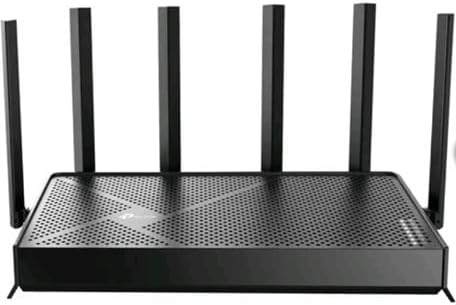
The Archer BE550 has the same modern, speaker-like silhouette as its BE9300 sibling: a tall, rounded enclosure with six internal antennas and a vertical band of LED indicators. It’s a clean design that fits a living-room shelf, but it’s not discreet — it stands roughly eight to nine inches tall and is not wall-mountable. Consumer Reports lists dimensions near 3.1 × 9.1 × 8.0 inches and about 2.5 pounds.

Build quality is solid for the class, and the internal-antenna layout keeps the device tidy. On the rear you’ll find the 2.5G WAN port, four 2.5G LAN ports, a USB 3.0 port, and the power input, with physical buttons for power, reset, WPS, Wi-Fi, and LED control. Setup runs through the TP-Link Tether app or a web interface; there’s no display.

Features and Technology

Tri-band Wi-Fi 7 with 6GHz. The 6GHz band is the headline: Wi-Fi 7 uses it with channel widths up to 320MHz — double the 160MHz max of Wi-Fi 6E — and it’s far less congested than 2.4/5GHz. This is the spectrum behind the platform’s highest speeds (up to 5760 Mbps on 6GHz). Caveat: 320MHz on 6GHz may be restricted in some regions, and real throughput depends on client support.

Multi-Link Operation (MLO). MLO lets a compatible Wi-Fi 7 client use two bands at once (e.g., 6GHz and 5GHz), improving speed and latency resilience. It’s the engine behind TP-Link’s “3.6× faster” marketing claim versus Wi-Fi 6/6E — a theoretical comparison requiring a Wi-Fi 7 client, MLO, and ideal conditions.

Full 2.5G port bank. This is the BE550’s defining practical feature. A 2.5G WAN port won’t bottleneck faster-than-gigabit broadband, and four 2.5G LAN ports let you connect a fast NAS, desktop, gaming console, and switch simultaneously at multi-gigabit speeds. Most routers at this price still ship gigabit LAN ports, so this is a genuine differentiator and the main thing that separates the BE550 from the BE9300 variant (which has one 2.5G LAN and three gigabit).

Six internal antennas & coverage. The internal antenna array is tuned for broader, more consistent coverage. Independent reviewers rate the BE550’s coverage as excellent on a single floor and good across multiple levels. TP-Link’s “up to 2,000 sq. ft.” figure is a marketing estimate that depends heavily on your layout and construction.

EasyMesh. Pair the BE550 with other EasyMesh-compatible TP-Link routers/extenders to form a seamless mesh — a flexible, low-cost path to whole-home coverage.

USB 3.0 file sharing. Plug in an external drive to share files or run a light NAS. Reviewers found it serviceable for modest network storage, not a full NAS replacement.

HomeShield. Free baseline protection is included; advanced parental controls and some security features require the paid HomeShield Pro subscription.

VPN client and server. Route the whole network through a VPN service (client) or access your home network remotely (server).

Tether app & smart-assistant support. Full management via the Tether app, plus Alexa and Google Assistant support.

Performance and Real-World Use

Independent assessments of the BE550/BE9300 hardware are positive on performance. RTINGS reports excellent top speeds suitable for a multi-gigabit internet connection and very good range, specifically praising the BE550 for apartments, condos, single-story homes, and multi-level houses. Dong Knows rates the BE550/BE9300 8/10, calling performance solid and value strong for small homes with gigabit-or-slower broadband, while noting range is relatively short compared with larger routers. CGMagazine scored the BE9300 9/10, describing it as the most affordable of the contemporary Archer BE series with easy setup.

The practical picture: for heavy everyday use — 4K/8K streaming, video calls, moderate gaming, and many devices at once — the BE550 is comfortably capable. For peak Wi-Fi 7 speeds you’ll want a Wi-Fi 7 client supporting 6GHz and MLO; older devices connect using their own standards. For very large multi-story homes, independent data suggests coverage is good but adding EasyMesh nodes (or a mesh system) is the reliable way to fill distant corners.

Compatibility and Installation

Compatibility:

  • Works with all Wi-Fi generations and internet providers (per TP-Link); Wi-Fi 7 features (MLO, 6GHz, 320MHz) need compatible Wi-Fi 7 clients to fully benefit.
  • The 2.5G WAN port supports multi-gigabit broadband and is backward compatible with gigabit and slower plans.
  • The four 2.5G LAN ports need 2.5G-capable devices (2.5G NIC/NAS/switch) to run at 2.5Gbps; gigabit devices simply negotiate at 1Gbps.
  • Works with Alexa and Google Assistant.

Installation:

  • Setup via the TP-Link Tether app or web browser — CD-free.
  • Connect your modem/gateway’s Ethernet out to the 2.5G WAN port.
  • Placement: central, elevated, away from thick walls and large metal objects; the router is not wall-mountable.
  • Confirm your region (US vs EU) and apply matching current firmware, since 6GHz channel rules differ by region.

Advantages and Disadvantages

Pros:

  • Tri-band Wi-Fi 7 with the clean 6GHz band and 320MHz support.
  • Five 2.5Gbps ports (1 WAN + 4 LAN) — full multi-gigabit wired connectivity.
  • Excellent top speeds and very good single-floor coverage (independent testing).
  • EasyMesh-compatible; simple Tether-app setup.
  • Strong value for Wi-Fi 7 on a budget.

Cons:

  • Tall, bulky; not wall-mountable.
  • “9.2 Gbps” and “3.6× faster” are theoretical marketing figures.
  • Advanced HomeShield features need the paid Pro subscription.
  • Range is good but not class-leading at very long distance.
  • Model naming confusion (BE550 vs BE9300) can be confusing when shopping.

Price and Value for Money

The Archer BE550 sits in the value tier of TP-Link’s Wi-Fi 7 lineup, but it punches above its price on wired connectivity: you get the 6GHz band, the Wi-Fi 7 feature set, and five 2.5G ports — a combination you usually have to pay significantly more for. For a household with multi-gigabit broadband or a 2.5G wired network, this is one of the most practical and best-value tri-band Wi-Fi 7 routers available, and independent reviews corroborate that positioning.

The value equation is straightforward: if you want the 6GHz band and multi-gigabit wired ports without flagship spend, the BE550 is a leading pick. If you don’t need the 6GHz band, a cheaper dual-band Wi-Fi 7 router (like the Archer BE230) saves money; if you need the absolute performance ceiling or 10G ports, higher-tier models exist at a much higher price. Because pricing, promotions, and stock change, check the current price and availability on the Amazon listing before deciding.

Best Alternatives and Comparisons

TP-Link Archer BE9300 (variant). The same BE9300-class tri-band Wi-Fi 7 platform under a different badge. The main difference is ports: the BE9300 variant has one 2.5G LAN port and three gigabit LAN ports, while the BE550 has four 2.5G LAN ports. If you need several fast wired connections, the BE550 is the better pick; if you only need one, you may save a little with the BE9300 variant — just verify which variant the listing actually is.

TP-Link Archer BE230 (dual-band). The budget Wi-Fi 7 router with no 6GHz band and two 2.5G ports, at a notably lower price. If you don’t need 6GHz and want the cheapest entry to Wi-Fi 7, the BE230 is the value pick; the BE550 is worth the step up if the 6GHz band and five 2.5G ports matter to you.

TP-Link Archer BE800 / BE19000-class (flagship). Higher-end TP-Link tri/quad-band models with faster multi-band aggregate speeds, 10G-class ports, and more premium features — substantially more expensive. Choose these only for multi-gigabit broadband, many Wi-Fi 7 clients, and a desire for the performance ceiling.

GL.iNet Flint 3 (GL-BE9300). Another entry-level/lower mid-range tri-band Wi-Fi 7 router that independent reviewers place in the same performance class as the BE550, with similar top speeds and range. Consider it if you value open firmware/advanced configuration; the BE550 is the simpler, more mainstream choice.

A Wi-Fi 6E router. If your devices are mostly Wi-Fi 6E and you don’t need Wi-Fi 7’s MLO/320MHz, a well-priced Wi-Fi 6E router covers most everyday needs for less. Wi-Fi 7 pays off mainly with Wi-Fi 7 clients and the broadband to use them.

Who Should Buy It?

  • Mid-range upgraders who want tri-band Wi-Fi 7 with the 6GHz band without flagship pricing.
  • Users with faster-than-gigabit broadband who want a WAN port that won’t bottleneck their plan.
  • Households with a 2.5G wired network (NAS, desktop, switch) that need several fast wired ports.
  • Single-floor / medium-home owners who want strong coverage plus easy app-based setup.
  • Mesh builders who’ll add EasyMesh-compatible nodes to extend coverage over time.

Who Should Consider Something Else?

  • Budget-only buyers — if you don’t need 6GHz, the dual-band Archer BE230 is cheaper; a Wi-Fi 6E or Wi-Fi 6 router may fit a slower plan.
  • Very large, multi-story homes — good range here, but serious whole-home coverage usually warrants a mesh system from the start.
  • Buyers who need only one fast wired port — the Archer BE9300 variant may cost a little less for the same wireless engine.
  • Flagship seekers — if you want 10G ports and the absolute fastest aggregate speeds, higher-tier models are the direction (at a much higher price).

Final Verdict

The TP-Link Archer BE550 is one of the best-value tri-band Wi-Fi 7 routers available, because it combines the clean 6GHz band with a full bank of five 2.5G ports at a mid-range price. Its strongest selling point is that rare combination: real Wi-Fi 7 performance and complete multi-gigabit wired connectivity without flagship spending. Its most significant limitation is physical size (tall, not wall-mountable) and a range that’s good but not class-leading at very long distance.

It’s the right buy for a home user who wants the 6GHz band and multi-gigabit wired ports in a single-floor or medium home. If you only need one fast wired port, compare the Archer BE9300 variant; if you don’t need 6GHz, the cheaper dual-band BE230 may be enough. Check the current price and availability on Amazon before you decide, since pricing and stock change.

Check the Latest Price on Amazon →

Amazon prices and availability can change. Check the product listing on Amazon for the latest price and current availability before purchasing.

Frequently Asked Questions

Related Guides and Categories

Category: Essential Tech Setup

The TP-Link Archer BE230 aims to make Wi-Fi 7 affordable. It’s a BE3600-class, dual-band Wi-Fi 7 router priced to sit well below most of its Wi-Fi 7 competitors, and it brings a genuinely useful feature set: two 2.5Gbps ports, a USB 3.0 port, EasyMesh support, and the modern Wi-Fi 7 improvements like Multi-Link Operation (MLO). For anyone on an older router who wants to future-proof their network without spending flagship money, it’s an immediately appealing option.

But there’s a critical catch hidden in the spec sheet: the Archer BE230 is a dual-band router. It runs on 2.4GHz and 5GHz only, with no 6GHz band — the frequency many people associate with Wi-Fi 7. That decision shapes everything about who should buy this router and who should spend more. This review weighs exactly that trade-off, drawing on independent testing and TP-Link’s official specifications.

Quick Verdict

Best for: Budget-conscious home users who want Wi-Fi 7’s modern features and multi-gigabit wired ports, live in an apartment or mid-size home, and don’t specifically need a 6GHz band.

Main strengths:

  • Two 2.5Gbps ports (WAN + LAN) — rare at this price point, and genuinely useful for faster-than-gigabit broadband or a 2.5G NAS/PC.
  • Fast top wireless speeds for the class, verified by independent testing.
  • EasyMesh support lets you add compatible mesh nodes (even non-TP-Link) to extend coverage.
  • Quad-core CPU (2.0GHz) handles busy multi-device homes without choking.

Main limitations:

  • No 6GHz band — Wi-Fi 7’s cleanest, uncongested band is missing.
  • 5GHz performance drops significantly at longer distances; coverage is best close to the router.
  • “3.6 Gbps” and “4K-QAM 120% more data” are theoretical/marketing figures, not real-world guarantees.
  • Advanced HomeShield security and parental controls require a paid subscription.

Value assessment: At its price, the Archer BE230 undercuts most Wi-Fi 7 routers significantly while still delivering dual-band Wi-Fi 7 plus two 2.5G ports. If you don’t need 6GHz, this is one of the best value Wi-Fi 7 entries available — and among the most affordable routers with 2.5Gbps ports. If you specifically want the 6GHz band, you’ll need a tri-band router that costs meaningfully more. Check the current price and availability on Amazon before deciding.

Verdict: The Archer BE230 is a smart buy for budget-minded upgraders who want Wi-Fi 7 features and 2.5G wired connectivity without the 6GHz requirement. For apartments and mid-size homes it’s an excellent value; for large homes or those who need 6GHz, consider a tri-band alternative.

Key Specifications

Specification Detail
Model TP-Link Archer BE230
Wi-Fi standard Wi-Fi 7 (802.11be), BE3600 class
Bands Dual-band: 2.4GHz + 5GHz (no 6GHz)
Max wireless speed (theoretical) 5GHz: 2882 Mbps; 2.4GHz: 688 Mbps (802.11be)
Ethernet ports 1× 2.5Gbps WAN, 1× 2.5Gbps LAN, 3× 1Gbps LAN
USB 1× USB 3.0
Antennas 4× external, with beamforming
Processor 2.0GHz quad-core (verified: 512MB RAM, 128MB flash)
Wi-Fi 7 features MLO, 4K-QAM, Multi-RU, OFDMA, MU-MIMO
Software TP-Link Tether app, HomeShield, VPN client/server
Mesh EasyMesh compatible
Working modes Router mode, Access Point mode
Security WPA3, SPI firewall, HomeShield (advanced features subscription)
Controls Power, WPS, Wi-Fi, LED buttons; reset

Note: wireless speeds are theoretical physical rates; real-world throughput is lower and varies. Processor/RAM/flash from independent hardware reporting, not TP-Link’s marketing page.

Design and Build Quality

The Archer BE230 has a conventional, unassuming router design: a slim black enclosure with a textured top and four external antennas that fold flat or stand up. It’s not a showpiece, but for a budget router that’s appropriate — the priority here is function. The rear panel is laid out clearly: the 2.5G WAN port, a 2.5G LAN port, three 1G LAN ports, a USB 3.0 port, and the power input. There are also physical buttons for WPS, toggling Wi-Fi, toggling the LED indicators, and power.

It’s designed to sit on a shelf or desk; there’s no wall-mount provision mentioned for this model. Setup is handled entirely through the TP-Link Tether app (or a browser), so the router itself has no display. For a budget device, build quality is adequate and practical — nothing premium, but nothing flimsy either. The four antennas are adjustable, which helps dial in coverage.

Features and Technology

Wi-Fi 7 (dual-band). The headline is Wi-Fi 7, but only on 2.4GHz and 5GHz — there’s no 6GHz radio. You still get several real Wi-Fi 7 improvements: Multi-Link Operation (MLO), which can use multiple bands at once for lower latency and better reliability; 4K-QAM, which packs more data into each signal (the “120% more data” claim is the marketing framing); and Multi-RU, which improves efficiency in busy networks. These benefit compatible Wi-Fi 7 clients. Older devices — Wi-Fi 6, 5, etc. — connect normally using their own capabilities.

Two 2.5Gbps ports. This is arguably the BE230’s most practical feature. A 2.5G WAN port means your router won’t bottleneck a faster-than-gigabit internet plan (e.g., 2Gbps fiber), and a separate 2.5G LAN port lets you connect a 2.5G-capable PC, NAS, or switch for fast internal transfers. Most budget routers only offer gigabit ports, so this is a genuine differentiator.

EasyMesh. If one unit can’t cover your home, EasyMesh lets you pair the BE230 with EasyMesh-compatible routers or range extenders — including units from other brands — into a seamless mesh. This is unusually flexible for a budget router and gives you a low-cost path to whole-home coverage.

USB 3.0 file sharing. Plug in an external drive to share files across your network or stream media. USB performance is modest (it’s not a NAS replacement), but it’s a handy inclusion.

HomeShield. TP-Link’s security platform provides basic protection (intrusion prevention, network scan) for free. Advanced parental controls and some security features require a HomeShield Pro subscription — budget for that if you want the full parental-control toolkit.

VPN client and server. The router supports VPN connections both as a client (routing your traffic through a VPN service) and as a server (remote access into your home network). A genuinely useful feature for privacy-minded users.

Quad-core CPU. The 2.0GHz quad-core processor handles a busy house of connected devices without becoming a bottleneck — important for households with many phones, laptops, and smart-home gadgets.

Performance and Real-World Use

Independent reviews confirm the Archer BE230 delivers strong top speeds for its class — especially over the 5GHz band — and handles modern multi-device homes well. Where it stands out is value: RTINGS calls it one of the most affordable routers on the market with 2.5Gbps ports and DFS support, and PCMag notes it’s the least expensive Wi-Fi 7 router to reach their labs. TP-Link’s own reviewer guide reports its Wi-Fi peak performance exceeding a Wi-Fi 6 router (Archer AX55 Pro) when tested with a Wi-Fi 7 client, with bi-directional WAN throughput roughly double.

The practical caveat is range. Independent testing shows speeds hold up well near the router but drop significantly at longer distances, especially on 5GHz. For a compact apartment or a single-floor home with the router centrally placed, that’s rarely a problem. For a large multi-story house with the router in a corner, you’ll likely need EasyMesh nodes to fill the far rooms.

For everyday use — streaming 4K, video calls, light online gaming, and many devices connected at once — the BE230 is comfortably capable. For heavy competitive gaming or very large homes, a tri-band router with better range would be a more appropriate (and pricier) choice.

Compatibility and Installation

Compatibility:

  • Works with all Wi-Fi generations and internet providers (per TP-Link); Wi-Fi 7 features require compatible Wi-Fi 7 clients to fully benefit.
  • No 6GHz band — so Wi-Fi 6E/7 clients won’t get 6GHz here. Check whether your devices actually use 6GHz before buying.
  • The 2.5G WAN port is ideal for multi-gigabit broadband; for gigabit-or-lower plans it still works fine (backward compatible).
  • The 2.5G LAN port needs a device with a 2.5G Ethernet adapter/NIC to reach those speeds; a gigabit device will simply negotiate at 1G.

Installation:

  • Setup is app-based via the TP-Link Tether app or a web browser — no CD or complex configuration required.
  • The router must be connected to your modem/gateway’s Ethernet output via the 2.5G WAN port.
  • Placement matters: central location, elevated, away from thick walls and large metal objects for best coverage.
  • After setup, update the firmware — reviewers note the BE230 has multiple hardware revisions (e.g., V1, V1.20, V2), so confirm your version and apply the matching current firmware.

Advantages and Disadvantages

Pros:

  • Very affordable entry point into Wi-Fi 7.
  • Two 2.5Gbps ports (WAN + LAN) — a standout feature at this price.
  • Modern Wi-Fi 7 features: MLO, 4K-QAM, Multi-RU.
  • EasyMesh support, including third-party nodes, for flexible coverage expansion.
  • USB 3.0 port for file sharing.
  • Quad-core CPU handles busy homes well; quick app setup.

Cons:

  • No 6GHz band — misses Wi-Fi 7’s cleanest spectrum.
  • 5GHz speed drops significantly at longer distances.
  • Theoretical “3.6 Gbps” and “4K-QAM” claims exceed real-world performance.
  • Advanced HomeShield features (parental controls, some security) need a subscription.
  • Plain design; no wall-mount option.

Price and Value for Money

The Archer BE230 is positioned as the low-cost gateway to Wi-Fi 7, and that’s exactly where its value lives. It delivers genuine Wi-Fi 7 features and — more practically — two 2.5G ports at a price that undercuts most tri-band Wi-Fi 7 routers by a wide margin. For a household on a gigabit or multi-gigabit plan that wants modern wireless and wired speeds without spending premium money, it represents strong value.

The value equation hinges on the 6GHz question. If you want Wi-Fi 7 primarily for its 6GHz band (for e.g. a Wi-Fi 6E/7 laptop or phone), the BE230 won’t deliver that, and a tri-band router is the correct — but more expensive — choice. If you want Wi-Fi 7’s efficiency features, the 2.5G ports, and a budget-friendly upgrade, this is one of the best-value options available.

Because pricing and stock change frequently, check the current price and availability on the Amazon listing before deciding. This is a value pick that makes sense if the 6GHz limitation doesn’t apply to you.

Best Alternatives and Comparisons

TP-Link Archer BE3600 (if a distinct variant exists in your region). TP-Link sells the BE230 under closely related names (e.g., Archer BE3600) in some markets, and some “Pro” Best Buy variants appear functionally identical. If you can get the same hardware under a different label, the value is the same — just verify the exact spec sheet and ports for the listing you’re looking at before treating them as identical.

ASUS RT-BE58U. Another budget dual-band Wi-Fi 7 router — like the BE230, it has no 6GHz band. Where it differs: its Ethernet ports are 1Gbps (the BE230’s two 2.5G ports are a step up for multi-gigabit work), and it’s typically priced higher. Pick the RT-BE58U if you prefer ASUS’s software/brand and don’t need 2.5G; pick the BE230 if the 2.5G ports matter more.

TP-Link Archer BE550 (tri-band). A step up in TP-Link’s Wi-Fi 7 lineup: a tri-band router that includes the 6GHz band with 320MHz channel support, and all five of its wired ports are 2.5G. It costs meaningfully more than the BE230. Choose it if you need 6GHz or want 2.5G on every port; choose the BE230 if budget is the priority and 6GHz isn’t required.

A Wi-Fi 6 router (e.g., Archer AX55-class). If your internet plan is a few hundred Mbps and your devices are mostly Wi-Fi 5/6, a well-priced Wi-Fi 6 router gets you 90% of the everyday experience for less. Wi-Fi 7 only pays off if you have the clients and (ideally) the faster broadband to use it.

Who Should Buy It?

  • Budget-conscious upgraders who want to move to Wi-Fi 7 without paying premium prices.
  • Users with faster-than-gigabit broadband who want a router whose WAN port won’t bottleneck their plan.
  • Home users with a 2.5G NAS or PC who want fast internal wired transfers without buying a separate switch.
  • Apartment/single-floor dwellers who don’t need long-range coverage and want an easy, app-based setup.
  • Small-home mesh builders who’ll use EasyMesh to extend coverage over time.

Who Should Consider Something Else?

  • Buyers who specifically want 6GHz — the BE230 doesn’t have it; choose a tri-band Wi-Fi 7 router like the Archer BE550.
  • Large multi-story homes — given the 5GHz range drop-off, you’ll likely need mesh nodes; consider starting with a mesh system instead.
  • Heavy competitive gamers — performance is fine for casual/light gaming, but serious esports setups often justify a higher-tier router with better range and 6GHz.
  • Budget users on slow broadband with older devices — if your plan is a few hundred Mbps and clients are Wi-Fi 5/6, a cheaper Wi-Fi 6 router may be the better value.

Final Verdict

The TP-Link Archer BE230 is one of the most affordable ways into Wi-Fi 7, and its two 2.5Gbps ports make it unusually practical for a budget router — especially if you have multi-gigabit broadband or a 2.5G internal network. Its strongest selling point is value: modern Wi-Fi 7 features and multi-gigabit wired connectivity at a budget-friendly price. Its most significant limitation is the missing 6GHz band, which means Wi-Fi 7’s cleanest spectrum isn’t available here.

It’s the right buy for a budget-conscious home user in an apartment or mid-size home who wants to future-proof without the premium price tag and doesn’t need 6GHz. If you do need 6GHz or large-home coverage, look at a tri-band router instead. Check the current price and availability on Amazon before you decide, since pricing and stock change.

Check the Latest Price on Amazon →

Amazon prices and availability can change. Check the product listing on Amazon for the latest price and current availability before purchasing.

Frequently Asked Questions

Related Guides and Categories

Category: Essential Tech Setup

The TP-Link Archer BE9500 is the fully-loaded version of TP-Link’s Wi-Fi 7 lineup. Where budget Wi-Fi 7 routers make compromises — dual-band radios, no 6GHz, gigabit-only ports — the BE9500 aims for the complete package: a tri-band radio including the 6GHz band, wide 320MHz channels, a 10-gigabit wired port, and Multi-Link Operation (MLO) across all three bands. It’s positioned squarely at enthusiasts, gamers, and large homes that want the full next-generation experience.

The central question this review answers is straightforward: is the premium step up to the BE9500 worth it compared with more affordable Wi-Fi 7 routers? The answer depends heavily on whether you can actually use what it offers — a 6GHz radio, 10G wired connectivity, and the capacity to drive dozens of fast devices at once. Here’s what the specs and independent testing tell us.

Quick Verdict

Best for: Enthusiasts and large-home users who want the complete Wi-Fi 7 experience — the 6GHz band, wide channels, and multi-gigabit wired speeds — and have the devices and budget to use them.

Main strengths:

  • True tri-band Wi-Fi 7 including the 6GHz band with up to 320MHz channels.
  • A 10G WAN/LAN port — rare and genuinely future-proof for multi-gigabit ISP tiers and 10G internal networking.
  • Multi-Link Operation (MLO) across all three bands for faster, lower-latency connections with Wi-Fi 7 clients.
  • Six antennas with beamforming and high-power FEM for strong, broad coverage; EasyMesh for expansion.

Main limitations:

  • Premium price — a significant step above budget/dual-band Wi-Fi 7 routers.
  • “9.5 Gbps” is theoretical; real-world throughput is lower and client-dependent.
  • Many of the headline benefits (6GHz, MLO, 320MHz) require Wi-Fi 7 clients to be realized.
  • The 10G port is only useful if you have multi-gigabit broadband or 10G-capable devices.

Value assessment: The BE9500 delivers the most complete feature set in TP-Link’s Wi-Fi 7 range, and its 10G port and 6GHz radio position it at the top of the consumer tier. Whether that’s good value depends on your needs: if you have 6GHz Wi-Fi 7 devices and multi-gigabit internet or a 10G NAS/PC, the premium is justified. If not, a dual-band Wi-Fi 7 router gives you most of the everyday benefit for much less. Check the current price and availability on Amazon before deciding.

Verdict: The Archer BE9500 is a top-tier Wi-Fi 7 router that earns its premium for buyers who can use its full capability — 6GHz devices, 10G wired networking, and large, busy homes. For everyone else, it’s more router than they need. Buy it if you fit the power-user profile; otherwise, compare more affordable Wi-Fi 7 options.

Key Specifications

Specification Detail
Model TP-Link Archer BE9500
Wi-Fi standard Wi-Fi 7 (802.11be), BE9500 class
Bands Tri-band: 2.4GHz, 5GHz, 6GHz
Max wireless speed (theoretical) 6GHz: 5765 Mbps; 5GHz: 2722 Mbps; 2.4GHz: 1032 Mbps (802.11be)
Wired ports 1× 10G WAN/LAN, 1× 2.5G WAN/LAN, 1× 2.5G LAN, 2× 1G LAN (per V1.6 datasheet)
USB 1× USB 3.0
Antennas 6× external, with beamforming and high-power FEM
Wi-Fi 7 features MLO, 320MHz channels, 4K-QAM, Multi-RU, OFDMA, MU-MIMO
Software TP-Link Tether app, HomeShield (Premium incl. year 1), VPN client/server
Mesh EasyMesh compatible
Working modes Router mode, Access Point mode
Security WPA2/WPA3, WPA/WPA2-Enterprise (802.1x), SPI firewall

Note: wireless speeds are theoretical physical rates; real-world throughput is lower. Port configuration per the official V1.6 datasheet; marketing materials describe “10G + multi-gigabit ports” — confirm the exact port set on the specific listing.

Design and Build Quality

The Archer BE9500 has a more substantial, premium presence than TP-Link’s budget routers. It’s a larger chassis with six external antennas (fixed) and a matte, black finish designed to sit as a centerpiece of a home network setup. It’s clearly built for performance and cooling rather than compactness — this is a desktop router meant to be placed centrally for coverage.

On the rear, the port layout is the standout: a 10G WAN/LAN port sits alongside multi-gigabit and gigabit LAN ports, plus a USB 3.0 port and the power input. There are physical buttons for power, WPS, and the LED/Wi-Fi toggle. Setup and management are done through the TP-Link Tether app or a web browser; there’s no display on the unit.

Build quality feels appropriately solid for the premium tier. There’s no wall-mount option mentioned, so plan for shelf or desk placement. The six antennas can be positioned to optimize coverage, and the high-power front-end module is designed to push a strong signal.

Features and Technology

Tri-band Wi-Fi 7 with 6GHz. This is the defining difference from budget Wi-Fi 7 routers. The BE9500 includes a 6GHz radio with up to 320MHz channels — the widest, cleanest spectrum Wi-Fi 7 offers. For a Wi-Fi 7 client that supports 6GHz (e.g., a recent laptop or phone), this delivers the highest speeds and least congestion. Without a 6GHz device, you won’t see this benefit.

Multi-Link Operation (MLO). MLO lets a Wi-Fi 7 client transmit across multiple bands at once (e.g., 6GHz + 5GHz) for higher throughput and lower latency. TP-Link claims this delivers faster speeds and lower latency than Wi-Fi 6/6E. It’s a genuine benefit, but it requires both the router and the client to support MLO.

10G wired port. The 10G WAN/LAN port is the other headline feature. As a WAN port, it fully supports multi-gigabit ISP tiers (2.5G, 5G, even 10G broadband) without bottlenecking. As a LAN port, it lets you connect a 10G-capable PC or NAS for very fast internal transfers. If you don’t have multi-gigabit internet or 10G devices, this port sits idle — but it does future-proof the router.

Six antennas with beamforming. Beamforming concentrates signal toward connected devices, and the high-power front-end module boosts transmission power. TP-Link rates coverage for large homes. Real-world coverage depends heavily on layout and placement; EasyMesh lets you add compatible nodes to fill dead zones.

HomeShield. TP-Link’s security platform provides baseline protection, and this listing includes one year of HomeShield Premium (advanced security and parental controls). After year one, Premium requires a subscription; the base tier remains free.

VPN client and server. The router supports VPN as both a client and a server, letting you route specified devices through a VPN or access your home network remotely — a useful feature for privacy-minded users.

Quad-core-class performance. A powerful CPU (TP-Link describes a “powerful CPU” for congestion-free multi-device handling) keeps a busy household — laptops, TVs, game consoles, smart-home gadgets — running smoothly.

Performance and Real-World Use

The Archer BE9500 is designed for the heaviest home use cases: 8K streaming, high-speed downloading, online gaming, video conferencing, and many simultaneous devices. Its tri-band design with a dedicated 6GHz radio gives it a clear advantage over dual-band Wi-Fi 7 routers when used with 6GHz clients, which is where its fastest speeds and lowest latency live.

As with all Wi-Fi routers, the headline “9.5 Gbps” is a theoretical aggregate across all three bands; no single client hits that figure, and real-world throughput is lower and varies with distance, interference, and client capability. Independent lab testing of the TP-Link BE9500 was not located in this research pass (most published reviews cover TP-Link’s budget models or other vendors’ BE9500-class gear), so performance claims here are based on TP-Link’s official specifications and the general characteristics of tri-band Wi-Fi 7 hardware — not on independent benchmarks.

For a large home with Wi-Fi 7 devices and a fast internet plan, the BE9500 will comfortably handle everything thrown at it. For a smaller home or mostly older devices, its extra capability will go largely unused — the practical difference versus a cheaper dual-band Wi-Fi 7 router will be small.

Compatibility and Installation

Compatibility:

  • Works with all Wi-Fi generations and internet service providers (per TP-Link).
  • Wi-Fi 7 features (6GHz, MLO, 320MHz) require compatible Wi-Fi 7 clients to be realized. Older devices connect normally using their own standards.
  • The 10G WAN port supports multi-gigabit broadband; it’s backward compatible with gigabit and slower plans.
  • The 10G LAN port needs a 10G-capable device/NIC to reach 10G speeds; a gigabit device negotiates at 1G.
  • The 6GHz band availability can vary by region, so check your local regulations and client support.

Installation:

  • Setup is via the TP-Link Tether app or a browser — no CD required.
  • Connect your modem/gateway to the WAN port (use the 10G port for multi-gigabit plans).
  • Place the router centrally, elevated, and away from thick walls and large metal objects.
  • After setup, update firmware and confirm the hardware revision; TP-Link ships multiple revisions, and the correct firmware matters.

Advantages and Disadvantages

Pros:

  • Complete tri-band Wi-Fi 7 including the 6GHz band and 320MHz channels.
  • 10G WAN/LAN port — rare, future-proof wired connectivity.
  • Multi-Link Operation across all three bands.
  • Six antennas with beamforming and high-power FEM for strong coverage.
  • EasyMesh for whole-home expansion; HomeShield Premium included for year 1.
  • VPN client and server; robust security (WPA3).

Cons:

  • Premium price — a major step above budget Wi-Fi 7 routers.
  • “9.5 Gbps” and coverage claims are theoretical/marketing; real-world results are lower.
  • Headline benefits need Wi-Fi 7 (and ideally 6GHz) clients to matter.
  • 10G port is only useful with multi-gigabit broadband or 10G devices.
  • HomeShield Premium becomes a subscription after year one.

Price and Value for Money

The Archer BE9500 sits at the premium end of the consumer Wi-Fi 7 market. Its value is tied directly to whether you can use its distinguishing features: the 6GHz band, 10G wired connectivity, and high multi-device capacity.

For a buyer with Wi-Fi 7 devices that support 6GHz, multi-gigabit internet, and/or a 10G NAS or PC, the BE9500 is a legitimate top-tier choice — the 10G port alone justifies it for anyone with 10G-capable gear. For a buyer on a standard gigabit plan with mostly Wi-Fi 5/6 devices, the premium buys capability that goes unused, and a dual-band Wi-Fi 7 router (or even a good Wi-Fi 6 router) delivers better value per dollar.

Because this is a high-end purchase with changing prices and availability, check the current price on the Amazon listing before deciding. This is a “buy if you fit the power-user profile” product, not a universal recommendation.

Best Alternatives and Comparisons

TP-Link Archer BE550. The BE550 is a tri-band Wi-Fi 7 router that includes the 6GHz band, but with 2.5G ports rather than a 10G port, and at a notably lower price. Choose the BE550 if you want 6GHz and tri-band without paying for a 10G port; choose the BE9500 if the 10G port and top-tier throughput justify the premium.

TP-Link Archer BE230 (BE3600). The budget dual-band Wi-Fi 7 router: no 6GHz band and gigabit-level wired (with two 2.5G ports). It’s dramatically more affordable and is the right choice if you just want an entry into Wi-Fi 7 without the premium cost. The BE9500’s 6GHz, tri-band radio, and 10G port are the trade-offs you pay for.

ASUS RT-BE92U (tri-band Wi-Fi 7). A comparable premium tri-band router with a 10G port and strong software (ASUS). It’s a direct competitor for buyers who want 6GHz plus 10G but prefer ASUS’s interface and ecosystem. Compare feature sets and current pricing on the relevant listings.

A high-end Wi-Fi 6E or Wi-Fi 6 router. If you don’t have Wi-Fi 7 devices, a well-reviewed Wi-Fi 6E router with a 6GHz band delivers most of the everyday speed at a lower price. Wi-Fi 7’s gains (MLO, 320MHz, 4K-QAM) need Wi-Fi 7 clients to be visible.

Who Should Buy It?

  • Wi-Fi 7 early adopters with 6GHz-capable laptops, phones, and tablets who want the fastest wireless speeds.
  • Multi-gigabit internet subscribers who need a router whose WAN port won’t bottleneck their plan.
  • Home network enthusiasts with a 10G NAS or PC who want fast wired transfers.
  • Large, busy households with many devices needing capacity and strong coverage.
  • Gamers and streamers who want low latency and headroom for the heaviest use.

Who Should Consider Something Else?

  • Budget-conscious buyers who don’t have Wi-Fi 7 or multi-gigabit gear — a dual-band Wi-Fi 7 router like the Archer BE230 is better value.
  • Buyers who only need 6GHz without 10G — the Archer BE550 covers this at a lower price.
  • Small homes or light users — the premium capability will go unused; a mid-range router suffices.
  • Anyone with mostly older Wi-Fi 5/6 devices — Wi-Fi 7’s benefits won’t be visible, so a Wi-Fi 6/6E router may be the better spend.

Final Verdict

The TP-Link Archer BE9500 is one of the most complete Wi-Fi 7 routers you can buy: tri-band with a real 6GHz radio, wide 320MHz channels, a 10G port, and Multi-Link Operation. Its strongest selling point is completeness — it’s future-proof on both the wireless and wired fronts. Its most significant limitation is that it’s a premium product whose headline capabilities only pay off with Wi-Fi 7 clients and multi-gigabit gear.

It’s the right buy for a power user with 6GHz Wi-Fi 7 devices, multi-gigabit internet, or a 10G home network who wants no-compromise performance. For everyone else, more affordable Wi-Fi 7 options deliver most of the everyday benefit for far less. Check the current price and availability on Amazon before deciding.

Check the Latest Price on Amazon →

Amazon prices and availability can change. Check the product listing on Amazon for the latest price and current availability before purchasing.

Frequently Asked Questions

Related Guides and Categories

Category: Essential Tech Setup

When the only dead zone left on your property is the backyard, a patio, or a pool house, a router under the desk cannot fix it. TP-Link’s answer is the Deco BE65-Outdoor: a tri-band Wi-Fi 7 mesh node sealed in an IP65 weatherproof shell and designed to be mounted on a wall, strapped to a pole, or set on a table outdoors.

This is not a standalone router. It is an add-on mesh node that joins an existing TP-Link Deco system (or pairs with a compatible Deco unit) to push a fast, reliable signal into outdoor spaces. Because it taps all three Wi-Fi 7 bands—2.4 GHz, 5 GHz, and 6 GHz—it differs from cheaper outdoor extenders that only use two bands. The strongest reason to consider it is the combination of genuine tri-band performance, weather durability, and two 2.5G Power over Ethernet (PoE) ports.

The central question this review answers is straightforward: is a dedicated outdoor node worth the investment over a cheaper indoor node placed near a window, and does the tri-band BE65-Outdoor justify its premium over TP-Link’s own dual-band BE25-Outdoor? We weigh verified specifications, hands-on testing from independent reviewers, and the practical realities of outdoor Wi-Fi to help you decide.

Quick Verdict

  • Best for: Homeowners and small-property owners who need fast, dependable Wi-Fi across a yard, patio, pool, or outbuilding, and who already run (or plan to run) a TP-Link Deco mesh.
  • Main strengths:
    • True tri-band Wi-Fi 7 including a dedicated 6 GHz band that works outdoors with AFC.
    • Excellent mid-to-long-range throughput — it substantially outperforms the eero Outdoor 7 at 50 ft and beyond in independent testing.
    • Rugged IP65 enclosure with a wide operating-temperature range and no external power adapter needed (direct AC input or PoE).
    • Two 2.5G auto-sensing ports with PoE support, giving flexibility for wired backhaul and an extra wired connection to an outbuilding.
    • Easy setup and included wall/pole mounting hardware.
  • Main limitations:
    • It is an add-on node, not a gateway — you need a compatible Deco system or primary router.
    • Mediocre throughput very close to the device (under ~15 ft) in testing, where it trails the eero Outdoor 7.
    • The 6 GHz band can take some trial and error to connect reliably (noted by Tom’s Hardware).
    • No USB port, and advanced HomeShield security features are behind a paid subscription; it lacks the integrated Thread/Zigbee smart-home radio found on the eero Outdoor 7.
  • Value assessment: Positioned in the premium tier of outdoor mesh nodes, the BE65-Outdoor delivers more combined bandwidth and stronger long-range performance than the dual-band eero Outdoor 7, at a lower price point — which makes it a compelling value for buyers who need outdoor Wi-Fi 7. Whether it is the right purchase depends on the current selling price, which can change; check the Amazon listing for the latest figure before deciding.
  • Verdict: The Deco BE65-Outdoor deserves serious consideration for anyone who needs full-speed Wi-Fi outside and already has or is willing to buy a compatible Deco system. If your needs are modest, the dual-band BE25-Outdoor covers more ground for less; if you want a smart-home hub built into the outdoor node, the eero Outdoor 7 is worth comparing.

Key Specifications

Attribute Specification
Model TP-Link Deco BE65-Outdoor (Deco 7 Outdoor), 1-pack add-on node
Wi-Fi standard Wi-Fi 7 (IEEE 802.11be); backward compatible with Wi-Fi 6/6E and earlier
Bands / class Tri-band, BE11000 class
Theoretical wireless rates 6 GHz: 5765 Mbps (outdoor with AFC) · 5 GHz: 4324 Mbps · 2.4 GHz: 688 Mbps
Antennas 6 internal antenna elements; adjustable polarization (Auto/Horizontal/Vertical)
Ports 2 × 2.5 Gbps auto-sensing WAN/LAN Ethernet ports (support PoE)
Power IEEE 802.3at PoE (PoE+) or direct AC 100–240 V input (no adapter)
Processor / memory Qualcomm IPQ5322 + QCN6274; 1.5 GHz quad-core; 1 GB RAM; 128 MB flash
Coverage Up to ~3,000 sq ft per unit
Client capacity Up to 200 connected devices
Enclosure IP65 weatherproof (dust-tight, water jets)
Operating temperature −22°F to +122°F (−30°C to +50°C)
Dimensions Approx. 7.0 in tall × 4.2 in diameter (per Tom’s Guide); datasheet: 110 × 119 × 217.5 mm
Security WPA/WPA2/WPA3; TP-Link HomeShield (base free; advanced tiers paid)
Smart-home Supports Matter devices
In the box Unit, AC power cord, RJ45 Ethernet cable, wall/pole mounting kit, installation guide

Temperature, coverage, and device counts are manufacturer-rated figures; throughput figures in the Performance section are from independent testing.

Design and Build Quality

The BE65-Outdoor is a white-and-black cylinder about 7 inches tall and 4.2 inches across, with a slanted top that sheds rain. The IP65 rating is the headline feature: it is dust-tight and protected against water jets, so sprinklers, storms, and general exposure are within its design envelope. Tom’s Guide noted it handled hot summer days, heavy downpours, and being doused by lawn sprinklers during testing, and it is rated for the −22°F to +122°F range.

Installation options are genuinely flexible. The unit can sit on a table, rest on an outdoor windowsill, or be mounted to a wall or pole with the included plastic bracket. Unlike some rivals with sealed cable connections, the BE65-Outdoor’s base unscrews to expose a direct AC input, so no separate power brick is needed. It can alternatively be powered over Ethernet via a PoE switch or injector, carrying data and power on a single cable—useful when running cable to a remote garage or outbuilding.

One physical note: because it is cylindrical and projects from a wall, it looks more like a large water bottle than the flatter eero Outdoor 7, and TP-Link does not recommend painting it. There is a single status LED up front (blue = ready to set up, yellowish-green = normal, red = problem). There is no USB port on this unit.

Features and Technology

  • Tri-band Wi-Fi 7 with a usable 6 GHz band. Unlike dual-band outdoor nodes that only use 2.4 GHz and 5 GHz, the BE65-Outdoor adds a 6 GHz band. Outdoors, this band runs under AFC (Automated Frequency Coordination), which lets the radio use higher power in permitted regions. The practical benefit is a cleaner, wider channel for modern Wi-Fi 7 clients.
  • Wi-Fi 7 mechanisms: Multi-Link Operation (MLO) lets a device use two bands at once for lower latency and higher throughput; 320 MHz channel width roughly doubles the peak channel bandwidth versus Wi-Fi 6; and 4K-QAM packs more data into each transmission. The unit also supports OFDMA, MU-MIMO, Multi-RU, and BSS Color, which together add capacity when many devices are connected.
  • AI-driven mesh and seamless roaming. The node supports the 802.11k/v/r mesh protocol and TP-Link’s AI-driven mesh features, so clients hand off between nodes without dropping. It can use wireless or wired (PoE) backhaul; wired backhaul generally yields the strongest performance.
  • HomeShield security. The base HomeShield tier includes network and privacy protection, parental controls, and QoS tools. More advanced features (web protection, intrusion alerts, and a full security suite with VPN and device malware scanning) require a paid HomeShield upgrade.
  • Matter support. The node integrates with Matter smart-home devices, though it does not include a built-in Thread/Zigbee radio like the eero Outdoor 7.

These are manufacturer-supported features; independent testing confirms the device’s throughput behavior, not every feature claim.

Performance and Real-World Use

Independent testing gives a clear picture of how the BE65-Outdoor behaves at different distances.

Tom’s Guide tested the node as a wireless satellite on a Deco BE63 network using the IxChariot benchmark (simulating ten data-hungry users) from a test laptop:

  • 15 ft: about 864 Mbps wireless (the device trails the eero Outdoor 7’s ~880 Mbps up close, but with a wired PoE backhaul the BE65 hit a peak of ~1.58 Gbps).
  • 50 ft: about 694 Mbps, well ahead of the eero Outdoor 7 (~389 Mbps) and the indoor Netgear Orbi 373 (~515 Mbps).
  • 75 ft: about 635 Mbps, more than double the eero Outdoor 7 (~275 Mbps).
  • 90 ft: about 373 Mbps, versus the eero Outdoor 7’s ~52 Mbps.

The pattern is consistent and important: the BE65-Outdoor is not the fastest node within arm’s reach, but it excels at exactly the distances that matter outdoors—mid-to-long range—where it dramatically outperforms the dual-band eero Outdoor 7. Tom’s Hardware likewise praised its performance, especially with a wired backhaul, and called it a high-performance wireless extender.

The 6 GHz band was the one source of friction in Tom’s Hardware’s testing, which noted it took some trial and error to connect. That is a common Wi-Fi 7/6 GHz quirk rather than a defect, but budget time for it during setup.

For ordinary users, the real-world takeaway is that this node delivers strong, usable outdoor throughput for streaming, video calls, smart devices, and work-from-yard sessions across a typical suburban lot, and its long-range endurance is its standout quality.

Compatibility and Installation

Before buying, check the following:

  • A compatible skeleton network is required. The BE65-Outdoor is an add-on mesh node, not a modem or standalone router. It must join a TP-Link Deco mesh (or be paired with a compatible Deco unit) to function. If you have no Deco system, you will also need a primary Deco router/mesh kit.
  • Power options. You can use the direct AC input (no adapter needed) or IEEE 802.3at PoE. For PoE, you need a PoE switch or injector; confirm your switch provides 802.3at (PoE+) power.
  • Ethernet. The two 2.5G ports are auto-sensing WAN/LAN. Use one for a wired backhaul if you want maximum throughput (independent testing showed a large improvement at close range with a wired backhaul).
  • 6 GHz / AFC region dependence. Outdoor 6 GHz operation relies on AFC and is subject to regional regulation; verify availability in your area.
  • Client devices. Wi-Fi 7 features (MLO, 320 MHz, 4K-QAM) require Wi-Fi 7-capable clients; older devices will connect on earlier standards and slower bands.
  • Setup app. Configuration is done through the free Deco app (iOS/Android), which requires a TP-Link account.

Advantages and Disadvantages

Pros

  • Genuine tri-band Wi-Fi 7 with an outdoor-usable 6 GHz band.
  • Outstanding mid-to-long-range throughput in independent testing.
  • IP65 weatherproof design with a wide operating-temperature range and no power adapter required.
  • Two 2.5G multigig ports with PoE support; flexible mounting (wall/pole/table).
  • Straightforward setup and seamless integration into a Deco mesh.

Cons

  • Add-on node only; it cannot serve as a standalone gateway.
  • Weaker throughput very close to the device (under ~15 ft) versus key rivals.
  • 6 GHz band connection can require some trial and error during setup.
  • No USB port; advanced security features require a paid subscription.
  • Lacks an integrated Thread/Zigbee smart-home radio found on the eero Outdoor 7.

Price and Value for Money

Assessed on positioning rather than a displayed price, the BE65-Outdoor sits in the premium tier of outdoor mesh nodes but is priced below the dual-band eero Outdoor 7 while delivering more combined bandwidth (about 11 Gbps theoretical vs. about 2.1 Gbps) and materially better long-range throughput. Against TP-Link’s own dual-band BE25-Outdoor, the BE65-Outdoor costs more but adds the third band (including 6 GHz) and two 2.5G ports, which is the main reason to step up.

Value is strongest for buyers who specifically need tri-band Wi-Fi 7 and long-range outdoor coverage. If you only need basic outdoor coverage, the cheaper BE25-Outdoor covers more area for the money. If your priority is a smart-home hub built into the outdoor node, the eero Outdoor 7 is the comparator.

Amazon prices and availability can change. Check the product listing on Amazon for the latest price and current availability before purchasing.

Best Alternatives and Comparisons

TP-Link Deco BE25-Outdoor. TP-Link’s dual-band outdoor node is the value alternative. It adds roughly 2,600 sq ft of coverage and supports a large number of devices, but it omits the third band and the 6 GHz radio. Choose it if you want reliable outdoor coverage without paying for tri-band performance.

eero Outdoor 7. A dual-band Wi-Fi 7 outdoor node with an IP66 rating (slightly better against heavy rain) and a built-in Thread/Zigbee radio for smart-home devices. It is generally more expensive, has a single 2.5G port, and trails the BE65-Outdoor at range. Choose it if a smart-home hub and the higher water rating matter more than raw long-range throughput.

Netgear Orbi 373 (indoor reference). An affordable indoor mesh kit often compared for value, but it is not built for outdoor placement. It helps illustrate that indoor nodes typically cannot match a dedicated outdoor unit at distance.

For a like-for-like purchase decision, compare the BE65-Outdoor directly against the eero Outdoor 7 and the BE25-Outdoor, matching your property size and device needs.

Who Should Buy It?

  • Homeowners with sizable yards, patios, or pool areas who want the same experience outside as inside.
  • Remote workers who take video calls or work from their backyard or porch and need reliable throughput at distance.
  • Owners of outbuildings or detached garages who can run a single PoE cable for both data and power.
  • Existing TP-Link Deco owners who want to add a rugged, high-performance outdoor satellite without changing their ecosystem.

Who Should Consider Something Else?

  • Buyers on a tight budget whose outdoor needs are light: the dual-band BE25-Outdoor covers more area for less.
  • Buyers who want a smart-home hub outdoors (Thread/Zigbee control): the eero Outdoor 7 is the better fit.
  • Anyone without a compatible Deco system who does not want to invest in a mesh ecosystem: the BE65-Outdoor will not work as a standalone router.
  • Buyers who want maximum performance right next to the node: this device’s strengths show at mid-to-long range.

Final Verdict

The TP-Link Deco BE65-Outdoor’s strongest selling point is that it makes full tri-band Wi-Fi 7 genuinely usable outdoors, with the long-range throughput that the vast majority of outdoor deployments actually need. Its most significant limitation is that it is an add-on node requiring a compatible Deco ecosystem, and its close-range performance is not class-leading.

It is best for homeowners and small-property owners who already run or are willing to run a Deco mesh, want durable IP65 hardware, and value 6 GHz and two 2.5G PoE ports. The decisive factor is whether your outdoor coverage needs justify a premium tri-band node versus the cheaper dual-band BE25-Outdoor; if you need the extra band and long-range speed, it is the right choice.

Before deciding, review current Amazon offers and availability, and compare it with the eero Outdoor 7 if a smart-home hub matters to you.

Check the Latest Price on Amazon →

Frequently Asked Questions

Related Guides and Categories

Category: Essential Tech Setup

Mesh systems have a reputation: the ones with all the Wi-Fi 7 features tend to cost a lot, and the ones that are affordable usually cut corners—most often by dropping the 6 GHz band. MSI’s Roamii BE Pro aims squarely at that gap. It is a two-unit mesh system that brings the full tri-band Wi-Fi 7 package—6 GHz, 320 MHz channels, MLO, and 4K-QAM—to a price point that lands well below comparable systems from more established networking brands.

The 2-pack ships with two identical nodes, each carrying four 2.5G Ethernet ports and a USB 3.0 port. It also includes MSI’s FortiSecu security suite, powered by Trend Micro, with no recurring subscription. That combination of tri-band Wi-Fi 7, multi-gigabit wired ports, and bundled security is the core of its appeal.

This review assesses whether the Roamii BE Pro delivers on those claims in real-world use, where it genuinely saves you money, and where the compromises—no 10G ports, manual satellite pairing, and modest USB storage performance—should give a buyer pause.

Quick Verdict

  • Best for: Homeowners with medium-to-large homes who want whole-home tri-band Wi-Fi 7 coverage, multi-gigabit wired ports, and robust security without paying a premium or a continuing subscription.
  • Main strengths:
    • Full tri-band Wi-Fi 7 including a dedicated 6 GHz band with 320 MHz and MLO support.
    • Four 2.5G Ethernet ports per unit—unusual at this price—enabling fast wired backhaul and wired device connections.
    • Free FortiSecu security (powered by Trend Micro) with parental controls and guest network isolation, no add-on fee.
    • Strong wireless and wired performance in independent testing, competitive with pricier rivals; quiet, fanless design with included wall mounts.
  • Main limitations:
    • No 10G ports and no AFC (6 GHz outdoor-style coordination).
    • Satellite units are not pre-synced; you must add the second node manually, and some reviewers noted a rocky setup/software experience.
    • USB-attached storage throughput is mediocre.
    • Wireless throughput falls off noticeably at longer range in some tests.
  • Value assessment: Positioned as one of the least expensive tri-band Wi-Fi 7 mesh systems available, the Roamii BE Pro delivers a feature set and performance that compare favorably with significantly pricier options for most buyers. Whether it is the best purchase for you depends on the current selling price, which can change—check the Amazon listing for the latest figure before deciding.
  • Verdict: The Roamii BE Pro is a strong, value-led choice for a tri-band Wi-Fi 7 mesh system, especially if you want four 2.5G ports per node and no subscription security. If you need 10G connectivity, automated 6 GHz coordination, or the most polished setup experience, compare alternatives before buying.

Key Specifications

Attribute Specification
Model MSI Roamii BE Pro (MRBE110), 2-pack of identical nodes
Wi-Fi standard Wi-Fi 7 (802.11be); backward compatible with 802.11a/b/g/n/ac/ax
Bands / class Tri-band (2.4 / 5 / 6 GHz), BE11000 class
Theoretical wireless rates (US) 6 GHz: up to 5764 Mbps · 5 GHz: up to 4323 Mbps · 2.4 GHz: up to 688 Mbps
Antennas 6 internal antennas
Processor Quad-core 1.5 GHz
Ethernet ports 4 × 2.5G per unit (WAN + LAN, auto-sensing)
USB 1 × USB 3.0 per unit (NAS-style features)
Security FortiSecu powered by Trend Micro (network security, parental controls, guest isolation); firewall with DoS, access control, URL filtering
VPN Client and server: OpenVPN, PPTP, L2TP/IPSec, WireGuard
Management Web UI (default 192.168.10.1) + MSI Router 2.0 app; no account required
Operation modes Router mode / AP mode
Coverage (tested) ~2,000 sq ft per unit; ~3,500 sq ft for the 2-pack
Client capacity 200+ connected devices
Power 12V/3A adapter (100–240V input) per unit
Dimensions / weight (per unit) 118.5 × 108 × 252.5 mm (4.7 × 4.3 × 9.9 in); ~830 g (1.8 lb)
In the box (2-pack) 2 nodes, 2 power adapters, 2 wall-mount kits, 1 Ethernet cable, quick-start guide

Wireless rates are manufacturer theoretical figures; coverage and throughput figures in the Performance section are from independent testing.

Design and Build Quality

Each Roamii BE Pro node is an elongated, equilateral-triangle tower with a clean, understated white finish and a programmable LED light bar along two edges (plus a small color-changing status LED on the front). It is designed to sit on a shelf or table, or to be wall-mounted using the included plastic brackets and hardware. The triangular footprint is compact—about 4.7 in wide, 4.3 in deep, and 9.9 in tall—and the units are sturdy and pleasant-looking enough to live out in the open.

There is no internal fan, so the system runs silently; independent testing found it stayed cool to the touch even under sustained load. On the rear of each unit you’ll find one 2.5G WAN port, three 2.5G LAN ports, a USB 3.0 port, a Sync button, a reset button, and two wall-mount holes.

A note on the USB port. The USB 3.0 port enables a few network-attached storage (NAS) features—shared folders, FTP server, and PC-less downloads. Independent testing found this USB storage throughput is serviceable but not strong; treat it as handy backup/file sharing rather than a primary NAS.

Features and Technology

  • Tri-band Wi-Fi 7. The system uses all three bands, including a dedicated 6 GHz band that is largely clear of legacy-device congestion. This is the main differentiator from MSI’s own dual-band Roamii BE Lite and from cheaper mesh systems.
  • Wi-Fi 7 mechanisms: 320 MHz channel width on 6 GHz doubles peak bandwidth versus Wi-Fi 6; MLO (Multi-Link Operation) lets a device connect over two bands at once for lower latency and higher reliability; 4K-QAM packs roughly 20% more data per transmission than Wi-Fi 6; and adaptive puncturing works around interference. These require Wi-Fi 7-capable clients to take effect.
  • Four 2.5G ports per node. Each unit carries a 2.5G WAN plus three 2.5G LAN ports. This supports multi-gigabit internet plans and fast wired backhaul between nodes, and lets you attach wired devices (gaming PCs, consoles, NAS units) at 2.5G without a separate switch. Independent testing measured the wired ports delivering close to the full rated line rate, ranking among the better 2.5G implementations tested.
  • FortiSecu security. Powered by Trend Micro, FortiSecu bundles network protection, parental controls, and guest network isolation. It is included with the router—no subscription. It is configured through the MSI Router 2.0 app. One privacy consideration: enabling FortiSecu means agreeing that a third party scans the router’s traffic, and the app can manage this feature remotely.
  • Full web interface + app. The router offers a comprehensive browser-based interface (default 192.168.10.1) plus the MSI Router 2.0 app, and neither requires a login account—reducing privacy friction compared with app-first systems. You get virtual SSIDs for IoT, guest, and child networks, each with its own scheduling/isolation options, plus port forwarding, IP reservation, Dynamic DNS, QoS, and a VPN server/client.

Performance and Real-World Use

Independent testing paints a consistently positive, if not flawless, picture.

Dong Knows tested the 2-pack for over a week as a standalone router, a wired-backhaul satellite, and a wireless mesh unit:

  • Wired throughput: the 2.5G ports delivered close to real 2.5G rates (about 2.4 Gbps from a 10G fiber line), among the best of their port class.
  • Wireless backhaul: ranked among the best tested, and the system’s sustained Wi-Fi rates generally edged out the much more expensive Netgear Orbi 770 series in most cases.
  • Range/capacity: one unit covered roughly 2,000 sq ft, and the 2-pack covered roughly 3,500 sq ft in testing; it supports 200+ devices and passed a 3-day stress test without issue, running silent and only slightly warm.

Tom’s Hardware called the Roamii BE Pro an “excellent entry” into the tri-band Wi-Fi 7 mesh market, praising competitive performance at a price aligned with its peers and a full-featured web interface and app. KitGuru (rating 7/10) noted Wi-Fi 7 performance was good close to the router but dropped off at range, and that legacy Wi-Fi 5/6 throughput was low up close—while praising the comprehensive interface, the generous wired ports, and the strong software feature set. Club386’s review headline summarized a very positive impression: “home Wi-Fi coverage solved.”

For ordinary users, the practical takeaway is that the Roamii BE Pro is a capable, well-rounded mesh system for whole-home coverage and multi-gigabit networking, best appreciated at close-to-midrange where it performs strongly; its weaknesses are at long range and in USB storage performance.

Compatibility and Installation

Before purchasing, check the following:

  • Placement and power. Each node uses its own power adapter (100–240 V input). You can place both on surfaces or wall-mount them with the included brackets.
  • Satellite pairing requires a manual step. The two units are not pre-synced out of the box; you select one as the primary router and add the second as a satellite via the Sync button (or through the interface). Several reviewers noted this step took a few minutes but that the app/software had some rough edges.
  • Wired vs. wireless backhaul. For best throughput, connect the satellite to the primary over Ethernet using the 2.5G LAN ports. Wireless backhaul is also supported and performed well in testing.
  • WAN setup. The router supports DHCP, static IP, PPPoE, PPTP, and L2TP WAN types. It works in Router mode as your main gateway or in AP mode on an existing network.
  • Client requirements. Wi-Fi 7 benefits (6 GHz, MLO, 320 MHz, 4K-QAM) require Wi-Fi 7-capable clients; older devices connect on earlier standards. The 6 GHz band’s availability is region-dependent.
  • Security setup. FortiSecu features are managed via the MSI Router 2.0 app and involve third-party traffic scanning; factor that privacy consideration into your decision.

Advantages and Disadvantages

Pros

  • Full tri-band Wi-Fi 7 at a value-friendly price.
  • Four 2.5G Ethernet ports per unit for fast wired backhaul and device connections.
  • Free FortiSecu security (Trend Micro) with parental controls — no subscription.
  • Comprehensive web UI plus app; no mandatory account.
  • Quiet, fanless, aesthetically clean design with included wall mounts.
  • Strong real-world throughput, competitive with pricier rivals.

Cons

  • No 10G ports and no AFC (6 GHz outdoor coordination).
  • Satellites must be paired manually; setup/software not perfectly polished.
  • USB-attached storage performance is mediocre.
  • Wireless throughput drops off at longer range in some tests.

Price and Value for Money

Assessed on positioning rather than a displayed price, the Roamii BE Pro is one of the least expensive tri-band Wi-Fi 7 mesh systems on the market, and it is notably cheaper than the comparable Netgear Orbi 770 series while delivering similar or better real-world throughput in most tests. The four 2.5G ports per unit and the free, subscription-free security suite add to that value.

The trade-offs are real but narrow: you give up 10G ports and AFC, and you accept a less polished setup experience. For most buyers seeking a tri-band Wi-Fi 7 mesh system, those are acceptable sacrifices for the savings. If your needs are modest, a dual-band system (like MSI’s own Roamii BE Lite) could cost less; if you want top-end wired speed or the most refined ecosystem, you may be better served by a premium system.

Amazon prices and availability can change. Check the product listing on Amazon for the latest price and current availability before purchasing.

Best Alternatives and Comparisons

Netgear Orbi 770 series. A comparable tri-band Wi-Fi 7 mesh, but considerably more expensive for a 2-pack. It adds broad brand recognition and a polished ecosystem, but on the spec sheet it offers fewer 2.5G ports per unit and its security features carry an add-on subscription. Choose it if you want the Netgear ecosystem and are willing to pay more.

TP-Link Deco BE65. A tri-band BE11000 mesh whose feature set aligns closely with the Roamii BE Pro and which is often priced similarly, making it the most direct competitor. It has a mature, app-first setup and strong brand support. Choose it if you prefer TP-Link’s Deco ecosystem and app experience.

MSI Roamii BE Lite. MSI’s own dual-band (no 6 GHz) Wi-Fi 7 mesh, meaningfully cheaper, built for entry-level buyers. Choose it if budget is the priority and you can live without the 6 GHz band and the extra ports.

For a like-for-like decision, compare the Roamii BE Pro directly against the TP-Link Deco BE65 and the Netgear Orbi 770, matching your home size, wired-device count, and budget.

Who Should Buy It?

  • Homeowners with medium-to-large homes who want seamless whole-home tri-band Wi-Fi 7 coverage.
  • Gamers and streamers who want multi-gigabit wired connections for consoles, PCs, and storage devices without buying a separate switch.
  • Buyers who prefer no subscription for router security and want robust parental controls out of the box.
  • Buyers who like a full web interface and privacy-friendly management without a mandatory account.

Who Should Consider Something Else?

  • Buyers who need 10G wired networking or automated 6 GHz outdoor-style coordination (AFC): the Roamii BE Pro lacks both.
  • Buyers who want the most polished, frictionless setup and are willing to pay more: a premium mesh like the Netgear Orbi 770 or a mature app-first system may be less frustrating.
  • Buyers who need USB storage as a real NAS should look elsewhere, as the Roamii’s USB throughput is modest.
  • Budget-first buyers who don’t need the 6 GHz band can save more with a dual-band system like the Roamii BE Lite.

Final Verdict

The MSI Roamii BE Pro’s strongest selling point is that it delivers the full tri-band Wi-Fi 7 experience—6 GHz, 320 MHz, MLO, and 4K-QAM—with four 2.5G ports per node and free FortiSecu security, at a price that undercuts most comparable systems. Its most significant limitations are the lack of 10G ports and AFC, manual satellite pairing, and unremarkable USB storage performance.

It is best for medium-to-large homes that want whole-home Wi-Fi 7 coverage and multi-gigabit wired connectivity without paying a premium or a security subscription. The key deciding factor is whether the missing 10G connectivity and the slightly rougher setup are acceptable to you; for most buyers, the value is compelling.

Before deciding, review current Amazon offers and availability, and compare it with the TP-Link Deco BE65 and Netgear Orbi 770 if those ecosystems appeal to you.

Check the Latest Price on Amazon →

Amazon prices and availability can change. Check the listing for the latest figures and current stock.

Frequently Asked Questions

Related Guides and Categories

Category: Essential Tech Setup

The GL.iNet Flint 3 (GL-BE9300) is a tri-band Wi-Fi 7 router that aims to bring the newest wireless standard to home users and small offices without the premium price that usually accompanies it. It is GL.iNet’s first Wi-Fi 7 home router, succeeding the well-regarded Flint 2 (GL-MT6000), and it packages Wi-Fi 7 with five 2.5G Ethernet ports and the company’s signature open, VPN-friendly firmware.

This router is designed for two broad groups. The first is anyone who wants a fast, future-ready network — tri-band Wi-Fi 7 for wireless, and five multi-gigabit wired ports for NAS units, desktop PCs, and multi-gig internet plans. The second is the GL.iNet community: people who value the built-in VPN support, ad blocking, and deep network controls that come free out of the box, without a subscription.

The main question this review answers is whether the Flint 3 is a smart buy compared with other Wi-Fi 7 routers in its range — and where its compromises matter. The short version: independent reviews rate it as an exceptional value for the money, with excellent wired ports and a huge feature set, but it is not without trade-offs, including lower VPN throughput than its predecessor and a weak mesh option. Amazon prices and availability can change, so check the product listing on Amazon for the latest price before deciding.

Quick Verdict

  • Best for: Home users and small offices that want Wi-Fi 7 and five 2.5G wired ports at a mid-range price, especially those who want built-in VPN, ad blocking, and open firmware without a subscription.
  • Main strengths:
    • Tri-band Wi-Fi 7 with MLO support, delivering strong wireless speeds and good range for a single router.
    • All five Ethernet ports are 2.5G — a rare and practical feature at this price point.
    • Free, feature-rich software: OpenVPN and WireGuard built in, AdGuard Home, parental controls, Multi-WAN failover, and DNS-over-TLS/HTTPS.
    • OpenWrt-based firmware that tinkerers can extend, while still being approachable for less technical users.
  • Main limitations:
    • 2×2 radios limit top-end speed versus 4×4 flagship routers.
    • VPN throughput (~680 Mbps measured) is lower than its predecessor, the Flint 2.
    • Weak mesh implementation — this is best treated as a single router, not a whole-home mesh system.
    • No true VLAN support in the default firmware; only guest-network-style segmentation.
  • Value assessment: For its feature set and five 2.5G ports, the Flint 3 is competitively positioned against Wi-Fi 7 rivals that cost more. Whether it is the best value depends on your priorities: if you need 4×4 performance or a full mesh, a different product fits better; if you want practical Wi-Fi 7 plus fast wired ports and free VPN features, this is one of the stronger options in its class. Because prices change, check the Amazon listing for the latest price.
  • Verdict: Consider the Flint 3 if you want a fast, customizable, VPN-friendly router with multi-gigabit wired ports and you’re happy with a single-router setup. If you need whole-home mesh, higher VPN throughput, or top-tier 4×4 Wi-Fi 7 speeds, compare alternatives first.

Key Specifications

Attribute Detail (GL.iNet official unless noted)
Model Flint 3 (GL-BE9300)
Class Tri-band Wi-Fi 7 (802.11be)
Wireless bands 2.4 GHz, 5 GHz, 6 GHz (2×2 per band)
Rated speeds 2.4 GHz up to 688 Mbps · 5 GHz up to 2882 Mbps · 6 GHz up to 5765 Mbps
Combined rating BE9300 (up to ~9,300 Mbps theoretical)
Processor Qualcomm quad-core 1.5 GHz
Memory / storage 1 GB DDR4 RAM · 8 GB eMMC
Ethernet ports 5× 2.5G (1× WAN, 1× WAN/LAN switchable, 3× LAN)
USB 1× USB 3.0 Type-A (external storage, cellular tethering)
Antennas 4× foldable external
Operating system GL.iNet firmware based on OpenWrt 23.05
Wireless features Multi-Link Operation (MLO), DFS, guest network isolation, PSC on 6 GHz
Security/software OpenVPN & WireGuard client/server, AdGuard Home, parental controls, DNS-over-TLS/HTTPS, kill switch, Multi-WAN failover/load balancing
Power DC 12V/4A adapter; typical draw under ~25 W without USB load
Dimensions / weight 240 × 157 × 74 mm · approx. 848 g
Coverage claim Up to ~2,000 sq ft

Bandwidth figures are manufacturer theoretical rates. Real-world throughput is lower and depends on client devices, distance, and interference.

Design and Build Quality

The Flint 3 is a desktop router with a low-profile, flat form factor that sits on a desk or shelf. It has four external, foldable antennas (a change from fully internal designs), which can be adjusted for signal placement. The body has a clean, dark finish with a small dual-color status LED and a reset button.

Around the back, the five 2.5G Ethernet ports are the standout design feature: every wired port runs at up to 2.5 Gbps, so there are no slow gigabit stragglers. One port is the WAN, one is switchable between WAN and LAN (useful for Dual-WAN setups), and three are LAN. A USB 3.0 Type-A port is included for attaching storage or tethering a phone for cellular backup.

Cooling is handled by a combination of active and passive measures; GL.iNet’s datasheet notes a fan that manages heat at ambient temperatures. Power is supplied by a 12V/4A adapter. Reported power draw is under about 25 W without USB devices attached (higher with a powered USB load). Early user reports on forums mentioned heat and fan noise, though these are anecdotal and vary with environment and load; the unit is designed for quiet desktop operation in normal use.

Features and Technology

Tri-band Wi-Fi 7 with MLO. The Flint 3 broadcasts on 2.4 GHz, 5 GHz, and 6 GHz. Wi-Fi 7’s Multi-Link Operation (MLO) lets a compatible client combine bands into one connection to reduce latency and improve throughput. As with all Wi-Fi 7 gear, these benefits require Wi-Fi 7 clients; older Wi-Fi 6/6E and earlier devices connect normally but run at their own speeds.

Five 2.5G ports. Each of the five Ethernet ports runs up to 2.5 Gbps. This is the most immediately useful feature for many buyers: you can connect a multi-gigabit modem, a NAS, a desktop PC, and more without any port bottlenecking at 1 Gbps. One port supports WAN/LAN switching, and the system supports Multi-WAN with load balancing and failover for two internet connections.

Built-in VPN. GL.iNet routers are well known for VPN support, and the Flint 3 includes OpenVPN and WireGuard as both client and server, pre-installed. You can route your whole network through a VPN, or apply VPN policies per device or per domain, with a kill switch. Tailscale and ZeroTier are also supported for secure remote access, along with TOR and GL.iNet’s AstroWarp service. Independent measurements put VPN throughput in the ~680 Mbps range for WireGuard and OpenVPN-DCO — fast enough for a gigabit-class connection, though lower than the predecessor Flint 2’s WireGuard (~900 Mbps).

AdGuard Home and parental controls. The firmware includes AdGuard Home for network-wide ad and tracker blocking, plus parental controls. These run on the router, so they protect every device on the network regardless of whether the device supports ad blocking.

OpenWrt base and extensibility. The firmware is built on OpenWrt 23.05, which gives experienced users a highly configurable platform. GL.iNet’s user interface sits on top, making day-to-day settings approachable. Note that raw OpenWrt community builds for this hardware are not yet at parity with the stock firmware, and the Qualcomm chipset is less trivially supported by the OpenWrt mainline than the MediaTek chip in the predecessor, which is a consideration for hardcore open-source users.

Dual-WAN and cellular tethering. Multi-WAN lets the router use two internet sources for load balancing or failover, and the USB port supports 4G/5G phone tethering as a backup connection.

Performance and Real-World Use

Independent reviewers are broadly positive on the Flint 3’s performance. TechRadar called it “affordable Wi-Fi 7 for the masses” and “an exceptional piece of equipment” for the money, praising its five 2.5G ports and baked-in OpenVPN/WireGuard. RTINGS rates it a great router for apartments or smaller homes, citing impressive speeds, good range, and excellent wired connectivity, plus DFS support for less-congested channels. EnosTech recommended the router, and RouterVerdict scored it above the median of the routers it compared.

Key points from testing:

  • Wireless: Tri-band operation with MLO delivers strong throughput on the 6 GHz band with Wi-Fi 7 clients. Because the radios are 2×2, top speeds are lower than 4×4 flagship routers, but for typical streaming, gaming, and everyday use the performance is more than adequate. RTINGS’s own coverage tests were undergoing methodology changes, so range should be taken as “good for a single router” rather than a precise figure; GL.iNet rates coverage up to about 2,000 sq ft.
  • Wired: All five ports at 2.5G mean wired devices can transfer at multi-gigabit speeds, which is a stronger wired result than many more expensive routers that still use 1G LAN ports.
  • VPN: Independent tests measured roughly 680 Mbps for both WireGuard and OpenVPN-DCO. This is less than the predecessor’s ~900 Mbps WireGuard result, so VPN-first buyers may prefer the Flint 2 unless they need Wi-Fi 7.
  • Caveats: Performance over Wi-Fi depends heavily on client devices. Wi-Fi 7 clients see the biggest gains; most current devices are Wi-Fi 6/6E and will not reach the headline numbers. Early-user forum reports mentioned firmware bugs (including MLO instability and PPPoE disconnects at launch) and heat; these are anecdotal and may have been improved by subsequent firmware updates.

Compatibility and Installation

Before you buy, check the following:

  • Modem/internet: Connect your modem or optical network terminal to the WAN (2.5G) port. Both the dedicated WAN and the switchable WAN/LAN port run at 2.5G, so this router is a good match for multi-gigabit internet plans. On a standard gigabit plan, its wired and wireless speed headroom will be partially unused.
  • Wired devices: Use the three LAN ports (plus the switchable port) for NAS, PCs, gaming consoles, and switches. All are 2.5G, so you don’t have to choose which device gets the fast port.
  • Wi-Fi clients: To use MLO and the 6 GHz band, clients need Wi-Fi 7 support. Older devices connect but run at their own speeds. The 6 GHz band is region-dependent; in some markets only a subset of 6 GHz channels is available.
  • VPN: If you plan to route the whole network through a VPN, be aware of the ~680 Mbps VPN throughput ceiling, and use a VPN provider with servers that can sustain that rate. For single-device VPN use, per-device policy is supported.
  • Placement: The router has external antennas and is designed for desktop placement. Position it centrally and clear of metal enclosures for best coverage. It is not a wall-mount or whole-home mesh product.
  • Setup: Initial setup is via the GL.iNet web admin panel or mobile app. The interface is beginner-friendly while still exposing advanced options. The user guide covers Ethernet, repeater, tethering, and cellular connection methods.

Advantages and Disadvantages

Pros

  • Five 2.5G Ethernet ports — excellent wired connectivity at this price.
  • Tri-band Wi-Fi 7 with MLO support.
  • Free, built-in VPN (OpenVPN/WireGuard), ad blocking (AdGuard Home), parental controls, and Multi-WAN failover.
  • OpenWrt-based firmware: customizable and extensible.
  • Strong value proposition per independent reviews (TechRadar, RTINGS, EnosTech).
  • Single-unit simplicity: no hub-and-spoke mesh configuration required.

Cons

  • 2×2 radios cap peak wireless speed versus 4×4 flagships.
  • VPN throughput (~680 Mbps) is lower than the predecessor Flint 2’s (~900 Mbps).
  • Weak mesh implementation; not suited to whole-home mesh needs.
  • No true VLAN support in the default firmware (guest-network-style segmentation only).
  • Qualcomm chipset is less trivially supported by the OpenWrt mainline than the predecessor’s MediaTek silicon.
  • Primary USB port has power limitations for larger external drives.

Price and Value for Money

The Flint 3 is positioned as a practical, mid-range Wi-Fi 7 router, and its main selling point is that you get tri-band Wi-Fi 7 and five 2.5G ports without spending flagship money. Independent reviews repeatedly emphasize its value for the feature set.

What justifies its price is the combination of five multi-gigabit wired ports and a deep, free software feature stack — VPN, ad blocking, parental controls, and failover — that many competitors either lack or gate behind subscriptions. What tempers its value is the 2×2 radio configuration (so you’re not buying top-tier wireless speed) and the lower VPN throughput than the cheaper Flint 2.

Whether it is the right value for you depends on the current price versus alternatives, and on your priorities. Because Amazon prices and availability can change, check the product listing on Amazon for the latest price before purchasing. Do not treat this as a fixed “deal” — the recommendation should be based on the live listing and your own requirements.

Best Alternatives and Comparisons

GL.iNet Flint 2 (GL-MT6000). The predecessor is a dual-band Wi-Fi 6 router with a MediaTek chipset, four wired ports (two 2.5G and two 1G), and higher WireGuard throughput (~900 Mbps measured). It’s a good choice if you don’t need Wi-Fi 7 or multi-gigabit on every port but want maximum VPN speed and a more mature open-source ecosystem. Its trade-off is older wireless technology and fewer 2.5G ports.

TP-Link Archer BE550. A mainstream tri-band Wi-Fi 7 router with multi-gigabit ports and a simpler, more consumer-friendly app — a solid direct comparison if you prefer a conventional, less tinker-focused experience and don’t need GL.iNet’s open firmware or per-device VPN policy. The trade-off is a less flexible software platform and, typically, a higher price for comparable multi-gigabit connectivity.

ASUS RT-BE92U / ZenWiFi BT10. ASUS’s Wi-Fi 7 routers offer AiMesh for expanding into a mesh later and a polished app ecosystem. They’re relevant if you expect to grow into a multi-node system over time — something the Flint 3 is not well suited to. The trade-off is higher cost and a more closed platform than GL.iNet.

GL.iNet Flint 3e (GL-BE6500). A cheaper sibling that forgoes the 6 GHz band (dual-band Wi-Fi 7). If you don’t have Wi-Fi 7 clients that use 6 GHz, this is a lower-cost way to get the same wired and software experience, with the trade-off of no 6 GHz support.

These comparisons are qualitative; prices and availability change, so check the relevant Amazon listings for current information.

Who Should Buy It?

  • Home users upgrading to Wi-Fi 7. If you want the newest wireless standard without paying flagship prices, and your home is covered by a single strong router, the Flint 3 is a compelling choice.
  • Small offices and power users with fast wired devices. The five 2.5G ports are ideal if you have a NAS, a multi-gigabit modem, and high-speed wired devices that would otherwise fight over a single fast port.
  • VPN users and privacy-conscious buyers. If you want to route your network through a VPN or run a WireGuard server for remote access, GL.iNet’s free, built-in support is a major advantage.
  • OpenWrt/GL.iNet enthusiasts. Users who value open, configurable firmware and ad blocking will appreciate the feature set — with the caveat about raw OpenWrt mainline support on this chipset.

Who Should Consider Something Else?

  • Buyers who need whole-home mesh. TechRadar singled out the mesh implementation as the Flint 3’s only significant failing. If you need seamless multi-node coverage, look at a mesh system instead.
  • VPN-first buyers who want maximum VPN speed. If VPN throughput is your top priority, the predecessor Flint 2 offers higher WireGuard throughput, or consider a router with dedicated VPN hardware acceleration.
  • Buyers chasing top wireless speeds. If you want 4×4 Wi-Fi 7 and the fastest possible wireless throughput, this 2×2 router will fall short of flagships.
  • Users who need VLANs. If you require true 802.1Q VLAN segmentation, the default GL.iNet firmware doesn’t provide it; consider raw OpenWrt or a different platform.
  • Buyers who prefer a mainstream consumer experience. If you want a conventional app and don’t care about open firmware or VPN flexibility, a mainstream router may be a better fit.

Final Verdict

The GL.iNet Flint 3 (GL-BE9300) is one of the best-value Wi-Fi 7 routers in its class. Its strongest selling points are the five 2.5G wired ports and the deep, free software stack — built-in VPN, ad blocking, parental controls, and Multi-WAN — which deliver more per dollar than most rivals. Its most significant limitations are the 2×2 radios, VPN throughput that’s lower than its predecessor, and a weak mesh option.

This router is intended for home users and small offices that want practical Wi-Fi 7, fast wired connectivity, and VPN-friendly open firmware without spending flagship money — and that are fine with a single-router setup. The key factors that should determine your purchase are whether you need whole-home mesh or top-tier wireless speed (if so, look elsewhere) and the current price relative to alternatives like the Flint 2 and mainstream Wi-Fi 7 routers.

Amazon prices and availability can change. Check the latest price and current availability on the product listing before you buy.

Check the Latest Price on Amazon →

Frequently Asked Questions

Related Guides and Categories

Category: Essential Tech Setup

The ASUS ZenWiFi BQ16 Pro is a whole-home mesh system that sits at the top of ASUS’s consumer Wi-Fi lineup. It is a quad-band Wi-Fi 7 (802.11be) system built for homes that need very high wireless throughput, wide coverage, and fast wired ports — the kind of environment where many smart devices, 4K/8K streaming, cloud gaming, and high-bandwidth work-from-home traffic are all happening at once.

It is aimed at two overlapping groups: people with multi-gigabit internet plans who actually want to use that bandwidth over Wi-Fi, and owners of larger homes (roughly 3,000–8,000 square feet) who want consistent coverage without dead zones. The BQ16 Pro’s headline features are a pair of 6 GHz radios (a rarity even among Wi-Fi 7 systems), dual 10G wired ports, and a subscription-free security suite.

The central question this review answers is whether the BQ16 Pro’s premium positioning is justified, or whether a slightly less expensive mesh system would serve most households just as well. The short version: independent testing shows it is one of the fastest consumer mesh systems ever measured, but it is a flagship product with flagship expectations — and a flagship price. Amazon prices and availability can change, so check the product listing on Amazon for the latest price before deciding.

Quick Verdict

  • Best for: Large-home owners on multi-gigabit internet who want top-tier Wi-Fi 7 speed, strong coverage, and free security without a subscription.
  • Main strengths:
    • Quad-band design with two 6 GHz radios — unusually flexible for backhaul and high-bandwidth clients.
    • Dual 10G Ethernet ports per node, ideal for multi-gig wired backhaul and high-speed wired devices.
    • Free, subscription-free security and parental controls (AiProtection by Trend Micro), plus a deep feature set (VPN, Dual-WAN, multi-SSID).
    • Independent testing found outstanding throughput and range; several outlets called it the fastest Wi-Fi 7 mesh they had tested.
  • Main limitations:
    • Expensive — it is firmly in the premium tier of mesh systems.
    • Only two multi-gigabit ports per unit; the other three Ethernet ports are 1G.
    • Early reviews noted firmware quirks: some settings require a long restart to apply, and MLO wireless backhaul was occasionally unreliable.
    • To unlock its full speed you need Wi-Fi 7 clients; older devices will run at their own (slower) speeds.
  • Value assessment: As an engineering package, the BQ16 Pro delivers a great deal of capability for its class. Whether it is the right value for a given buyer depends heavily on the current street price versus competitors such as the TP-Link Deco BE95 and the NETGEAR Orbi 970 series. Because Amazon prices fluctuate, check the listing on Amazon for the latest price before purchasing.
  • Verdict: Consider the BQ16 Pro if you want a no-compromise, future-proof Wi-Fi 7 mesh for a large home and you have (or plan to get) a multi-gigabit connection. If your internet is gigabit or slower, or your home is modest in size, a more affordable mesh system will likely serve you just as well.

Key Specifications

Attribute Detail (ASUS official unless noted)
Model ZenWiFi BQ16 Pro (W-2-PK two-pack / W-1-PK single)
Class BE30000 quad-band Wi-Fi 7 (802.11be)
Wireless bands 2.4 GHz, 5 GHz, 6 GHz-1, 6 GHz-2
Rated speeds 2.4 GHz up to 1376 Mbps · 5 GHz up to 5764 Mbps · each 6 GHz band up to 11529 Mbps
Radio config 4×4 per band (2.4 / 5 / 6 GHz-1 / 6 GHz-2)
Antennas 12 internal (official); one reviewer lists 13
Processor / memory Quad-core 2.6 GHz CPU · 2 GB DDR4 RAM · 256 MB flash
Ethernet ports 1× 10G WAN/LAN, 1× 10G LAN, 1× 1G WAN/LAN, 2× 1G LAN
USB 1× USB 3.0 (supports 4G/5G mobile tethering)
Wireless tech Multi-Link Operation (MLO), 4096-QAM, OFDMA, 320 MHz channels
Security AiProtection (Trend Micro), subscription-free
Mesh technology AiMesh (compatible with supported ASUS routers)
Operating modes Router, AiMesh node, Access Point
Dimensions / weight 214 × 174.2 × 72 mm · approx. 1,341 g per unit
Cooling Fanless
Coverage claim Up to 8,000 sq ft (two-pack)

Bandwidth figures are manufacturer theoretical rates. Real-world throughput is much lower and depends on client devices, distance, and interference.

Design and Build Quality

The BQ16 Pro units are upright, tower-like nodes with a modern, unobtrusive look intended to blend into a living room. They are larger and heavier than many consumer mesh nodes — they are not small pucks — but reviewers consistently describe them as compact relative to other high-end Wi-Fi 7 hardware such as the TP-Link Deco BE95. Each node is fanless, which ASUS lists as a design benefit: there is no moving part to wear out and no fan noise.

Internally, each unit carries 12 internal antennas arranged to broadcast in all directions, with high-power front-end modules to help cover dead zones. The bottom of each node carries the ports: two 10G Ethernet ports (one shared WAN/LAN, one LAN), three 1G Ethernet ports, and a USB 3.0 port. There is a power LED, and controls include reset, WPS, and a rocker switch.

One practical limitation: the nodes are not wall-mount-ready, so they need to sit on a shelf, table, or similar surface. The two-pack ships with identical units; one unit is typically indicated as the main router during setup, though either unit can act as the primary node.

Features and Technology

Two 6 GHz radios. Most Wi-Fi 7 mesh systems use a single 6 GHz band, sometimes dedicated to backhaul. The BQ16 Pro has two separate 6 GHz radios (6 GHz-1 and 6 GHz-2). This gives you flexibility: one can be dedicated to the wireless link between nodes while the other serves Wi-Fi 7 clients, or both can serve clients when you use a wired backhaul. Reviewers note this is a genuine differentiator, though its practical value depends on how you configure the system and which clients you own.

Multi-Link Operation (MLO). Wi-Fi 7’s MLO lets a device connect across multiple bands at once. In testing, MLO had a modest effect on individual client speeds but a large effect on the wireless backhaul between mesh nodes — the link between the router and the satellite. Dong Knows measured a sustained satellite-to-router MLO backhaul above 6.5 Gbps from over 40 feet, which they described as the fastest they had seen.

Dual 10G ports. Each node has two 10G Ethernet ports (one auto-sensing WAN/LAN). This is the fastest wired port configuration in ASUS’s ZenWiFi family. You can connect a 10G-capable modem or fiber ONT for the WAN, run a 10G wired backhaul between nodes, or attach a 10G switch to expand multi-gigabit wired ports. The remaining three ports are 1G, which is the main wired limitation.

Subscription-free security and parental controls. AiProtection, powered by Trend Micro, provides network security scanning and parental controls at no extra cost and with no subscription. ASUS does not gate these behind a paid tier on this system (unlike some competitors). There are also advanced parental controls with presets, scheduling, and rewards.

Smart Home Master (multi-SSID). The ASUSWRT 5.0 firmware lets you create multiple virtual SSIDs (networks) for different purposes — for example, a separate IoT network, a guest network, or a kids’ network — each with its own settings. The “access intranet” option controls whether a virtual network shares the main subnet or is isolated.

VPN and WAN options. The router includes a full VPN feature set (OpenVPN, PPTP, L2TP, WireGuard support in the client/server stack) plus Dual-WAN and WAN failover, so you can use two internet connections. The USB port also supports 4G/5G mobile tethering, which can keep you online if your main connection drops.

AiMesh. The system can form a mesh with other supported ASUS routers, and units can run in Router, AiMesh Node, or Access Point mode. Mixing with older Wi-Fi 6/6E ASUS hardware is possible, but ASUS and reviewers note that some Wi-Fi 7 benefits (notably MLO) are lost when mixed with older hardware.

Performance and Real-World Use

Independent reviews rate the BQ16 Pro’s performance very highly. The consistent theme across PCMag, Tom’s Hardware, Tom’s Guide, Dong Knows, and B&H is that the BQ16 Pro is one of the fastest consumer Wi-Fi mesh systems tested. Tom’s Hardware called it “the fastest Wi-Fi 7 router we’ve tested,” and PCMag’s verdict was “Wi-Fi 7 that’s worth the expense.” Dong Knows gave it 8.6/10 (performance 9.5, features 9.5).

Key independent results:

  • Throughput: As a router or wired satellite, Dong Knows measured the system as the first to sustain over 3 Gbps to a 2×2 Wi-Fi 7 client. Wireless satellite performance was also the fastest they had recorded to date in most scenarios.
  • Backhaul: With MLO, the wireless link between the satellite and router held a sustained speed above 6.5 Gbps from more than 40 feet — the fastest backhaul the reviewer had seen. Even without MLO, the 6 GHz backhaul was faster than previous ASUS hardware.
  • Range: The 6 GHz band matched the 5 GHz band’s reach in the reviewer’s tests (unusual for 6 GHz). As a single unit, coverage was estimated around 2,500 sq ft; a two-pack covers most homes up to roughly 8,000 sq ft in ideal conditions.
  • Reliability: The system passed a three-day stress test without disconnects and stayed relatively cool despite having no fan.

Important caveats:

  • These figures come from Wi-Fi 7 clients with modern adapters (Intel BE200, Qualcomm NCM865) running recent Windows versions. Your real-world speeds will depend heavily on the devices you use. Wi-Fi 6/6E devices connect only to their supported bands and won’t see the headline throughput.
  • Test methodologies differ across sites, so exact numbers are not directly comparable. The direction of the results — that this is a very fast system — is consistent.
  • USB NAS performance: Hosting a portable SSD, Dong Knows measured roughly 130 MB/s write and 175 MB/s read. That’s fine for casual network file sharing but well below the capability of the 10G port, so heavy NAS use is better served by a dedicated network-attached storage device.

Compatibility and Installation

Before you buy, check the following:

  • Modem/internet: For the WAN, you can use the 10G port or the 1G WAN/LAN port. A multi-gigabit plan is the main reason to choose a system like this; on a standard gigabit plan, most of the BQ16 Pro’s speed potential will go unused.
  • Wired backhaul vs. wireless: For best performance and stability, reviewers recommend connecting the nodes with a 10G wired backhaul if practical. Wireless backhaul works but depends on placement and can be affected by walls and interference.
  • Client devices: To benefit from Wi-Fi 7 features (MLO, 6 GHz), clients need Wi-Fi 7 support. Wi-Fi 6/6E and older devices still connect but at their own capabilities.
  • Placement: Nodes are not wall-mountable, so they sit on surfaces. Position them to distribute coverage; each unit covers roughly 2,500 sq ft in typical conditions.
  • App/web interface: Setup uses the ASUS Router app or the full web UI. The web UI is the more powerful option for advanced settings. Early reviews noted that applying some changes can take several minutes and briefly take the network offline.
  • Region: The dual-6GHz Pro variant is the U.S. model in the supplied listing. In regions where only the lower 6 GHz band is permitted, ASUS sells the non-Pro BQ16 (dual 5 GHz, single 6 GHz). Confirm which variant applies to your market.

Advantages and Disadvantages

Pros

  • Outstanding real-world Wi-Fi 7 throughput and range per independent reviews.
  • Two 6 GHz radios, rare among consumer mesh systems, giving flexibility for backhaul and high-bandwidth clients.
  • Dual 10G Ethernet ports per node for multi-gigabit wired speeds.
  • Free, subscription-free security and parental controls; no paid tier required.
  • Deep feature set: VPN, Dual-WAN, multi-SSID, AiMesh, 4G/5G tethering.
  • Fanless, relatively quiet, and compact for its class.

Cons

  • Premium pricing — one of the most expensive consumer mesh systems.
  • Only two multi-gigabit ports per unit; the other three Ethernet ports are 1G.
  • Full performance requires Wi-Fi 7 clients; benefits shrink with older devices.
  • Early firmware quirks reported: slow/long restarts when applying settings, and sometimes unreliable MLO wireless backhaul.
  • USB network storage performance is modest despite the fast wired ports.
  • Not wall-mount-ready.

Price and Value for Money

The BQ16 Pro sits at the top end of the consumer mesh market, and its value depends on the current price relative to its competition. What you are paying for is the combination of quad-band Wi-Fi 7, dual 6 GHz radios, dual 10G ports, and a genuinely free security/feature suite — a package few competitors match.

In terms of justifications for that cost: the dual 6 GHz radios and dual 10G ports are the features most buyers would actually feel, especially with a multi-gigabit internet plan and a wired backhaul. If you have a gigabit connection, a smaller home, or mostly older Wi-Fi clients, you will not see most of this system’s advantages, and a more affordable mesh system would give a better cost-to-benefit ratio.

Because Amazon prices and availability can change, check the product listing on Amazon for the latest price before purchasing. The buying recommendation may change depending on the current price gap between the BQ16 Pro and its main alternatives. Do not treat this as a “deal” — pricing fluctuates, and the decision should be based on the live listing.

Best Alternatives and Comparisons

TP-Link Deco BE95 (BE33000 quad-band). This is the closest direct competitor. It offers all-multi-gigabit wired ports, including a 10G SFP+ combo port, which is more flexible for wired networking than the BQ16 Pro’s two 10G ports. The trade-offs: it has a single 6 GHz band (not dual), it requires the mobile app (no full web UI), and several advanced features (Security+ and advanced parental controls) sit behind a paid subscription on the Deco platform — whereas ASUS includes them free. The fan-based Dec also has a fan, which some may find noticeable. Choose it if you need more multi-gigabit wired ports or a 10G SFP+ connection; choose the BQ16 Pro if you want free advanced features and dual 6 GHz radios.

NETGEAR Orbi 970 series (quad-band Wi-Fi 7). The Orbi is another flagship mesh. It uses 10G and 2.5G Ethernet ports, so its wired ports are also strong, but it pairs two 5 GHz radios rather than two 6 GHz radios, which is a meaningful difference for Wi-Fi 7 clients and 6 GHz backhaul. NETGEAR also pushes a paid subscription for advanced security features. Consider it if you prefer NETGEAR’s platform or need the specific port mix; the BQ16 Pro generally has the edge in raw Wi-Fi speed and free features.

ASUS ZenWiFi BQ16 (non-Pro). This is the same hardware platform but with a single 6 GHz band and dual 5 GHz bands (BE25000 class), sold in markets where only the lower 6 GHz band is allowed. If you live outside the U.S., or you don’t need the dual 6 GHz band, the non-Pro BQ16 is a more sensible, likely less expensive choice with the same day-to-day features.

ASUS ZenWiFi BT10 (tri-band Wi-Fi 7). A step-down in class (one 6 GHz band, tri-band), available for buyers who want Wi-Fi 7 and AiMesh for a lower tier of port speed (10G + 1G). It’s a reasonable option if the dual-6GHz feature set is more than you need.

These comparisons are qualitative; prices and availability change, so check the relevant Amazon listings for current information.

Who Should Buy It?

  • Large-home owners with multi-gigabit internet. If you have a 2+ Gbps connection and a home of roughly 3,000–8,000 sq ft, this system is built to actually deliver high throughput across the house. Its dual 6 GHz radios and dual 10G ports let you use that bandwidth.
  • Power users who want wired speed too. If you have a 10G-capable NAS, gaming PC, or multi-gigabit devices, the dual 10G ports allow fast wired connections and a 10G backhaul.
  • Smart-home-heavy households. The free multi-SSID feature makes it easy to isolate IoT devices, and the subscription-free security and parental controls are practical for families.
  • Buyers who want a future-proof flagship. If you’re willing to invest in the top tier of Wi-Fi 7 today and want to avoid subscriptions, this is one of the most capable consumer systems available.

Who Should Consider Something Else?

  • Gigabit or slower internet users. Without a multi-gigabit plan, most of the BQ16 Pro’s speed advantage is unreachable; a less expensive mesh will be more sensible.
  • Modest homes or apartment dwellers. For smaller spaces, a single router or a compact tri-band mesh delivers ample performance for far less.
  • Buyers who primarily need wired multi-gigabit ports. If most of your high-speed gear is wired, the TP-Link Deco BE95’s all-multi-gigabit port set (including SFP+) may fit better.
  • Buyers on a budget. The BQ16 Pro is a flagship-priced product. If price is a primary constraint, look at lower-class Wi-Fi 7 mesh systems instead.
  • Readers outside the U.S. Confirm which variant (Pro with dual 6 GHz vs. non-Pro BQ16) is available and legal in your region before buying.

Final Verdict

The ASUS ZenWiFi BQ16 Pro is one of the fastest and most fully-featured consumer mesh systems available. Its strongest selling point is the combination of dual 6 GHz radios and dual 10G ports, which independent testing shows delivers class-leading throughput and range — and its security and advanced features are free, with no subscription. Its most significant limitation is simply its premium price, plus the fact that it rewards multi-gigabit internet and Wi-Fi 7 clients; otherwise you won’t see most of its advantages.

This system is intended for large-home owners with fast internet who want a no-compromise, future-proof network and are comfortable paying for it. The key factor that should determine your purchase is the current price versus your actual internet speed and device mix. If you have a multi-gigabit plan and a large home, the BQ16 Pro deserves serious consideration. If not, compare it against more affordable mesh systems before deciding.

Check the Latest Price on Amazon →

Frequently Asked Questions

Related Guides and Categories

Category: Essential Tech Setup

The ASUS ROG Rapture GT-BE19000AI is the ceiling of ASUS’s consumer gaming-router lineup: a tri-band Wi-Fi 7 router that pairs flagship wireless performance with genuinely unusual hardware — an on-device AI Core with its own NPU, dual 10G Ethernet ports, and four 2.5G ports. It is built for enthusiasts who want the fastest, most feature-dense router available, and it carries a flagship price to match.

Before you consider it, two things matter. First, this is a premium product aimed at a specific buyer: if you have multi-gigabit broadband, a wired network with several high-speed devices, or a home full of Wi-Fi 7 clients, the GT-BE19000AI is built for you. Second, the “AI” is real hardware, not just branding — and whether it’s worth paying for is a genuine question. This review sorts out what the router actually offers, what independent reviewers found, and who should realistically buy it.

Quick Verdict

Best for: Enthusiast gamers, content creators, and power users with multi-gigabit broadband and a wired/10G-capable network who want a flagship tri-band Wi-Fi 7 router with the deepest feature set.

Main strengths:

  • Dual 10G + four 2.5G ports — class-leading wired connectivity, including 20G link aggregation.
  • Excellent tri-band Wi-Fi 7 performance; independent reviewers report best-in-class 6GHz range and very high throughput.
  • Dedicated AI Core with NPU for AI-assisted QoS, gaming acceleration, security, and Docker support.
  • Deep gaming/enthusiast feature set: AI Game Boost, Gaming Port, OpenNAT, AiMesh, AiProtection Pro, VPN support.

Main limitations:

  • Flagship price — clearly overkill for typical homes and gigabit-or-slower broadband.
  • Huge footprint; heavy (≈2kg); requires serious shelf space.
  • AI features are vendor-claimed; independent reviewers differ on how essential they are for everyday use.
  • Peak 6GHz/320MHz speeds require compatible Wi-Fi 7 clients and multi-gigabit broadband.

Value assessment: For a buyer who will use its capabilities — multi-gigabit broadband, a 10G/2.5G wired network, many Wi-Fi 7 clients, and the AI/enthusiast tooling — the GT-BE19000AI is one of the most powerful and most complete routers available, and the premium is defensible. For a typical home, the value is poor: cheaper tri-band Wi-Fi 7 routers deliver most of the everyday experience for far less. Check the current price on Amazon before deciding, since pricing varies by listing.

Verdict: The GT-BE19000AI is a genuine flagship, worth considering if you have the bandwidth, the wired network, and the appetite for its feature set. If you don’t need 10G ports or AI-assisted networking, a mid-range tri-band Wi-Fi 7 router gives you most of the performance at a fraction of the cost.

Key Specifications

Specification Detail
Model ASUS ROG Rapture GT-BE19000AI
Wi-Fi standard Wi-Fi 7 (802.11be), BE19000 class
Bands Tri-band: 2.4GHz + 5GHz + 6GHz
Max wireless speed (theoretical) 2.4GHz: 1376 Mbps; 5GHz: 5764 Mbps; 6GHz: 11529 Mbps
Ethernet ports 2× 10G (1 WAN/LAN + 1 LAN), 4× 2.5G (1 WAN/LAN + 3 LAN), 1× 1G LAN
USB 1× USB 3.2 Gen1, 1× USB 2.0
Antennas 8× external (4×4 per band)
Routing processor 2.6GHz quad-core
AI Core Synaptics SL1680 (quad-core, 7.9 TOPS NPU), 32GB flash + 4GB RAM
Wi-Fi 7 features 320MHz (6GHz), 4096-QAM, OFDMA, MU-MIMO
Software ASUSWRT web UI + ASUS Router app; AiMesh; AiProtection Pro; VPN (WireGuard/OpenVPN/IPSec)
Gaming features AI Game Boost, Gaming Port, Mobile Game Mode, OpenNAT, Gear Accelerator
Working modes Router (AiMesh router), AiMesh node, Access Point
Power 12V / 5A max (DC)
Dimensions / weight 350.41 × 350.41 × 220.6 mm; ~2000 g

Note: wireless speeds are theoretical physical rates; real-world throughput is lower and depends on clients, distance, and interference. Processor/AI-chip details from ASUS official specs and independent teardowns.

Design and Build Quality

The GT-BE19000AI is an imposing, deliberately extravagant device. It takes the familiar ROG Rapture “spider” look with eight external antennas radiating from a large, angular chassis with aggressive styling, fan-shaped details, and ROG RGB accents. It is not subtle — and it’s big: roughly 350 × 350 × 220mm and about 2kg, so plan for a substantial shelf or stand. OC3D describes it as having a “dead spider look” with RF-tuned antennas for strong signal and minimal dead zones.

Build quality and cooling are premium. OC3D notes thicker aluminum cooling (around 30% thicker vs older models) for better heat dispersal, appropriate given the additional AI/NPU hardware. Ports are spread across the sides: the gaming-prioritized 10G port, a second 10G port, four 2.5G ports, a 1G port, two USB ports, and power controls. A large ROG Eye logo and RGB round out the enthusiast aesthetic.

Features and Technology

Tri-band Wi-Fi 7 with 6GHz. The router runs 2.4GHz, 5GHz, and 6GHz, with up to 320MHz channels on 6GHz and 4096-QAM throughout. ASUS rates the theoretical peak at 11529 Mbps on 6GHz. Real throughput depends on Wi-Fi 7 clients and multi-gigabit broadband; the 6GHz band also carries the least congestion.

The AI Core (the differentiator). The GT-BE19000AI includes a dedicated secondary processor — a Synaptics SL1680 with its own ARM-based quad-core CPU, 32GB storage, 4GB RAM, and a 7.9 TOPS NPU. ASUS uses it for on-device AI: intelligent QoS and automatic gaming priority, adaptive QoE (quality of experience), network “noise detection,” energy saving, and router-assistant features. It also enables Docker support, so the router can run containerized apps like a mini-server. Independent reviewers confirm the AI Core is real hardware; whether you’ll notice it depends on how much you lean into those features.

Premium wired connectivity. Dual 10G ports (one flexible WAN/LAN, one LAN) and four 2.5G ports (one flexible WAN/LAN plus three LAN) are the headline practical feature. A 10G WAN handles the fastest available broadband without bottlenecking, and 10G/2.5G LAN ports serve NAS, desktop, and switch connections at multi-gigabit speeds — including 20G link aggregation. A 1G LAN port remains for older devices.

AI Game Boost & gaming stack. Three-level game acceleration surfaces as AI-driven device optimization, adaptive QoE, and a dedicated “Gaming Network” SSID. There’s also a Gaming Port (the priority 10G port), Mobile Game Mode, OpenNAT game profiles, and Gear Accelerator. These are vendor-described features; independent testing highlights the gaming-port traffic prioritization as genuinely useful for low-ping setups.

AiMesh & whole-home mesh. The router can act as an AiMesh primary or node, pairing with other ASUS AiMesh routers for whole-home coverage. Guest Network Pro, a dedicated IoT network, and a one-click VPN network round out the security/networking toolkit.

Security: AiProtection Pro. AI-enhanced security including router assessment, malicious-site blocking, and two-way intrusion prevention. ASUS frames it as “triple-level” protection; the security feature set is broad.

Performance and Real-World Use

Independent assessments of the GT-BE19000AI (and its close sibling GT-BE19000) are strongly positive on wireless performance. Blacktubi rated the AI model 9.5/10, reporting blistering 6GHz throughput (in the ~3.7Gbps range at short range) and calling its 6GHz range the best they’d tested on a wireless router. OC3D awarded the Enthusiast Award, praising the connection options, strong signal, and deep control while noting it is overkill for most people. Tom’s Hardware and Dong Knows both reviewed the AI model positively, with Dong Knows calling it ASUS’s best Wi-Fi 7 router; Tom’s Hardware focused on whether the NPU/AI features justify themselves. The German outlet connect tested the sibling GT-BE19000 and rated it “sehr gut” (very good) with strong measured throughput.

The practical picture: for multi-gigabit broadband, heavy streaming, large file transfers, and a house full of Wi-Fi 7 devices, the GT-BE19000AI delivers top-tier performance and best-in-class 6GHz range. For a typical 1Gbps-or-slower home with a handful of devices, the router’s headroom — and its price — are simply not needed, which independent reviewers all make the same point about.

Compatibility and Installation

Compatibility:

  • Works with all Wi-Fi generations and internet providers; Wi-Fi 7 features (6GHz, 320MHz, MLO) require compatible Wi-Fi 7 clients.
  • 10G/2.5G ports need 10G/2.5G-capable devices (NICs, NAS, switches) to run at those speeds; slower devices negotiate down.
  • AiMesh pairs with compatible ASUS routers for mesh coverage.
  • VPN support includes WireGuard, OpenVPN, IPSec, and PPTP (client and server/fusion).

Installation:

  • Setup via the ASUSWRT web interface or ASUS Router app; comprehensive and configurable.
  • Connect your modem/gateway’s Ethernet out to the 10G (or 2.5G) WAN port.
  • Placement: the router is large and heavy; give it a sturdy, ventilated surface, and note the 8 external antennas spread outward.
  • Peak 6GHz/320MHz channels may be region-restricted; apply current firmware for your region.

Advantages and Disadvantages

Pros:

  • Dual 10G + four 2.5G ports with 20G link aggregation — class-leading wired connectivity.
  • Excellent tri-band Wi-Fi 7 performance and best-in-class 6GHz range (independent testing).
  • Dedicated AI Core with NPU: AI-assisted QoS, gaming, security, energy saving, Docker support.
  • Deep enthusiast stack: AI Game Boost, Gaming Port, OpenNAT, AiMesh, AiProtection Pro, VPN.
  • Robust cooling and premium build quality.

Cons:

  • Flagship price — overkill for typical homes and gigabit-or-slower broadband.
  • Huge, heavy footprint; needs serious space.
  • AI features are vendor-claimed; daily value depends on using them.
  • 6GHz/320MHz peak speeds require Wi-Fi 7 clients and multi-gigabit broadband.
  • No independent RTINGS-style benchmark set for the AI model specifically at research time.

Price and Value for Money

The GT-BE19000AI is positioned at the very top of ASUS’s consumer router range, and its value is entirely conditional on the buyer. For an enthusiast with multi-gigabit broadband, a 10G/2.5G wired network, many Wi-Fi 7 clients, and an interest in the AI/Docker capabilities, this is one of the most capable and complete routers money can buy — the premium is defensible for that buyer. Independent reviewers consistently frame it as a top-tier product that is, for the majority of homes, overkill.

For most households, the value is poor by comparison: a mid-range tri-band Wi-Fi 7 router (e.g., TP-Link’s Archer BE550 class) delivers a large share of the everyday experience for a fraction of the price, and only lacks the 10G ports, the AI hardware, and some enthusiast tools. Because pricing and availability vary between listings, check the current price on the Amazon listing before deciding.

Best Alternatives and Comparisons

ASUS GT-BE98 Pro (quad-band flagship). The step-up sibling: a quad-band BE30000-class router with even more wireless spectrum and a second 6GHz band. It costs more and is the most “overkill” option yet; choose it only if you truly max out multi-band Wi-Fi 7 and want maximum aggregate width. The GT-BE19000AI offers a more practical tri-band setup at a lower price.

TP-Link Archer BE550 / BE9300-class. A far more affordable tri-band Wi-Fi 7 router with five 2.5G ports (no 10G). It delivers strong everyday Wi-Fi 7 performance for a fraction of the GT-BE19000AI’s price. Choose it if you don’t need 10G ports, AI features, or the enthusiast tooling — the value is much better for most homes.

ASUS RT-BE86U / other mid-range ASUS Wi-Fi 7. Mid-range ASUS tri-band Wi-Fi 7 routers give you AiMesh and the mature ASUSWRT software without the 10G ports or AI Core, at a lower price. Good middle ground for ASUS fans who don’t need flagship wired speed.

A cheaper tri-band or dual-band Wi-Fi 7 router. If your broadband is gigabit or slower, a budget tri-band router (or even a dual-band Wi-Fi 7 model) covers most needs. The GT-BE19000AI’s 10G and AI features simply won’t be used.

Who Should Buy It?

  • Enthusiast gamers who want AI-assisted gaming QoS, a gaming-prioritized 10G port, and top wireless performance.
  • Power users with multi-gigabit broadband (2Gbps+) who want a WAN port that won’t bottleneck.
  • Builders of a 10G/2.5G wired network (NAS, desktop, switch) needing many fast wired ports and link aggregation.
  • Very busy Wi-Fi 7 households with many high-bandwidth clients that will actually use the 6GHz band.
  • Self-hosters / tinkerers interested in the AI Core’s Docker support and on-device apps.

Who Should Consider Something Else?

  • Typical homes with gigabit-or-slower broadband — the flagship price and 10G/AI features simply won’t pay off; a mid-range tri-band router is the better value.
  • Buyers who don’t need 10G ports — the Archer BE550 class offers most performance for far less.
  • Those who want the absolute maximum multi-band spectrum — the quad-band GT-BE98 Pro is the step up.
  • Budget-conscious buyers — a dual-band Wi-Fi 7 router (like the Archer BE230) suffices when 6GHz isn’t required.

Final Verdict

The ASUS ROG Rapture GT-BE19000AI is a genuine flagship: a tri-band Wi-Fi 7 router with best-in-class 6GHz range, class-leading dual 10G + four 2.5G wired connectivity, and a real on-device AI Core that powers AI-assisted QoS, gaming, security, and Docker. Its strongest selling point is sheer capability — it is one of the most complete and powerful consumer routers available. Its most significant limitation is the flagship price and the fact that, for most homes, it is overkill.

It’s the right buy for an enthusiast with multi-gigabit broadband, a 10G/2.5G wired network, and a real use for the AI/enthusiast features. If you don’t need 10G ports or AI-assisted networking, a mid-range tri-band Wi-Fi 7 router delivers most of the performance for far less. Check the current price and availability on Amazon before you decide, since pricing and stock vary.

Check the Latest Price on Amazon →

Amazon prices and availability can change. Check the product listing on Amazon for the latest price and current availability before purchasing.

Frequently Asked Questions

Related Guides and Categories

Scroll to Top