Keyboards Mice & Peripherals

Affiliate Disclosure: ComponentCrate participates in the Amazon Associates Program. As an Amazon Associate, I earn from qualifying purchases. We may receive a commission when you purchase through qualifying links, at no additional cost to you. Full disclosure

Category: Keyboards Mice & Peripherals

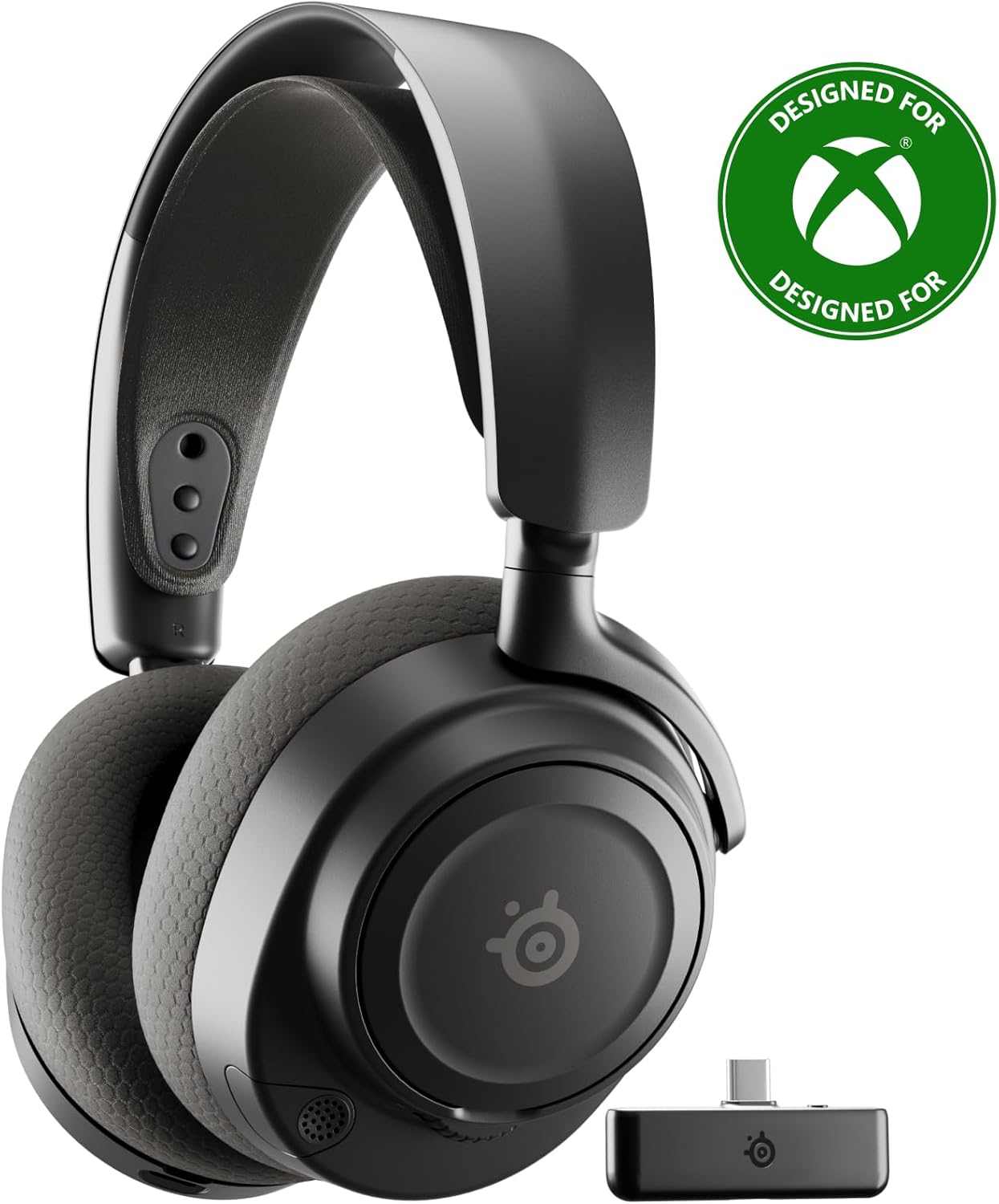
SteelSeries Arctis Nova 7X Wireless Gen 2 Review: The Cross-Platform Gaming Headset

The SteelSeries Arctis Nova 7X Wireless Gen 2 is the updated version of one of the most versatile wireless gaming headsets you can buy. Like its predecessor, it is built around a simple but powerful idea: one headset, one USB dongle, and compatibility with virtually every platform you own — Xbox, PlayStation, PC, Nintendo Switch, and mobile.

This second-generation model keeps that formula and adds meaningful upgrades where it matters: a significantly larger battery, support for SteelSeries’ Arctis Companion mobile app, a refined microphone, and fresh colorways. It is aimed squarely at multi-platform players who switch between a console, a PC, and a phone during a single session and want to keep game audio and mobile audio running at the same time.

The central question of this review is straightforward: does the Gen 2 earn its position as the go-to cross-platform headset, or do the changes amount to a marginal refresh? We evaluated it against verified specifications, independent reviews, and practical buying considerations rather than marketing copy.

Disclosure: componentcrate may earn a commission from qualifying purchases made through links in this article, at no additional cost to you.

Quick Verdict

  • Best for: Gamers who play across multiple platforms — especially Xbox plus PlayStation, PC, or Switch — and want one headset that follows them everywhere.
  • Main strengths: Exceptionally broad console/PC/mobile compatibility from a single dongle; simultaneous 2.4 GHz + Bluetooth audio mixing; excellent battery life with fast charging; comfortable, light design; useful mobile companion app with 200+ game EQ presets.
  • Main limitations: No active noise cancellation; Bluetooth uses only the SBC codec (no aptX/LC3); the disposable is wide and can block adjacent USB ports; the microphone is good but not class-leading; premium pricing for a mostly plastic build.
  • Value assessment: The 7X Gen 2 sits in the upper-middle tier of wireless gaming headsets. Its value comes from versatility rather than raw audio purity — if you genuinely use it across Xbox, PlayStation, PC, and phone, it does the work of several headsets in one. If you play on a single platform, you can likely get comparable audio for less elsewhere, so check current pricing on Amazon before deciding.
  • Verdict: A strong, well-rounded buy for the multi-platform gamer. If you live on one platform only, weigh it against cheaper single-platform alternatives first.

Key Specifications

Specification Details
Product SteelSeries Arctis Nova 7X Wireless Gen 2 (Black)
Manufacturer SteelSeries (model HS31; dongle HS31TXX)
Type Closed-back, over-ear wireless gaming headset
Drivers 40 mm Neodymium magnetic
Frequency response 20 Hz – 22,000 Hz
Impedance 36 Ω
Sensitivity ~105 dB SPL
Connectivity 2.4 GHz wireless (USB-C dongle), Bluetooth 5.0, 3.5 mm wired
Bluetooth codec SBC
Wireless audio Up to 24-bit/48 kHz over 2.4 GHz
Battery (rated) Up to 54 h (2.4 GHz), 42 h (Bluetooth), 38 h (simultaneous)
Fast charging 15 minutes ≈ 6 hours; full charge ~90 minutes
Microphone Retractable ClearCast Gen 2 cardioid
Active noise cancelling No (passive isolation only)
Weight ~325–332 g (per reviews)
Software SteelSeries GG/Sonar (PC); Arctis Companion app (iOS/Android)
In the box Headset, USB-C dongle, USB-C-to-USB-A adapter, USB-C charging cable, 3.5 mm cable
Warranty 1 year (per retailer listing)

Note: Battery figures are manufacturer ratings; independent reviewers measured around 50–53 hours over 2.4 GHz in real-world use.

Design and Build Quality

The Arctis Nova 7X Gen 2 keeps the signature Arctis look: a light steel headband with an elastic suspension strap, rotating earcups, and a retractable microphone that tucks cleanly into the left earcup. The overall weight lands around 325–332 g, which is light for a wireless headset of this size and helps over long sessions.

Comfort is a genuine strength. The ear cushions use the AirWeave fabric and memory foam, which are breathable and comfortable over hours of play, and the suspension headband distributes weight across the top of the head. Independent reviewers consistently rate the fit highly, though a couple noted that pressure can build up around glasses after long sessions, and the earcup depth isn’t roomy enough for every ear shape.

The build is solid but not luxurious. SteelSeries uses a mostly plastic construction with a steel frame for durability; reviewers describe it as fine but “plasticky” at this price point. The controls — a volume wheel, ChatMix dial, power, Bluetooth, mute, and a 3.5 mm jack — are laid out across the earcups, and the wide USB-C dongle is a minor annoyance because it can block adjacent USB ports on laptops or hubs. There is no active noise cancellation; the closed-back design offers only passive isolation, which is adequate in a quiet room but not for loud environments.

Features and Technology

Simultaneous 2.4 GHz + Bluetooth audio. This is the headline feature. The headset connects to your game device over the 2.4 GHz dongle while staying linked to your phone over Bluetooth, so you can hear game audio and a call, music, or Discord at the same time. You can even apply a separate EQ to each source — bass-boost your playlist while sharpening footsteps in your game.

Arctis Companion app (new in Gen 2). The mobile app gives you real-time control of EQ presets and settings from your phone, including 200+ game-specific presets for titles like Call of Duty, Fortnite, and Minecraft. Independent reviews confirm the app works well and is convenient before dropping into a console match, though EQ control in the mobile app is less granular than in the desktop SteelSeries GG/Sonar software.

SteelSeries GG / Sonar on PC. For PC users, the GG software offers deeper control: a full parametric EQ, sidetone, and ChatMix channel balancing. ChatMix on PC requires Sonar, which is free but is an extra layer of software to set up.

Battery and fast charging. SteelSeries rates the Gen 2 at up to 54 hours over 2.4 GHz — about 40% more than the previous generation. A 15-minute USB-C charge restores roughly 6 hours of play, and a full charge takes about 90 minutes.

ClearCast Gen 2 microphone. The retractable cardioid mic adds background-noise rejection, which is enhanced further by Sonar AI on PC. It’s clear and reliable for team chat, though reviewers describe it as good rather than class-leading.

Performance and Real-World Use

In games, the Nova 7X Gen 2’s 40 mm Neodymium drivers deliver a detailed, well-balanced soundscape. Reviewers highlight strong mids and a clear presence in footsteps, gunfire, and weapon sounds, with a wide soundstage and solid positional audio. The bass is present but slightly subdued at stock settings — the EQ presets let you boost it if you want more punch. Spatial audio works well in games on supported platforms.

Battery life is the standout practical improvement. Independent testers ran the headset for a full work week of ~8-hour days over the 2.4 GHz connection and still had charge left, landing around 50–53 hours — close to SteelSeries’ claim. Using Bluetooth and 2.4 GHz simultaneously cuts that to roughly 38 hours, which is still a strong figure. The 15-minute fast charge is genuinely useful for a quick top-up before a session.

There are trade-offs. Bluetooth uses only the SBC codec, which is fine for calls and casual listening but not ideal for high-fidelity music, and some reviewers note noticeable latency when watching video over Bluetooth — another reason to use the dongle for anything time-sensitive. If you need active noise cancellation for a loud environment, this headset doesn’t have it.

Important: These are insights drawn from independent published reviews and manufacturer documentation. componentcrate has not personally tested this headset, and individual results vary with the environment and ears.

Compatibility and Installation

The 7X is the most compatible variant in the Nova 7 Gen 2 line. It works with:
– Xbox Series X|S and Xbox One (dongle set to “Xbox” mode)
– PC and Mac (dongle set to “USB” mode)
– PlayStation 5 and 4 (dongle set to “USB” mode)
– Nintendo Switch, including Switch 2 (dongle in “USB” mode)
– Android/iOS mobile, Meta Quest, and handheld devices (dongle in “USB” mode)
– Wired 3.5 mm for devices with a headphone jack

Setup is plug-and-play: insert the USB-C dongle (or use the included USB-C-to-USB-A adapter), set the dongle’s mode switch, and power on. No pairing is required for the dongle connection; Bluetooth pairs separately via the Bluetooth button. The comparison is worth noting: the 7P (PlayStation) and standard 7 (PC) variants do not work with Xbox — the 7X is the only one that covers both console families, making it the right pick for mixed-console households.

Advantages and Disadvantages

Pros:

  • Works across Xbox, PlayStation, PC, Switch, and mobile from a single dongle — the most versatile option in the line.
  • Simultaneous game + mobile audio with separate EQ per source.
  • Excellent battery life (~50–53 hours measured over 2.4 GHz) with 15-minute fast charging.
  • Light and comfortable for long sessions; breathable AirWeave cushions.
  • Arctis Companion app adds 200+ game EQ presets and phone-based control.
  • Retractable ClearCast Gen 2 mic with noise rejection.

Cons:

  • No active noise cancellation.
  • Bluetooth is SBC-only, with no aptX or newer codecs.
  • The wide USB-C dongle can block adjacent ports.
  • Mic quality is good but not class-leading.
  • Premium price for a largely plastic build.
  • Requires the free Sonar software on PC to get full ChatMix control.

Price and Value for Money

The Arctis Nova 7X Gen 2 is positioned at the upper end of the mid-range wireless gaming market, alongside other premium wireless options. Its value is defined by capability rather than raw audio performance.

The strongest case for it is versatility. If you play on Xbox and PlayStation — or move between a console and a PC with a phone in the mix — this is one of the few headsets that covers all of it with a single dongle and simultaneous audio. That can replace the need for two separate headsets, which changes the value equation significantly.

If you game on a single platform, the value case is weaker. You can find solid single-platform wireless headsets at a lower cost, and the premium you pay for the 7X is largely for the cross-platform flexibility you may not use. If you need active noise cancellation, high-fidelity Bluetooth codecs, or a class-leading microphone, other options may serve you better for your money.

Amazon prices and availability can change. Check the product listing on Amazon for the latest price and current availability before purchasing.

Best Alternatives and Comparisons

Because the 7X’s core value is its cross-platform versatility, the most relevant comparisons are other multi-platform wireless headsets and premium Xbox-compatible options.

  • SteelSeries Arctis Nova 7 Wireless Gen 2 (PC model): The same headset but without Xbox support, aimed at PC and PlayStation players. It costs less, but if you own an Xbox, that’s the feature you’d lose.
  • SteelSeries Arctis Nova Pro Wireless (Xbox): A more premium option with swappable hot-swap batteries and stronger software features, but at a noticeably higher price. Choose it if you want the high-end battery convenience and don’t mind paying more; the 7X remains the value pick for mixed-console use.
  • A more affordable single-platform wireless headset (e.g., from the Logitech G or Razer lines): If you only game on one console or PC, these can deliver very good audio for less money. You’ll trade away the multi-platform dongle flexibility of the 7X.

Each alternative involves trade-offs, and current pricing shifts over time — check the Amazon listings to compare today’s offers before deciding. We do not recommend one purely on brand; the right choice depends on how many platforms you actually use.

Who Should Buy It?

  • Multi-platform gamers who own both an Xbox and a PlayStation, or a console plus a PC and want one headset that works everywhere.
  • Xbox owners who also play on PC or Switch — the 7X is the variant that actually unlocks Xbox compatibility.
  • Gamers who want simultaneous chat/music from their phone while gaming, with separate EQ per source.
  • Players who value long battery life and quick charging and don’t want to babysit a charger.
  • Comfort-focused users who play for long sessions and appreciate a light, breathable headset.

Who Should Consider Something Else?

  • Single-platform players who only use PC or PlayStation — they can likely get comparable audio for less, or a feature they need (like ANC) elsewhere.
  • Buyers who need active noise cancellation for loud environments — the 7X has none.
  • Audiophiles who want high-quality Bluetooth codecs (aptX/LC3) for music — the 7X is SBC-only over Bluetooth.
  • Anyone wanting a premium-feeling build — the 7X is functional but mostly plastic at its price point.
  • Those on a strict budget — money is better spent on a solid single-platform headset than on flexibility they won’t use.

Final Verdict

The SteelSeries Arctis Nova 7X Wireless Gen 2 is the best choice in its class if your gaming life spans multiple platforms. Its single most valuable feature is that one dongle covers Xbox, PlayStation, PC, Switch, and mobile, and the Gen 2 upgrades — bigger battery, fast charging, and the Arctis Companion app — make it genuinely better than the already-strong original.

Its biggest limitation is that this versatility comes at a premium, and anyone who only plays on one platform can probably get comparable audio for less. The deciding factor should be simple: do you actually use more than one platform? If yes, the 7X is hard to beat. If no, compare single-platform alternatives and check current Amazon pricing before committing, since prices and availability change.

Check the Latest Price on Amazon

Amazon prices and availability can change. Consult the listing for current pricing and stock before purchasing.

Frequently Asked Questions

Is the Arctis Nova 7X Wireless Gen 2 worth buying?
Yes, for multi-platform gamers. It’s one of the few headsets that works across Xbox, PlayStation, PC, Switch, and mobile from a single dongle, with excellent battery life. If you only play on one platform, you may find better value in a cheaper single-platform headset, so check current pricing to confirm it fits your budget.

Who is the Arctis Nova 7X Gen 2 best suited for?
It’s best for players who switch between consoles and PC — especially anyone who owns both an Xbox and a PlayStation, since the 7X is the only variant in the line that supports both. It also suits gamers who want simultaneous game audio and phone calls or music.

What are the main limitations of the Arctis Nova 7X Gen 2?
There’s no active noise cancellation, so ambient noise isn’t blocked out. Bluetooth uses the older SBC codec, which limits music quality and can add latency for video. The wireless dongle is also fairly wide and may block adjacent USB ports on laptops or hubs.

Does the Arctis Nova 7X Gen 2 work with Xbox and PlayStation?
Yes. The 7X is the only model in the Nova 7 Gen 2 line that works with Xbox and PlayStation (plus PC, Switch, and mobile). Set the dongle to “Xbox” mode for an Xbox, or “USB” mode for PlayStation and other platforms.

Is the Arctis Nova 7X Gen 2 compatible with the Nintendo Switch?
Yes, including Switch 2. It connects through the USB dongle in “USB” mode, and you can also use the included 3.5 mm cable if you prefer a wired connection.

How long does the Arctis Nova 7X Gen 2 battery last?
SteelSeries rates it at up to 54 hours over the 2.4 GHz wireless connection, about 42 hours on Bluetooth, and around 38 hours when using both at once. Independent reviews measured roughly 50–53 hours in real-world use, so expect a very long week of play before charging. A 15-minute USB-C charge restores about 6 hours.

Does the Arctis Nova 7X Gen 2 have active noise cancellation?
No. It relies on passive isolation from its closed-back design and ear cushions. That’s fine in a quiet room, but it won’t block out loud background noise the way an ANC headset would.

How does the Arctis Nova 7X Gen 2 compare with the Nova 7P or Nova 7?
They’re the same headset hardware, but the 7X is the only one that works with Xbox; the 7P and 7 don’t. The 7P (PlayStation) swaps the ChatMix dial for a sidetone dial, and the standard 7 targets PC. If you own an Xbox, the 7X is the one to pick.

Does the Arctis Nova 7X Gen 2 work on PC with voice chat software?
Yes, it functions as a standard USB headset on PC. For full ChatMix channel balancing, you’ll need to install the free SteelSeries Sonar software. The retractable ClearCast Gen 2 microphone handles Discord and similar apps well.

Where can I check the current price of the Arctis Nova 7X Gen 2?
Check the official listing on Amazon, since prices and availability change over time. The same headset is also sold in white and magenta colorways, which may have separate listings.

Category: Keyboards Mice & Peripherals

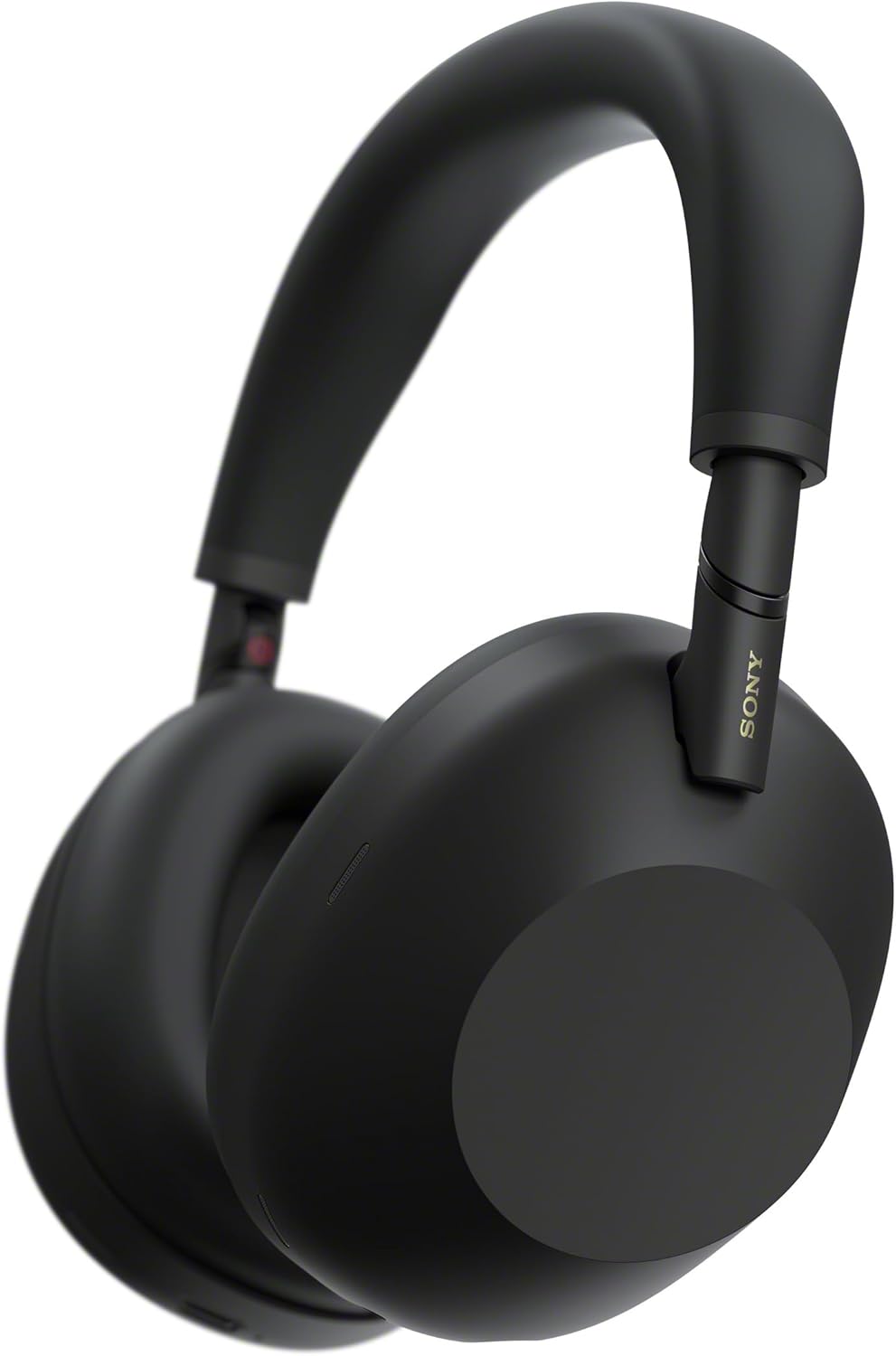
Sony WH-1000XM6 Review: The Noise-Cancelling Flagship, Tested

The Sony WH-1000XM6 is the latest in the series many consider the benchmark for wireless noise-cancelling headphones. It builds on the acclaimed XM5 with a new QN3 processor, a larger microphone array, and refinements to comfort, fit, and battery — while keeping the same 30mm driver architecture and the foldable design the series was once known for.

This is a flagship product for travellers, commuters, and remote workers who want the best available cancellation of the world around them, with premium wireless sound and long battery life. The central question of this review is whether the XM6’s improvements justify its premium over the now-discounted XM5 and rivals like the Bose QuietComfort Ultra.

We evaluated it against verified specifications, independent reviews, and practical buying considerations rather than marketing copy.

Disclosure: componentcrate may earn a commission from qualifying purchases made through links in this article, at no additional cost to you.

Quick Verdict

  • Best for: Frequent travellers, commuters, and anyone who wants class-leading noise cancellation plus premium wireless sound and long battery life.
  • Main strengths: Excellent, class-leading ANC (especially on voices and mid/low-frequency hum); clean, balanced sound with LDAC hi-res support; very good comfort and foldable design; 30–40h battery with quick charge; broad feature set (Adaptive NC, Ambient Sound, multipoint).
  • Main limitations: Premium price; battery is good but beaten by some rivals (e.g., Sennheiser Momentum 4); no USB-C audio (USB-C is charging only); no water-resistance rating; ANC and comfort are fit-dependent (glasses can break the seal); call quality drops in noisy/windy conditions.
  • Value assessment: The XM6 sits at the top of the premium ANC market. Its value is anchored in best-in-class noise cancellation and holistic polish rather than raw specifications. It is most justified for buyers who prioritize maximum ANC and a complete feature set; those willing to accept slightly less ANC can save considerably with the XM5 or rivals. Check current Amazon pricing before deciding.
  • Verdict: Arguably the best all-round noise-cancelling headphones on the market. They are worth the premium if you want the very best ANC and will use the feature set — but weigh the XM5 and Momentum 4 before paying the flagship price.

Key Specifications

Specification Details
Product Sony WH-1000XM6 (Black)
Manufacturer Sony Electronics
Type Closed, over-ear wireless noise-cancelling headphones
Driver 30 mm with carbon-fiber composite dome
Processor HD Noise Canceling Processor QN3 (claimed ~7x faster than QN1)
ANC Hybrid ANC; Adaptive NC Optimizer; Auto Ambient Sound; Quick Attention
Microphones 12 for ANC; 6 AI-based beamforming for calls
Frequency response 20Hz–20kHz (Bluetooth), 4Hz–40kHz (LDAC/hi-res)
Battery (rated) 30h (ANC on) / 40h (ANC off); 3-min charge ≈ 3h playback
Charging USB-C, ~3.5h full
Bluetooth 5.3; codecs SBC, AAC, LDAC, LC3; multipoint; ~33ft range
Weight ~254 g
Connectivity USB-C (charging only), 3.5mm analog cable
Water resistance None (no IP rating)
Stability Foldable; compact case with magnetic closure

Note: Battery figures are manufacturer ratings; independent tests measured ~37–40h with ANC on.

Design and Build Quality

The XM6 returns to a foldable design with a compact carry case with magnetic closure — a welcome change for travellers after the XM5’s non-folding build. The finish uses a fingerprint-resistant coating on the earcups, and the headband is wider and asymmetrical with smooth synthetic leather for a pressure-free fit.

The headphones are light at roughly 254g and generally comfortable, though reviewers note the clamp and earcup depth are not ideal for everyone — particularly glasses wearers, for whom the fit can interrupt the seal and slightly reduce ANC performance. There is no water-resistance rating, so these are not for heavy rain or workouts.

Features and Technology

QN3 processor and 12-microphone ANC. The headline feature is the new HD Noise Canceling Processor QN3, which Sony says is about seven times faster than the QN1 in the XM5. It drives a 12-microphone array (up from eight) for real-time noise cancellation. Independent reviewers consistently rate the result as class-leading, with particularly good suppression of human voices and mid/low-frequency hum — rivaling and often edging the Bose QuietComfort Ultra.

Adaptive NC Optimizer and Auto Ambient Sound. The XM6 adapts its noise cancellation to external noise, air pressure, and your wearing style (even with a hat or glasses), and its Auto Ambient Sound mode intelligently balances music with important external sounds like announcements. Quick Attention and HearThrough let you hear the world on demand.

LDAC and hi-res audio. The XM6 supports LDAC over Bluetooth (roughly three times the data of standard codecs) for high-resolution wireless audio, plus standard SBC/AAC. Sound is clean, balanced, and detailed, with a bass-leaning signature that reviewers describe as engaging rather than neutral. DSEE Extreme upscaling is also included.

Battery and charging. Rated at 30 hours with ANC on and 40 hours with ANC off — with a 3-minute charge giving about 3 hours of playback (with a USB-PD adapter). You can also listen while charging, which is new. This is strong, though rivals like the Sennheiser Momentum 4 (60h) last longer.

Performance and Real-World Use

Noise cancellation is the XM6’s standout. In real-world testing (public transport, traffic, offices), reviewers report near-silence and excellent voice suppression. Independent measurement (DHRME) recorded about −29 dB average ANC, and SoundGuys rated it 8.7/10, beating most over-ear ANC headphones. The system struggles a little with sudden, loud incidental noises and, as with most ANC, performance depends on a good fit and seal.

Sound quality is a strength too: the 30mm carbon-fiber dome driver delivers detailed, clean audio with punchy bass and clear highs, suitable for both music and calls. SoundGuys measured a very high audio-quality score (4.8/5).

Battery performance in independent tests matched or exceeded the ratings: SoundGuys measured about 37 hours 14 minutes with ANC on, and GSMArena reported roughly 40 hours in mixed use. This places the XM6 at the top of the ANC tier, behind only much longer-lasting rivals like the Momentum 4.

Call quality is good in quiet conditions, with the six-microphone AI beamforming isolating your voice — but reviewers note clarity drops in noisy or windy environments, and softer speech may not transmit perfectly.

Important: These insights are drawn from independent published reviews and manufacturer documentation. componentcrate has not personally tested these headphones, and results vary with environment, fit, and settings.

Compatibility and Installation

The XM6 connects via:
– Bluetooth 5.3 to smartphones, tablets, laptops, and PCs, with multipoint connection to two devices simultaneously.
– 3.5mm analog cable for wired listening to devices with a headphone jack (e.g., some consoles).
– USB-C is used for charging only — there is no USB-C digital audio input.
– The Sony Sound Connect app (formerly Headphones Connect) for ANC settings, EQ, and firmware.

There is no water-resistance rating, so avoid heavy moisture. LDAC requires a compatible Android source for hi-res; iPhones fall back to AAC.

Advantages and Disadvantages

Pros:

  • Class-leading noise cancellation with excellent voice and hum suppression.
  • Clean, detailed, engaging sound with LDAC hi-res support.
  • 30–40h battery with quick charge (3 min ≈ 3h) and listen-while-charging.
  • Comfortable, light, and foldable with a compact case.
  • Rich feature set: Adaptive NC Optimizer, Auto Ambient Sound, multipoint, EQ.
  • Strong ANC for its class; very good overall polish.

Cons:

  • Premium price for a flagship.
  • No USB-C audio input (USB-C is charging only).
  • No water/ingress protection rating.
  • Comfort and ANC are fit-dependent; glasses can break the seal.
  • Call quality drops in noisy or windy conditions.
  • Battery is beaten by some rivals (e.g., Sennheiser Momentum 4).

Price and Value for Money

The Sony WH-1000XM6 is positioned at the top of the premium wireless ANC market. Its value rests on best-in-class noise cancellation and a complete, polished feature set rather than on the longest battery or the lowest price.

For buyers who prioritize maximum ANC and want the full Sony ecosystem (LDAC, Adaptive NC, app control), the XM6 is a defensible flagship purchase. But the value equation is sensitive to competition: the XM5 is now widely discounted and delivers much of the same ANC and sound for less, and the Sennheiser Momentum 4 offers far longer battery life at a comparable premium. Bose QuietComfort Ultra is the other main rival on ANC.

The deciding factor is whether you want the absolute best ANC and the newest features — and whether you’re willing to pay the flagship premium for them. Because prices move and vary by seller, check the Amazon listing for the current price before deciding.

Amazon prices and availability can change. Check the product listing on Amazon for the latest price and current availability before purchasing.

Best Alternatives and Comparisons

  • Sony WH-1000XM5: The predecessor, now widely discounted. It offers very similar ANC and sound, a similar feature set, and a comfortable fit — but it doesn’t fold and uses the older QN1 processor. The value pick if you don’t need the newest hardware.
  • Bose QuietComfort Ultra: The main ANC rival, with excellent noise cancellation and immersive audio modes. It’s a strong alternative if you prefer Bose’s tuning or find the XM6’s fit unsuitable; the XM6 generally edges it on ANC and battery.
  • Sennheiser Momentum 4 Wireless: Roughly double the battery life (up to ~60h) and a highly regarded sound, at a comparable premium. Choose it if battery longevity matters more than absolute ANC.
  • Apple AirPods Max: A premium option that integrates tightly with the Apple ecosystem, with strong ANC but shorter battery (~20h) and a much higher price. Best for committed Apple users.

Each alternative involves real trade-offs. Choose based on whether ANC supremacy, battery, ecosystem, or price matters most, and check current Amazon offers for each.

Who Should Buy It?

  • Frequent travellers and commuters who want the best possible noise cancellation.
  • Remote workers and open-office users who need to focus in noisy environments.
  • Audiophiles using Android devices who want LDAC hi-res wireless audio.
  • Buyers who want a complete, polished feature set in a premium, foldable package.

Who Should Consider Something Else?

  • Budget-conscious buyers — the XM5 delivers most of the experience for less.
  • Battery maximizers — the Sennheiser Momentum 4 lasts nearly twice as long.
  • Apple ecosystem users — AirPods Max integrate more seamlessly with Apple devices (at a higher price).
  • Buyers needing water resistance or USB-C audio — the XM6 has neither.

Final Verdict

The Sony WH-1000XM6 is one of the best all-round noise-cancelling headphones you can buy. Its strongest selling point is class-leading ANC — powered by the faster QN3 processor and a 12-microphone array — combined with clean, detailed LDAC sound, strong battery life, and a comfortable, foldable design.

Its most significant limitations are the flagship price, the lack of USB-C audio and water resistance, and fit-dependence for both comfort and ANC. Its intended buyer is someone who wants the very best ANC and a complete feature set and is willing to pay for it.

The key factor in your decision is whether the ANC and feature upgrades over the cheaper XM5 are worth the premium to you. If they are, the XM6 is a legitimate top choice — if not, the XM5 or a longer-battery rival may serve you better. Compare these options and check current Amazon offers before committing.

Check the Latest Price on Amazon

Amazon prices and availability can change. Consult the listing for current pricing and stock before purchasing.

Frequently Asked Questions

Is the Sony WH-1000XM6 worth buying?
Yes, if you want the best available noise cancellation and a complete premium feature set. It’s a top-tier flagship. If you’re on a tighter budget or don’t need the newest hardware, the WH-1000XM5 delivers most of the experience for less.

Who is the WH-1000XM6 best suited for?
It’s best for frequent travellers, commuters, remote workers, and audiophiles who prioritize maximum noise cancellation, premium wireless sound (LDAC), and long battery life in a foldable, comfortable package.

What are the main limitations of the WH-1000XM6?
It has a premium price, no USB-C digital audio input (USB-C is charging only), and no water-resistance rating. Battery is strong but beaten by some rivals, and both comfort and ANC depend on achieving a good fit and seal.

Does the WH-1000XM6 have good noise cancellation?
Yes. It’s widely rated as class-leading, powered by the new QN3 processor and a 12-microphone array. It’s especially effective at suppressing voices and low/mid-frequency hum, rivaling the Bose QuietComfort Ultra.

How long does the WH-1000XM6 battery last?
Sony rates it at 30 hours with noise cancellation on and 40 hours with it off. Independent tests measured roughly 37–40 hours with ANC on. A 3-minute charge provides about 3 hours of playback with a USB-PD charger.

Is the WH-1000XM6 better than the WH-1000XM5?
Generally yes, but incrementally. It adds the faster QN3 processor, a 12-microphone ANC array, better voice suppression, a foldable design, and the ability to listen while charging. The XM5 is still excellent and is now cheaper.

Does the WH-1000XM6 support multipoint Bluetooth?
Yes. It supports Bluetooth 5.3 with multipoint connection, so you can pair it with two devices simultaneously and switch between them, such as a phone and a laptop.

Does the WH-1000XM6 work with iPhones?
Yes. It connects via Bluetooth and supports AAC, the codec iPhones use. Note that LDAC high-resolution audio is available on compatible Android devices rather than iPhones. A 3.5mm cable also works for wired listening.

How does the WH-1000XM6 compare with the Bose QuietComfort Ultra?
Both are top-class ANC headphones. Most reviewers find the XM6’s noise cancellation slightly superior or comparable, with better battery life and LDAC support. The Bose has its own immersive audio modes; the choice often comes down to fit, sound tuning, and ecosystem preference.

Where can I check the current price of the WH-1000XM6?
Check the official listing on Amazon, since prices and availability change over time. The headphones also come in other colorways, which may have separate listings.


Category: Keyboards Mice & Peripherals

Razer BlackShark V3 Pro Review: A Competitive Headset That Adds ANC

The Razer BlackShark V3 Pro is Razer’s flagship wireless gaming headset, and it fills the one notable gap in the much-loved BlackShark line: active noise cancellation. It is the first BlackShark to ship with hybrid ANC, alongside a faster wireless link, better drivers, more connectivity options, and the same 70-hour battery rating as its predecessor.

It is aimed squarely at competitive players who want every possible edge — ultra-low wireless latency, precise positional audio, and isolation from their surroundings — while also working as a versatile headset for calls, music, and mobile use. The question this review answers is whether the ANC and connectivity upgrades justify the premium over the non-Pro BlackShark V3 and the older V2 Pro.

We evaluated it against verified specifications, independent reviews, and practical buying considerations rather than marketing copy.

Disclosure: componentcrate may earn a commission from qualifying purchases made through links in this article, at no additional cost to you.

Quick Verdict

  • Best for: Competitive PC and PS5 FPS players who want ultra-low wireless latency, strong positional audio, and active noise cancellation in a premium, comfortable package.
  • Main strengths: Best-in-class ~10ms wireless latency; hybrid ANC (a rarity in gaming headsets); excellent directional audio and tom detail; four connectivity modes including simultaneous 2.4GHz + Bluetooth; very good detachable mic; 70-hour rated battery with fast charging.
  • Main limitations: ANC effectiveness is inconsistent and depends on a good seal; the fabric cushions and yoke design can make a perfect seal difficult; 10mm/ANC/features can cut real battery life to ~30 hours; premium price with no hot-swappable battery; THX Spatial is PC-only.
  • Value assessment: The V3 Pro is positioned at the top of the mid-to-premium wireless tier. Its value rests on combining competition-grade latency and audio with ANC and multi-device flexibility. It justifies its premium mainly for serious competitive players and those who genuinely want ANC in a gaming headset; casual or single-platform buyers may get comparable audio for less elsewhere. Check current Amazon pricing before deciding.
  • Verdict: A technically excellent, feature-rich flagship that earns consideration if you value low latency and ANC. If you don’t need ANC, the non-Pro V3 (or V2 Pro) delivers most of the audio for less — so the deciding factor is whether hybrid ANC is worth the premium to you.

Key Specifications

Specification Details
Product Razer BlackShark V3 Pro Wireless ANC (Black)
Manufacturer Razer
Type Closed-back, over-ear wireless gaming headset
Drivers 50 mm TriForce Bio-Cellulose Gen-2
Frequency response 12 Hz – 28 kHz
Wireless Razer HyperSpeed Wireless Gen-2 (2.4 GHz, ~10 ms latency), Bluetooth 5.3
Bluetooth codecs AAC, SBC
Battery (rated) 70 h (PC, 2.4 GHz), 48 h (console), ~30 h with ANC + ultra-low-latency
Fast charging 15 minutes ≈ 6 hours; full charge ~4 hours (USB-C)
Active noise cancelling Hybrid ANC (on / off / ambient; 4 adjustable levels in software)
Microphone Detachable HyperClear Full Band 12 mm (48 kHz)
Connectivity 2.4 GHz dongle (USB-A), Bluetooth, USB wired, 3.5 mm analog
Spatial audio THX Spatial 7.1.4 (Windows), Tempest 3D (PS5), Windows Sonic (Xbox)
Software Razer Synapse / Razer Audio app
Weight ~367 g
Dimensions ~203 x 167 x 95 mm
Compatibility PC, Mac, PS5, Nintendo Switch, smartphone (this SKU); separate Xbox variant

Note: Battery figures are manufacturer ratings under specific conditions; real runtime depends heavily on settings like ANC and low-latency mode.

Design and Build Quality

The BlackShark V3 Pro keeps the understated, tournament-ready aesthetic of the series: a largely matte-black build with memory foam cushions, a flexible frame, and a detachable boom mic. The earcups use dual-layer FlowKnit fabric over leatherette and swivel via adaptive 15° joints to help conform to your head. At roughly 367g, it’s not the lightest headset, but reviewers consistently describe it as comfortable for long sessions.

The build quality is excellent — this is a durable, premium-feeling frame with solid hinges. The controls are practical: an ANC button, a configurable roller (by default balancing the two wireless inputs), a multi-function button for EQ presets and Bluetooth pairing, plus dedicated volume and mic mute. The main ergonomic caveat is that the breathable fabric cushions don’t create as airtight a seal as leatherette, which matters for ANC performance (see below).

Features and Technology

Ultra-low-latency wireless (HyperSpeed Gen-2). Over 2.4GHz, Razer claims roughly 10ms latency — among the lowest in gaming headsets, which reviewers describe as imperceptible and ideal for twitch FPS play. This is the headset’s competitive core.

Hybrid active noise cancellation. A first for the BlackShark line, using four microphones (inside and outside) to block ambient noise. You can toggle ANC on, off, or an Ambient mode that amplifies outside sound, and adjust four ANC levels in Razer Synapse or the Audio app. Its effectiveness is the most contested feature: Tom’s Guide found it highly effective (even calling it excellent), while PC Gamer and SoundGuys found it modest, partly because the fabric cushions and yoke design make a tight seal harder to achieve.

Simultaneous 2.4GHz + Bluetooth. You can game over the dongle while staying connected to your phone over Bluetooth for calls, Discord, or music, with a roller to balance the two. Reviewers found this worked well in practice.

Four connectivity modes. 2.4GHz dongle, Bluetooth 5.3, USB wired, and 3.5mm analog — covering nearly every device. Note that the USB-A dongle connects via a cable, which some reviewers found clunky for handheld use.

THX Spatial and software. On Windows, Razer Synapse unlocks THX Spatial Audio (7.1.4 virtual surround) and pro-tuned EQ profiles for titles like Counter-Strike 2, Valorant, and Apex Legends. On PS5, Tempest 3D Audio is supported. THX Spatial is PC-only.

Performance and Real-World Use

The 50mm TriForce Bio-Cellulose drivers are a genuine high point. Reviewers describe a wide, detailed soundstage with strong tonal separation, punchy bass, and clear highs — excellent for picking out footsteps and directional cues in competitive titles. The mic is also a strength: the detachable 12mm full-band capsule produces rich, clear voice chat, though a few reviewers noted noise rejection is not its strongest suit.

The battery is rated at 70 hours on PC over 2.4GHz (48 hours on console), which is strong but not class-leading — the HyperX Cloud Alpha Wireless (300h) and Cloud III S (120h/200h) last far longer. More importantly, enabling the ultra-low-latency toggle and ANC cuts runtime to roughly 30 hours, so the headline figure is optimistic for feature-heavy use. Fast charging helps: 15 minutes restores about 6 hours.

Important: These insights are drawn from independent published reviews and manufacturer documentation. componentcrate has not personally tested this headset, and results vary with environment, fit, and settings.

Compatibility and Installation

This SKU (the “for PC” version) works with:
– PC and Mac (2.4GHz dongle, Bluetooth, USB, or 3.5mm)
– PlayStation 5 (2.4GHz dongle; Tempest 3D Audio)
– Nintendo Switch (2.4GHz dongle or 3.5mm)
– Smartphone / tablet (Bluetooth; low-latency mode via app)
– Wired USB and 3.5mm for devices with those ports

Razer also sells a separate Xbox variant of the V3 Pro; this PC/PS5 SKU does not support Xbox. There is no hot-swappable battery, and the dongle connects via a cable rather than plugging in directly.

Advantages and Disadvantages

Pros:

  • Very low ~10ms wireless latency — genuinely competitive-grade.
  • Hybrid ANC is a rarity in gaming headsets and can meaningfully cut ambient noise when the seal is good.
  • Excellent directional, detailed audio from 50mm TriForce drivers.
  • Four connectivity modes including simultaneous 2.4GHz + Bluetooth mixing.
  • Strong detachable full-band mic.
  • Comfortable, premium build; fast charge (15 min ≈ 6 h); 70h rated battery.

Cons:

  • ANC effectiveness varies with fit; fabric cushions make a perfect seal harder to achieve.
  • Realistic battery with ANC + low-latency is ~30 hours, not 70.
  • Premium price, with no hot-swappable battery.
  • THX Spatial is PC-only; dongle requires a cable.
  • Rivals offer longer total battery (e.g., HyperX Cloud III S).

Price and Value for Money

The BlackShark V3 Pro is a genuine flagship, priced at the top of the wireless gaming market. Its value is defined by the combination of competition-grade latency and audio, hybrid ANC, and unmatched connectivity flexibility — not by battery longevity or a low price.

For a serious competitive player on PC/PS5 who wants the lowest wireless latency and ANC for focus, the V3 Pro justifies its premium: few headsets offer all of these together. For everyone else, the value case is weaker. The non-Pro BlackShark V3 delivers essentially the same great audio and low latency for significantly less — you only lose ANC, the extra connectivity modes, and some build weight. The HyperX Cloud III S offers dramatically longer battery for a lower price, if battery is your priority. And the V2 Pro (2023) still sounds excellent at a lower price if you don’t need ANC.

The right call depends on whether hybrid ANC and full connectivity are worth the premium to you. Because pricing moves and varies by seller, check the Amazon listing for the current price before deciding.

Amazon prices and availability can change. Check the product listing on Amazon for the latest price and current availability before purchasing.

Best Alternatives and Comparisons

  • Razer BlackShark V3 (non-Pro): The same family, lighter (~267g), with ultra-low-latency wireless and the same great audio — but no hybrid ANC, no 3.5mm, and fewer connection modes. The natural value pick if you don’t need ANC.
  • Razer BlackShark V2 Pro (2023): The predecessor, still excellent-sounding and comfortable, with a strong mic, at a lower price. You lose ANC and simultaneous dual-wireless; a good option if cost matters.
  • HyperX Cloud III S Wireless: Far longer battery (120h/200h rated), dual 2.4GHz/Bluetooth, and dual mics at a lower price — but no ANC and no Xbox support. Choose it if battery longevity matters more than ANC.
  • SteelSeries Arctis Nova Pro Wireless (Xbox/PC): A premium rival with hot-swappable batteries and strong ANC, at a higher price. Consider it if you want battery swappability and are willing to spend more.

Each alternative involves real trade-offs, and prices shift — check the relevant Amazon listings for current offers. We recommend based on your priorities (ANC, battery, latency, platform), not brand.

Who Should Buy It?

  • Competitive FPS players on PC or PS5 who want the lowest practical wireless latency and precise positional audio.
  • Buyers who want ANC in a gaming headset for focus in noisy spaces (roommates, PC fans, travel).
  • Multi-device users who want one headset for PC, console, and phone, with simultaneous game + mobile audio.
  • Buyers who value premium build, a strong detachable mic, and flexible wired/wireless connectivity.

Who Should Consider Something Else?

  • Budget-conscious buyers — the non-Pro V3 or V2 Pro delivers most of the audio for less.
  • Battery maximizers — the HyperX Cloud III S lasts far longer.
  • Buyers who need Xbox support — choose the BlackShark V3 Pro Xbox variant or a cross-platform headset.
  • Those who want hot-swappable batteries or richer ANC at any cost — consider the Arctis Nova Pro Wireless.

Final Verdict

The Razer BlackShark V3 Pro is an excellent, feature-rich flagship whose strongest selling point is combining competition-grade ~10ms wireless latency, superb positional audio, and the rare-to-gaming hybrid ANC — plus four connectivity modes and a strong mic, all in a comfortable, premium build.

Its most significant limitation is that the ANC headline feature is effective only when you get a good seal, and that the realistic battery under heavy feature use is far below the 70-hour rating. Its intended buyer is a serious competitive gamer who values latency and focus and is willing to pay a premium for them.

The deciding factor should be whether you actually want ANC and full connectivity. If you do, the V3 Pro is a legitimate contender. If not, the non-Pro V3 gives you most of the experience for less. Compare these options and check current Amazon offers before committing.

Check the Latest Price on Amazon

Amazon prices and availability can change. Consult the listing for current pricing and stock before purchasing.

Frequently Asked Questions

Is the Razer BlackShark V3 Pro worth buying?
Yes, for competitive PC/PS5 players who want ultra-low wireless latency and hybrid ANC in a premium headset. If you don’t need ANC, the non-Pro BlackShark V3 delivers most of the same audio for less, so weigh the premium against whether you’ll actually use the noise cancellation.

Who is the BlackShark V3 Pro best suited for?
It’s best for serious FPS gamers who want the lowest practical wireless latency and precise positional audio, plus buyers who want ANC in a gaming headset for focus. It also suits multi-device users who want one headset for PC, console, and phone.

What are the main limitations of the BlackShark V3 Pro?
An effectiveness depends on getting a tight seal, and the fabric cushions can make that difficult. Realistic battery with ANC and low-latency mode is about 30 hours, not the 70-hour rating. There’s no hot-swappable battery, and THX Spatial is PC-only.

Does the BlackShark V3 Pro have active noise cancellation?
Yes. It’s the first BlackShark with hybrid ANC, using four microphones, with modes for ANC on, off, and ambient sound, and four adjustable levels in software. Reviews differ on how effective it is; it works best with a good fit and seal.

Is the BlackShark V3 Pro good for FPS gaming?
Yes. The ~10ms HyperSpeed wireless latency is among the lowest available, and the 50mm TriForce drivers deliver excellent directional audio for tracking footsteps and enemy cues. This is its core strength.

Does the BlackShark V3 Pro work with PS5?
Yes. This PC/PS5 version connects to the PS5 over the 2.4GHz dongle (or USB/3.5mm) and supports Tempest 3D Audio. Note that this SKU does not support Xbox — Razer sells a separate Xbox variant.

How long does the BlackShark V3 Pro battery last?
Razer rates it at 70 hours on PC over 2.4GHz (48 hours on console). Using ANC and the ultra-low-latency mode together cuts real runtime to roughly 30 hours. A 15-minute charge restores about 6 hours, and a full charge takes around 4 hours.

How does the BlackShark V3 Pro compare with the V2 Pro?
The V3 Pro adds hybrid ANC, simultaneous 2.4GHz + Bluetooth, USB and 3.5mm wired modes, and upgraded TriForce drivers. The V2 Pro is lighter-feeling, costs less, and still sounds excellent — a good option if you don’t need ANC or the extra connectivity.

Where can I check the current price of the BlackShark V3 Pro?
Check the official listing on Amazon, since prices and availability change over time. The headset also comes in a white variant, which may have a separate listing.


Category: Keyboards Mice & Peripherals

Jabra Evolve2 65 Flex Review: The Portable Hybrid-Work Headset

The Jabra Evolve2 65 Flex is Jabra’s take on the hybrid-work headset: a lightweight, collapsible Bluetooth headset designed to move between the office and the home without demanding space in your bag. Where the standard Evolve2 65 is a sturdy desk headset, the Flex adds a fold-and-go design, hybrid active noise cancellation, and a retractable boom microphone that tucks away for travel.

It is aimed at professionals who spend their day in meetings — on Microsoft Teams, Zoom, or Google Meet — and want a headset that is comfortable for hours, blocks out office noise, and packs flat when the workday ends. The central question of this review is whether the premium price is justified by that portability and Teams certification, or whether a less expensive alternative covers your needs just as well.

We evaluated it against verified specifications, independent reviews, and practical buying considerations rather than marketing copy.

Disclosure: componentcrate may earn a commission from qualifying purchases made through links in this article, at no additional cost to you.

Quick Verdict

  • Best for: Hybrid and remote workers who attend many meetings, want an extremely portable, comfortable headset, and value Microsoft Teams certification, a visible busy light, and good call quality.
  • Main strengths: Unique fold-and-go design and very light 136g build; strong comfort with Jabra AirComfort padding; hybrid ANC plus HearThrough; excellent voice isolation via ClearVoice six-mic array; integrated 360° busylight; dual Bluetooth connectivity and long wireless range; up to 32-hour battery with fast and wireless charging.
  • Main limitations: Premium price; on-ear design may suit some heads better than others; ANC is competent but not class-leading; call quality degrades in windy/outdoor conditions; build feels less rugged than bulkier desk headsets; buttons are small and the companion app’s full features require the USB adapter.
  • Value assessment: The Flex is a premium business headset, priced accordingly. Its value rests on portability, comfort, and Teams/UC integration rather than raw audio specs. It is most justified for heavy-meeting hybrid workers who will actually use the fold-and-go design and busy light; lighter meeting users can likely find adequate quality at a lower price. Check current Amazon pricing before deciding.
  • Verdict: An excellent, comfortable, highly portable choice for the hybrid professional — provided the premium and the on-ear fit suit you. If you need a rugged or cheaper headset, or rarely travel with it, alternatives may serve you better.

Key Specifications

Specification Details
Product Jabra Evolve2 65 Flex Wireless Stereo Headset (Black)
Manufacturer Jabra (GN Group)
Form factor On-ear, fold-and-go collapsible
Weight ~136 g
Drivers 28 mm custom speakers
Frequency range 20 Hz – 20,000 Hz (music)
Microphones 6 (2 analog MEMS + 4 digital MEMS), ClearVoice technology
Active noise cancelling Hybrid ANC, plus HearThrough mode
Busylight Integrated 360° red light
Connectivity Bluetooth 5.2 (dual: 2 simultaneous, up to 8 paired); Jabra Link 390 USB adapter
Wireless range Up to 30 m / 100 ft
Battery (rated) Music up to 32h (ANC off) / 21h (ANC on); talk up to 20h (ANC/busylight off) / 15h (ANC/busylight on)
Charging USB-C; ~120 min full; ~45% in 30 min; optional wireless charging
Software Jabra Sound+, Jabra Direct, Jabra Xpress
Certifications Microsoft Teams (variant dependent); UC, Zoom, Google Meet, Cisco, etc.
Warranty 2 years (registration required per listing)

Note: Battery figures are manufacturer ratings; independent usage approximated ~30 hours per charge with mixed ANC.

Design and Build Quality

The Evolve2 65 Flex’s standout design feature is its fold-and-go mechanics: a hinged, collapsible headband and slim earcups fold flat to fit the included soft carry pouch, making it genuinely portable for a professional headset. At just 136g, it is featherweight — noticeably lighter than most office headsets.

Comfort is a priority. Jabra’s AirComfort padding uses perforated foam layers in the headband and rotating, flexible earcups with ultra-soft cushions. Reviewers consistently praise the fit for long wears, though it is an on-ear design (the cushions rest on the ears rather than enclosing them), so fit is a personal factor. The materials are leatherette, plastic, and stainless steel — comfortable but not the most rugged construction, and reviewers warn it lacks the resilience of heavier desk headsets in a turbulent commute (a hard shell is advisable if you travel rough).

Features and Technology

Hybrid ANC and HearThrough. The Flex uses hybrid active noise cancellation to reduce ambient noise, with a dedicated button on the left earcup to toggle between ANC and HearThrough (which amplifies nearby sound so you can hear colleagues). Reviewers found the ANC effective at taming office chatter, HVAC hum, and low-frequency noise, though it is not class-leading compared with dedicated ANC headphones — and the on-ear fit adds strong passive isolation that helps.

ClearVoice microphone array and 360° busylight. Six microphones (two analog, four digital MEMS) isolate your voice from background noise, and the integrated 360° busylight turns red when you’re in a call so colleagues know not to interrupt. The boom arm retracts and hides when not in use; raising it mutes, lowering it unmutes/answers.

Microsoft Teams certification. This variant is certified for Microsoft Teams, with a dedicated Teams button to join meetings instantly. The UC (Unified Communications) variant covers other platforms; both work with Zoom, Google Meet, and standard VoIP.

Dual connectivity. The headset connects to two Bluetooth devices simultaneously (e.g., PC and phone) and remembers up to eight devices. A bundled Jabra Link 390 USB adapter provides a reliable, plug-and-play computer connection with the long 30m/100ft range.

Performance and Real-World Use

Call quality is the core job here, and reviewers rate it highly. The ClearVoice mic array captures clear, natural voice, with good background-noise suppression for office environments. The main caveat is wind: like most boom-style headsets, call quality drops outdoors in breezy conditions.

Music and sound quality are strong for a business headset — crisp and clear with a pleasant signature, and customizable via the Jabra Sound+ app (including a hearing-test-based MySound tuning). The speakers cap at a lower maximum volume than some, but it’s fine for calls and general listening.

Battery life is excellent for the size: up to 32 hours of music with ANC off (21 with ANC on) and up to 20 hours of talk time. A 30-minute charge restores about 45%, a full USB-C charge takes about two hours, and an optional wireless charging pad is available.

Important: These insights are drawn from independent published reviews and manufacturer documentation. componentcrate has not personally tested this headset, and results vary with environment and fit.

Compatibility and Installation

The Evolve2 65 Flex connects to:
– Computers via the bundled Jabra Link 390 USB adapter (USB-A/USB-C variants) or Bluetooth.
– Mobile devices (smartphones/tablets) via Bluetooth, with dual simultaneous connections.
– Unified communications platforms including Microsoft Teams (this variant), Zoom, Google Meet, Cisco, and standard VoIP.

Setup is plug-and-play: insert the adapter or pair over Bluetooth, and the headset is ready. The Teams variant ships with a dedicated Teams button. Note that full customization (EQ, ANC level, hearing test) uses the Jabra Sound+ / Direct software, which typically works via the computer adapter.

Advantages and Disadvantages

Pros:

  • Unique fold-and-go design and remarkably light 136g build.
  • Excellent long-wear comfort with AirComfort padding.
  • Effective hybrid ANC plus HearThrough for busy offices.
  • Clear voice pickup via the six-mic ClearVoice array.
  • Integrated 360° busylight.
  • Dual Bluetooth connectivity with long 30m range.
  • Up to 32-hour battery, fast USB-C charging, and optional wireless charging.
  • Microsoft Teams certification with a dedicated Teams button.

Cons:

  • Premium price for a business headset.
  • On-ear design suits some heads better than others.
  • ANC is competent but not class-leading.
  • Call quality drops in windy/outdoor conditions.
  • Light build feels less rugged than desk headsets.
  • Small buttons; full software features require the USB adapter.

Price and Value for Money

The Jabra Evolve2 65 Flex is positioned as a premium, professional wireless headset. Its value is anchored in portability, comfort, and UC/Teams integration rather than raw audio specifications.

For the hybrid worker who spends hours in meetings and frequently moves between locations, the fold-and-go design and 136g weight deliver real daily utility, and the Teams button and busylight streamline workflow. In that context, the premium is defensible.

The value is weaker for lighter meeting users, or for anyone who wants a rugged build or class-leading ANC, or who simply doesn’t need Teams certification or extreme portability. For those buyers, the standard Evolve2 65 (no folding, still comfortable) and other capable work headsets can deliver much of the experience at a lower price. Because pricing varies by seller and configuration (USB-A vs USB-C, UC vs Teams, with/without wireless charging), check the Amazon listing for the current price and availability.

Amazon prices and availability can change. Check the product listing on Amazon for the latest price and current availability before purchasing.

Best Alternatives and Comparisons

  • Jabra Evolve2 65 (non-Flex): The original, a comfortable over-ear desk headset with the same strong mic and Teams/UC certification, but without the folding design, hybrid ANC, or retractable mic. A good pick if you don’t need portability and want a more substantial build.
  • Jabra Evolve2 55: A lower-price option in the Evolve2 line with solid call quality and ANC (less effective per reviews), for budget-conscious buyers who don’t need the Flex’s portability.
  • Jabra Evolve2 75 / Engage series: Higher-tier over-ear models with stronger ANC and leatherette cushions, suited to those prioritizing isolation over portability.
  • SteelSeries / gaming-style headsets with ANC (e.g., Razer BlackShark V3 Pro): If you want a headset that doubles for both work calls and gaming, these offer ANC and strong mics at a comparable premium, though they lack Teams certification and a busylight.

Each alternative involves real trade-offs. Choose based on whether portability, Teams certification, ANC strength, or a double-duty work/gaming role matters most; check current Amazon offers for each.

Who Should Buy It?

  • Hybrid and remote workers who attend many meetings and move between office, home, and travel.
  • Microsoft Teams power users who want a certified headset with a dedicated Teams button and a busy light.
  • Comfort-focused professionals who wear a headset for hours and want a very light, well-padded design.
  • Travelers who want a genuinely foldable, packable professional headset.

Who Should Consider Something Else?

  • Budget-conscious buyers — the Evolve2 65 or 55 delivers much of the quality for less if you don’t need the folding design.
  • Those who need a rugged build — the Flex is light, not tough; choose a sturdier over-ear model.
  • Buyers prioritizing maximum ANC — dedicated ANC over-ear headphones block more noise.
  • Gamers wanting a single work/gaming headset — consider an ANC gaming headset instead of a UC-cetified work model.

Final Verdict

The Jabra Evolve2 65 Flex is an excellent, comfortable, genuinely portable hybrid-work headset whose strongest selling point is its unique fold-and-go design combined with strong call quality, hybrid ANC, and Microsoft Teams certification.

Its most significant limitation is the premium price and the fact that comfort and value depend heavily on your meeting volume and your preference for an on-ear fit. Its intended buyer is the hybrid professional who lives in meetings and values portability.

The key factor in your decision is whether you’ll actually use the portability and Teams integration. If you will, the Flex is a legitimate top choice. If not, the less expensive Evolve2 65 (or another work headset) covers most needs. Compare these options and check current Amazon offers before committing.

Check the Latest Price on Amazon

Amazon prices and availability can change. Consult the listing for current pricing and stock before purchasing.

Frequently Asked Questions

Is the Jabra Evolve2 65 Flex worth buying?
Yes, for hybrid professionals who attend many meetings and value an extremely portable, comfortable headset with Microsoft Teams certification. If you rarely travel with your headset or want a more rugged, lower-priced option, the standard Evolve2 65 or Evolve2 55 may be a better fit.

Who is the Evolve2 65 Flex best suited for?
It’s best for hybrid and remote workers who spend hours in meetings and move between office, home, and travel. It’s especially well-suited to Microsoft Teams users who want a certified headset with a dedicated Teams button and a busy light.

What are the main limitations of the Evolve2 65 Flex?
It’s a premium-priced headset with a light, not-very-rugged build. It’s an on-ear design, so fit is a personal factor, and its ANC is effective but not class-leading. Call quality can also degrade in windy, outdoor conditions.

Does the Evolve2 65 Flex have active noise cancellation?
Yes. It uses hybrid ANC to reduce ambient noise and also has a HearThrough mode that amplifies nearby sound. Reviewers found the ANC effective for office chatter and hum, though not as strong as dedicated ANC over-ear headphones.

Is the Evolve2 65 Flex certified for Microsoft Teams?
Yes, in the Teams variant, with a dedicated button to join meetings. A separate UC (Unified Communications) variant covers other platforms, and both work with Zoom, Google Meet, and standard VoIP.

How long does the Evolve2 65 Flex battery last?
Jabra rates it at up to 32 hours of music with ANC off (21 with ANC on) and up to 20 hours of talk time. Independent use approximated about 30 hours per charge with mixed ANC. A 30-minute charge restores roughly 45%, a full USB-C charge takes about two hours, and wireless charging is available.

How does the Evolve2 65 Flex compare with the Evolve2 65?
The Flex adds the fold-and-go collapsible design, hybrid ANC, a retractable boom mic, and overall lighter weight. The standard Evolve2 65 is a more substantial over-ear desk headset with the same strong mic and Teams/UC certification but no folding design.

Is the Evolve2 65 Flex comfortable for all-day use?
Most reviewers say yes. At about 136g with Jabra AirComfort padding and rotating earcups, it’s very light and comfortable for long sessions. However, it’s an on-ear design, so people with larger ears or preferences for over-ear fit may want to try it first.

Where can I check the current price of the Evolve2 65 Flex?
Check the official listing on Amazon, since prices and availability change over time. The headset comes in multiple configurations (USB-A/USB-C, UC/Teams, with or without wireless charging), which may have separate listings.


Category: Keyboards Mice & Peripherals

HyperX Cloud III S Wireless Review: The Marathon-Battery Headset for PS5, Switch & PC

The HyperX Cloud III S Wireless is the new wireless flagship of the Cloud III family, and it answers the single biggest complaint about the original Cloud III Wireless: it only connected one way. This S variant adds Bluetooth 5.3 alongside the 2.4GHz dongle, a second built-in microphone, and battery life that is frankly in a class of its own — up to 120 hours over 2.4GHz and a claimed 200 hours over Bluetooth.

It is built for the gamer who wants one comfortable headset that moves between a PC, a PlayStation 5, a Nintendo Switch, and a phone without missing a beat. The catch is where it cannot go: there is no Xbox version, and there is no wired connection at all. Those are the two trade-offs that should shape your decision before you even look at sound quality.

This review evaluates the Cloud III S on what actually matters in daily use — comfort, battery, connectivity, sound, and value — using verified specifications, independent reviews, and practical buying considerations rather than marketing copy.

Disclosure: componentcrate may earn a commission from qualifying purchases made through links in this article, at no additional cost to you.

Quick Verdict

  • Best for: PC, PlayStation, and Switch gamers who want one extremely long-lasting wireless headset that also works with their phone or Mac — and who don’t need Xbox support or a wired mode.
  • Main strengths: Exceptional battery life (rated 120–200 hours) with no fast charging needed in practice; dual 2.4GHz + Bluetooth connectivity; excellent comfort for long sessions; two microphones (detachable boom + built-in); clean, detailed directional audio for games.
  • Main limitations: No Xbox support; no wired/analog connection; leatherette earcups can get warm; no active noise cancelling; limited software customization; premium positioning relative to feature set.
  • Value assessment: The Cloud III S sits in the upper-middle tier of wireless gaming headsets. Its value centers on battery longevity and flexibility rather than raw audio fidelity or features. It is a strong buy if you genuinely use PlayStation/Switch plus mobile and value “charge it rarely.” If you need Xbox support, a wired fallback, or want richer software features, comparable alternatives may serve you better — check current Amazon pricing to confirm your best option.
  • Verdict: A well-rounded, comfortable, marathon-battery headset for PS5/Switch/PC/mobile users. It deserves serious consideration if you fit that platform profile and prioritize battery life.

Key Specifications

Specification Details
Product HyperX Cloud III S Wireless (Black)
Manufacturer HyperX (HP Inc.)
Type Closed-back, over-ear (circumaural) wireless gaming headset
Drivers 53 mm angled dynamic, neodymium magnets
Frequency response 10 Hz – 21 kHz
Impedance 64 Ω
Sensitivity ~111.9 dB SPL at 1 kHz
Connectivity 2.4 GHz wireless (USB-C dongle, USB-A adapter included), Bluetooth 5.3
Bluetooth codecs SBC, MPEG-2, AAC-LC
Battery (rated) Up to 120 h (2.4 GHz), up to 200 h (Bluetooth)
Charging USB-C (charging only); full charge ~4–5 hours; no fast charge
Microphones Detachable uni-directional boom mic; built-in omni-directional mic
Active noise cancelling No
Software HyperX NGENUITY (EQ, DTS Headphone:X, mic level)
Weight ~341 g (headset); ~354 g with boom mic
Compatibility PC, Mac, PS5, PS4, Nintendo Switch, mobile; no Xbox
Warranty Standard HyperX limited warranty (1–2 years depending on region/listing)

Note: Battery figures are manufacturer ratings; SoundGuys measured ~113 hours over 2.4 GHz in real-world testing.

Design and Build Quality

The Cloud III S Wireless inherits the classic Cloud III silhouette: padded leatherette earcups over memory foam, an aluminum frame, and steel forks, finished in black (or a black/red variant). It does not fold flat and has no exposed wires, which keeps it tidy but less travel-friendly.

Comfort is a headline strength. The headset weighs around 341g — light for a wireless model of this size — and reviewers consistently describe the clamping force as light yet secure, comfortable over hours of wear. The main comfort caveat is the leatherette ear cushions: several reviewers (including Tom’s Guide) reported that ears can get warm during prolonged sessions, since leather doesn’t breathe as well as fabric.

Build quality is solid and durable, consistent with HyperX’s reputation. There is no active noise cancelling, so isolation is passive only — fine in a quiet room, but not a tool for loud environments. The controls are straightforward: volume, a multifunction button (calls/track skip/mode switch), and mic mute/monitoring on the earcup.

Features and Technology

Dual wireless — 2.4GHz and Bluetooth. This is the defining upgrade over the Cloud III Wireless. You can use the 2.4GHz USB-C dongle for low-latency game audio on PC/PS5/Switch, or switch to Bluetooth for phone, tablet, and Mac. The headset connects to one device at a time (no true multipoint simultaneous mixing), but toggling between modes is quick.

Instant Pair with OMEN laptops. On select HP OMEN gaming laptops, the headset can connect over 2.4GHz without the dongle, via HP’s built-in Instant Pair receiver. This is a convenience for OMEN owners but irrelevant to most buyers.

Extreme battery life. HyperX rates the Cloud III S at 120 hours over 2.4GHz and 200 hours over Bluetooth — several times the typical wireless gaming headset. Independent testing reached roughly 113 hours over 2.4GHz. The trade-off is that there is no fast charging, and a full charge takes about four to five hours — but you’ll rarely need it. Reviews also caution against fully draining the battery, which has occasionally left some HyperX units unable to power on until recharged.

Two microphones. The detachable 10mm boom mic handles team chat, and a built-in omni-directional mic lets you take calls or chat without the boom attached — useful when using the headset away from the PC. The boom mic is uni-directional and clear, though not class-leading; reviewers rate it good but not exceptional.

NGENUITY software. The HyperX NGENUITY app offers EQ presets, microphone level, and DTS Headphone:X virtual surround. Reviews note the software is functional but offers limited deep customization, and DTS spatial sound is subtle in practice.

Performance and Real-World Use

The 53mm angled dynamic drivers deliver a warm, punchy, game-focused sound. Reviewers highlight deep bass, clear highs, and excellent directional positioning — footsteps, gunfire, and environmental cues are easy to pick out. The sound is tuned for gaming immersion rather than musical neutrality; Tom’s Guide and SoundGuys both note it’s great for games but not a critical-listening music headset. The angled driver design aids spatial cues, and the detail retrieval across complex game audio is a genuine strength.

Battery life is the standout practical feature. With roughly 8 hours of daily use, most users will go two or more weeks between charges. The lack of fast charging matters less when a single charge lasts so long, though a five-hour recharge is a real planning consideration if you do run it down.

Important: These insights are drawn from independent published reviews and manufacturer documentation. componentcrate has not personally tested this headset, and individual results vary with environment and use.

Compatibility and Installation

The Cloud III S works with:
– PC and Mac (2.4GHz dongle or Bluetooth)
– PlayStation 5 and PlayStation 4 (2.4GHz dongle)
– Nintendo Switch (2.4GHz dongle in dock or handheld via adapter)
– Mobile devices (iOS/Android) and other Bluetooth sources
– Select HP OMEN laptops via Instant Pair (no dongle)

Setup is plug-and-play: insert the dongle (or use the included USB-A adapter), power on, and it pairs instantly. Bluetooth pairs in the usual way.

No Xbox support is the key limitation — this is not an Xbox headset. No wired/analog connection means you cannot fall back to a 3.5mm cable for devices with only a headphone jack; USB-C is used for charging only.

Advantages and Disadvantages

Pros:

  • Superb battery life — rated 120h (2.4GHz) / 200h (Bluetooth); measured ~113h over 2.4GHz.
  • Dual connectivity (2.4GHz + Bluetooth 5.3) for PC, PS5, Switch, and mobile.
  • Comfortable, light fit for long sessions.
  • Two microphones: detachable boom mic plus built-in mic for on-the-go use.
  • Clear game-oriented sound with strong directional audio from 53mm angled drivers.
  • Detachable, well-built, and durable.

Cons:

  • No Xbox support at all.
  • No wired/analog connection — wireless-only.
  • Leatherette earcups can get warm during long use.
  • No active noise cancelling.
  • No fast charging; full charge takes ~4–5 hours.
  • Limited software customization; DTS surround is subtle.
  • Does not fold flat, which limits portability.

Price and Value for Money

The HyperX Cloud III S is positioned at the upper end of the mid-range wireless gaming market. Its value proposition rests on two pillars: battery life that dwarfs most rivals, and dual-wireless flexibility — rather than on premium audio or software polish.

For a PC/PlayStation/Switch user who wants one headset that also works on a phone, the battery longevity is a genuine practical win: you essentially stop thinking about charging. That alone can justify the premium for heavy users.

However, the value is conditional. If you need an Xbox headset, this is simply not the product — you’d be looking at the Xbox-compatible alternatives. If you want a wired fallback, or richer software features, or better music fidelity, you can find comparable or better options elsewhere. The premium is easier to justify for multi-platform (non-Xbox) users than for single-console buyers.

Amazon prices and availability can change. Check the product listing on Amazon for the latest price and current availability before purchasing.

Best Alternatives and Comparisons

  • HyperX Cloud III Wireless (original): The direct predecessor — same comfort and 53mm drivers, but 2.4GHz only, no Bluetooth, no built-in mic, and a shorter battery (rated ~120h). If you don’t need Bluetooth or the second mic, you may save money with the original; you give up the dual connectivity that defines the S.
  • SteelSeries Arctis Nova 5: A similarly positioned dual-wireless headset with a companion app and more flexible EQ control. It targets the same PC/console/mobile crowd and is a reasonable alternative if you want stronger software customization — though you should compare comfort and battery, which favor the Cloud III S.
  • SteelSeries Arctis Nova 7X Wireless Gen 2: This is the key alternative if you own an Xbox — it is the cross-platform model that works on Xbox, PlayStation, PC, Switch, and mobile from one dongle, with good battery life. Choose it if Xbox compatibility is a must; the Cloud III S remains the stronger pure-battery pick for non-Xbox users.
  • Asus ROG Pelta: An alternative with its own feature set (including RGB options) in a similar price tier; reviewers cite it as a value-conscious alternative, though battery life is far shorter than the Cloud III S.

Each alternative involves real trade-offs, and pricing shifts frequently — check the relevant Amazon listings to compare today’s offers. We recommend based on your actual platform mix and priorities, not brand.

Who Should Buy It?

  • PC and PlayStation gamers who want a single wireless headset with almost absurd battery life.
  • Nintendo Switch owners who want a low-latency wireless option via the dongle.
  • Mobile-first users who want a headset that works with a phone over Bluetooth and still games well on console/PC.
  • Streamers and long-session players who value comfort and hate stopping to recharge.
  • Buyers who dislike dongle dependency — Bluetooth mode offers a dongle-free option (and Instant Pair on OMEN laptops).

Who Should Consider Something Else?

  • Xbox owners — the Cloud III S does not support Xbox; look at Xbox-compatible models like the Arctis Nova 7X.
  • Buyers who want a wired fallback — this headset is wireless-only with no 3.5mm jack.
  • Audiophiles / music listeners — the sound is game-tuned, not neutral; dedicated headphones will serve music better.
  • Those who need active noise cancelling — not available here.
  • Buyers wanting deep software customization or RGB — NGENUITY is functional but limited.

Final Verdict

The HyperX Cloud III S Wireless is an excellent, comfort-first wireless headset whose superpower is battery life — up to 120–200 hours rated, with independent testing confirming well over 100 hours on a charge. Combined with dual 2.4GHz/Bluetooth connectivity and two microphones, it’s a superb all-in-one for PC, PS5, Switch, and mobile users.

Its most significant limitation is equally clear: it is not an Xbox headset and offers no wired connection. The deciding factor should be your platform — if you don’t need Xbox and value battery endurance, the Cloud III S is among the best in its class. If you need Xbox support or a wired option, compare the alternatives and check current Amazon offers before deciding.

Check the Latest Price on Amazon

Frequently Asked Questions

Is the HyperX Cloud III S Wireless worth buying?
Yes, for PC, PlayStation, or Switch gamers who want the longest battery life in the wireless headset class and value dual 2.4GHz/Bluetooth flexibility. It’s less compelling if you need Xbox support or a wired option — in that case, check Xbox-compatible alternatives first.

Who is the HyperX Cloud III S best suited for?
It’s best for gamers who play on PC, PS5, PS4, or Nintendo Switch and also want to use the headset with a phone or Mac over Bluetooth. It’s especially well-suited to long-session players and streamers who want to charge as rarely as possible.

What are the main limitations of the HyperX Cloud III S?
It does not support Xbox, and there’s no wired/analog connection — USB-C is charging only. The leatherette earcups can get warm over long use, there’s no active noise cancelling, and there’s no fast charging (a full charge takes about four to five hours).

Does the HyperX Cloud III S work with PS5 and Nintendo Switch?
Yes. It connects to the PlayStation 5, PlayStation 4, and Nintendo Switch over the included 2.4GHz USB dongle (with a USB-A adapter). It also works with PC, Mac, and phone via Bluetooth.

Is the HyperX Cloud III S compatible with Xbox?
No. There is no Xbox-compatible version of the Cloud III S. If you need an Xbox headset, look at cross-platform models like the SteelSeries Arctis Nova 7X instead.

How long does the HyperX Cloud III S battery last?
HyperX rates it at up to 120 hours over 2.4GHz and up to 200 hours over Bluetooth. Independent testing measured about 113 hours over 2.4GHz. For most users that means weeks between charges, though a full recharge takes roughly four to five hours and there’s no fast charging.

Does the HyperX Cloud III S have active noise cancelling?
No. It relies on passive isolation from its closed-back design and ear cushions. That’s fine in a quiet room, but it won’t block loud background noise the way an ANC headset would.

How does the HyperX Cloud III S compare with the original Cloud III Wireless?
The S adds Bluetooth 5.3, a built-in second microphone, and even longer rated battery life, and it supports Instant Pair on select OMEN laptops. The original Cloud III Wireless is 2.4GHz-only with no Bluetooth and no built-in mic, normally at a lower price.

Does the HyperX Cloud III S work on Mac?
Yes. It connects to Mac over Bluetooth, or via the 2.4GHz dongle with the included USB-A adapter. Note that the NGENUITY customization software is primarily Windows-based, so Mac users may rely on default settings.


Category: Keyboards Mice & Peripherals

Razer Viper V4 Pro Review: A 49g Esports Mouse That Packs 8K Polling

Introduction

The Razer Viper V4 Pro is the next step in Razer’s flagship symmetrical gaming mouse line, designed for competitive esports. It is the successor to the Viper V3 Pro, and it trims the weight to just 49 g in black, upgrades the optical sensor, and introduces optical switches and an optical scroll wheel. This is a mouse aimed squarely at serious FPS and esports players who want the fastest, lightest hardware available — not at general-purpose or office users.

At its core, the Viper V4 Pro is about one question: does chasing marginal gains in weight, sensor precision, and polling rate actually make a meaningful difference in real-world play, and is it worth the premium over the previous generation and the competition? This review examines the design, features, performance, and value of the Viper V4 Pro to help you decide whether it deserves a place on your desk.

Quick Verdict

  • Best for: Competitive FPS/esports players who use claw or fingertip grips and want an ultralight, symmetrical wireless mouse with top-end performance.
  • Main strengths: Very light 49 g build; excellent Focus Pro 50K optical sensor with Frame Sync; 8K polling wired and wireless; crisp optical switches; significantly improved battery life over the previous generation; optical scroll wheel for durability.
  • Main limitations: It is a premium-priced mouse; right-side buttons are absent (side buttons on the left only), so it is not truly ambidextrous for left-handed use; the scroll wheel feel is firm and clicks are softer, which not everyone will prefer; and the 8K polling mode shortens battery life considerably.
  • Value assessment: For a competitive player who wants a top-tier, ultra-lightweight esports mouse, the Viper V4 Pro offers strong value relative to its capabilities and standing in the market. For casual users or those on a tighter budget, the price is harder to justify. Because Amazon prices and availability can change, check the product listing on Amazon for the latest price before buying.
  • Verdict: A worthy upgrade and a serious contender for competitive gamers who value light weight and elite sensor performance. Anyone not chasing tournament-level performance can get strong results for less with a more versatile mouse — but if you are a serious competitor, this is one of the most capable options available.

Key Specifications

Specification Details
Model Razer Viper V4 Pro (Black / White)
Form factor Symmetrical, right-handed (side buttons on left only)
Weight 49 g (Black) / 50 g (White)
Dimensions ≈127.1 × 63.9 × 39.9 mm
Sensor Razer Focus Pro 50K Optical Sensor Gen-3
Max DPI 50,000 (adjustable in 1-DPI steps)
Max speed / acceleration 930 IPS / 90 G
Polling rate Up to 8,000 Hz (wired and wireless)
Wireless Razer HyperSpeed Wireless Gen-2 (2.4 GHz)
Switches Razer Optical Mouse Switches Gen-4 (rated 100M clicks)
Scroll wheel Razer Optical Scroll Wheel (optical encoder)
Buttons 6 total (2 main, 2 side, scroll-wheel click, 1 extra)
Battery life ~180 hours at 1,000 Hz; ~45 hours at 8,000 Hz (manufacturer-rated)
Charging USB-C (cable included)
Software Razer Synapse 4 (PC/macOS); Synapse Web browser beta
Compatibility PC (Windows), Mac; USB-A to USB-C

Note: Weight, battery, and performance figures are manufacturer-rated. Button count is based on independent teardowns; see verification notes.

Design and Build Quality

The Viper V4 Pro keeps the low, symmetrical profile that defined the Viper line, and it now weighs just 49 g in black (50 g in white). The shell has a smooth-touch finish that is soft to the touch yet remains easy to grip, and the large PTFE mouse feet support a smooth glide. Razer uses separated side buttons on the left edge to help prevent accidental presses, and the overall structure is rigid enough to avoid flex despite the low weight.

At approximately 127 mm long, the mouse is a medium-large shape. It is built for claw and fingertip grips, though many palm-grip users will still find it comfortable. Because the side buttons sit only on the left side, the shape is effectively right-handed despite looking symmetrical — left-handed players will not get side buttons on the right edge.

The build quality is consistently praised in independent reviews: the main buttons have no significant pre- or post-travel, and there is no side-to-side wobble on the main or side buttons. The optical scroll wheel has a firm, notched feel; it is smooth with tight, dampened steps, though some reviewers find the click tension slightly soft for precise scrolling.

Features and Technology

Focus Pro 50K Optical Sensor Gen-3. Razer’s latest sensor tracks up to 50,000 DPI, 930 IPS, and 90 G. Alongside it, “Frame Sync” aligns sensor reporting with the display refresh, which Razer says reduces latency and makes micro-tracking feel more consistent. This is a manufacturer claim, but reviewers unanimously describe the tracking as excellent.

8,000 Hz polling (wired and wireless). The Viper V4 Pro reports to the PC up to 8,000 times per second over both the 2.4 GHz wireless connection and USB cable. Higher polling can feel smoother on high-refresh displays, though many players cannot distinguish 1,000 Hz from 8,000 Hz. The practical trade-off is battery life.

Optical switches and optical scroll wheel. The Gen-4 optical switches actuate via light rather than metal contact, rated for 100 million clicks, and they feel lighter and more tactile than the previous generation. The optical scroll wheel has no mechanical contact, which Razer claims is about 3.3× more reliable than mechanical scroll wheel designs; it is genuinely smoother and more durable in principle, though the feel is a matter of preference.

Battery life. Razer claims up to 180 hours at 1,000 Hz and 45 hours at 8,000 Hz wireless charging. The 180-hour figure at 1,000 Hz is roughly double the previous generation’s rating, which is a meaningful improvement for everyday use.

Synapse 4 and Synapse Web. The mouse works with Razer Synapse 4 on PC and Mac for DPI, polling rate, button remapping, and power settings. Razer also introduced Synapse Web, a browser-based driver, which some users may prefer to the heavier desktop app.

Performance and Real-World Use

On paper, the Viper V4 Pro is among the most capable wireless mice available. Its 50K sensor, 8K polling, and optical switches target the fastest, most demanding players. Independent reviews consistently describe the tracking as precise, the clicks as responsive and clean, and the ultralight weight as easy to flick and adjust quickly.

That said, several caveats temper the performance story. First, the difference between 1,000 Hz and 8,000 Hz polling is subtle and depends on both the player and the display; most people will not notice it, and it significantly reduces battery life. Second, the light weight and smooth finish are advantages for fast aiming, but some players prefer slightly more weight for stability. Third, while Razer’s latency and reliability figures are plausible, they are manufacturer claims, not standardized independent benchmark results — independent reviews describe the feel as excellent but do not publish comparative latency measurements.

For the average gamer, the Viper V4 Pro will feel excellent, but its advantages are most apparent to competitive players who can take advantage of high polling rates and who notice the reduced weight during long sessions. For casual play, a more affordable mouse will perform nearly as well.

Compatibility and Installation

The Viper V4 Pro connects wirelessly via a 2.4 GHz HyperSpeed dongle or with the included USB-C cable. It is compatible with Windows PCs and Macs; the Synapse 4 software is available on both platforms, and Razer also offers the browser-based Synapse Web. The mouse works out of the box for basic use, but installing Synapse unlocks customization such as DPI steps, polling rate, button remapping, and power saving.

There is nothing to install in the PC itself: the mouse uses a USB-A to USB-C connection or the dongle. If you use a laptop with only USB-C ports, you may need an adapter for the dongle, and the cable plugs into a USB-C port on the device and a USB-A port on the PC.

Advantages and Disadvantages

Advantages
– Extremely light (49 g), reducing fatigue during long sessions
– Outstanding sensor with Frame Sync and up to 50,000 DPI
– 8K polling in both wired and wireless modes
– Optical switches rated for 100 million clicks
– Optical scroll wheel for durability and smooth tracking
– Excellent battery life at 1,000 Hz compared with the prior generation

Disadvantages
– Premium asking price that is hard to justify for casual users
– No right-side buttons, so not truly ambidextrous
– High 8K polling mode drains the battery much faster (45 hours)
– Scroll-wheel click tension is soft; not everyone will prefer the wheel feel
– Very light weight may feel too light for players who prefer more stability

Price and Value for Money

The Viper V4 Pro sits at the top of the wireless gaming-mouse market, and its price reflects that positioning. Whether it represents good value depends on what you prioritize. For a competitive player who wants the lightest, highest-performing mouse available, the combination of a 49 g weight, a 50K sensor, 8K polling, and optical switches makes it a compelling choice — especially given the battery life improvement over the previous generation.

For more casual gamers, the premium is harder to justify. Many well-regarded wireless mice at a lower price offer excellent performance, and most players will not notice the difference between 1,000 Hz and 8,000 Hz polling. The value case is strongest when you fall into the “serious competitor” camp. Because prices and availability on Amazon can change, check the current listing to confirm the latest price before deciding.

Best Alternatives and Comparisons

Razer Viper V3 Pro. The previous generation is a strong, slightly heavier alternative (about 54 g) with a 35K sensor and the same 8K polling. It is typically more affordable, making it the sensible pick if you want Viper performance for less and do not need the newest sensor or optical scroll wheel.

Logitech G PRO X SUPERLIGHT 2 (or G PRO X2). A leading ultralight esports mouse with a great sensor and wireless performance. It is a direct competitor for competitive FPS players. Its main advantage is brand ecosystem and proven tournament adoption; the trade-off is a different shape and Razer’s newer optical scroll wheel.

Logitech G502 X PLUS. A heavier, feature-rich mouse with more buttons and a scroll-wheel mode switch. It is better for MOBA/MMO players or users who want more programmable inputs, but it is not as light or FPS-focused.

Razer DeathAdder V4 Pro. A right-handed ergonomic option for players who prefer a fuller palm grip and a larger mouse; it is heavier and less geared toward ultralight flick aiming, but very comfortable for palm users.

Who Should Buy It?

  • Competitive FPS/esports players. If you aim to squeeze out every advantage in fast, click-heavy games, the ultralight weight, high polling rate, and crisp optical switches make this a strong fit.
  • Claw and fingertip grip users. The shape is optimized for these grips across a wide range of hand sizes.
  • Buyers upgrading a lighter-generation Viper. The roughly 5 g weight drop, new sensor, and doubled battery life are meaningful upgrades over the V3 Pro.
  • Users who want the latest tech. If the newest sensor, optical scroll wheel, and 8K wireless are priorities, this is the flagship to consider.

Who Should Consider Something Else?

  • Casual or general-purpose gamers. Many more affordable mice will meet your needs without the premium cost.
  • Left-handed users who need side buttons on the right. The Viper V4 Pro only has side buttons on the left edge.
  • Palm-grip players who prefer a larger, fuller mouse. An ergonomic right-handed option like the DeathAdder line may be more comfortable.
  • Buyers on a strict budget. Consider the Viper V3 Pro or other proven ultralight wireless mice.

Final Verdict

The Razer Viper V4 Pro is an exceptional ultralight wireless esports mouse. Its strongest selling point is the combination of a 49 g weight, a 50K optical sensor, and 8K wired/wireless polling with optical switches and an optical scroll wheel — all wrapped in a proven symmetrical shape. Its most significant limitation is its premium price, along with the right-handed-only side-button layout.

It is best for serious competitive FPS/esports players who use claw or fingertip grips and want the fastest, lightest hardware available. The key factor in your decision should be whether you are the kind of player who will actually use an 8K polling rate and benefit from an ultralight design. If so, this mouse deserves serious consideration. If not, you may be better served by a more affordable alternative.

Because Amazon prices and availability can change, check the latest price and current availability on Amazon before you buy.

Check the Latest Price on Amazon — View the Razer Viper V4 Pro on Amazon

Disclosure: componentcrate may earn a commission from qualifying purchases made through links in this article, at no additional cost to you.

FAQ

1. Is the Razer Viper V4 Pro worth buying?
Yes, if you are a competitive FPS/esports player who values an ultralight design and top-tier sensor performance. Its premium price is better justified for serious competitors than for casual users, so weigh your use case before committing.

2. Who is the Razer Viper V4 Pro best suited for?
It is best for competitive players who use claw or fingertip grips and want a very light, fast wireless mouse. Its symmetrical-but-right-handed shape suits a wide range of hand sizes, though side buttons only appear on the left edge.

3. What are the main limitations of the Razer Viper V4 Pro?
The main limitations are its premium price, the lack of right-side buttons, and the firm scroll-wheel feel. The 8K polling mode also drains the battery much faster (about 45 hours), so it is best reserved for competitive sessions.

4. What is the battery life of the Viper V4 Pro?
Razer rates it at about 180 hours at a 1,000 Hz polling rate and about 45 hours at 8,000 Hz, on wireless. These are manufacturer figures; real-world life varies with polling rate, usage, and settings.

5. Does the Viper V4 Pro work with Mac?
Yes. It is compatible with Mac and PC, and Razer Synapse 4 is available on both platforms. A browser-based Synapse Web option is also offered, which some users prefer.

6. How does the Viper V4 Pro compare with the Viper V3 Pro?
The V4 Pro is roughly 5 g lighter, adds the Focus Pro 50K sensor, optical switches, an optical scroll wheel, and roughly doubles rated battery life at 1,000 Hz. The V3 Pro is typically more affordable and remains a strong alternative if you don’t need the newest features.

7. Is the Viper V4 Pro good for left-handed users?
It is a symmetrical shape, but the side buttons are only on the left side. Left-handed users who need side buttons on the right should look for a truly ambidextrous or left-handed mouse.

8. Does 8K polling really make a difference?
Higher polling can feel smoother on high-refresh displays, but most players cannot reliably tell 1,000 Hz from 8,000 Hz. It does reduce battery life considerably, so it is best used selectively rather than always on.

9. What software does the Viper V4 Pro use?
It uses Razer Synapse 4 on PC and Mac for DPI, polling rate, button remapping, and power settings. Razer also offers Synapse Web in the browser, which is lighter than the desktop app.

10. Where can I check the current price of the Viper V4 Pro?
Amazon prices and availability can change, so check the product listing on Amazon for the latest price and current availability before purchasing.

Category: Keyboards Mice & Peripherals

Razer DeathAdder V4 Pro Review: Speed, Weight, and the 8K Battery Trade-Off

The Razer DeathAdder V4 Pro is the latest flagship in Razer’s most iconic mouse line — a wireless ergonomic gaming mouse designed for esports and serious competitive play. It builds on the much-loved DeathAdder V3 Pro by dropping the weight to 56 grams, adding a higher-spec sensor, new optical switches and scroll wheel, and Razer’s newest wireless technology. It claims up to 8,000 Hz polling even over wireless.

Central to deciding whether this mouse is for you is a trade-off that Razer states openly but few shoppers read: at the headline 8,000 Hz polling rate, the battery lasts about 22 hours — not the 150 hours quoted at 1,000 Hz. This review looks at what the V4 Pro does well, whether that battery trade matters, and how it stacks up against the V3 Pro and rivals.

Quick Verdict

  • Best for: Competitive FPS and esports gamers who want an ergonomic, ultra-lightweight wireless mouse with the fastest polling available, and who play in short-to-medium sessions where a ~22-hour charge at 8K is acceptable.
  • Main strengths:
  • Ultra-lightweight (56 g) without a honeycomb shell, keeping a solid feel.
  • Outstanding sensor specs: up to 45,000 DPI, 900 IPS, 85 G, 99.8% accuracy.
  • Up to 8,000 Hz polling in both wired and wireless modes.
  • Crisp, quiet optical switches rated for 100 million clicks.
  • Iconic, comfortable right-handed ergonomic shape; excellent battery life at 1,000 Hz (~150 hr).
  • Main limitations:
  • At 8,000 Hz, battery life drops to ~22 hours — a real trade-off.
  • Right-handed only; not for lefties.
  • Flagship price — not for budget-conscious gamers.
  • 45K DPI is marketing headroom you’ll rarely touch; software (Synapse) is needed for full config.
  • Value assessment: The V4 Pro is a premium flagship. Its value is highest for competitive players who will actually use 8K polling and appreciate the sub-60 g weight. For casual or mid-level gamers, the V3 Pro delivers much of the experience for less.
  • Verdict: If you’re a serious competitive gamer who wants Razer’s best ergonomic wireless mouse, the V4 Pro is a strong, category-leading choice. For everyone else, weigh the premium against the V3 Pro — and check the Amazon listing for the current price before deciding.

Key Specifications

Specification Detail
Model Razer DeathAdder V4 Pro (Black 56 g / White 57 g / Esports Green 58 g)
Type Wireless ergonomic gaming mouse, right-handed
Sensor Razer Focus Pro 45K Optical Sensor Gen-2 (up to 45,000 DPI, 900 IPS, 85 G, 99.8% resolution accuracy)
Polling rate Up to 8,000 Hz (wired and wireless)
Connectivity Razer HyperSpeed Wireless Gen-2 + wired (USB)
Buttons ~6–8 programmable (source varies; see notes) with new optical Gen-4 switches (100M-click rating)
Scroll wheel Optical scroll wheel (first Razer optical wheel), tactile
Battery Up to ~150 h at 1,000 Hz; ~22 h at 8,000 Hz (internal rechargeable)
Dimensions ≈ 128 × 68 × 44 mm
Weight 56 g (black) / 57 g (white)
Software Razer Synapse (required for DPI, hypershift, polling, RGB/config)
Materials >67% bio-based and post-consumer recycled plastics
Warranty Razer 2-year limited (verify at time of purchase)

Button count differs across sources (8 per Razer/most reviews; 6 per a retailer listing) — confirmed in Part D. Battery figures are manufacturer ratings and vary with polling rate, surface, and firmware.

Design and Build Quality

The DeathAdder V4 Pro keeps the award-winning, sculpted ergonomic shape that has made the DeathAdder line a favorite for over a decade. It is a right-handed mouse built for palm and claw grips, and reviewers consistently praise how naturally it sits in the hand, especially for FPS aim.

The headline change is weight. At 56 grams (black) — about 10% lighter than the V3 Pro — Razer achieved ultra-lightweight without drilling honeycomb holes in the shell. The result is a mouse that feels solid and premium but swipes quickly. The white and Esports Green variants are marginally heavier at 57 g and 58 g. A smooth-touch finish improves grip, though it attracts some fingerprints.

Internally, Razer reinforced the side walls for durability without adding weight, and used over 67% bio-based and post-consumer recycled plastics — a meaningful sustainability step. Larger PTFE feet provide a smooth, consistent glide across pads and desks. Split side buttons are designed to reduce accidental presses during intense play. The new hemispherical dongle is weighted so it stays anchored to the desk, with LED indicators for connection quality, battery, and polling rate.

The one clear ergonomic limitation is hand orientation: there is no left-handed version, so lefties are directed to symmetric options like the Viper series.

Features and Technology

  • Focus Pro 45K Optical Sensor Gen-2. Developed with PixArt, this is a new sensor, not just a rebrand. It reaches 45,000 DPI, 900 IPS tracking speed, and 85 G acceleration with 99.8% resolution accuracy. Realistically, most players never leave the 400–1,600 DPI range; the headroom matters less than the flawless tracking and adjustable lift-off distance. Features like Dynamic Sensitivity, Mouse Rotation, and a Sensitivity Matcher let you port settings from another mouse.
  • Up to 8,000 Hz polling. The V4 Pro supports HyperPolling up to 8,000 Hz in both wired and wireless modes — among the fastest in the industry. TechPowerUp measured click latency dropping to ~0.3 ms at 8K wireless. The catch: battery life scales inversely, from ~150 hours at 1,000 Hz down to about 22 hours at 8,000 Hz.
  • HyperSpeed Wireless Gen-2. Razer claims 37% lower latency and 63% greater power efficiency over the previous generation. These are manufacturer figures; review testing confirms stable connection and impressively low latency, especially on the new dongle.
  • Optical Mouse Switches Gen-4. Redesigned optical switches rated for 100 million clicks. Reviewers describe them as lighter and crisper than the previous generation, with a clear, satisfying feel — good for spam-clicking.
  • Optical scroll wheel. Razer’s first optical scroll wheel is designed for durability (claimed triple the durability of mechanical wheels) with consistent, tactile control. There is no tilting horizontal scroll.
  • On-board memory. One on-board profile lets you carry settings between systems without software, though full configuration runs through Razer Synapse.

Performance and Real-World Use

Independent testing paints a clear picture of a top-tier competitive mouse.

  • Sensor. TechPowerUp confirmed the Focus Pro 45K Gen-2 tracks flawlessly, with pre-defined DPI steps out of the box and a wide, adjustable lift-off range. The sensor is not the limiting factor for anyone; it’s genuinely elite.
  • Latency. TechPowerUp measured click latency of ~0.9 ms at 1,000 Hz wireless, dropping to ~0.3 ms at 8,000 Hz. That’s class-leading, though the difference at 8K is largely imperceptible to most players; the real benefit shows in very fast, flick-heavy aim.
  • Battery. At 1,000 Hz, the V4 Pro is rated for up to 150 hours (improved by firmware from the 120 hours on initial packaging) and reviewers report it comfortably lasting the work week or more of intensive play. At 8,000 Hz, figure roughly 22 hours — a few sessions, not a week. If you want both 8K and long endurance, you’ll be charging often or dropping to lower polling.
  • Comfort and weight. The sub-60 g weight is the biggest day-to-day win; reviewers note you feel it in every swipe. The ergonomic shape remains among the most comfortable for long sessions.
  • Clicks and wheel. The optical switches feel crisp and light, the scroll wheel is tactile and precise, and overall the mouse is quiet enough for intense use.

For its intended audience — competitive FPS players — the V4 Pro performs at an elite level. For office or casual use, its weight and flagship focus are overkill next to a productivity mouse.

Compatibility and Installation

  • Systems: Works with Windows and macOS via USB (wired) or the wireless receiver. Razer Synapse is required for full DPI, hypershift, polling, and RGB configuration.
  • Setup: Plug the dongle into a USB port (or connect wired) and pair. The mouse is rechargeable via USB; no dedicated charging dock is required.
  • Grip/size: A medium-to-large right-handed ergonomic mouse; confirm the shape suits your hand and grip before buying.

Advantages and Disadvantages

Advantages
– Ultra-lightweight 56 g build without sacrificing solid feel.
– Class-leading sensor (45K DPI, 900 IPS) with flawless tracking.
– Up to 8,000 Hz polling, wired and wireless.
– Crisp optical switches rated for 100 million clicks.
– ~150-hour battery at 1,000 Hz.
– Comfortable, proven ergonomic shape; sustainable materials.

Disadvantages
– 8K polling cuts battery to ~22 hours — a real trade-off.
– Right-handed only; no left-handed version.
– Flagship price point.
– 45K DPI is mostly marketing headroom.
– Requires Synapse software for full customization.

Price and Value for Money

The DeathAdder V4 Pro sits at the top of Razer’s esports lineup and commands a flagship price. Whether it’s worth it depends on how seriously you compete. For an esports-focused player who will use 8K polling and prizes the sub-60 g weight, the V4 Pro is a legitimate premium buy — the sensor, switches, and wireless tech are genuinely best-in-class. For a casual or mid-level gamer, the value story is weaker; the DeathAdder V3 Pro delivers most of the same shape, comfort, and a very capable sensor for less, and you can spend far less on a great ergonomic mouse overall.

Because pricing varies by seller and over time, check the product listing on Amazon for the latest price and availability before purchasing. Amazon prices and availability can change.

Best Alternatives and Comparisons

Alternative Why it’s relevant Main advantage over V4 Pro Trade-off
Razer DeathAdder V3 Pro The previous DeathAdder flagship; same ergonomic shape Usually lower-priced; proven sensor and comfort Heavier (63 g), lower polling (up to 4K), no optical scroll wheel
Razer Viper V3 Pro Symmetric esports mouse, also ultra-lightweight Ambidextrous shape; often lighter and favored by claw-grip players Different shape; not ergonomic for palm-grip users
Logitech G PRO X2 SUPERLIGHT Top-tier symmetric esports mouse from a rival Pioneering ultra-lightweight wireless design (60 g class) Symmetric, not ergonomic; higher price
Razer Basilisk V3 Pro Ergonomic mouse with more buttons and RGB More programmable buttons, scroll-wheel tilt, Chroma RGB Heavier and less esports-focused

For ergonomic palm-grip fans, the V4 Pro is the natural flagship. For symmetric/claw players, the Viper V3 Pro or Logitech G PRO X2 SUPERLIGHT are the alternatives worth comparing. Check current pricing on the relevant Amazon listings.

Who Should Buy It?

  • Competitive FPS gamers who want the fastest polling and a sub-60 g ergonomic mouse for flick-aim play.
  • Esports players who prioritize the headline specs — sensor headroom, 8K wireless, and low latency.
  • Existing DeathAdder fans upgrading from a V2 or V3 and wanting the lightest, most advanced version of the shape.
  • Right-handed palm/claw-grip users who value the proven ergonomic silhouette.

Who Should Consider Something Else?

  • Left-handed users — there’s no left-handed version; look at the symmetric Viper series.
  • Budget-conscious gamers — the V3 Pro offers much of the same comfort and a strong sensor for less.
  • Players who want long battery at high polling — if you refuse to drop below 8K, the ~22-hour endurance may frustrate; consider a mouse with a larger battery or lower polling.
  • Casual/office users — a productivity mouse or a mid-range gaming mouse will serve better value.

Final Verdict

The Razer DeathAdder V4 Pro’s strongest selling point is that it combines the brand’s most comfortable ergonomic shape with genuinely class-leading competitive hardware — a 45K sensor, 8K polling, crisp optical switches, and a 56 g build. Its main limitation is the explicit trade-off between that headline 8K polling and battery life (~22 hours vs ~150 at 1K), plus a flagship price and no left-handed variant.

Its intended buyer is a serious right-handed competitive gamer who will actually use 8K polling and who values the ultra-lightweight ergonomic shape. The deciding factor is whether you’re willing to accept the battery cost of 8K and pay the flagship premium. If you are, the V4 Pro is among the best esports mice available. If not, the V3 Pro is the smarter value. Check the Amazon listing for the current price and availability, which can change.

Check the Latest Price on Amazon

Disclosure: componentcrate may earn a commission from qualifying purchases made through links in this article, at no additional cost to you.


Frequently Asked Questions

Is the Razer DeathAdder V4 Pro worth buying?
For competitive right-handed FPS gamers who will use 8K polling and want a sub-60 g ergonomic mouse, yes — it’s among the best esports mice available and received strong reviews. For casual players, the V3 Pro offers much of the same comfort at a lower price. Check the Amazon listing for the current price.

Who is the DeathAdder V4 Pro best suited for?
Esports-minded gamers, FPS players, and enthusiasts who want Razer’s flagship ergonomic wireless mouse with ultra-lightweight build, a 45K sensor, and up to 8K polling. It is right-handed only, so it’s not for left-handed users.

What are the main limitations of the DeathAdder V4 Pro?
At 8,000 Hz polling, battery life drops to roughly 22 hours versus ~150 hours at 1,000 Hz. It’s also right-handed only, carries a flagship price, and the 45K DPI ceiling is far beyond practical needs. Full customization requires Razer Synapse.

How does the DeathAdder V4 Pro compare with the V3 Pro?
The V4 Pro is lighter (56 g vs 63 g), has a newer Focus Pro 45K sensor, adds optical switches and an optical scroll wheel, and supports up to 8K polling vs 4K. The V3 Pro is usually cheaper and still offers excellent ergonomics and sensor performance, so it’s the value pick.

Does the DeathAdder V4 Pro support 8,000 Hz polling wirelessly?
Yes. It supports up to 8,000 Hz polling in both wired and wireless modes. TechPowerUp measured click latency around 0.3 ms at 8K. Note that 8K polling significantly reduces battery life versus 1,000 Hz.

How long does the DeathAdder V4 Pro battery last?
At 1,000 Hz, up to about 150 hours (improved by firmware from 120 hours on initial packaging). At 8,000 Hz, expect roughly 22 hours. Actual life varies with polling rate, surface, and usage.

What software does the DeathAdder V4 Pro require?
Razer Synapse is required for full configuration, including DPI steps, polling rate, hypershift, and on-board profile setup. Basic function works without it, but you’ll want Synapse to unlock the mouse’s capabilities.

Is the DeathAdder V4 Pro compatible with Mac and Windows?
Yes, it works with Windows and macOS via wired USB or the wireless receiver, using Razer Synapse on either platform. Confirm the latest OS support on Razer’s site before purchase.

Where can I check the current price of the DeathAdder V4 Pro?
Amazon holds the current price and availability, and both can change over time. Use the link in this article to view the listing and confirm the latest price before purchasing.

What alternatives should I consider?
The Razer DeathAdder V3 Pro is the value alternative with the same ergonomic shape. For symmetric/claw users, consider the Razer Viper V3 Pro or Logitech G PRO X2 SUPERLIGHT. If you want more buttons and RGB, the Basilisk V3 Pro is worth a look. Compare current pricing on Amazon.

Category: Keyboards Mice & Peripherals

Logitech MX Anywhere 3S Review: A Premium Compact Mouse for Life on the Go

Introduction

The Logitech MX Anywhere 3S is the company’s flagship compact wireless mouse, designed for people who work from a laptop, travel often, or want a small high-precision pointer that fits in a bag. It’s the portable sibling of the larger MX Master line, and it packs most of the same premium technology into a much smaller body.

The name says it all: Logitech positions it as a mouse that “tracks everywhere and goes anywhere.” This review looks at whether the MX Anywhere 3S actually delivers on that promise — its sensor, quiet clicks, scrolling, battery, and multi-device workflow — and who should choose it over a full-size productivity mouse.

Quick Verdict

  • Best for: Mobile professionals, frequent travelers, and laptop users who want a compact, high-precision wireless mouse that works on any surface and pairs with up to three devices.
  • Main strengths: 8K DPI Darkfield sensor tracks on glass and other surfaces; quiet clicks; MagSpeed smart scrolling; long ~70-day battery with USB-C quick charge; compact and lightweight; Easy-Switch for three devices; Logi Options+ customization.
  • Main limitations: Small size won’t suit large hands or long full-day ergonomic use; no left–right tilt scroll wheel; premium price; not a gaming mouse.
  • Value assessment: For its target audience — mobile workers who need a portable, precise, multi-device mouse — the MX Anywhere 3S is one of the strongest options available. It earns its premium by combining flagship tracking, quiet clicks, and long battery in a compact body. Buyers who don’t need portability may get more comfort and features for the money from a full-size mouse. Because Amazon prices and availability can change, check the product listing on Amazon for the latest price before buying.
  • Verdict: A top-tier compact travel mouse that delivers on its “anywhere” promise. It’s ideal for people who work on the move; if you have large hands or mainly work at one desk, compare the full-size alternatives.

Key Specifications

Specification Details
Model Logitech MX Anywhere 3S (Compact Wireless Mouse)
Dimensions ≈100.5 × 65 × 34.4 mm (L × W × H)
Weight ≈99–101 g
Sensor Darkfield high-precision optical, 200–8,000 DPI
Surface tracking Works on most surfaces, including glass
Buttons 6 (left/right, back/forward, wheel mode-shift, middle)
Scroll wheel MagSpeed with SmartShift (ratchet + hyper-fast)
Battery USB-C rechargeable 500 mAh Li-Po; up to 70 days per charge
Charging USB-C; quick charge (≈3 hours from ~1 minute)
Connectivity Bluetooth Low Energy + Logi Bolt USB receiver
Devices Up to 3 via Easy-Switch
Wireless range Up to 10 m
Feet PTFE low-friction
Software Logitech Logi Options+
Compatibility Windows 10+, macOS 10.15+, iPadOS 13.4+, ChromeOS, Linux
Warranty 2-year limited hardware

Note: Battery life, range, and DPI are manufacturer-rated. Sensor is optical (Darkfield), not laser.

Design and Build Quality

The MX Anywhere 3S is compact and lightweight at roughly 100 × 65 mm and about 100 g — noticeably smaller than the MX Master line, making it easy to slip into a laptop bag or pocket. Its design is right-handed with a subtle contour, a comfortable thumb area, and a solid, premium-feeling build.

The buttons have a quiet, tactile click (Logitech’s “Quiet Click” technology), which reduces noise versus the previous MX Anywhere 3 — a nice benefit in shared offices, coffee shops, or during calls. The scroll wheel is flanked by a mode-shift button, and the whole body has low-friction PTFE feet for smooth gliding.

One trade-off of the compact design: the mouse is best for small to medium hands. Users with larger hands may find it a bit small for extended all-day use, and reviewers note there is no left–right tilt scroll wheel (unlike the larger MX Master models).

Features and Technology

8K DPI Darkfield sensor. The headline feature. Logitech’s Darkfield technology lets the sensor track on nearly any surface — including glass and other glossy or transparent materials that defeat ordinary optical sensors. Up to 8,000 DPI, it also lets you cover more screen with smaller hand movements. This is a genuinely useful feature for working on the go, where you may not have a mousepad.

Quiet Click. The primary buttons are quieter than the standard MX Anywhere 3 while keeping a satisfying tactile feel. This is aimed at reducing distraction in quiet environments.

MagSpeed scroll wheel with SmartShift. The scroll wheel has a ratchet mode (precise, stepped scrolling) and a hyper-fast mode (free-spinning for long pages), with SmartShift automatically switching between them based on how quickly you scroll. It’s fast and convenient for documents, spreadsheets, and web browsing.

Multi-device Easy-Switch. The mouse pairs with up to three devices and lets you switch between them with the press of a button, over Bluetooth or the Logi Bolt USB receiver. Logi Options+ also enables Logitech Flow for moving the cursor across multiple computers and copy-pasting between them.

Long battery with USB-C. The built-in 500 mAh battery is rated up to 70 days per charge, and a one-minute USB-C quick charge provides about three hours of use — handy for travel.

Performance and Real-World Use

In daily use, the MX Anywhere 3S is smooth and precise. The Darkfield sensor tracks reliably on a desk, on glass, and on other non-standard surfaces, which is the main reason people choose it for travel. The MagSpeed wheel handles both precise line-by-line scrolling and fast long-page scrolling well, and the quiet clicks feel pleasant without being mushy.

Battery life is a strong point: the ~70-day rating means most users charge weekly at most, and the USB-C quick charge reduces downtime. Multi-device switching is seamless for those who move between a laptop, desktop, or tablet.

The main limitations are physical: it’s small, so large-hand users may find it cramped for long sessions, and there’s no tilt scroll. It’s also not a gaming mouse — the sensor is accurate but not a gaming-grade high-polling sensor, and there’s no gaming software.

Compatibility and Installation

The MX Anywhere 3S works with Windows 10+, macOS 10.15+, iPadOS 13.4+, ChromeOS, and Linux. It connects over Bluetooth Low Energy or the included Logi Bolt USB receiver. Logi Options+ (Windows/macOS) provides full customization — button remapping, Smart Actions, Flow, and fine DPI adjustment. On ChromeOS and many Linux distros, the core functions (sensor, wheel, buttons) work without extra drivers.

Setup is simple: pair via Bluetooth or plug in the Logi Bolt receiver. There’s no driver for basic use; Options+ is only needed for advanced customization. Note that the receiver requires a USB-A port, so USB-C-only laptops may need an adapter.

Advantages and Disadvantages

Advantages
– Darkfield sensor tracks on glass and most surfaces
– High 8,000 DPI resolution in a compact body
– Quiet clicks reduce noise
– MagSpeed smart scrolling with ratchet + hyper-fast modes
– ~70-day battery with USB-C quick charge
– Pairs with up to 3 devices via Easy-Switch; Flow support
– Light, portable, premium build

Disadvantages
– Small size not ideal for large hands or long ergonomic use
– No left–right tilt scroll wheel
– Premium price for a compact mouse
– Not a gaming mouse
– Options+ required for full customization (Windows/macOS)

Price and Value for Money

The Logitech MX Anywhere 3S is priced as a premium productivity mouse, reflecting its flagship tracking sensor, quiet clicks, MagSpeed scrolling, and long battery. For the mobile professional who needs a compact, precise, multi-device mouse, it offers strong value because few competitors match its combination of portability and high-end features.

Value weakens for buyers who don’t need portability or who have larger hands — a full-size mouse may offer more comfort and features for a similar price. And since it’s a productivity tool rather than a gaming peripheral, gamers should look elsewhere. Because Amazon prices and availability can change, check the listing on Amazon for the latest price before deciding.

Best Alternatives and Comparisons

Logitech MX Anywhere 3. The previous generation. It’s very similar but uses a 4,000 DPI sensor, has standard (louder) clicks, and is generally a bit less expensive. Choose the 3S if you want the higher-resolution sensor and quiet clicks; the 3 remains a solid budget-friendly alternative.

Logitech MX Master 3S. The full-size member of the MX family. It offers a larger, more ergonomic body, a thumb wheel for horizontal scrolling, and more buttons, at the cost of portability. Choose it if you work mainly at one desk and want maximum comfort and features.

Razer Pro Click Mini. A compact wireless mouse aimed at productivity, with a quieter feel and a more affordable price. It’s a competitor for users who want a small wireless mouse but don’t need the Darkfield sensor or MagSpeed wheel.

Logitech Lift / MX Vertical. Ergonomic vertical mice, if wrist comfort is your main priority rather than portability. They’re larger and not travel-focused.

Who Should Buy It?

  • Frequent travelers and mobile professionals. The compact size and Darkfield sensor make it ideal for working in airports, cafes, and on the go.
  • Laptop users wanting one mouse for multiple devices. Easy-Switch for up to three devices plus Flow support streamline multi-device workflows.
  • Users who work on glass or unusual surfaces. The Darkfield sensor is a rare, genuinely useful feature.
  • People who want a premium, quiet compact mouse. The quiet clicks and high build quality appeal to those who value polish.

Who Should Consider Something Else?

  • Users with large hands. The small size may cause discomfort over long sessions; consider the MX Master 3S.
  • Desktop-centric workers. If you rarely travel, a full-size ergonomic or feature-rich mouse may serve you better.
  • Gamers. This is a productivity mouse, not a gaming peripheral.
  • Budget-conscious buyers. If you don’t need the latest sensor and quiet clicks, the MX Anywhere 3 or another compact mouse may be better value.

Final Verdict

The Logitech MX Anywhere 3S is an excellent compact wireless mouse that delivers on its “anywhere” promise. Its strongest points are the 8K DPI Darkfield sensor that tracks on glass, quiet clicks, MagSpeed scrolling, and a long battery with USB-C quick charge — all in a portable, premium body. Its most significant limitation is the small size, which won’t suit large hands or extended desktop use.

It is best for mobile professionals and travelers who need a precise, multi-device, go-anywhere mouse. The key factor in your decision is your portability needs and hand size: if you work on the move, this is one of the best compact mice available. If you work mostly at one desk or have large hands, compare the full-size options. Because Amazon prices and availability can change, check the latest price and current availability on Amazon before you buy.

Check the Latest Price on Amazon — View the Logitech MX Anywhere 3S on Amazon

Disclosure: componentcrate may earn a commission from qualifying purchases made through links in this article, at no additional cost to you.

FAQ

1. Is the Logitech MX Anywhere 3S worth buying?
Yes, for mobile professionals and travelers who want a compact, high-precision wireless mouse. Its Darkfield sensor, quiet clicks, and long battery justify the premium if portability matters to you. Desktop-only users with large hands may get more from a full-size mouse.

2. Who is the MX Anywhere 3S best for?
It’s best for people who work on laptops and on the go, need a mouse that tracks on any surface (including glass), and want to switch between multiple devices. It’s also great for those who want a quiet, premium compact mouse.

3. Does the MX Anywhere 3S track on glass?
Yes. The Darkfield high-precision sensor is designed to track on glass and other glossy surfaces that defeat standard optical sensors, making it excellent for travel when a mousepad isn’t available.

4. How long does the battery last?
Logitech rates it at up to 70 days per charge on the 500 mAh USB-C rechargeable battery. A one-minute quick charge provides about three hours of use. Real-world life varies with usage and settings.

5. What is the difference between the MX Anywhere 3S and MX Anywhere 3?
The 3S upgrades the sensor to 8,000 DPI (from 4,000) and adds Quiet Click technology for quieter buttons. The 3 is generally more affordable but louder and lower-resolution. Otherwise they’re very similar.

6. How many devices can it connect to?
It pairs with up to three devices and switches between them via the Easy-Switch button, over Bluetooth or the Logi Bolt USB receiver. Logitech Flow also lets you move between computers and copy-paste across them.

7. Is the MX Anywhere 3S good for gaming?
No. It’s a productivity mouse with an accurate but non-gaming sensor and no gaming software. For gaming, look at a dedicated gaming mouse with high polling rates and gaming-grade tracking.

8. Is the MX Anywhere 3S compatible with Mac?
Yes. It works with Windows 10+, macOS 10.15+, iPadOS 13.4+, ChromeOS, and Linux. Logi Options+ on Windows/macOS provides full customization; core functions work on other platforms without extra drivers.

9. Why does the product listing say “laser” mouse?
The Amazon URL slug is outdated. The MX Anywhere 3S uses a Darkfield optical sensor, not a laser sensor. This is a listing artifact, not the actual product technology.

10. Where can I check the current price of the MX Anywhere 3S?
Amazon prices and availability can change, so check the product listing on Amazon for the latest price and current availability before purchasing.

Category: Keyboards Mice & Peripherals

Logitech Lift Vertical Ergonomic Mouse Review: A Comfortable Fit for Small and Medium Hands

Introduction

The Logitech Lift Vertical Ergonomic Mouse is designed for a simple but important purpose: to make a full day at the computer more comfortable. Unlike conventional mice that keep your hand flat on the desk, the Lift angles the hand to a 57° “handshake” position, which Logitech says reduces pressure on the wrist and forearm. It’s aimed at office workers, remote professionals, and anyone who wants a more natural mouse posture.

The Lift is specifically built for small to medium hands, sitting below Logitech’s larger MX Vertical in the ergonomic lineup. For this review, the key questions are whether the 57° angle genuinely helps, how the quiet clicks and multi-device features work in practice, and who should pick the Lift over a bigger vertical mouse. We’ll assess the design, features, usability, and value to help you decide.

Quick Verdict

  • Best for: Users with small to medium hands who want a comfortable vertical mouse for office work, multi-device productivity, and quieter environments — especially those experiencing wrist or forearm strain.
  • Main strengths: Natural 57° vertical angle; whisper-quiet main clicks; smart dual-mode scroll wheel; excellent ~24-month AA battery life; connects to three devices via Bluetooth/Logi Bolt; Light, approachable design with a left-handed option.
  • Main limitations: 4,000 DPI optical sensor caps at productivity precision — not a gaming mouse; side buttons are louder than the main pair; size won’t suit larger hands (those should look at the MX Vertical); Logi Options+ software is needed for full button customization.
  • Value assessment: For its intended audience, the Lift offers strong value: ergonomic design, quiet operation, long battery life, and multi-device support in an accessible package. It’s positioned as an approachable ergonomic option rather than a premium flagship — and for small-hand users it’s often the better fit than the pricier MX Vertical. Because Amazon prices and availability can change, check the product listing on Amazon for the latest price before buying.
  • Verdict: A well-rounded, comfortable vertical mouse that earns strong consideration for office and home productivity users with small to medium hands. If you have larger hands or need gaming-grade precision, compare the alternatives.

Key Specifications

Specification Details
Model Logitech Lift Vertical Ergonomic Wireless Mouse
Form factor Vertical, ergonomic (right- or left-handed options)
Tilt angle 57°
Sensor Optical, 400–4,000 DPI (adjustable)
Weight ~125 g (without battery)
Dimensions 108 × 70 × 71 mm (L × W × H)
Battery 1× AA; up to 24 months (manufacturer-rated)
Connectivity Bluetooth Low Energy + Logi Bolt USB receiver
Wireless range Up to 10 m
Buttons 4 customizable (configured in Logi Options+)
Scroll wheel SmartWheel (precision + speed-scroll modes)
Software Logitech Logi Options+
Compatibility Windows 10/11, macOS 10.15+, iPadOS 14+, Chrome OS, Linux, Android 8.0+

Note: Battery and range figures are manufacturer-rated. Weight is listed without the AA battery.

Design and Build Quality

The Lift uses a vertical, sculpted silhouette that raises your hand into a handshake-like position. The 57° angle is Logitech’s recommended ergonomic position, intended to help keep your wrist, forearm, and upper body more relaxed than with a flat mouse. The body has a soft-touch finish with a rubberized grip and a thumb rest, and it’s made using recycled plastic (a sustainability detail Logitech highlights).

At roughly 108 × 70 × 71 mm and about 125 g, the Lift is compact and light for a vertical mouse — which is exactly the point, since it’s designed for small to medium hands. It’s available in Graphite, Rose, and Off-white, and in both right-handed and left-handed versions. This is one of the few mainstream vertical mice with a true left-handed model, which matters for lefties looking for ergonomic support.

Build quality is solid for the price: the construction feels durable, the rubber grip is comfortable, and the scroll wheel has a smooth, quiet action. Reviews note the main buttons deliver a genuinely quiet “silent” click, though the forward/back side buttons are noticeably louder and more hollow-sounding — a minor inconsistency.

Features and Technology

57° vertical angle. The defining feature. By tilting your hand up, the Lift encourages a more neutral wrist position, which Logitech says reduces muscle activity and wrist pressure. This is an ergonomic design goal rather than a tested performance metric, but it’s the core reason people buy vertical mice.

Quiet clicks. The two main buttons use Logitech’s “silent” switch design, producing a much softer sound than typical mice. This makes the Lift a good fit for shared offices, open-plan spaces, or late-night work. Note the side buttons are not as quiet.

SmartWheel. The scroll wheel switches between two modes: precision scrolling (stepped, for line-by-line control) and speed scrolling (smooth free-spin, for flying through long pages). It’s a handy, practical feature for productivity work.

Multi-device connectivity. The Lift pairs with up to three devices using the Easy-Switch button, toggling between Bluetooth Low Energy and the Logi Bolt USB receiver. Logitech Flow support lets you move the cursor across multiple computers and copy-paste between them when the software is installed.

4 customizable buttons. In Logi Options+ (Windows/macOS), you can assign shortcuts or app-specific actions to the main buttons. Options are more limited on non-Windows/macOS systems, where basic functions work without extra drivers.

AA battery. The Lift runs on a single AA battery rated up to 24 months. Many reviewers appreciate this vs. a built-in rechargeable battery, since a fresh AA is easy to replace — though some prefer USB rechargeable convenience.

Performance and Real-World Use

In daily productivity use, the Lift is easy to adapt to after a short adjustment period — a few days is common for people new to vertical mice. The 57° angle does encourage a more relaxed wrist, and the small size fits well in small and medium hands. The quiet clicks and smooth scrolling make it pleasant for long typing-and-clicking sessions, and the multi-device pairing is seamless for switching between a laptop and desktop.

The main performance limitation is the sensor: at 4,000 DPI, it’s fine for office work, browsing, and general productivity, but it’s not built for high-precision gaming. If you want a vertical mouse that can also game, you’d need to check for a higher-DPI model or accept the Lift’s productivity focus.

Battery life is a highlight: the ~24-month rating on a single AA means you’ll rarely think about charging. This is one of the Lift’s biggest practical advantages over rechargeable vertical mice.

Compatibility and Installation

The Lift works out of the box with Windows, macOS, iPadOS, Chrome OS, Linux, and Android. For Windows and macOS, full customization (button remapping, app-specific profiles, Flow) is available via Logi Options+. On other platforms, the basic functions work without additional drivers, but advanced customization isn’t supported.

Setup is simple: pair over Bluetooth or plug in the included Logi Bolt USB-A receiver. There’s no driver to install for basic use. If you use a laptop with only USB-C ports, you may need an adapter for the receiver. Keep in mind the design is right- or left-handed specific, so choose the correct version for your hand.

Advantages and Disadvantages

Advantages
– Comfortable 57° vertical angle reduces wrist/forearm strain
– Great fit for small and medium hands; left-handed version available
– Whisper-quiet main clicks
– Up to ~24 months on a single AA battery
– Connects to three devices via Bluetooth or Logi Bolt; Flow support
– SmartWheel dual-mode scrolling
– Light, approachable, and reasonably priced

Disadvantages
– 4,000 DPI sensor isn’t suited to gaming
– Side buttons are louder than the main pair
– Too small for larger hands — the MX Vertical is the better fit there
– Full customization requires Logi Options+ (Windows/macOS)
– Not rechargeable; relies on AA batteries

Price and Value for Money

The Logitech Lift sits in the middle of the ergonomic-mouse market — positioned as an approachable, everyday option rather than a flagship. For small- to medium-hand users, it delivers a lot of value: genuine ergonomic design, quiet operation, long battery life, and multi-device support, all in a compact, well-built package.

Its main value rival within Logitech is the larger MX Vertical, which costs more and is rechargeable but is designed for medium to large hands. For small-hand users, the Lift is often the better-value and better-fitting choice. For gaming or high-precision work, the Lift’s 4,000 DPI cap is a limiting factor that pushes some buyers toward other options. Because Amazon prices and availability can change, check the listing on Amazon for the latest price before deciding.

Best Alternatives and Comparisons

Logitech MX Vertical. The larger, rechargeable sibling. It’s built for medium to large hands, charges over USB-C, and typically costs more. Choose the MX Vertical if you have larger hands or prefer a rechargeable battery; choose the Lift for smaller hands and longer battery life.

Logitech MX Master 3S. A premium, non-vertical ergonomic mouse with more buttons, a thumb wheel, and a high-precision 8K DPI sensor. It’s a strong pick if you want advanced productivity features without the vertical angle, and if you don’t need the wrist-tilt design.

Anker or other budget vertical mice. Several lower-cost vertical mice offer a similar angle at a lower price. They may trade off on build quality, quiet clicks, multi-device support, or battery life. The Lift’s advantage is Logitech’s proven comfort, software, and reliability.

Keychron M5 (or similar). A wireless ergonomic vertical mouse from a notable peripheral brand, often at a competitive price point. It’s worth considering if you want a vertical option outside Logitech’s ecosystem.

Who Should Buy It?

  • Office and remote workers. The ergonomic angle and quiet clicks suit long days at a desk, especially in shared spaces.
  • People with small to medium hands. The Lift is purpose-built for this hand size — and it’s one of the few mainstream vertical mice with a left-handed version.
  • Users wanting multi-device convenience. Pairing with up to three devices and Flow support make it easy to switch between a laptop, desktop, or tablet.
  • Anyone who wants long battery life. The ~24-month AA battery means minimal maintenance.

Who Should Consider Something Else?

  • People with large hands. The Lift may feel too small; the MX Vertical or another larger vertical mouse is a better fit.
  • Gamers. The 4,000 DPI sensor and productivity focus aren’t suited to high-precision gaming.
  • Users who prefer rechargeable devices. If you don’t want to deal with AA batteries, choose a USB-C rechargeable vertical mouse.
  • Buyers who want more buttons or advanced features. A premium mouse like the MX Master 3S offers far more inputs and capabilities.

Final Verdict

The Logitech Lift Vertical Ergonomic Mouse is a comfortable, approachable ergonomic mouse that does its job well. Its strongest points are the natural 57° angle, a great fit for small to medium hands, whisper-quiet clicks, and class-leading ~24-month battery life. Its most significant limitations are the productivity-grade 4,000 DPI sensor and the small size, which won’t suit larger hands or gamers.

It is best for office and home productivity users with small to medium hands who want a more comfortable wrist position and quiet, multi-device operation. The key factor in your decision is your hand size and intended use: if you’re in the target audience, this is one of the most comfortable and reliable vertical mice available. If you need a larger fit, higher precision, or a rechargeable battery, compare the alternatives. Because Amazon prices and availability can change, check the latest price and current availability on Amazon before you buy.

Check the Latest Price on Amazon — View the Logitech Lift Vertical Ergonomic Mouse on Amazon

Disclosure: componentcrate may earn a commission from qualifying purchases made through links in this article, at no additional cost to you.

FAQ

1. Is the Logitech Lift vertical mouse worth buying?
Yes, for users with small to medium hands who want ergonomic comfort for office work. It offers a natural 57° angle, quiet clicks, long battery life, and multi-device support at a reasonable price. Larger-handed users or gamers should consider other options.

2. Who is the Logitech Lift best for?
It’s best for people with small to medium hands who spend long hours at a computer and want a more comfortable wrist position. It’s also a strong choice for left-handed users, since a dedicated left-handed version is available.

3. What is the difference between the Logitech Lift and MX Vertical?
The Lift is smaller, built for small to medium hands, uses a single AA battery (up to ~24 months), and is generally more affordable. The MX Vertical is larger, fits medium to large hands, and uses a rechargeable USB-C battery.

4. How long does the battery last?
Logitech rates the Lift at up to 24 months on a single AA battery. Actual life varies with usage and settings, but it’s long enough that most users rarely think about replacing the battery.

5. Is the Logitech Lift good for gaming?
Not really. Its 4,000 DPI optical sensor is designed for productivity, not high-precision gaming. If you need a gaming mouse, look for a model with a higher-DPI sensor and gaming-grade performance.

6. Can the Lift connect to multiple devices?
Yes. It pairs with up to three devices and you can switch between them using the Easy-Switch button, over Bluetooth or the Logi Bolt USB receiver. Logitech Flow also lets you move between computers and copy-paste across them.

7. Is the Lift quiet?
The two main buttons use Logitech’s silent switch design and are noticeably quiet. Reviewers note the side buttons are not as quiet, but the primary clicks are well suited to shared or quiet spaces.

8. Does the Lift work with Mac?
Yes. It’s compatible with Windows, macOS, iPadOS, Chrome OS, Linux, and Android. For full customization on Windows and macOS, use Logi Options+ software. On other platforms, basic functions work without extra drivers.

9. Is the Lift left-handed?
A left-handed version is available. The standard model is right-handed, so be sure to choose the correct version for your hand when ordering.

10. Where can I check the current price of the Logitech Lift?
Amazon prices and availability can change, so check the product listing on Amazon for the latest price and current availability before purchasing.

Category: Keyboards Mice & Peripherals

Logitech G502 X LIGHTSPEED Review: The Iconic G502, Rebuilt and Wireless

Introduction

The Logitech G502 is one of the most famous gaming mice ever made, and the G502 X LIGHTSPEED is its modern wireless reinterpretation. It takes the beloved, button-heavy G502 shape and pairs it with Logitech’s latest tech: a HERO 44K sensor, LIGHTFORCE hybrid switches, and LIGHTSPEED wireless. This is a mouse aimed at gamers who want a comfortable, feature-rich wireless mouse with many programmable controls — not a stripped-down ultralight esports mouse.

The central question for this review is whether the G502 X LIGHTSPEED still earns its status as a go-to all-rounder in 2026, given that faster 8K-polling competitors exist. We’ll look at the design, the updated sensor and switches, real-world use, and who should buy it.

Quick Verdict

  • Best for: Gamers who want a versatile wireless mouse with many buttons, a comfortable ergonomic shape, and excellent battery life — especially MOBA/MMO players and those who want one mouse for work and play.
  • Main strengths: Updated HERO 44K sensor; LIGHTFORCE hybrid switches combine speed with a satisfying mechanical click; 13 programmable controls; up to 140 hours of battery life; adjustable DPI-Shift button; proven, comfortable shape.
  • Main limitations: Pols at 1,000 Hz — behind the newest 8K wireless mice; it’s relatively heavy at about 102 g compared with ultralight rivals; no RGB lighting on this model (the G502 X PLUS adds it); and the premium price is only justified if you actually use the extra buttons.
  • Value assessment: For a buyer who wants a feature-dense, comfortable wireless gaming mouse, the G502 X LIGHTSPEED is one of the strongest values in its segment — it delivers a lot of hardware for its tier. If you only need a simple ultralight mouse for competitive FPS, you may pay for buttons you never use. Because Amazon prices and availability can change, check the product listing on Amazon for the latest price before buying.
  • Verdict: A genuinely excellent all-round wireless gaming mouse that earns its reputation. It’s ideal for gamers who want many buttons and a comfortable shape; competitive FPS purists chasing the lightest, highest-polling hardware should weigh the alternatives.

Key Specifications

Specification Details
Model Logitech G502 X LIGHTSPEED (Black / White)
Form factor Ergonomic, right-handed
Weight ~102 g (Black) / ~101.5 g (White)
Dimensions 131.4 × 79.2 × 41.1 mm (L × W × H)
Sensor Logitech HERO 44K (optical)
Max DPI up to 44,000 (current model)
Polling rate Up to 1,000 Hz
Wireless Logitech LIGHTSPEED (2.4 GHz)
Switches LIGHTFORCE hybrid optical-mechanical
Programmable controls 13
Scroll wheel Dual-mode hyper-fast (notched + free-spin), tilt-capable
Battery life Up to 140 hours (manufacturer-rated)
Charging USB-C (cable included); PowerPlay wireless charging compatible
Onboard memory Up to 5 profiles
Software Logitech G HUB
Compatibility Windows 10+ and macOS

Note: Weight, DPI, and battery figures are manufacturer-rated; sensor generation reflects the current 2026 model. See verification notes.

Design and Build Quality

The G502 X LIGHTSPEED keeps the ergonomic, right-handed shape that made the G502 famous, with a thumb rest and a contour that suits palm and claw grips. It is built from solid plastic with a matte finish, and its low-friction PTFE feet allow a smooth glide. At about 102 g, it is lighter than the original wired G502 (which used optional tuning weights) yet still noticeably heavier than ultralight esports mice — a deliberate trade-off that gives it a planted, stable feel.

The button layout is the star here: 13 programmable controls are arranged around the mouse, including two primary buttons, a pair of thumb buttons, three additional buttons near the left edge, and a DPI-Shift button. A key 2026 update is the redesigned, adjustable DPI-Shift button, which can be removed, reversed to sit closer to your thumb, or replaced with an included blank cover if you never use it. This is a thoughtful ergonomic touch.

The dual-mode hyper-fast scroll wheel can switch between a notched, stepped mode for precise line-by-line scrolling and a free-spin mode for flying through long pages or weapon wheels. It also tilts left and right for horizontal scrolling or extra bindings.

Features and Technology

HERO 44K sensor. The current G502 X LIGHTSPEED ships with Logitech’s HERO 44K optical sensor, offering up to 44,000 DPI with zero smoothing, filtering, or acceleration. For practical purposes, the high DPI ceiling matters less than the sensor’s accuracy and consistent tracking across speeds — and the HERO line is well regarded for this.

LIGHTFORCE hybrid switches. These combine optical actuation (fast, reliable) with a mechanical component that preserves a crisp, tactile click feel. The result is a switch that is both quick and satisfying to press, with a long rated lifespan. This is a genuine differentiator versus pure-mechanical or pure-optical designs.

LIGHTSPEED wireless. Logitech’s tournament-proven 2.4 GHz wireless delivers low-latency, lag-free response, with the current architecture claiming response times 68% faster than the previous generation. The mouse also works in wired mode via USB-C if you prefer or need to charge while playing.

13 programmable controls and G HUB. Every button can be remapped in Logitech G HUB, which also handles DPI presets, onboard profiles, and lighting-free power settings. Up to five profiles can be stored on the mouse itself, so your settings follow you between PCs without software.

Battery life. Logitech rates the internal 500 mAh battery at up to 140 hours. Independent testing has matched roughly 140–150 hours at the standard 1,000 Hz polling rate, which is excellent for a feature-laden wireless mouse.

Performance and Real-World Use

In everyday gaming, the G502 X LIGHTSPEED is smooth and responsive. The HERO sensor tracks accurately across fast swipes and slow precision movements, and the LIGHTFORCE switches register clicks quickly with a reassuring feel. The free-spin scroll wheel is handy for cycling weapons or scrolling long inventories, and the many buttons make it easy to map abilities, macros, and gaming shortcuts without reaching for the keyboard.

The main caveat is polling rate. At 1,000 Hz, the G502 X LIGHTSPEED matches most standard gaming mice but trails newer 8K wireless models (such as the Razer Viper V4 Pro or DeathAdder V4 Pro) that can report up to 8 times faster. In practice, many players cannot distinguish beyond 1,000 Hz, and higher polling can even cost CPU performance in some games. For the majority of gamers, the 1,000 Hz ceiling is a non-issue; for elite FPS players running very high-refresh rigs, it’s worth noting.

Battery life is a standout: at roughly 140 hours between charges, most users will go weeks without plugging in, and you can top up with USB-C or go fully wireless-wireless with a PowerPlay mousepad.

Compatibility and Installation

The G502 X LIGHTSPEED connects via the included LIGHTSPEED USB receiver (2.4 GHz) or a USB-C cable. It works with Windows 10+ and macOS out of the box, and Logitech G HUB unlocks full remapping and profile configuration. There is no driver to install for basic use; G HUB is only needed for customization.

Setup is straightforward: plug in the receiver (or cable), and the mouse is recognized. If you use a laptop with only USB-C ports, you may need an adapter for the receiver. The mouse also charges over USB-C, and its onboard profiles mean your settings carry between PCs once configured.

Advantages and Disadvantages

Advantages
– Comfortable, proven ergonomic shape with a thumb rest
– HERO 44K sensor with accurate, smoothing-free tracking
– LIGHTFORCE hybrid switches: fast and satisfying
– 13 programmable controls for macros and game bindings
– Excellent ~140-hour battery life
– Adjustable/reversible DPI-Shift button and dual-mode scroll wheel
– Onboard profiles and G HUB support

Disadvantages
– 1,000 Hz polling trails newer 8K wireless mice
– Relatively heavy for competitive FPS at ~102 g
– No RGB lighting on this model (G502 X PLUS adds it)
– Premium price is harder to justify if you won’t use the extra buttons
– Software (G HUB) is required for full customization

Price and Value for Money

The G502 X LIGHTSPEED is positioned as a premium wireless gaming mouse, and its price reflects the feature set: an updated sensor, hybrid switches, 13 controls, and excellent battery life. For a gamer who wants all of that in a comfortable, proven shape, it represents strong value — it essentially bundles the features of a high-end mouse with the flexibility of many bindings.

Where value weakens is if you do not need the button count or the wireless conveniences. A lighter, simpler mouse with a higher polling rate may offer more for competitive FPS at a similar or lower price, and the non-RGB G502 X LIGHTSPEED is a deliberate price/feature tradeoff versus the RGB-equipped G502 X PLUS. Because Amazon prices and availability can change, check the listing on Amazon for the latest price before deciding.

Best Alternatives and Comparisons

Logitech G502 X PLUS. The RGB-equipped sibling of the same mouse. It adds LIGHTSYNC RGB lighting and is otherwise nearly identical; it is slightly heavier and has a shorter rated battery life because of the lighting. Choose the PLUS if you want RGB and are willing to charge a bit more often.

Logitech G Pro X SUPERLIGHT 2. A far lighter (around 60 g) esports-focused wireless mouse with high polling and a minimalist button layout. It is a better choice for competitive FPS players who prioritize low weight and simplicity over many buttons.

Razer Viper V4 Pro. A 49 g ultralight wireless mouse with a 50K sensor and 8K polling. It offers faster polling and lower weight but many fewer buttons and a different, symmetrical shape — a superior fit for tournament FPS, not for MOBA/MMO players who want lots of controls.

Razer Basilisk V3 Pro. A direct ergonomic rival with a similar button-rich layout, adjustable scroll wheel, and high polling. It is a solid alternative if you want Razer’s ecosystem and hyper-fast scrolling with more buttons in a comfortable right-handed shape.

Who Should Buy It?

  • MOBA and MMO gamers. The 13 buttons make it easy to bind abilities, items, and macros without keyboard reach.
  • Gamers who want one mouse for everything. It works well for FPS, strategy, productivity, and browsing, with the free-spin wheel for long documents.
  • Players who value comfort and don’t want an ultralight. If you prefer a planted, stable, ergonomic mouse, the G502 X LIGHTSPEED is an excellent fit.
  • Buyers upgrading an aging wired G502. The wireless freedom, updated sensor, and lighter build are a meaningful upgrade.

Who Should Consider Something Else?

  • Competitive FPS purists. If the lowest weight and highest polling are your priority, an ultralight 8K mouse (e.g., Razer Viper V4 Pro or Logitech G Pro X SUPERLIGHT 2) is more appropriate.
  • Left-handed users. The G502 X LIGHTSPEED is right-handed only; this some symmetric or left-handed mice.
  • Buyers who want RGB. The G502 X PLUS adds lighting if that matters to you.
  • Budget-conscious buyers who won’t use many buttons. A simpler, lighter wireless mouse may offer better value for your use.

Final Verdict

The Logitech G502 X LIGHTSPEED is an excellent all-round wireless gaming mouse. Its strongest points are the updated HERO 44K sensor, LIGHTFORCE hybrid switches, 13 programmable controls, and class-leading battery life, all wrapped in the comfortable, proven G502 shape. Its most significant limitation is its 1,000 Hz polling rate, which trails the newest 8K mice, along with a weight that is high for competitive FPS.

It is best for gamers who want a feature-rich, comfortable wireless mouse for many genres and everyday use. The key factor in your decision is whether you’ll actually use the button count and value the ergonomic, wire-free experience — if so, this is one of the best choices in its class. If you’re chasing the lightest, fastest competitive hardware, compare the ultralight alternatives. Because Amazon prices and availability can change, check the latest price and current availability on Amazon before you buy.

Check the Latest Price on Amazon — View the Logitech G502 X LIGHTSPEED on Amazon

Disclosure: componentcrate may earn a commission from qualifying purchases made through links in this article, at no additional cost to you.

FAQ

1. Is the Logitech G502 X LIGHTSPEED worth buying?
Yes, for most gamers who want a versatile, feature-rich wireless mouse. It delivers an updated sensor, hybrid switches, 13 programmable buttons, and excellent battery life in a comfortable design. It’s less suited to those who want the lightest, highest-polling competitive mouse.

2. Who is the G502 X LIGHTSPEED best for?
It’s best for gamers who want many programmable buttons and a comfortable ergonomic shape — particularly MOBA/MMO players, and anyone who wants one mouse for both gaming and productivity. It’s also a great upgrade for existing G502 owners.

3. What sensor does the G502 X LIGHTSPEED use?
The current model ships with Logitech’s HERO 44K optical sensor (up to 44,000 DPI). Note that the original 2022 version used a HERO 25K sensor, so some older reviews and spec sheets reference the older sensor.

4. What is the battery life?
Logitech rates it at up to 140 hours at 1,000 Hz polling. Independent testing broadly matches that (roughly 140–150 hours), so most users can expect weeks between charges. USB-C charging and PowerPlay wireless charging are supported.

5. Does the G502 X LIGHTSPEED work with Mac?
Yes. It works with Windows 10+ and macOS out of the box, and Logitech G HUB is available for both platforms for remapping and profile setup.

6. How does it compare with the G502 X PLUS?
They’re nearly identical; the PLUS adds LIGHTSYNC RGB lighting (and is slightly heavier with a somewhat shorter rated battery life due to the lighting). Choose the LIGHTSPEED if you don’t need RGB and prefer lower weight and longer battery.

7. Is 1,000 Hz polling rate still good enough?
Yes, for the vast majority of players. 1,000 Hz is smooth and responsive; the jump to 4,000–8,000 Hz mainly benefits elite players on high-refresh rigs and can even cost some CPU performance in certain games.

8. How many buttons does it have?
It has 13 programmable controls per Logitech’s official spec. These include the two main buttons, thumb and side buttons, the DPI-Shift button, and the scroll wheel (including tilt clicks). Some spec databases count 11 physical buttons, not counting wheel tilt.

9. Is the DPI-Shift button removable?
Yes. The DPI-Shift button is adjustable: you can remove it, reverse it to sit closer to your thumb, or replace it with the included blank cover to prevent accidental presses.

10. Where can I check the current price of the G502 X LIGHTSPEED?
Amazon prices and availability can change, so check the product listing on Amazon for the latest price and current availability before purchasing.

Scroll to Top