PC Components

Affiliate Disclosure: ComponentCrate participates in the Amazon Associates Program. As an Amazon Associate, I earn from qualifying purchases. We may receive a commission when you purchase through qualifying links, at no additional cost to you. Full disclosure

Category: PC Components

The NVIDIA GeForce RTX 5070 is the mid-high tier of the Blackwell generation — a 12 GB card built for high-refresh 1440p gaming and capable 4K with upscaling. ASUS’s Prime GeForce RTX 5070 OC Edition (model PRIME-RTX5070-O12G) is that card delivered in the brand’s value-oriented Prime line: a factory-overclocked, 2.5-slot design with a compact footprint that is also SFF-ready, aimed at builders who want a solid 5070 without paying a premium for ROG or TUF styling or RGB.

The central question is whether a value-focused, SFF-ready 5070 makes sense for most buyers — and where its trade-offs sit. The Prime OC brings a real factory overclock, quiet dual-BIOS cooling, and one of the more compact designs in the class. But it also has a 12 GB VRAM ceiling, and third-party street pricing for the 5070 can vary significantly, so the current listing price is the deciding factor.

Quick Verdict

  • Best for: 1440p gamers and compact/SFF builders who want a clean, value-oriented, factory-overclocked 5070 without RGB or premium-brand markup.
  • Main strengths: RTX 5070-class performance with a factory OC; quiet dual-BIOS cooling with zero-RPM idle; compact 2.5-slot, SFF-ready footprint; solid build (phase-change pad, metal frame, stainless I/O bracket).
  • Main limitations: 12 GB GDDR7 is a ceiling for heavy 4K texture loads; performance tier below the 5070 Ti/5080; third-party price premiums can erode its value advantage; no RGB or premium styling (a con only if you want it).
  • Value assessment: Independent reviews call this one of the best-value ways into the 5070 class. But because the 5070’s street price varies by seller, value depends on the current listing price. Amazon prices and availability can change — check the current listing before deciding.

Key Specifications

Attribute ASUS Prime RTX 5070 OC Edition
Model PRIME-RTX5070-O12G
GPU NVIDIA GeForce RTX 5070 (GB205, Blackwell)
Unified shaders 6144
Memory 12 GB GDDR7, 192-bit (≈672 GB/s)
Boost clock 2587 MHz (OC mode) / 2557 MHz (Default mode), factory-OC
Total Graphics Power 250 W (reference; adjustable 175–300 W)
Power connector 1× 16-pin 12V-2×6 (adapter to 2×8-pin included)
Recommended PSU 750 W (ASUS)
Dimensions 304 × 126 × 50 mm
Slot 2.5-slot; SFF-Ready compatible
Cooling 3× Axial-tech fans, dual ball bearings, MaxContact base, phase-change pad, backplate with passthrough vent
Dual BIOS P (Performance) / Q (Quiet) modes
Outputs 3× DisplayPort 2.1b, 1× HDMI 2.1b
Interface PCIe 5.0
Software ASUS GPU Tweak III

Manufacturer specifications (ASUS). Thermal/noise behavior from independent testing.

Design and Build Quality

The Prime RTX 5070 OC is compact and functional. It measures 304 × 126 × 50 mm in a 2.5-slot format, and ASUS markets it as SFF-ready — a meaningful advantage for small-form-factor and tighter mid-tower builds where many high-end cards simply will not fit. The cooler uses three Axial-tech fans with dual ball bearings, a design ASUS uses across its gaming cards for longevity and airflow.

Build quality highlights include a MaxContact base (a precisely machined heatsink contact surface), a premium phase-change GPU thermal pad for better heat conduction, a metal GPU reinforcement frame to resist sag, a backplate with a passthrough vent for airflow, and a stainless-steel I/O bracket. The box includes a power adapter that converts two 8-pin PCIe connectors into the card’s single 16-pin 12V-2×6 connector, plus a reusable Velcro cable tie. A switch next to the power connector toggles between the two BIOS modes. In short, it is a clean, well-made card that makes relatively few compromises for its value positioning.

Features and Technology

  • RTX 5070 (Blackwell) silicon: 6144 CUDA cores with 12 GB of GDDR7 over a 192-bit bus for ~672 GB/s — a strong high-refresh 1440p card. Note the 12 GB capacity (rather than 16 GB on higher-tier cards) is a practical ceiling for heavy 4K texture workloads.
  • Factory overclock: ASUS raises the boost clock above the 2512 MHz reference to 2587 MHz in OC mode (2557 MHz in Default mode), delivering a small but real out-of-the-box performance edge.
  • Axial-tech cooling + dual BIOS: three fans with ball bearings and a phase-change pad keep the card cool; the P/Q BIOS switch lets you trade a slightly more aggressive fan curve (P) for a quieter one (Q). All fans come to a standstill below ~50 °C for silent idle operation.
  • SFF-Ready design: the compact 2.5-slot footprint and 304 mm length are designed to fit small builds.
  • Blackwell features: supports DLSS 4 with Multi Frame Generation, NVIDIA Reflex 2, and a 9th-gen NVENC encoder for streaming/recording; DisplayPort 2.1b and PCIe 5.0 support.
  • ASUS GPU Tweak III: monitoring, overclocking, and fan/tuning control in one utility.

Performance and Real-World Use

The RTX 5070 is NVIDIA’s mid-high Blackwell card, and the Prime OC delivers that platform with a modest factory-overclock advantage. Independent testing (HWCooling) concluded the card offers “great value” and is one of the most affordable RTX 5070 options, avoiding the typical pitfalls of low-cost models — strong build quality and cooling despite the budget positioning.

In practical terms, this is a high-refresh 1440p card: it handles the most demanding modern titles well at 1440p, and with DLSS upscaling and frame generation it can push 4K gaming convincingly. Thermally, independent video testing reported the GPU staying around 62–63 °C in pure-raster scenarios, and in the quieter Q-BIOS mode the card is reported as very quiet, with idle fans stopped entirely. Because it sits below the 5070 Ti and 5080, 4K at native ultra settings with ray tracing will require upscaling — as with any card in this class. No first-party componentcrate testing was performed; performance and thermal/noise observations are attributed to the independent sources cited.

Compatibility and Installation

Check these before buying:

  1. Case clearance: 304 mm long, 126 mm tall, 2.5-slot thick. It fits most mid-towers and, being SFF-ready, many smaller cases — but always verify length and slot clearance against your chassis.
  2. Power supply: the card uses a single 16-pin 12V-2×6 connector; the included adapter converts two standard 8-pin PCIe connectors. ASUS recommends a 750 W PSU; confirm your unit has the required connectors and wattage for your full system.
  3. Motherboard/PCIe: PCIe 5.0 is backward compatible with older slots; pair with a modern board and a strong CPU to avoid bottlenecks at high frame rates.
  4. Software: standard NVIDIA drivers apply; ASUS GPU Tweak III is optional for tuning/monitoring. Set the P/Q BIOS switch before installing if you want a particular fan behavior.

Advantages and Disadvantages

Pros

  • RTX 5070-class performance with a factory overclock (OC boost 2587 MHz).
  • Quiet dual-BIOS cooling with zero-RPM idle.
  • Compact 2.5-slot, SFF-ready footprint.
  • Strong value positioning noted by independent reviews.
  • Solid build: phase-change pad, metal reinforcement frame, stainless I/O bracket, included power adapter.

Cons

  • 12 GB GDDR7 is a ceiling for heavy 4K texture loads.
  • Performance tier below the 5070 Ti and 5080.
  • Third-party street pricing can erase its value advantage — verify the current listing.
  • No RGB or premium styling (a con only if you want them).
  • The P-mode fan curve is more audible than Q mode.

Price and Value for Money

The ASUS Prime RTX 5070 OC is positioned as one of the most affordable ways into the 5070 class, and independent reviews highlight its price-to-performance strength. Its value proposition is twofold: a factory overclock and solid cooling for a value-tier card, plus an SFF-ready footprint that makes it more versatile across case types than bulkier rivals.

That said, the RTX 5070’s street price can vary significantly by seller, and for a card this value-driven the current listing price is the deciding factor. We do not display prices here; check the current listing on Amazon for the latest price and availability before committing. If the listing you find is notably higher than the typical street level for this class, a different seller or a competing card may be the better buy.

Best Alternatives and Comparisons

  • NVIDIA GeForce RTX 5070 Founders Edition — The reference baseline for the class. It offers the same core performance; the ASUS Prime adds a factory overclock, a quieter dual-BIOS cooler, and a more SFF-friendly footprint. Choose by size, cooling preference, and current price.
  • ASUS Dual GeForce RTX 5070 OC — The other value-tier ASUS option, often slightly cheaper than the Prime. It typically has a more compact dual-fan design. Difference is mostly cooler design, BIOS options, and price; pick based on whichever fits your build and budget best.
  • ASUS TUF Gaming RTX 5070 OC / ROG Strix RTX 5070 — Upmarket ASUS variants with larger coolers and more premium aesthetics at a higher price. Choose these only if you want the bigger cooler or the styling and are willing to pay more for it.
  • AMD Radeon RX 9070 — AMD’s rival in this tier: strong rasterization value with 16 GB of VRAM, but weaker ray-tracing performance than the 5070. Pick by ecosystem, ray-tracing usage, and current pricing.

Recommendations reflect verified positioning and feature differences; no monetary comparisons are made.

Who Should Buy It?

  • 1440p gamers on a mid-range budget who want Blackwell features (DLSS 4, Reflex 2) at a value tier.
  • Compact/SFF builders who need a 2.5-slot, 304 mm card that fits smaller cases.
  • Value-conscious buyers who want a well-built, factory-overclocked 5070 without ROG/TUF pricing or RGB.
  • Upgraders from the older RTX 30/40-series looking for a modern 1440p card with the latest features.

Who Should Consider Something Else?

  • 4K-heavy gamers: 12 GB of GDDR7 is a practical limit for the heaviest 4K textures — consider a 16 GB card like the RTX 5070 Ti or an AMD RX 9070-series if that matters to you.
  • Buyers wanting maximum performance per dollar at the top tier: if you have headroom, a step up to the 5070 Ti or 5080 buys meaningful uplift, at higher cost.
  • Ray-tracing purists vs raster value: if you place a premium on ray tracing and upscaling, NVIDIA’s 5070 is the better fit; if pure raster value matters most, compare AMD’s RX 9070.
  • Anyone seeing an inflated listing price: if the current Amazon price for this card is far above the typical street level, compare sellers or a competing model before buying.

Final Verdict

The ASUS Prime GeForce RTX 5070 OC Edition is a well-executed value card: RTX 5070-class performance with a real factory overclock, quiet dual-BIOS cooling, and a compact 2.5-slot SFF-ready design that makes it unusually versatile. Independent reviews call it one of the best-value ways into the 5070 class.

Buy it if you want a clean, affordable, SFF-friendly 5070 and the current listing price is at a sane street level. Compare alternatives — or check the current Amazon listing — if you need 16 GB VRAM for heavy 4K, want more performance (5070 Ti/5080), or find this specific listing priced well above the class norm.

Check the Latest Price on Amazon →

Related Guides

Frequently Asked Questions

Category: PC Components

The AMD Radeon RX 7700 XT is the mid-range workhorse of the RDNA 3 generation — a 12 GB card built for high-refresh 1080p and 1440p gaming with strong raster performance. ASRock’s RX 7700 XT Challenger 12GB OC (model RX7700XT CL 12GO) is a compact, quiet baseline version: a dual-fan, factory-overclocked card with a metal backplate and none of the flashy RGB found on pricier models.

The central question is whether the 7700 XT remains the right AMD mid-range pick — and where its trade-offs sit. The Challenger delivers reliable 1440p raster performance in a small, quiet package, and at its current street pricing it reads as much better value than at launch. But it struggles with ray tracing, and the RX 7800 XT above it is the perennial temptation, so value depends on the current listing price and what you prioritize.

Quick Verdict

  • Best for: 1080p/1440p gamers who want good raster performance in a compact, quiet card, and who don’t prioritize ray tracing.
  • Main strengths: strong raster performance for the class; compact dual-fan design; runs quiet and surprisingly cool; factory overclock; 12 GB VRAM.
  • Main limitations: weak ray-tracing performance; the RX 7800 XT above it is faster for a modest price step; LED indicators are white-only (minor); not a 4K card.
  • Value assessment: At its current street level, this is a strong mid-range value — much better than reviews from launch suggested. Value depends on the current listing price versus the RX 7800 XT. Amazon prices and availability can change — check the current listing before deciding.

Key Specifications

Attribute ASRock RX 7700 XT Challenger 12GB OC
Model RX7700XT CL 12GO
GPU AMD Radeon RX 7700 XT (Navi 32, RDNA 3)
Stream processors 3456
Compute units 54 (with RT + AI accelerators)
Infinity Cache 48 MB
Memory 12 GB GDDR6, 192-bit (18 Gbps, ≈432 GB/s)
Boost clock 2584 MHz (OC; reference 2544 MHz)
Game clock 2226 MHz
Power connectors 2× 8-pin
Recommended PSU 750 W
Dimensions 267 × 130 × 51 mm
Cooling Dual-fan, striped-ring fans, ultra-fit heatpipes, metal backplate, 0dB silent airflow
Outputs 3× DisplayPort 2.1 (DSC), 1× HDMI 2.1
Interface PCIe 4.0 x16
Software ASRock Tweak 2.0

Manufacturer specifications (ASRock). Thermal/noise behavior from independent testing.

Design and Build Quality

The ASRock Challenger RX 7700 XT is compact and functional. It measures 267 × 130 × 51 mm with a dual-fan design, making it one of the smaller cards in its class — reviewers note it fits easily in most cases, including compact MicroATX builds, without needing a sag bracket. The card uses two striped-ring fans, an ultra-fit heatpipe array, and a metal backplate (a feature often reserved for pricier cards). Small white LED indicators provide subtle status lighting without RGB.

The build is clean and no-nonsense. The main aesthetic caveat is that the LED indicators only light up white, which can look out of place in an RGB-heavy build — a minor point. The card carries the essentials well: solid cooling, a metal backplate, dual 8-pin power connectors, and a good selection of outputs.

Features and Technology

  • RX 7700 XT (RDNA 3) silicon: 3456 stream processors with 12 GB of GDDR6 over a 192-bit bus and 48 MB of Infinity Cache — a strong high-refresh 1080p and 1440p card with good raster performance.
  • Factory overclock: ASRock raises the boost clock to 2584 MHz (from the 2544 MHz reference), providing a small out-of-the-box edge.
  • 0dB silent cooling: the dual fans stop spinning when the GPU is idle, enabling near-silent low-load operation; the cooler runs quiet even under load.
  • Dual-fan + metal backplate: the compact cooler and backplate keep the card small while managing heat well.
  • DisplayPort 2.1: the card supports DisplayPort 2.1 with DSC (up to UHBR3), future-proofing for high-bandwidth displays, plus HDMI 2.1.
  • AMD ecosystem: FSR upscaling (including FSR 3 frame generation on supported titles), hardware AV1 encoding, AMD Noise Suppression, and AMD Software: Adrenalin Edition.

Performance and Real-World Use

The RX 7700 XT is a 1080p/1440p card, and the Challenger delivers on that expectation. In XDA’s independent testing on a Ryzen 7 7800X3D platform, the card posted a 3DMark Time Spy score of 16,306 (Time Spy Extreme 7,548; Fire Strike Ultra 10,493), comfortably above the RTX 4060 Ti (13,792) and below the RTX 4070 Super (18,547).

In real games at 1080p and 1440p, raster performance was reliable: Cyberpunk 2077: Phantom Liberty (Ultra, no ray tracing) ran at about 116 FPS at 1080p and 79 FPS at 1440p; Avatar: Frontiers of Pandora (Ultra) at 67/49 FPS; Alan Wake 2 (High) at 91/59 FPS; The Last of Us (Ultra) at 95/58 FPS; and A Plague Tale: Requiem (Ultra) at 80/51 FPS. This is a strong 1440p experience for the class.

The clear weakness is ray tracing: in Cyberpunk 2077 at 1080p with ray tracing on Ultra, the card managed about 40 FPS. AMD’s ray-tracing performance lags NVIDIA’s in this tier, so buyers who want the best RT experience should look at NVIDIA alternatives. Thermals and noise, conversely, are standout strengths — reviewers measured a peak around 68 °C with many games below 65 °C, and noise stabilizing around 40 dB, making it among the quietest cards tested. No first-party componentcrate testing was performed; these observations are attributed to the independent source cited.

Compatibility and Installation

Check these before buying:

  1. Case clearance: 267 mm long, 130 mm tall, ~51 mm thick. It’s compact, but verify length and slot clearance against your chassis.
  2. Power supply: the card uses two 8-pin power connectors; ASRock recommends a 750 W PSU. Confirm your unit has the connectors and wattage for your full system.
  3. Motherboard/PCIe: PCIe 4.0 x16, backward compatible with older slots; pair with a capable CPU for high frame rates.
  4. Software: use AMD Software: Adrenalin Edition drivers; ASRock Tweak 2.0 is optional for tuning/monitoring.

Advantages and Disadvantages

Pros

  • Strong raster performance at 1080p/1440p.
  • Compact dual-fan design with a metal backplate.
  • Runs quiet and surprisingly cool.
  • Factory overclock (2584 MHz boost).
  • 12 GB VRAM and DisplayPort 2.1 support.

Cons

  • Weak ray-tracing performance vs NVIDIA at this tier.
  • The RX 7800 XT above it is faster for a modest price step.
  • White-only LED indicators (minor aesthetic quibble).
  • Not really a 4K card.

Price and Value for Money

The RX 7700 XT launched as a mid-range card, and its value story has improved meaningfully since. Independent reviews at launch (early 2024) criticized the 7700 XT because the faster RX 7800 XT was only modestly more expensive, making the 7700 XT hard to recommend. At the current street level reflected in the supplied record, that gap is much wider, which makes the 7700 XT a genuinely strong mid-range value today — provided it stays comfortably below the 7800 XT.

We do not display prices here; check the current listing on Amazon for the latest price and availability before committing. The deciding factor is how the 7700 XT’s current price compares to the 7800 XT, the RTX 4060 Ti, and the RTX 4070 Super in your region.

Best Alternatives and Comparisons

  • AMD Radeon RX 7800 XT — The main step-up: faster across the board with 16 GB of VRAM. If its current price is only modestly above the 7700 XT, it is usually the better buy; if the gap is wide, the 7700 XT is the value pick. XDA’s launch-era verdict was that the 7800 XT’s near price made it the better recommendation then — reassess based on the current gap.
  • NVIDIA GeForce RTX 4060 Ti (16 GB) — NVIDIA’s comparable-priced option. The RX 7700 XT offers stronger raster performance and more raw value; the RTX 4060 Ti counters with better ray tracing and DLSS. Choose by whether you prioritize raster (AMD) or RT/DLSS (NVIDIA).
  • NVIDIA GeForce RTX 4070 Super — Faster than both AMD cards at this tier, with better ray tracing, at a higher price. Choose it if you want more headroom and RT/DLSS and your budget stretches.
  • AMD Radeon RX 7700 (newer budget sibling) — A lower-end RDNA 3 card (also from ASRock) for buyers on a tighter budget who can drop below the 7700 XT’s performance tier.

Recommendations reflect verified positioning and feature differences; no monetary comparisons are made.

Who Should Buy It?

  • 1080p/1440p gamers who want strong raster performance and don’t prioritize ray tracing.
  • Value-conscious AMD buyers who want a compact, quiet card at a sensible street price.
  • Small-form-factor / MicroATX builders who value a small footprint and quiet operation.
  • Buyers who want 12 GB VRAM and DisplayPort 2.1 without jumping to the RX 7800 XT tier.

Who Should Consider Something Else?

  • Ray-tracing enthusiasts: AMD’s RT performance lags NVIDIA at this tier — consider the RTX 4060 Ti or RTX 4070 Super if RT fidelity matters.
  • Buyers who can afford the RX 7800 XT: if its current price is only modestly above the 7700 XT, the 7800 XT is the better overall buy (faster, 16 GB VRAM).
  • 4K gamers: the 7700 XT is best kept to 1440p; look higher up the stack for 4K.
  • Those wanting RGB: the Challenger has only white LED indicators — look at an ASRock Steel Legend or other models if RGB matters.

Final Verdict

The ASRock Radeon RX 7700 XT Challenger 12GB OC is a well-made, quiet, compact mid-range card that delivers reliable raster performance at 1080p/1440p. It runs cool and quiet, carries 12 GB of VRAM and DisplayPort 2.1, and at its current street pricing it reads as a genuinely strong value — much better positioned than reviews from launch suggested.

Buy it if you want a compact, quiet AMD card for 1440p raster gaming and the current listing price sits comfortably below the RX 7800 XT. Compare alternatives — or check the current Amazon listing — if you care about ray tracing (look to NVIDIA), want the extra 16 GB and speed of the RX 7800 XT, or find the 7800 XT priced only modestly higher in your region.

Check the Latest Price on Amazon →

Related Guides

Frequently Asked Questions

Category: PC Components

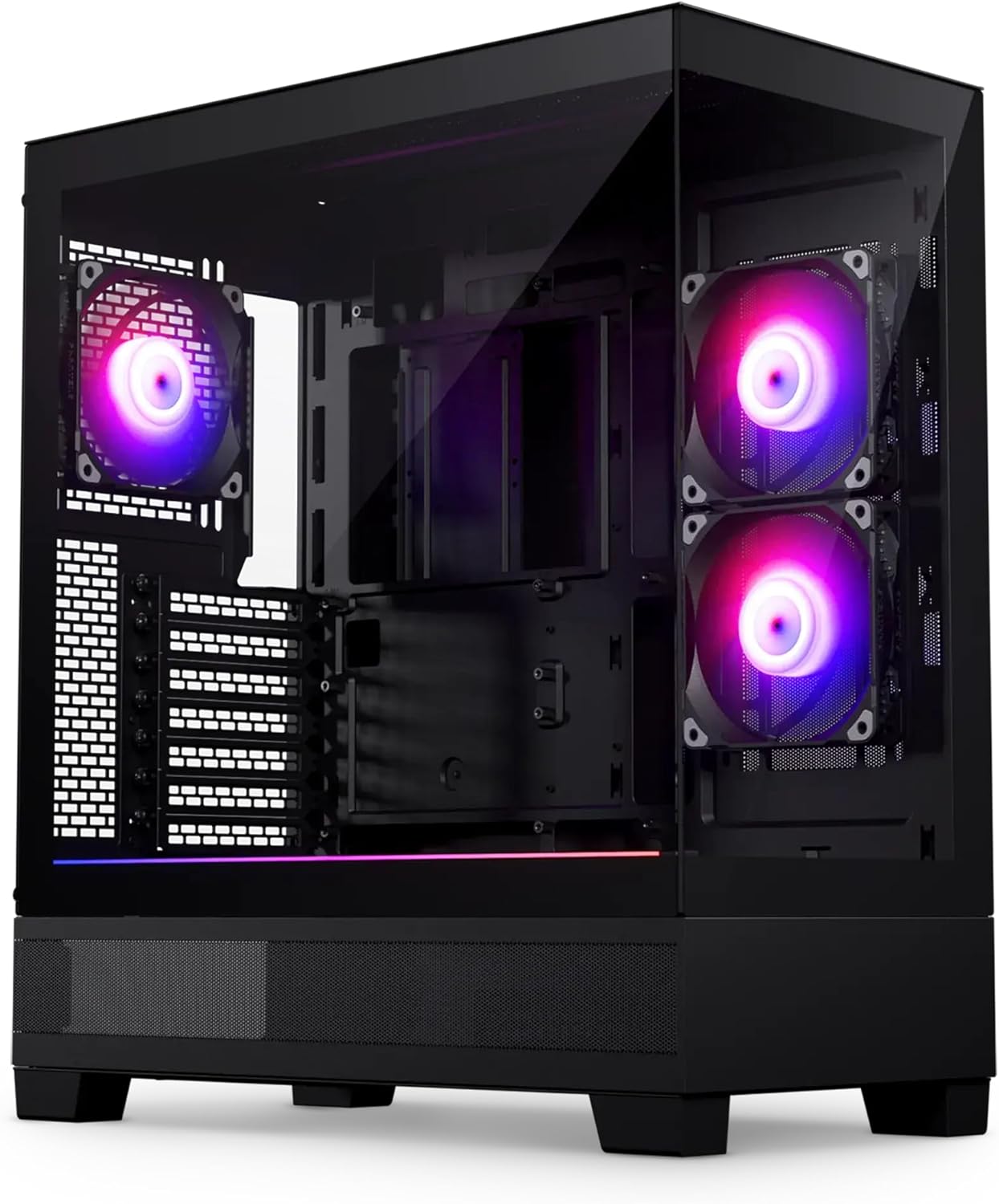
Phanteks XT View, Compact ATX Mid-Tower Gaming Chassis, Tempered Glass Front and Side Window, USB-C 3.2 Gen2, 3X M25-120 DRGB Fans Included(Black)

The Phanteks XT View is a mid-tower case that aims to deliver the popular “panoramic” tempered-glass look without the premium price that usually comes with it. It pairs glass front and side panels with three included D-RGB fans, a front USB-C port, and refreshingly broad component support — including E-ATX boards (up to 280 mm wide) and the newer hidden-connector “back-connect” motherboard standard.

Launched in 2024 to broad acclaim, the XT View sits at the value end of Phanteks’ XT family, below the higher-end XT Pro Ultra and XT Ultimate, and separate from the XT View Matrix (which adds a dot-matrix LED display panel). This review evaluates whether the standard XT View is genuinely one of the best budget panoramic cases, and where its compromises show.

Disclosure: componentcrate may earn a commission from qualifying purchases made through links in this article, at no additional cost to you.

Quick Verdict

Best for: Value-focused builders who want a tempered-glass showcase case with three included D-RGB fans, USB-C, and the option to run E-ATX or back-connect motherboards.

Main strengths
– Panoramic tempered-glass front and side panels deliver a true showcase look at a budget price.
– Three M25-120 D-RGB fans included (two reverse-blade intake + one rear exhaust), plus a side ARGB LED strip and controller.
– Broad compatibility: E-ATX (up to 280 mm wide), ATX, micro-ATX, Mini-ITX, and back-connect boards.
– Generous clearances: up to ~415 mm GPU, ~184 mm CPU cooler, ~270 mm PSU, and a 360 mm top radiator.

Main limitations
– No rubber grommets on the cable-management openings.
– No GPU anti-sag bracket included or built in.
– The included fan cables are a bit messy to route near the 24-pin connector and rear I/O (independent reviewer noted this).
– Front I/O has one USB-A and one USB-C (no second USB-A on the front, per spec).

Value assessment: On paper and in reviews, the XT View is positioned as a clear value pick: it gives you glass panels, three RGB fans, and E-ATX/back-connect support at a price that usually buys far less. The catch is that Amazon reseller pricing can vary widely, and some listings carry a heavy markup, so the value you actually get depends on the seller and current price. Confirm the current Amazon price before buying.

Verdict: Yes for the budget-conscious builder who wants the panoramic look and broad compatibility without spending up for a premium glass case. Buyers who want a fancier front panel could consider the XT View Matrix; those who want a more premium build feel should compare a dual-chamber glass case.

Key Specifications

Specification Detail
Model Phanteks XT View (PH-XT523V1_DBK01, black)
Form factor Mid-tower (ATX)
Dimensions 440 × 230 × 500 mm (D×W×H)
Materials Steel chassis, tempered glass (front + side), ABS plastic
Motherboard support E-ATX (up to 280 mm wide), ATX, micro-ATX, Mini-ITX
Back-connect support ASUS BTF, MSI Project Zero, Gigabyte Project Stealth
Pre-installed fans 3× M25-120 D-RGB (2 reverse-blade side intake + 1 rear exhaust), plus side ARGB LED strip and D-RGB controller
Total fan support Up to 9× 120 mm (top 3×, side 2×, midplate 3×, rear 1×)
Radiator support Top up to 360 mm, side up to 240 mm, rear up to 120 mm
GPU clearance Up to ~415 mm
CPU cooler clearance Up to ~184 mm
PSU clearance Up to ~270 mm (ATX)
PCI slots 7 (vertical GPU via optional bracket)
Storage Up to 5× 2.5″ + 1× 3.5″ HDD (or 2× 3.5″)
Front I/O 1× USB-C 3.2 Gen2, 1× USB 3.0, mic/headphone combo, power, reset, D-RGB color + mode buttons
Warranty 5-year limited

All figures are manufacturer-specified; use them for planning. Independent measurements for this exact model were not located.

Design and Build Quality

The XT View’s defining feature is its two tempered-glass panels — front and side — which give a near-seamless panoramic view of the interior. Phanteks’ official spec lists a steel chassis with ABS plastic trim, and PC Gamer’s review of the related XT View Matrix praised the paint finish and the seamless edges of the glass panels.

At this price, the case trades some premium touches for value: there are no rubber grommets on the cable-management openings, and there is no GPU anti-sag bracket included. These are notable but not fatal for most builders — an anti-sag bracket or a simple support is an easy addition if you run a long, heavy card.

Features and Technology

Included D-RGB fans and light strip. The case ships with three M25-120 D-RGB fans — two reverse-blade side intake fans and one rear exhaust — plus a full side ARGB LED strip. You control the lighting via the front-panel D-RGB color and mode buttons, or you can sync to your motherboard’s RGB header. This means you get a complete, lit layout out of the box, which is a genuine convenience at this price.

Front USB-C. A single USB-C 3.2 Gen2 port on the front panel gives fast data transfer; note that the front panel carries one USB-A and one USB-C, so check your peripheral needs.

Back-connect motherboard support. The XT View is compatible with hidden-connector boards — ASUS BTF, MSI Project Zero, and Gigabyte Project Stealth — which route power and data connectors to the rear for a cleaner, near-cable-free build. If you’re building with one of these boards, this case is designed for the layout.

Broad radiator and fan support. The top accepts up to a 360 mm radiator, the side up to 240 mm, and the rear 120 mm, with nine total 120 mm fan positions including three on the midplate for direct GPU cooling.

Accessories. The accessory kit is generous — PC Gamer counted 30 cable ties in the related Matrix package, plus the usual screws, standoffs, and the triple SSD bracket.

These feature claims are manufacturer-specified; the build-ease, accessory count, and absence of grommets/anti-sag bracket are corroborated by PC Gamer’s review of the same chassis (Matrix variant).

Performance and Real-World Use

Thermal performance for the standard XT View was not independently benchmarked in the sources we could verify, so we assess it from its specification and the chassis’s test record.

The design is airflow-oriented: an all-around mesh pattern feeds three included fans (two intake, one exhaust), with optional floor/side fans and a top-radiator route. The midplate’s three fan locations sit directly beneath the graphics card, which Phanteks says aids GPU cooling. For a typical mid-range gaming build, this layout should handle heat comfortably with the included fans; for high-end parts, adding fans or a top AIO gives headroom.

We have not tested this case hands-on, and no independent benchmark of the standard XT View was located. The discussion above is based on the manufacturer’s published specifications and on PC Gamer’s review of the same chassis in its Matrix form, not on first-party testing.

Compatibility and Installation

Before you buy, check these items:

  • Motherboard size: Fits E-ATX (up to 280 mm wide), ATX, micro-ATX, and Mini-ITX. Measure your E-ATX board’s width, as not all E-ATX boards fit.
  • Back-connect boards: Compatible with ASUS BTF, MSI Project Zero, and Gigabyte Project Stealth. If using one, plan for its rear connectors.
  • GPU length: Up to ~415 mm clears virtually all current cards. Measure your GPU, especially with front fans or a radiator in place.
  • CPU cooler height: Up to ~184 mm covers most tower air coolers.
  • Power supply: Up to ~270 mm handles standard ATX PSUs; verify your unit’s length.
  • Top/side radiators: A 360 mm top radiator or 240 mm side radiator fits; account for radiator thickness and memory clearance.
  • Vertical GPU: Supported only with a separately purchased bracket (PH-VGPUKT4.0_03R / PH-PGPUKT_01).

PC Gamer describes building in this chassis as “a breeze” with plenty of cable tie-off points and rear space. The main build caveat is the included fan cables, which can look messy near the 24-pin connector and rear I/O.

Advantages and Disadvantages

Pros
– Panoramic tempered-glass front and side panels.
– Three D-RGB fans included, plus a side ARGB LED strip and controller.
– E-ATX, ATX, micro-ATX, Mini-ITX support — and back-connect motherboard compatibility.
– Generous GPU, CPU-cooler, and PSU clearances; 360 mm top radiator support.
– Easy build with a generous accessory kit (30 cable ties in the related Matrix package).
– 5-year warranty.

Cons
– No rubber grommets on cable openings.
– No GPU anti-sag bracket included or built in.
– Included fan cables are messy to route.
– Front I/O has one USB-A and one USB-C.
– Amazon reseller pricing can vary widely, so watch the seller and current price.

Price and Value for Money

The XT View is positioned, and widely reviewed, as a value case: it delivers dual tempered-glass panels, three RGB fans, USB-C, and E-ATX/back-connect support at a price that typically buys far less. PC Gamer called the related Matrix version the best budget PC case of the year, and the standard XT View shares the same chassis value.

The important caveat is seller pricing. Because this model is normally sold at a budget price, some marketplace listings — particularly on Amazon — can carry a significant third-party markup. That means the value you actually get hinges on the specific listing. Always check the current Amazon price and compare sellers; if the listing you’re looking at is far above the case’s usual price, it’s worth shopping around.

Amazon prices and availability can change. Check the product listing on Amazon for the latest price and current availability before purchasing.

Best Alternatives and Comparisons

If the XT View doesn’t quite fit, these are worth comparing. None is “better” across the board; each trades features for price differently.

Case Why consider it Main trade-off vs. XT View
Phanteks XT View Matrix Same chassis with a dot-matrix LED display panel (also sold separately) Higher price; bold aesthetic some users dislike
Montech XR Another budget panoramic case with three included ARGB fans Similar feature set; different brand/build character
NZXT H6 Flow Premium dual-chamber panoramic glass with angled intake fans Priced above the XT View
Lian Li O11 Vision Compact Triple-glass showcase with dual-chamber layout and back-connect support Fans sold separately; premium

Phanteks XT View Matrix is the most natural step up: the same chassis and value with a configurable dot-matrix display on the PSU cover, controllable via Phanteks’ NexLinq software. If you like the look, it’s a compelling upgrade; if you find it too bold, buy the standard model (the display is also sold separately).

Montech XR is a comparable budget panoramic case with three included ARGB fans and USB-C — a strong alternative if you want a similar feature set from a different brand.

NZXT H6 Flow is for builders who want a more premium dual-chamber panoramic case with a refined build experience and are willing to pay more.

Lian Li O11 Vision Compact suits showcase builders who want triple glass and back-connect support, but plan to buy your own fans.

Compare current prices on the respective Amazon listings before deciding; prices and availability change.

Who Should Buy It?

  • Budget and first-time builders who want the panoramic tempered-glass look with ready-to-go RGB fans.
  • Enthusiasts using E-ATX or back-connect motherboards (ASUS BTF, MSI Project Zero, Gigabyte Project Stealth) who want a case designed for them.
  • Gamers with large graphics cards who want the clean and generous GPU clearance.
  • Value-focused builders who prioritize feature-per-dollar over a premium chassis feel.

Who Should Consider Something Else?

  • Premium-feel seekers who want grommets, an anti-sag bracket, and a more refined out-of-the-box finish should look at a dual-chamber glass case like the NZXT H6 Flow.
  • Fans of the display look should consider the XT View Matrix or the separately sold display panel.
  • Max-airflow-first builders who don’t need glass may prefer a mesh-front airflow case.
  • Shoppers wary of seller markup should confirm the listing is a fair price before committing — and shop around if a third-party listing is inflated.

Final Verdict

The Phanteks XT View’s strongest selling point is its value: dual tempered-glass panels, three included D-RGB fans, USB-C, and E-ATX/back-connect support at a price that usually buys far less. Its most significant limitation is the trade-off set that comes with that value — no grommets, no anti-sag bracket, and some cable-management friction — plus the fact that Amazon reseller pricing can vary widely.

If you are a budget or first-time builder who wants the panoramic showcase look and broad component support, the XT View is among the most sensible choices in its class, backed by strong independent reviews of the same chassis. If you want a more premium feel, a display front, or a different aesthetic, compare the alternatives above.

Amazon prices and availability can change. Check the product listing on Amazon for the latest price and current availability before purchasing.

Check the Latest Price on Amazon →

(Affiliate link. Amazon prices and availability can change.)

Related guides

Frequently Asked Questions

Category: PC Components

NZXT H9 Flow
NZXT H9 Flow

The NZXT H9 Flow (2025) is a large dual-chamber ATX mid-tower case built to be the centerpiece of a high-end build. NZXT redesigned the H9 Flow family for 2025 — the case is bigger than its 2023 predecessor, with panoramic tempered glass, room for the largest AIO radiators, and support for the new generation of back-connect motherboards (like ASUS BTF and MSI Project Zero).

This review covers the base H9 Flow (2025) Black (model CM-H92FB-01) — the non-RGB trim that ships with four airflow fans and no lighting hub. It’s aimed at enthusiasts who want a spacious, glass-forward showcase case and plan to choose their own fans, cooler, and lighting. The central questions: is the redesigned H9 Flow worth its premium positioning, who is it really for, and how does it compare to smaller, cheaper single-chamber cases? We verify the specs against official documentation, attribute independent results correctly, and help you decide.

Quick Verdict

  • Best for: Enthusiast builders who want a large, glass-panorama showcase case with dual 420mm radiator support, back-connect motherboard compatibility, and easy cable management — and who plan to choose their own fans and cooler.
  • Main strengths: Spacious dual-chamber layout with generous cable routing; panoramic tempered glass on three sides; up to two 420mm radiators; back-connect (BTF/Project Zero) ATX support; ten fan positions; strong thermal potential in independent tests; four airflow fans included.
  • Main limitations: Large and heavy; no RGB or control hub on this base trim; back-connect support is ATX-only; GPU length drops with a front 420mm AIO; included fans can be loud at default settings; premium pricing.
  • Value assessment: This is a premium-positioned showcase case whose value is about scale, aesthetics, and headroom rather than raw airflow per dollar. For builders who will use the size and glass, it justifies itself; for budget airflow-focused builds, smaller cases offer more value. Check the Amazon listing for the latest price and availability.
  • Verdict: A strong recommendation for the showpiece build it’s designed for — no a value pick for shoppers who don’t need the scale or glass.

Key Specifications

Specification Detail
Model NZXT H9 Flow (2025), Black — CM-H92FB-01 (base non-RGB)
Enclosure type Large dual-chamber mid-tower
Motherboard support E-ATX (up to 277mm), ATX, Micro-ATX, Mini-ITX
Back-connect support Yes (ATX only)
Dimensions (H×W×D) 506 × 315 × 481 mm (with feet)
Weight 12.46 kg
Materials SGCC steel, dark-tinted tempered glass (black)
CPU cooler clearance Up to 165 mm
GPU clearance Up to 459 mm (with <56mm front fans); up to 410 mm (with 56mm 420mm AIO + fans)
PSU clearance Up to 200 mm
Front I/O 2× USB 3.2 Type-A, 1× USB 3.2 Gen 2×2 Type-C, 1× 3.5mm headset jack
Expansion slots 7 standard (vertical GPU kit compatible, 2024+ kits)
Drive bays 4+2× 2.5″, 2× 3.5″
Fan positions 10 total: 9× 140mm (top, front-right, bottom) + 1× 120mm rear
Radiator support Top & front-right up to 360mm (120mm base) or 420mm (140mm base); bottom up to 360mm; rear 120mm
Included fans 3× F140Q Airflow (front) + 1× F120Q Airflow (rear)
Warranty 2 years

Specifications are from NZXT’s official documentation. Independent measurements are noted in the Performance section.

Design and Build Quality

The H9 Flow (2025) is physically imposing. It measures 506mm tall including feet, 315mm wide, and 481mm deep, and weighs about 12.46 kg — this is a large case that needs desk space and careful handling. The construction uses SGCC steel with a dark-tinted tempered glass panel on the front and both side areas, giving a near-panoramic view of the interior. On the black variant the glass is tinted, so the internals are visible but slightly muted.

The defining layout feature is the dual-chamber design. The power supply, drives, and bulk of the cabling live behind the motherboard tray in a second chamber, so the main compartment stays clean. Independent reviews consistently praise the cable management: PC Gamer called it “insane-level cable management,” and Custom PC’s review of the earlier H9 Flow highlighted how the dual-chamber hides cabling and water-cooling clutter while keeping the motherboard area tidy. The 2025 version is larger than its predecessor, and NZXT says it grew by roughly ten liters, which is why it can fit the biggest components.

One trade-off of the glass-forward design: on this base trim there is no functional RGB, and the panoramic glass is a showcase-first choice rather than a maximum-airflow-mesh one. Builders who want the most airflow per dollar in a plain tower will find more utilitarian options.

Features and Technology

Dual-chamber layout. The PSU and cabling are isolated in a second chamber behind the motherboard tray. Practical benefit: clean, tidy builds and easier cable management without bulky bundles in the main compartment.

Back-connect motherboard support. The 2025 H9 Flow supports back-connect motherboards (ASUS BTF, MSI Project Zero, and similar), where connectors sit on the rear of the board so nearly all cables are hidden from the glass side. Important caveat: official specs state this support is ATX-only — not E-ATX. This is a forward-looking feature that matters if you plan a back-connect board.

Panoramic tempered glass. The front and both side regions are glass, giving a wide view of components. This is the central aesthetic selling point. On the black variant, the glass is dark-tinted.

Big radiator and fan headroom. The case holds up to ten fans — nine 140mm across the top, front-right, and bottom, plus one 120mm rear. It supports radiators up to 420mm on both the top and front-right (with 140mm-base radiators), and up to 360mm on the bottom. NZXT markets support for the largest AIOs, like a 420mm Kraken, on top or front-right. This is a genuine differentiator: few cases at this scale take two 420mm radiators.

Included airflow fans. The base trim ships with three F140Q Airflow fans up front and one F120Q Airflow fan in the rear (the F120Q runs at up to ~1,350 RPM, ~60 CFM, ~24 dBA per official specs). That’s a usable four-fan setup out of the box — but note there is no RGB and no fan/RGB control hub on this trim. Buyers who want lighting will need to add their own fans and a hub.

Performance and Real-World Use

Independent testing of the 2025 H9 Flow family is broadly positive on thermals, with the caveat that stock fans benefit from tuning.

Tweakers (Netherlands) tested the H9 Flow RGB+ and rated it among the coolest cases in their comparison, especially with high-performance aftermarket fans; they noted the F420 block’s three extra 140mm fans kept components cooler than the base H9 Flow. The base H9 Flow still performed well, with the caveat that the stock 12V fans ran on the loud side at high PWM.

PC Gamer reviewed the H9 Flow RGB+ and gave it high marks for “outstanding looks and exceptional cooling,” while criticizing the high price and the “lackluster” rear 120mm fan.

Windows Central called the H9 Flow RGB+ “the best PC case I’ve used,” noting that even with the included fans on the default Silent mode there was no risk of overheating — and that stock fan behavior was best adjusted through NZXT’s CAM software.

GameRevolution (RGB+) highlighted excellent thermals and easy building, but flagged the stock fan noise profile and recommended tuning fan curves in BIOS or CAM.

Custom PC reviewed the earlier (2023) H9 Flow and gave it 83%, praising the dual-chamber design as “a great home for a high-end air or water-cooled PC.” The 2025 version is larger and adds the 420mm radiator and back-connect support.

What this means for you. The H9 Flow family is one of the more capable large showcase cases for thermals when configured with good fans or big radiators. With the stock fans on this base trim, expect decent out-of-the-box airflow but plan to set a fan curve — independent reviewers consistently recommend it to keep noise reasonable. The case shines when you fill it with the fans and AIO it’s designed to accept.

Compatibility and Installation

Before buying, check:

  1. Motherboard size. Supports E-ATX up to 277mm, ATX, Micro-ATX, and Mini-ITX. If you plan a back-connect board, verify it’s ATX (not E-ATX) — that’s the only back-connect-supported size.
  2. CPU cooler height. Max 165mm clearance. Most tower coolers fit; very tall coolers may not.
  3. GPU length. Up to 459mm with slim (<56mm thick) front fans. If you mount a 56mm-thick 420mm AIO at the front, GPU clearance drops to 410mm — check your card against this.
  4. PSU length. Up to 200mm. A standard ATX PSU fits; check extra-long units.
  5. Radiator mounting. Top and front-right accept up to 360mm (120mm base) or 420mm (140mm base); bottom up to 360mm; rear 120mm. Top radiator thickness (with fans) must stay within limits per the manual.
  6. Front I/O. 2× USB 3.2 Type-A, 1× USB 3.2 Gen 2×2 Type-C, 1× headset jack. Check your motherboard has the matching internal headers (especially a USB-C header).
  7. Physical space. This is a tall, heavy case; measure your space. The bottom has a removable magnetic dust filter.

Advantages and Disadvantages

Pros
– Spacious dual-chamber layout with excellent cable management.
– Panoramic tempered glass for a clean, showpiece look.
– Supports up to two 420mm radiators (top and front-right) — rare capability.
– Back-connect motherboard support (ATX) hides nearly all cables.
– Ten fan positions for maximum airflow/cooling configs.
– Four airflow fans included out of the box.
– Strong thermal potential per independent reviews.

Cons
– Large and heavy; needs desk/floor space.
– No RGB, fans, or control hub on this base trim.
– Back-connect support is ATX-only (not E-ATX).
– GPU length drops to 410mm with a front 420mm AIO.
– Stock fans can run loud at default settings — plan a fan curve.
– Premium pricing for the segment.

Price and Value for Money

We don’t publish prices here because Amazon prices and availability change; check the listing for the current price. That said, the 2025 H9 Flow sits at the premium end of the large mid-tower segment. Its value is tied to a specific builder profile: someone who wants a glass-panorama showcase case with the headroom for a big AIO (or two) and possibly a back-connect motherboard.

What justifies the cost for the right buyer:
– The scale and dual-chamber build quality, plus cable management that reviewers rate highly.
– Dual 420mm radiator support, which few competing cases offer at this size.
– Back-connect readiness, which is forward-looking.

What can weaken the value for you:
– If you don’t need the scale, glass, or 420mm support, a smaller single-chamber case will cost less and satisfy an airflow-focused build.
– On this base trim you still need to budget for your own RGB and a fan hub if you want lighting, which adds cost.
– Because this is a showcase case, the visual payoff is the main reason to pay the premium.

For the right enthusiast build, the H9 Flow justifies its price; for value-driven airflow builds it does not. Confirm the current Amazon price and availability before deciding.

Best Alternatives and Comparisons

  • NZXT H7 Flow (2024). A smaller, single-chamber mid-tower from the same brand with strong airflow and a more conventional price. Advantage over the H9 Flow: lower cost and smaller footprint, while still fitting large GPUs and 360mm radiators. Trade-off: no panoramic dual-chamber glass, no dual 420mm support, no back-connect focus. Consider it if you want NZXT build quality at a more accessible size and price.
  • Lian Li O11 Dynamic EVO XL. Another large glass showcase case and one of the few at this scale that also supports dual 420mm radiators. Advantage: similar showcase/radiator capability and established enthusiast ecosystem. Trade-off: typically a higher price. Consider it if you prefer the O11-style layout and are comparing flagship showcase cases.
  • Fractal Design Torrent / Meshify 3 XL. Airflow-focused large cases with excellent stock cooling. Advantage: strong out-of-the-box airflow and often a better value-per-airflow ratio, without the glass-panorama approach. Trade-off: more utilitarian look and single-chamber layout. Consider these if your priority is raw cooling performance over showcase aesthetics.
  • Corsair 4000D Airflow. A compact, well-regarded mid-range mid-tower. Advantage: far smaller and more affordable, good airflow, fits most builds. Trade-off: much less expansion and radiator headroom (360mm max), no dual-chamber glass. Consider it if you want a clean, compact build and don’t need the H9’s scale.

Comparisons are qualitative based on verified positioning; confirm specs and pricing on each listing before purchase.

Who Should Buy It?

  • Enthusiast showcase builders who want a large, panoramic-glass centerpiece and will fill it with premium fans and a big AIO.
  • Builders planning a back-connect ATX motherboard (ASUS BTF, MSI Project Zero) who want the hidden-cable look.
  • High-end builders who want dual 420mm radiator support for maximum liquid-cooling headroom.
  • Anyone who values easy, clean cable management in a spacious dual-chamber layout.

Who Should Consider Something Else?

  • Budget or value-focused builders — a smaller single-chamber case delivers more airflow per dollar.
  • SFF or space-constrained builders — this case is large and heavy.
  • Airflow purists who prioritize maximum mesh intake and minimal glass over showcase looks.
  • Buyers who want RGB out of the box — this base trim has none; get the RGB/RGB+ trims or add your own fans.
  • Builders on a back-connect E-ATX board — back-connect support is ATX-only here.

Final Verdict

The NZXT H9 Flow (2025) is a premium, large dual-chamber showcase case that does exactly what it sets out to do: provide a spacious, glass-panorama home for a high-end build, with exceptional cable management, back-connect motherboard support, and the rare ability to mount two 420mm radiators. Independent reviewers rate its cooling highly when configured with good fans, while noting the stock fans benefit from a custom curve.

Its main limitation is that it’s a showcase product — large, heavy, and premium-priced, with no RGB on this base trim. It’s clearly the right choice for enthusiasts who will use the scale and glass; it’s not the value pick for airflow-focused builds, where a smaller case delivers more per dollar.

Deciding factor: if a glass-forward, high-headroom centerpiece is your goal, the H9 Flow (2025) is a top contender; if not, compare smaller single-chamber alternatives. Since the base trim has no RGB, factor in your own fan/lighting plans. Check the Amazon listing for the current price and availability before purchasing.

Check the Latest Price on Amazon →

Related guides

Frequently Asked Questions

Category: PC Components

NZXT H3 Flow
NZXT H3 Flow

The NZXT H3 Flow is NZXT’s first dedicated micro-ATX tower — a compact, airflow-focused case that sits between the tiny mini-ITX world and full-size ATX towers. At roughly 35 liters, with mesh on five of its six panels, it’s designed for builders who want a smaller, cleaner system without giving up the ability to fit full-sized graphics cards, tall air coolers, or a solid liquid-cooling setup.

The H3 Flow is effectively a scaled-down reinvention of NZXT’s older H210 line (and a shorter sibling to the H5 Flow), updated for modern hardware. We’re reviewing the white model (CC-H31FW-01). It carries NZXT’s minimalist aesthetic, includes a single rear fan to keep the cost down, and supports back-connect (BTF / MSI Project Zero) motherboards — a feature set aimed at a clean, modern build. The central questions: does the H3 Flow really deliver the airflow it promises, how good is the value, and where does it fall short? We verified the specs against NZXT’s documentation and independent reviews, and we’ll help you decide.

Quick Verdict

  • Best for: Value-conscious micro-ATX builders who want a clean, compact tower with strong airflow, room for a large GPU (up to 377mm) or up to a 280mm front radiator, tall CPU-cooler clearance, and back-connect motherboard support — without paying premium prices.
  • Main strengths: Excellent value for the price; space-efficient but far from cramped; strong airflow via extensive mesh panels; supports full-sized GPUs and 240/280mm radiators; 170mm CPU-cooler clearance; back-connect (BTF/Project Zero) support; clean NZXT aesthetic; easy tool-free panel removal; solid build quality.
  • Main limitations: Only one fan included (a single rear 120mm); no front audio jack and just one front Type-A USB port; cable management is basic (no grommets/channeling); the mesh lets sound escape, so it can get noisy with more fans; it’s not as compact as true SFF cases; mATX motherboard choice is more limited than ATX.
  • Value assessment: At its launch price, the H3 Flow is widely judged excellent value — PCGamesN gave it 9/10, PC Gamer 84%, and CGMagazine 7.5/10, all praising its quality-to-price ratio. The value is strongest if you already have (or budget for) fans, since only one is included. Check the Amazon listing for the latest price and availability.
  • Verdict: A strong, well-rounded micro-ATX case that should be on the shortlist for budget-conscious builders — provided you’re comfortable adding a couple of fans and don’t need a front audio jack. If you want maximum value with fans included or a more premium build experience, consider the alternatives below.

Key Specifications

Specification Detail
Model NZXT H3 Flow (2025) — CC-H31FW-01 (White); CC-H31FB-01 (Black)
Type Micro-ATX tower (~35 L)
Motherboard support Micro-ATX, Mini-ITX; back-connect (BTF/Project Zero) on micro-ATX
Dimensions (H×W×D) 400 × 225 × 389 mm
Weight 4.8 kg
Materials SGCC steel, ultra-clear tempered glass (White)
CPU cooler clearance Up to 170 mm
GPU clearance Up to 377 mm (no front fans); 352 mm (front fans); 317 mm (front fans + radiator)
PSU support ATX, up to 185 mm
Included fans 1× rear F120Q (1,350 RPM, 60.2 CFM, 24.1 dBA)
Fan support Front 2×120/140; top 2×120/140; bottom (PSU shroud) 2×120; rear 1×120 (up to 7)
Radiator support Front up to 280 mm; top up to 240 mm
Front I/O 1× USB 3.2 Type-A, 1× USB 3.2 Gen 2×2 Type-C (20Gbps). No audio jack.
Drive bays 1+2× 2.5″; 1× 3.5″ (shared)
Expansion slots 4 horizontal (no vertical GPU)
Warranty 2 years

Specifications are from NZXT’s official documentation and corroborated by independent reviews. Independent measurements are noted in the Performance section.

Design and Build Quality

The H3 Flow looks unmistakably NZXT: clean lines, a flat ultra-fine mesh front panel, a crystal-clear tempered-glass side panel, and a top cover that’s about three-quarters ventilated with a neat magnetic dust filter. CGMagazine praised the build quality as “ahead of the curve” for the price, and the white sample PCGamesN tested was described as “very clean and smart.” The steel-and-glass construction (~4.8kg) feels solid and well-made, with no rattling panels.

Practical access is a highlight. The front mesh panel pops off easily for cleaning; the glass side panel is held by push-pins and a spring latch with no thumbscrews — PCGamesN called panel removal “super easy” and CGMagazine described it as “one of the fastest panel removal systems I’ve come across.” The top magnetic filter lifts off for access to the roof fan mounts.

Two design caveats stand out. First, there are no rubber grommets in the cable-routing holes (PCGamesN noted this), so clean cable management takes extra care. Second, the bottom PSU chamber has no floor perforations — CGMagazine notes the PSU must face up, blowing toward the GPU and relying on the front intake to push air out, which is an odd choice for an airflow-first case.

Features and Technology

High-airflow design. Five of six panels are mesh, creating strong overall airflow. The front panel sits in front of fan mounts that can take 2×120mm or 2×140mm fans, or 240mm/280mm AIO radiators. The PSU shroud is ventilated on three sides. This is the defining feature — it makes the case genuinely “Flow,” though the mesh does let sound escape.

Full-sized component support. Despite the compact exterior, you can fit a GPU up to 377mm (with no front fans), a CPU cooler up to 170mm, and an ATX PSU up to 185mm. PC Gamer confirmed even a full-sized RTX 5090 fits “fairly comfortably” with the four PCIe slot covers. Radiator support: up to 280mm front / 240mm top.

Back-connect motherboard support. The H3 Flow is designed for back-connect boards (MSI Project Zero, Asus BTF, etc.), with integrated cable channels and tie-down points behind the tray. This is a real plus for a clean, hidden-cable build. Note the back-connect support is for micro-ATX boards specifically, and PCGamesN flags that rear clearance is tight — route carefully.

Front I/O. One USB 3.2 Type-A and one USB 3.2 Gen 2×2 Type-C (20Gbps) port. The Type-C is fast, but there’s no audio jack — you’ll use the motherboard’s rear audio or a USB/USB-C device. (One Type-A port is also a modest amount of front USB.)

Storage and expansion. Two 2.5″ mounts plus a shared 2.5″/3.5″ mount, for up to three 2.5″ drives or one 3.5″ HDD. Four horizontal PCIe slots; no vertical GPU option.

Performance and Real-World Use

Independent testing shows the H3 Flow cools well, with a clear caveat about fan count.

Thermals. PCGamesN tested with a Ryzen 7 9800X3D and an MSI RTX 5070 Ti. On the single included rear fan (at 100%): the CPU reached 81°C — reasonable and within limits. Adding two front fans dropped CPU temperature to 72°C. GPU temperature sat around 71°C and didn’t change with the added fans, meaning the stock setup is serviceable but adding front intake helps the CPU most.

Noise. The mesh panels do not contain sound well. PCGamesN measured 51dBA on the stock single fan, rising to 55dBA with added fans at 100% speed, and dropping to ~50dBA at 50% fan speed. Their advice: if you add fans, opt for several slower-spinning units to exploit the airflow without the noise penalty.

What this means for you. Out of the box, the H3 Flow runs a midrange-to-high-end gaming system acceptably on its single rear fan, and it has enormous headroom once you add intake fans. For a budget build you can start now and upgrade later; for a quiet build, plan fan choices carefully because the mesh won’t mask them.

Compatibility and Installation

Before buying, check:

  1. Motherboard: micro-ATX or Mini-ITX. If you want back-connect (BTF/Project Zero), you need a micro-ATX back-connect board.
  2. GPU: up to 377mm with no front fans. If you install front fans, the limit drops to 352mm; with a front radiator, 317mm. Measure your card and your planned front cooling.
  3. CPU cooler: up to 170mm — almost any tower air cooler fits.
  4. PSU: ATX up to 185mm. The PSU must face up (no bottom vent); you may want to pre-route the main cables.
  5. Fans: only one included. Plan to add front (and/or top) fans for high-TDP builds. Cool bottom PSU-shroud fan mounts exist but may be blocked by the GPU/motherboard slot location.
  6. Radiators: up to 280mm front / 240mm top. No 360mm support.
  7. Storage: up to three 2.5″ drives or one 3.5″ HDD. No dedicated drive cage — drives mount to the floor plate / tray.
  8. Front I/O: no audio jack; one Type-A + one Type-C port.

Advantages and Disadvantages

Pros
– Outstanding value for the price — widely praised by reviewers.
– Strong airflow with extensive mesh panels.
– Fits full-sized GPUs (up to 377mm), 170mm CPU coolers, and 240/280mm radiators.
– Back-connect (BTF/Project Zero) motherboard support.
– Clean, minimalist NZXT aesthetic; easy tool-free panel removal.
– Solid steel-and-glass build quality for the price.
– Good expansion for the size (4 slots, up to 7 fans).

Cons
– Only one fan included (rear); a 2.5″ budget for more.
– No front audio jack; only one front Type-A USB port.
– Basic cable management — no grommets or channeling.
– Mesh lets sound escape; can get noisy with additional fans.
– Not as compact as true SFF cases (still wider/taller than some mATX options).
– Bottom PSU chamber is restrictive (no floor vent; PSU faces up).

Price and Value for Money

We don’t publish prices here because Amazon prices and availability change — check the listing for the current price. That said, the H3 Flow launched at a very aggressive price point that independent reviews uniformly call excellent value, and our research indicates current street pricing has fluctuated around that launch figure (occasionally above it depending on seller and availability).

What drives the value:
– The combination of compact size, strong airflow, and support for full-sized hardware (large GPUs, 280mm radiators, tall coolers).
– The clean design and solid build quality at a budget price.
– Back-connect motherboard support that’s uncommon at this price tier.

What can temper the value for you:
– With only one fan included, a fully equipped build (4+ fans) raises the effective cost — reviewers note this diminishes the “budget” edge unless you reuse fans or buy sensibly.
– If you want a case that includes fans, a more premium I/O, or easier cable management, competing options (which cost more) may serve you better.
– The lack of a front audio jack and limited front USB are real omissions.

For a micro-ATX builder on a budget who understands the fan situation, the H3 Flow is one of the best-value options available. Confirm the current Amazon price and availability before deciding.

Best Alternatives and Comparisons

  • Fractal Design Pop Mini Air. A slightly larger micro-ATX case that includes three fans and a more complete front I/O (including an audio jack). Advantage: better out-of-the-box value (fans included) and more robust I/O. Trade-off: higher price, bigger footprint, and a more conventional look. Consider it if you want fans included and a more finished feature set.
  • Lian Li A3-mATX. A more compact micro-ATX case with a similar budget price point but no fans included. Advantage: smaller footprint and a popular, well-regarded mATX option. Trade-off: fewer fans included (same situation as the H3) and less airflow-focused construction. Consider it if size matters more than airflow headroom.
  • NZXT H5 Flow (2024). NZXT’s larger ATX-sided airflow case. Advantage: more radiator/fan headroom (including larger builds), the same clean NZXT aesthetic, and a more roomy interior. Trade-off: bigger and more expensive, and mATX boards can look small inside it. Consider it if you may move to ATX or want more expansion.
  • Phanteks XT M3. A competing budget micro-ATX airflow case at a similar price tier. Advantage: alternative styling and a comparable value proposition. Trade-off: fewer fans included and generally a more plastic-forward build. Consider it as a direct alternative if you prefer its design.

Comparisons are qualitative based on verified positioning; confirm specs and pricing on each listing before purchase.

Who Should Buy It?

  • Budget-conscious micro-ATX builders who want a clean, airy tower without paying premium prices.
  • First-time PC builders who want a straightforward, tool-free, easy-to-build-in case with room to grow — CGMagazine specifically praised it for beginners who already plan to buy fans.
  • Gamers building a high-end but space-efficient rig — it fits a full-sized high-end GPU (e.g., an RTX 5090 class card) in a more compact chassis.
  • Builders using back-connect boards (MSI Project Zero / Asus BTF) who want a case designed for hidden cabling.
  • Anyone who wants NZXT’s clean aesthetic at a budget price.

Who Should Consider Something Else?

  • Buyers who want a case with fans included — the H3 Flow ships with just one; the Fractal Pop Mini Air includes three.
  • Anyone who needs a front audio jack — the H3 Flow doesn’t have one (use rear audio or a USB headset).
  • Builders who want premium cable management — no grommets or channeling; if tidy cabling is a must, invest in a higher-tier case.
  • Quiet-build-focused builders — the mesh lets sound escape; if noise is your priority, a more damped case might serve better.
  • SFF purists — at 35L and 400mm tall, this is compact but not truly small-form-factor; look at mini-ITX cases for a much smaller footprint.

Final Verdict

The NZXT H3 Flow is an excellent, well-rounded micro-ATX case that delivers strong airflow, a clean aesthetic, and support for full-sized hardware at a price reviewers uniformly call great value. PCGamesN (9/10), PC Gamer (84%), and CGMagazine (7.5/10) all praise its quality-to-price ratio, ease of building, and airflow.

Its most significant limitations are the single included fan, the lack of a front audio jack, and basic cable management — all reasonable trade-offs at this price point, but real ones. The mesh panels also mean it’s not the quietest case once you add fans.

The deciding factor is your priority. If you want a compact, airy, budget-friendly micro-ATX build and you’re comfortable adding a couple of fans, the H3 Flow is a top-tier choice — and one of the best-value cases in its class. If you want fans included, a front audio jack, or premium cable management, explore the alternatives. Confirm your GPU length and front-cooling plan, and check the Amazon listing for the current price and availability before purchasing.

Check the Latest Price on Amazon →

Related guides

Frequently Asked Questions

Category: PC Components

MONTECH XR Panoramic ATX Gaming PC Case, Mid Tower, 3 ARGB PWM Fans, Black

If you want the clean “fish-tank” look of a panoramic tempered-glass PC case, you usually pay for it — several of the best-known glass cases ship without a single fan and carry a premium price. The Montech XR takes the opposite approach: it is an ATX mid-tower with front-and-side tempered glass that arrives with three ARGB PWM fans already installed, a front USB-C port, and support for a 360 mm all-in-one liquid cooler. For a first build or a budget gaming build, that combination is unusual.

This review evaluates whether the XR is genuinely the value pick of the panoramic-case class, or whether its budget positioning forces compromises that matter. We rely on Montech’s official specifications and on TechPowerUp’s independent testing (the case won that outlet’s Editor’s Choice and Budget awards), and we note where a claim is manufacturer-reported rather than independently confirmed.

Disclosure: componentcrate may earn a commission from qualifying purchases made through links in this article, at no additional cost to you.

Quick Verdict

Best for: Budget-conscious ATX builders who want a panoramic tempered-glass showcase and ready-to-go cooling out of the box, without spending up for a premium glass case.

Main strengths
– Panoramic front-and-side tempered glass gives a genuine showpiece look at a budget price.
– Three 120 mm ARGB PWM fans included (two reverse-blade intake + one rear), so you don’t have to buy fans separately.
– Front USB-C plus two USB 3.0 ports.
– Handles a 360 mm top AIO and long graphics cards; cable-management touches (grommets, Velcro straps) that are solid for the price.

Main limitations
– Fan wiring is messy out of the box and may need tidying.
– A top-mounted AIO blocks access to the top edge of the motherboard, so plan your CPU power and top connections first.
– The underside magnetic dust filter can detach when the case is handled.
– Steel gauge is thinner than premium competition — fine for value, less substantial than high-end cases.

Value assessment: At its price point, the XR packs a feature set — panoramic glass, three ARGB fans, USB-C, 360 mm AIO support — that usually costs considerably more. It is one of the most affordable ways to get a panoramic build, and TechPowerUp’s Editor’s Choice and Budget awards back that value story. As with any case, confirm the current Amazon price and availability before deciding.

Verdict: Yes for the value-focused builder who wants the panoramic look without the premium price tag. Compare it against dual-chamber glass cases if you want more radiator flexibility or cleaner cable channels, and check the current Amazon price before you buy.

Key Specifications

Specification Detail
Form factor ATX mid-tower
Motherboard support ATX, micro-ATX, Mini-ITX (manufacturer-specified)
Materials Tempered glass front + side panels; steel frame; wood-grain I/O trim
Pre-installed fans 3× 120 mm ARGB PWM (2 reverse-blade side intake + 1 rear exhaust)
Total fan support Up to 9 fans (manufacturer-specified)
Radiator support Top-mounted up to 360 mm AIO
GPU clearance Up to ~420 mm (manufacturer-specified)
CPU cooler clearance Up to ~175 mm (manufacturer-specified)
PSU clearance Up to ~230 mm (manufacturer-specified)
Front I/O USB-C, 2× USB 3.0 (USB-A)
Dust filters Removable magnetic filters (top, side, bottom)
Colors Black (also white and wood-faced variants)

Tests marked “manufacturer-specified” are Montech’s published figures; use them for planning, not as independent measurements.

Design and Build Quality

The XR’s headline feature is its panoramic front-and-side tempered glass, which gives the interior a wraparound view typical of far more expensive cases. TechPowerUp’s review describes the build as solid for the class — “well built, no plastic in sight” — and notes there is little flex in the metal body even with the glass panels removed. The wood-grain I/O trim (on the black model) adds a subtle accent that differentiates it from plain black boxes.

The trade-off is materials: at this price, the steel gauge and general heft are thinner and lighter than premium cases. That is a reasonable compromise for a budget case, but buyers who want a hefty, premium-feeling chassis should look higher up the range.

Features and Technology

Pre-installed reverse-blade ARGB fans. Two of the three included 120 mm fans are reverse-blade units mounted on the side, so their illuminated faces point into the interior for a cleaner showcase instead of showing the support frames. You get a complete, lit fan layout out of the box — a real convenience for builders who don’t want to buy fans separately.

Front USB-C and USB 3.0. A modern USB-C port on the front panel is a meaningful feature at this price; USB 3.0 USB-A ports keep peripherals within reach.

Cable-management details. TechPowerUp highlights grommets on the main cable-management openings, flat-band USB cables, and Velcro straps — small touches that help produce a tidy build.

360 mm AIO support. The top mount accepts up to a 360 mm radiator, so you can scale to liquid cooling without changing cases.

These are largely confirmed by the TechPowerUp review; the reverse-blade fan count and clearances are manufacturer-specified and not independently measured.

Performance and Real-World Use

Thermal and acoustic performance is best understood through independent testing. TechPowerUp’s review (published September 2024) tested the XR out of the box using its standard rig with a six-core Intel CPU, a GeForce RTX 3060 Ti, and a low-profile air cooler, running combined stress loads. That outlet awarded the case Editor’s Choice and Budget awards, indicating strong value and capable thermal behavior for the price. Because its test equipment and methodology are specific to that outlet, we do not combine its numbers with results from other publications.

For ordinary builders, the practical takeaway is that the included three-fan layout provides a ready, lit cooling setup, and the case’s airflow design is well-suited to typical gaming hardware. As with any case, real temperatures depend on your GPU, cooler, ambient room temperature, and fan curves — allow headroom for high-end components and tune your fan curve.

We have not tested this case hands-on. The performance discussion above is based on TechPowerUp’s independent review and on the manufacturer’s published specifications, not on first-party testing.

Compatibility and Installation

Before you buy, check these items:

  • Motherboard size: ATX, micro-ATX, and Mini-ITX boards fit; confirm your board’s form factor.
  • GPU length: The manufacturer specifies up to ~420 mm, which clears virtually all current graphics cards. Measure your card, especially with a front fan or radiator installed.
  • CPU cooler height: Up to ~175 mm covers most tower air coolers; tall coolers should be checked against your exact model.
  • Power supply: Up to ~230 mm handles standard ATX PSUs; check your unit’s length against the shroud space.
  • Top radiator: A 360 mm top AIO fits, but TechPowerUp notes it blocks access to the top edge of the motherboard — connect your CPU power and top fan headers before or as you fit the radiator.
  • Fans: You can add fans up to the case’s nine-fan capacity; the included three give you a working layout immediately.

The fan wiring is a known annoyance out of the box and can benefit from re-routing during the build.

Advantages and Disadvantages

Pros
– Panoramic tempered glass at a budget price.
– Three ARGB PWM fans included — no extra fan spend.
– Front USB-C and two USB 3.0 ports.
– Supports a 360 mm top AIO and long GPUs.
– Good cable-management touches for the price (grommets, Velcro straps).
– Independent Editor’s Choice and Budget awards from TechPowerUp.

Cons
– Fan wiring is messy out of the box.
– Top AIO blocks access to the top motherboard edge.
– Underside magnetic filter can fall off when handled.
– Thinner steel than premium cases; less substantial feel.
– No fans on the shroud/floor positions included (you add those yourself).

Price and Value for Money

The Montech XR’s core value proposition is that it delivers the panoramic showcase aesthetic and three pre-installed ARGB fans at a price well below what those features usually cost. TechPowerUp explicitly frames it as punching above its weight and being one of the most affordable ways into this style of case, which is exactly why it earned that outlet’s Budget award.

The main question is whether the specific features — reverse-blade fans, USB-C, and a 360 mm AIO mount — justify the ask for you. They represent genuinely useful additions rather than filler, which makes the value story strong for first-time and budget builders.

Because Amazon prices and availability can change, check the product listing on Amazon for the latest price and current availability before purchasing. If the price has moved above its usual value tier, the calculus changes accordingly — so confirm it before you commit.

Best Alternatives and Comparisons

If the XR doesn’t quite fit, these are worth comparing. None is “better” across the board; each trades features for price in a different way.

Case Why consider it Main trade-off vs. XR
NZXT H6 Flow Polym-chamber panoramic glass with angled intake fans; well-regarded builder experience Priced above the XR; similar idea in a more premium package
Lian Li O11 Vision (Compact) Triple-glass showcase, dual-chamber layout, back-connect motherboard support Fans sold separately; premium price
Montech Sky Two Montech’s own step-up panoramic-style line; same brand family Priced above the XR with the same basic design idea
Montech AIR 903 MAX Maximum airflow value, four included 140 mm fans, mesh front Not panoramic glass; different look

NZXT H6 Flow is the closest direct competitor if you want the panoramic wraparound glass but are willing to pay more for a dual-chamber design with angled intake fans and a refined builder experience.

Lian Li O11 Vision Compact is for builders who want a triple-glass “showcase” with dual-chamber layout and back-connect motherboard support — but plan to buy your own fans.

Montech Sky Two is the sibling within Montech’s lineup: the same family design language at a higher price, useful if you want a bit more refinement without switching brands.

Montech AIR 903 MAX is the pick if your priority is raw airflow value rather than glass: a mesh front and four included 140 mm PWM fans, at a similar value price, but without the panoramic showcase look.

Compare current prices on the respective Amazon listings before deciding; prices and availability change.

Who Should Buy It?

  • First-time builders who want the popular panoramic look without spending up for a premium glass case.
  • Budget gaming builders who want a ready-to-go fan layout and a 360 mm AIO option without buying fans separately.
  • Value-focused enthusiasts comfortable with a lighter, budget-tuned chassis who prioritize feature-per-dollar.
  • Anyone wanting front USB-C on a budget ATX case.

Who Should Consider Something Else?

  • Premium-feel seekers who want a heavier, thicker-steel chassis with cleaner out-of-the-box cabling should look at a dual-chamber glass case like the NZXT H6 Flow.
  • High-end radiator builders who need large radiators in multiple positions should favor a case with more radiator mounts.
  • Max-airflow builders who don’t care about glass should consider a mesh-front case like the Montech AIR 903 MAX.
  • Back-connect motherboard users should check that a case officially supports that layout before buying.

Final Verdict

The Montech XR’s strongest selling point is its value: real panoramic tempered glass plus three included ARGB PWM fans, USB-C, and 360 mm AIO support, all at a price that undercuts the usual cost of this feature set. Its most significant limitation is that budget positioning — thinner steel, messy stock fan wiring, and a top AIO that blocks motherboard-edge access.

If you are a budget or first-time builder who wants the clean showcase look and a case that arrives with working, lit cooling, the XR is one of the most sensible choices in its class, and independent reviewers agree. If you prioritize a more premium feel, more radiator flexibility, or tidier out-of-the-box cabling, compare a dual-chamber glass case first.

Amazon prices and availability can change. Check the product listing on Amazon for the latest price and current availability before purchasing.

Check the Latest Price on Amazon →

(Affiliate link. Amazon prices and availability can change.)

Related guides

Frequently Asked Questions

Category: PC Components

Lian Li LANCOOL 217 ATX Mid-Tower PC Case, 5 PWM Fans, Black Walnut Wood

The Lian Li Lancool 217 is a mid-tower case built around a simple but powerful idea: give you most of what you need out of the box. It ships with five PWM fans, a fan and RGB hub, and support for back-connect motherboards — features you often have to buy separately or pay much more for. On top of that, it dresses the front in real wood trim, with a dark walnut finish on the black model and light birch on the white.

Launched in May 2025 as the spiritual successor to the well-regarded Lancool 216, the 217 has already earned an Editor’s Choice award from TechPowerUp and a 4.0 Excellent rating from PCMag. This review evaluates whether it lives up to that acclaim, and where its real-world compromises — especially noise — should weigh on your decision.

Disclosure: componentcrate may earn a commission from qualifying purchases made through links in this article, at no additional cost to you.

Quick Verdict

Best for: Mid-range and enthusiast ATX builders who want strong out-of-the-box cooling with five included fans, back-connect motherboard support, and a distinctive wood-accented design.

Main strengths
– Five PWM fans included (2× 170 mm front, 2× 120 mm reverse-blade, 1× 140 mm rear) — excellent value and cooling out of the box.
– Broad compatibility: E-ATX, SSI-EEB, ATX, micro-ATX, Mini-ITX, plus back-connect support.
– Real wood trim adds a distinctive, premium feel.
– ARGB/fan hub included, with tool-less fan mounting and adjustable front-fan positions.

Main limitations
– Loud at full fan speed — among the loudest cases in some independent test groups.
– No dust filter over the lower intake vents.
– The included fans are not lit (no ARGB fan lighting).
– Front-panel connector cable is too short for micro-ATX/ITX boards in some setups.

Value assessment: At its price, the Lancool 217 packs a feature set that usually costs more: five fans, a fan/RGB hub, back-connect support, and real wood trim. Independent reviewers consistently frame it as excellent value, and TechPowerUp gave it an Editor’s Choice award. The main trade-off is that you’ll likely want to tune fan curves to manage noise. Confirm the current Amazon price before buying.

Verdict: Yes for the builder who wants strong stock cooling and modern features without spending up for a premium case. If silence at full load is your priority, look at a quieter alternative; if you don’t need back-connect or the wood look, the cheaper Lancool 216 may be the smarter buy.

Key Specifications

Specification Detail
Model Lian Li LANCOOL 217 (LAN217X black / LAN217W white)
Form factor ATX mid-tower
Dimensions 482 × 238 × 503 mm (D×W×H)
Materials Steel, 4.0 mm tempered glass, real wood trim
Motherboard support SSI-EEB (≤330 mm wide), E-ATX (≤280 mm wide), ATX, micro-ATX, Mini-ITX
Back-connect support ATX, micro-ATX
Pre-installed fans 5× PWM: 2× 170 mm front (FDB), 2× 120 mm reverse-blade above PSU shroud, 1× 140 mm rear
Fan hub ARGB/fan hub (6× PWM ports, 4× 5V ARGB ports)
Fan support (total) Front 3× 140/120 mm; top 3× 120 mm or 2× 140 mm; above shroud 3× 120 mm; below shroud 2× 120 mm; rear 1× 140/120 mm
Radiator support Top up to 360/280/240 mm
GPU clearance Up to ~380 mm (manufacturer)
CPU cooler clearance Up to ~180 mm
PSU clearance Up to ~220 mm standard / ~180 mm rotated
PCI slots 7 (rotatable PCI bracket)
Front I/O 2× power buttons, 2× USB 3.0, 1× USB-C, audio
Dust filters Removable magnetic filters (front + bottom)

All figures are manufacturer-specified; independent measurements and test notes are attributed in the text.

Design and Build Quality

The Lancool 217’s standout design feature is its real wood trim on the front panel — dark walnut on the black model, light birch on the white. Independent reviewers describe it as classy and tasteful rather than gimmicky, giving the case a warm, modern look. The switch is steel with a 4.0 mm tempered-glass side panel that opens on a hinge rather than sliding off, which reviewers found more convenient mid-build.

Build quality is well regarded for the price: reviewers note solid panels with little flex, and TechPowerUp highlighted the overall construction and the thoughtful material mix. The wood implementation demands tighter manufacturing tolerances, and reviewers generally found the fit good on their samples.

Features and Technology

Five pre-installed PWM fans. This is the flagship feature. You get two large 170 mm FDB-bearing front fans, two 120 mm reverse-blade fans above the PSU shroud, and a 140 mm rear exhaust — a complete, working cooling layout out of the box. The front fans are tool-less and adjustable: you can raise them to prioritize CPU cooling or keep them lower for balanced CPU/GPU cooling.

ARGB/fan hub included. A hub with six PWM fan ports and four 5V ARGB ports is bundled, so you can connect and manage your fans without buying a separate controller.

Back-connect motherboard support. The case supports hidden-connector boards (ATX and micro-ATX) for a cleaner, near-cable-free build.

Dual PSU mounting and dual power buttons. You can install the PSU facing front or rotated for easier cable management (up to ~220 mm standard, ~180 mm rotated). Two power buttons — one on top, one on the front — make the case convenient whether it sits on the floor or on a desk.

Real wood accents. Genuine walnut (black model) or birch (white model) trim adds a distinctive aesthetic.

E-ATX/SSI-EEB support. The case fits large boards up to SSI-EEB (330 mm wide), expanding its appeal beyond standard ATX builds.

These are manufacturer-specified and corroborated by independent reviews; the fan hub and back-connect support are confirmed by TechPowerUp and GamersNexus.

Performance and Real-World Use

The Lancool 217 is a strong performer thermally, but its noise behavior is the main point of contention.

Thermals. TechPowerUp awarded the case Editor’s Choice and concluded it “cools extremely well.” GamersNexus’ testing validated strong airflow, noting the vertical-GPU arrangement lets the bottom intake fans feed the GPU directly. The FPS Review also recorded solid GPU-side temperatures. The mesh front and five fans give it clear cooling headroom for high-end components.

Noise. The trade-off is volume. Both GamersNexus and A2K Media found the case among the loudest they’d tested at full fan speed (A2K recorded over 52 dBA at 100%), and PCMag similarly flagged its full-speed roar. In noise-normalized testing (40 dBA), reviewers still found the stock fan configuration delivered the best thermal balance. The practical takeaway: the cooling is there, but expect to set sensible fan curves — the included hub helps you do this — to keep the system quiet.

Fan modes. TechPowerUp found little tangible difference between the “CPU” and “GPU” fan positioning modes in practice, so don’t over-index on that feature.

We have not tested this case hands-on. Thermal and noise figures above are attributed to the cited independent reviews (TechPowerUp, GamersNexus, A2K Media, PCMag) and are not combined across methodologies.

Compatibility and Installation

Before you buy, check these items:

  • Motherboard size: Fits SSI-EEB (≤330 mm wide), E-ATX (≤280 mm wide), ATX, micro-ATX, and Mini-ITX. Measure your E-ATX/SSI-EEB board’s width.
  • Back-connect boards: Supported for ATX and micro-ATX. TechPowerUp found back-connect installation straightforward with good clearance around the rear ports.
  • GPU length: Manufacturer spec is ~380 mm; reviews note current flagship cards fit comfortably (some outlets cite higher figures depending on fan placement). Measure your card.
  • CPU cooler height: Up to ~180 mm. Check your cooler’s height, especially if using top-mounted fans.
  • Power supply: Up to ~220 mm in standard orientation or ~180 mm when rotated.
  • Radiators: Top supports up to a 360 mm radiator; a removable top bracket makes radiator installation easier.
  • Front fan flexibility: To fit 120/140 mm fans in the front, use the included fan brackets.

Reviewers describe the build experience as pleasant: removable bottom fans ease header access, I/O cables come pre-grouped in a single block, and there’s generous rear cable-routing depth. Two notes: the front-panel connector cable can be too short for micro-ATX/ITX boards, and the blanking plates can be fiddly to remove.

Advantages and Disadvantages

Pros
– Five PWM fans included — exceptional value and stock cooling.
– ARGB/fan hub included.
– Back-connect motherboard support (ATX/micro-ATX).
– Broad board support up to SSI-EEB.
– Real wood trim with a premium look.
– Dual PSU orientations and dual power buttons.
– Easy build with tool-less fans and generous cable routing.
– Editor’s Choice (TechPowerUp), 4.0 Excellent (PCMag).

Cons
– Loud at full fan speed; tune fan curves for quiet operation.
– No dust filter over the lower intake vents.
– Included fans are not lit (no ARGB fan lighting).
– Front-panel connector cable too short for some micro-ATX/ITX builds.
– Little real difference between CPU and GPU fan modes.
– Top power button’s LED is dim (TechPowerUp).

Price and Value for Money

The Lancool 217 is positioned as a strong-value mid-range case, and the price is consistent with that positioning. What justifies the ask is the bundle: five fans, a fan/RGB hub, back-connect support, E-ATX capability, and real wood trim are features you often pay extra for elsewhere. TechPowerUp’s verdict captures it well — a case that “cools extremely well, ships with five fans, has great build quality featuring wood accents and includes a PWM/ARGB Hub.” That is a lot for the money.

The main caveat is noise at full fan speed, which means you may want to invest a little effort in fan-curve tuning. As long as the purchase price matches the model’s normal street level, the value story is strong. Amazon prices and availability can change, so check the product listing on Amazon for the latest price and current availability before purchasing.

Best Alternatives and Comparisons

If the Lancool 217 doesn’t quite fit, these are worth comparing. None is “better” across the board; each trades features differently.

Case Why consider it Main trade-off vs. Lancool 217
Lian Li Lancool 216 Previous-gen Lancool, lower price, similar airflow/build No back-connect support or wood trim
Corsair 4000D Airflow Established mid-range airflow classic Fewer fans included; no back-connect
Fractal Design Pop Air Clean, affordable mid-range option Fewer included fans; less feature-packed
be quiet! Pure Base 500DX Quieter silent-PC alternative with RGB front Runs warmer under load; no back-connect

Lian Li Lancool 216 is the most direct alternative and often the smarter buy if you don’t need back-connect support or the wood accent: it gives up very little in airflow and build quality at a lower price.

Corsair 4000D Airflow is a strong, well-established mid-range airflow case, but it includes fewer fans out of the box and lacks back-connect support.

Fractal Design Pop Air is a clean, affordable alternative with a solid reputation, though it’s less feature-packed than the 217.

be quiet! Pure Base 500DX is the pick if noise is your absolute priority: it’s quieter at idle but runs warmer under load, and it lacks back-connect support.

Compare current prices on the respective Amazon listings before deciding; prices and availability change.

Who Should Buy It?

  • Mid-range and enthusiast ATX builders who want strong stock cooling without buying extra fans.
  • Builders using back-connect motherboards (ATX/micro-ATX) who want a case designed for the cleaner layout.
  • E-ATX/SSI-EEB users who need room for larger boards.
  • Anyone who values a distinctive real-wood aesthetic with modern features.

Who Should Consider Something Else?

  • Silence-focused builders who prioritize low noise at full load should look at a quieter case like the be quiet! Pure Base 500DX.
  • Budget buyers who don’t need back-connect or wood should consider the cheaper Lancool 216.
  • Shoppers who want RGB-lit fans out of the box should note the 217’s included fans are not lit, and may prefer an ARGB fan case.
  • Mini-ITX/micro-ATX builders should be aware of the short front-panel connector cable before choosing.

Final Verdict

The Lian Li Lancool 217’s strongest selling point is value-through-inclusion: five PWM fans, a fan/RGB hub, back-connect support, E-ATX capability, and real wood trim at a mid-range price. Its most significant limitation is noise at full fan speed — expect to tune fan curves to keep it quiet.

If you are a mid-range builder who wants strong stock cooling and modern features without paying up for a premium case, the Lancool 217 is one of the best-value choices in its class, backed by an Editor’s Choice award. If silence is your priority, or you don’t need back-connect and the wood look, compare the quieter or cheaper alternatives above.

Amazon prices and availability can change. Check the product listing on Amazon for the latest price and current availability before purchasing.

Check the Latest Price on Amazon →

(Affiliate link. Amazon prices and availability can change.)

Related guides

Frequently Asked Questions

Category: PC Components

Lian Li Lancool 207
Lian Li Lancool 207

The Lian Li Lancool 207 is a compact mid-tower ATX case that tries to do something unusual: pack a full ATX build into a small 45.5-liter chassis without skimping on cooling or component support. It does this with a clever rethink of the classic layout — a front-mounted power supply, a recessed motherboard tray, and two fans mounted directly below the graphics card. And it ships with four fans already installed, which is more than many cases at its size offer.

This review covers the Lancool 207 Black (model LAN207RX), the standard non-Digital variant. It’s aimed at builders who want a space-efficient ATX case with strong out-of-the-box airflow, the option of a 360mm radiator on top, and the convenience of an included GPU anti-sag bracket — all at an accessible price point. The central questions: does the clever layout actually deliver, what are its real constraints, and who should choose it over a more conventional mid-tower? We verify the specs against official documentation, attribute independent results correctly, and help you decide.

Quick Verdict

  • Best for: Builders who want a compact ATX mid-tower with excellent stock cooling (four fans included), a front-mounted PSU for cleaner builds, and room for a 360mm top radiator — at a value-friendly price.
  • Main strengths: Four included fans (two 140mm ARGB front, two 120mm PWM under the GPU); compact 45.5L footprint with full ATX support; clever front-mounted PSU with included AC extension; included adjustable GPU anti-sag bracket; strong out-of-the-box thermals in independent testing.
  • Main limitations: PSU must be under 160mm (GamersNexus recommends ~150mm and modular); no front radiator support; sparse dust filtration (bottom filter only); stock fans are loud at full speed; GPU clearance is limited to ~375mm per official spec.
  • Value assessment: This is one of the stronger value packages in the compact ATX segment — four quality fans and thoughtful design at an accessible price. The value is best for builders who will use the stock fans and a top AIO, and who run a PSU within the size limit. Check the Amazon listing for the latest price and availability.
  • Verdict: A strong recommendation for compact ATX builds that fit its constraints; check your PSU length and GPU size first.

Key Specifications

Specification Detail
Model Lian Li Lancool 207, Black — LAN207RX (standard, non-Digital)
Form factor Compact mid-tower (45.5 liters)
Motherboard support Standard ATX (≤244mm wide), Micro-ATX, Mini-ITX
Dimensions (D×W×H) 455.6 × 219 × 456 mm
Materials Steel, 4.0mm tempered glass
PSU support ATX under 160mm; front-mounted, connectors facing out
Included fans 2× 140mm ARGB front (450–1900 RPM) + 2× 120mm PWM above PSU shroud (500–1950 RPM)
Fan support Front 2× 140mm; top 3× 120mm or 2× 140mm; PSU shroud 2× 120mm; rear 1× 120mm
Radiator support Top 360/280/240mm (push-pull at 360mm); no front radiator slot
GPU clearance Up to 375 mm (manufacturer spec)
CPU cooler height Up to 180 mm
Drive bays 2× 3.5″ HDD or 2.5″ SSD
Expansion slots 7
Front I/O 2× USB 3.0 Type-A, 1× USB 3.1 Gen 2 Type-C, audio jack, power button
Included extras Adjustable GPU anti-sag bracket; AC PSU extension cable
Warranty 1 year

Specifications are from Lian Li’s official documentation. Independent measurements are noted in the Performance section.

Design and Build Quality

The Lancool 207 is compact — 455.6mm deep, 219mm wide, and 456mm tall — making it noticeably smaller than many ATX mid-towers while still accepting a full ATX board. The body is steel with a 4.0mm tempered-glass side panel; the front, top, and bottom use ventilated mesh panels to promote airflow.

The key design innovation is the front-mounted PSU. Instead of the conventional bottom-rear position, the power supply sits at the front with its connector ports facing outward for easier cable access, and Lian Li includes an AC extension cable so power can still enter from the rear. This frees up space and lets the design mount two fans directly above the PSU shroud. The motherboard tray is recessed/offset to improve top-radiator clearance and position those bottom fans directly under the GPU.

Independent reviewers generally praise the build and layout. GamersNexus noted the case comes apart into three main panels, including a perforated lower quarter-panel, and that the four stock fans are all attached with radiator screws — a non-standard mounting that works but imposes atypical limits if you want to swap fans. Overall, the fit and finish are good for the price, with the main trade-offs being sparse dust filtration and the PSU size limitation.

Features and Technology

Four included fans. The 207 ships with two 140mm ARGB fans at the front (450–1900 RPM, with an infinity-mirror center) and two 120mm PWM fans above the PSU shroud (500–1950 RPM, 11 blades). This is a generous stock configuration that most cases at this size don’t match — many competitors ship two fans or fewer. The bottom fans blow air directly at the graphics card, which independent testing shows helps GPU thermals.

Recessed motherboard tray and offset layout. The tray is positioned to improve clearance for a top radiator (up to 360mm) and to place the bottom fans directly under the GPU. This is a space-saving layout that works well in practice, though you should check that your motherboard’s headers (especially a 90-degree USB 3.0 header) clear the tray — Lian Li offers a specific FAQ for that interference case.

Front-mounted PSU. The PSU sits at the front with connectors facing outward, and an AC extension cable is included for rear power entry. Benefit: cleaner routing and easier access. Important condition: the PSU must be under 160mm long, and GamersNexus recommends about 150mm with a modular unit — plus the design is not compatible with RS/back-connector PSUs because the recessed bottom fans block the 24-pin area.

Included adjustable GPU anti-sag bracket. A bracket with vertical and horizontal adjustment supports cards roughly between 285mm and 375mm. This prevents sagging and protects the card and PCIe slot, a nice included extra.

360mm top radiator support. The top can hold a 360mm, 280mm, or 240mm radiator, with push-pull possible at 360mm. Note there is no front radiator mount — the top is the main AIO location.

Performance and Real-World Use

Independent testing of the Lancool 207 is broadly positive on out-of-the-box cooling, with the key caveat being fan noise.

GamersNexus reviewed the Lancool 207 in depth. With noise-normalized testing (fans lowered to a ~27 dBA target), the bottom fans proved effective for GPU thermals, and the case performed well overall as an airflow design. However, GN was explicit that the case is loud with all fans at full speed, so a fan curve is strongly recommended. They also flagged the PSU constraints: the 160mm limit is real, and they recommend sticking to ~150mm with a modular unit.

PCMag gave the Lancool 207 a solid review, praising “solid overall performance for the money,” the compact size, and the four included fans (two large 140mm front, two 120mm internal). Their cons were limited dust filtration, limited space for large front-mounted radiators, and the PSU-depth restriction. PCMag measured GPU clearance at 394mm and listed the MSRP (black) as a strong value entry point.

Other UK reviews (2026) echo the same pattern: the four included fans are a real day-one value advantage versus common competitors that ship two fans, and owner feedback suggests the stock fans perform well at lower speeds without being intrusive, though they’re not the quietest available.

What this means for you. For a compact ATX build, the Lancool 207 offers excellent cooling out of the box, especially for the GPU thanks to the bottom fans. Plan to set a fan curve to manage noise. For heavy liquid cooling, the 360mm top radiator is your main option — there’s no front radiator mount. The case is best matched with a short modular PSU and a GPU that fits the ~375mm official clearance.

Compatibility and Installation

Before buying, check:

  1. PSU length. Must be under 160mm; GamersNexus recommends ~150mm and a modular unit. RS/back-connector PSUs are not compatible (recessed bottom fans block the 24-pin area).
  2. GPU length. Official clearance is up to 375mm; verify your card’s length. The included anti-sag bracket covers roughly 285–375mm cards.
  3. CPU cooler height. Up to 180mm — most tower coolers fit.
  4. Motherboard. Standard ATX (≤244mm wide), Micro-ATX, or Mini-ITX. E-ATX is not supported. Check header clearance (e.g., a 90-degree USB 3.0 header) against the recessed tray.
  5. Radiator. Top only: 360/280/240mm. No front radiator mount. Plan your AIO for the top.
  6. Cable length. With a front-mounted PSU using a downward-facing fan, the CPU/EPS cable often needs to be ~600mm for angled routing; some builds need a longer CPU cable.
  7. Filters. Only a bottom dust filter is included; a front filter is an optional accessory if you want more protection.
  8. Fan swaps. The stock fans use radiator screws and 30mm-thick front fans; Lian Li includes 16 long screws to swap them for standard 25mm fans. Fans wider than 140mm at the front are not supported.

Advantages and Disadvantages

Pros
– Four included fans for excellent out-of-the-box cooling (two 140mm ARGB front, two 120mm PWM under the GPU).
– Compact 45.5L footprint that still fits a full ATX motherboard.
– Clever front-mounted PSU with included AC extension cable for cleaner builds.
– Included adjustable GPU anti-sag bracket.
– 360mm top radiator support (push-pull possible).
– Good value positioning with strong stock performance.

Cons
– PSU must be under 160mm; RS/back-connector PSUs are not compatible.
– No front radiator support — top is the only radiator location.
– Sparse dust filtration (bottom filter only; front filter optional).
– Stock fans are loud at full speed — a fan curve is recommended.
– GPU clearance limited to ~375mm (official), less than some larger mid-towers.
– No reset button; non-standard fan mounting (radiator screws).

Price and Value for Money

We don’t publish prices here because Amazon prices and availability change; check the listing for the current price. That said, the Lancool 207 sits at the accessible end of the compact ATX segment, and its value is genuinely strong: four quality fans included, a clever space-saving layout, and solid thermal performance at a price that undercuts many larger mid-towers with fewer stock fans.

What justifies the value for the right buyer:
– The four included fans mean you likely don’t need to buy extra fans up front.
– The compact footprint and full ATX support fit modern builds in a small space.
– The included anti-sag bracket is a thoughtful extra.

What can weaken the value for you:
– If your PSU exceeds 160mm or is an RS/back-connector model, this case won’t fit it.
– If you want a front-mounted radiator, the top-only support is a limitation.
– If you’re sensitive to fan noise, budget time to tune fan curves.
– If you need a very long GPU, the official ~375mm clearance may be restrictive.

For a compact ATX build that fits its constraints, the Lancool 207 is among the better values in its class. Confirm the current Amazon price and availability before deciding.

Best Alternatives and Comparisons

  • Corsair 4000D Airflow. A well-regarded, conventional mid-tower with excellent airflow and a larger interior. Advantage: more conventional layout, slightly more GPU headroom, and wider PSU compatibility. Trade-off: ships with only two fans (versus four) and is larger. Consider it if you prefer a standard layout and don’t need the compact footprint.
  • Fractal Design Pop Air. A clean, affordable mid-tower with two included 140mm fans and good airflow. Advantage: established brand, standard layout, and solid build. Trade-off: fewer stock fans and less extra design innovation than the Lancool 207. Consider it if you want a simple, proven compact mid-tower.
  • Fractal Design Torrent Compact. A premium airflow-focused case with strong stock cooling and excellent thermal performance. Advantage: exceptional airflow and premium build. Trade-off: higher price and larger footprint than the Lancool 207. Consider it if airflow performance is your top priority and budget allows.
  • Lian Li Lancool 207 Digital. The same compact platform with an integrated 6-inch LCD screen and three included 140mm fans (a different configuration). Advantage: adds a display for monitoring and aesthetics. Trade-off: higher price and a different fan layout. Consider it if you want the LCD feature.

Comparisons are qualitative based on verified positioning; confirm specs and pricing on each listing before purchase.

Who Should Buy It?

  • Compact ATX builders who want a full ATX build in a small footprint.
  • Builders who want strong out-of-the-box cooling without buying extra fans — four are included.
  • Users with a modern short modular PSU (under 160mm) who can take advantage of the front-mount layout.
  • Builders adding a 360mm top AIO who want push-pull potential.
  • Anyone who wants the included GPU anti-sag bracket for large, heavy cards.

Who Should Consider Something Else?

  • Builders with a PSU over 160mm or an RS/back-connector PSU — these won’t fit.
  • Builders wanting a front-mounted radiator — the Lancool 207 supports top radiators only.
  • Users needing a very long GPU (over ~375mm official) — verify clearance carefully.
  • Noise-sensitive users who don’t want to tune fan curves — stock fans are loud at full speed.
  • Builders wanting extensive dust filtration — filtration is minimal (bottom filter only).

Final Verdict

The Lian Li Lancool 207 is a compact, cleverly designed ATX mid-tower that delivers excellent out-of-the-box cooling — four fans included, with two mounted directly under the GPU — in a space-efficient 45.5-liter chassis. Independent reviewers rate its value and thermal performance highly, with the main caveats being the PSU-length limit, top-only radiator support, minimal dust filtration, and stock fan noise that benefits from a curve.

Its strongest selling point is the combination of compact size, full ATX support, and four quality included fans at an accessible price. Its most significant limitation is the 160mm PSU constraint, which rules out longer units and RS/back-connector PSUs.

Deciding factor: if your PSU fits within ~150–160mm and your GPU fits the ~375mm official clearance, the Lancool 207 is one of the stronger value choices in compact ATX. If not, a conventional mid-tower will be a safer fit. Check the Amazon listing for the current price and availability before purchasing.

Check the Latest Price on Amazon →

Related guides

Frequently Asked Questions

Category: PC Components

Fractal Design Torrent Compact RGB Black - Light Tint Tempered Glass Side Panels - Open Grille for Maximum air Intake - Two 180mm RGB PWM Fans Included - Type C - ATX Airflow Mid Tower PC Gaming Case
Fractal Design Torrent Compact RGB Black – Light Tint Tempered Glass Side Panels – Open Grille for Maximum air Intake – Two 180mm RGB PWM Fans Included – Type C – ATX Airflow Mid Tower PC Gaming Case

Disclosure: componentcrate may earn a commission from qualifying purchases made through links in this article, at no additional cost to you.

The Fractal Design Torrent Compact is the answer to a very specific question: can you get the full-size Torrent’s legendary airflow in a case that actually fits on or beside your desk? Fractal’s answer is a smaller tower that keeps the two defining 180mm intake fans, trims the chassis, and forgoes the extra fans of the bigger model. For air-cooling enthusiasts, it is one of the most compelling compact ATX cases you can buy.

But “compact” here means more than a smaller box. The Torrent Compact uses an unusual top-mounted power-supply layout, and it makes real sacrifices in exchange for its size — most notably in cable management, storage, and how much room you have if you ever want to add liquid cooling. This review covers what the case does brilliantly and the trade-offs you should understand before buying.

Quick Verdict

Best for: Builders who want maximum airflow in a desk-friendly compact ATX tower and plan to cool the CPU with a good air cooler, not a liquid loop.

Main strengths:
– Two 180×38 mm intake fans provide superb out-of-the-box airflow — verified by several independent reviewers.
– Compact footprint (450 mm tall) that still fits up to E-ATX boards (274 mm wide).
– Pre-installed 9-port PWM fan hub, RGB fans and ARGB PSU-shroud strip, and a useful GPU support bracket.
– Great choice for large air coolers up to 174 mm tall with plenty of clearance.

Main limitations:
– Very tight cable-management space (20 mm behind the motherboard tray) with few routing hooks.
– Limited storage: only one 3.5″/2.5″ combo mount plus three 2.5″ trays.
– No rear exhaust fan is included.
– The top-mounted PSU layout makes liquid-cooling builds genuinely awkward — generally limiting you to a microATX board and a 280mm radiator.

Value assessment: The Torrent Compact sits at a premium relative to more conventional compact towers, but it delivers airflow that budget cases cannot match. It represents strong value specifically for air-cooled, airflow-focused builds — and weaker value if you plan a more complex liquid-cooling setup.

Verdict: A worthy buy for air-cooling fans who want a compact, high-airflow ATX case and accept its quirks. If you want more storage, easier cable management, or serious radiator support, look at alternatives. Amazon prices and availability can change — check the product listing on Amazon for the latest price and current availability before purchasing.

Key Specifications

Fractal Design Torrent Compact RGB

Specification Detail
Model FD-C-TOR1C-02 (Black RGB, Light Tint TG)
Case type Mid-tower
Dimensions (L×W×H) 450 × 222 × 467 mm
Net weight ~8.0 kg
Materials Steel, plastic, tempered glass
Motherboard support E-ATX (up to 274 mm wide), ATX, mATX, Mini-ITX, SSI-CEB
Power supply ATX, top-mounted; max length 210 mm
Front I/O 1× USB 3.2 Gen 2×2 Type-C (20 Gbps), 2× USB 3.0, audio
Included fans 2× 180×38 mm Prisma AL-18 ARGB PWM (front)
Fan hub Nexus 9P Slim PWM hub (9 ports), pre-installed
Additional fan mounts Rear: 1× 120 mm (optional); Bottom: 2× 180/140 mm or 3× 120 mm (with mATX or smaller board)
Dust filters Front and bottom
Radiator support Front up to 360/280 mm; Bottom up to 240/280 mm; Rear 120 mm; Top: none
Max GPU length 330 mm with front fans installed (368 mm with fans removed)
Max CPU cooler height 174 mm
Drive bays 1× 3.5″/2.5″ combo, 3× dedicated 2.5″
Expansion slots 7
Warranty 2 years (Fractal Design standard case warranty)

Design and Build Quality

The Torrent Compact carries the family’s aggressive, industrial look — an open front grille that shows off the two enormous 180mm fans behind it, with a clean, angular front fascia that reviewers consistently praise. The front panel is designed specifically to feed the large intake fans without restricting airflow, and Fractal’s styling here is among the most distinctive in the category (Tom’s Hardware calls the design “aggressive”; Club386 says the front fascia “looks better than ever”).

Build quality is solid. The case uses steel, plastic, and tempered glass, with seamless glass side panels that latch tool-free from the top. The finish is matte plastic, which looks clean but reviewers note is prone to fingerprints. At roughly 8 kg, it is heavy for its size but feels sturdy.

The unusual layout is the defining design choice. The power supply mounts at the top, above the motherboard, which shortens the overall footprint but has knock-on effects we’ll cover below. The bottom of the case is given over to a full-length intake area with its own fan mounts and filter — Fractal’s approach to GPU cooling.

Image suggestion: A front-on photo showing the open grille and the two 180mm fans, placed near “Design and Build Quality.”

Features and Technology

The 180mm Prisma ARGB fans. The headline feature. The two included 180×38 mm Prisma AL-18 fans are custom-built for high airflow at low rotational speeds, which translates to strong cooling without the high-pitched whine of smaller, faster fans. This “move a lot of air slowly” philosophy is the core of the Torrent family. The RGB versions (like this one) have addressable RGB lighting controllable through 5V ARGB motherboard headers.

Nexus 9P Slim PWM fan hub. A pre-installed hub with nine fan ports lets you run the included fans plus additional ones from a single motherboard header. Reviewers note this is generous for a case this size (Tom’s Hardware highlighted it as a reason to buy).

ARGB PSU-shroud strip. The top-mounted PSU shroud carries an integrated ARGB light strip, adding a clean ambient light accent that ties into the motherboard’s ARGB control. This is a purely cosmetic feature, and it’s available on TG/RGB variants.

GPU support bracket. A bundled bracket helps keep long, heavy graphics cards level and reduces sag. It’s a thoughtful inclusion for a case aimed at high-end builds.

Dust filters and cooling layout. Removable filters cover the front and bottom intakes — the two primary airflow paths. The bottom area is designed to feed cool air directly to the GPU, which Fractal calls “unprecedented GPU cooling” potential when the bottom fan mounts are used.

Gaming and monitoring performance. In real-world testing, the case keeps components cool without extreme fan speeds. Akiba PC Hotline observed a high-end build holding the CPU around 50°C and the GPU in the upper 70s°C under load — strong results for an airflow-focused case.

Performance and Real-World Use

The Torrent Compact’s thermal performance is its strongest credential. TechPowerUp reviewed the exact RGB variant and concluded it performs similarly to the full-size Torrent — a case that set a high benchmark for airflow. GamersNexus also noted the Compact performed comparably to the larger Torrent in its testing. This is notable: you lose little cooling performance by downsizing.

Tom’s Hardware praised the “impressive airflow” and the 180mm fans, and Club386 was enthusiastic about the “dual 180mm intakes” delivering on the airflow promise, while noting the case reduces volume by about a third versus the full Torrent.

The practical takeaway: for air-cooled builds, the case runs cool with the included fans alone, and at lower fan speeds the large fans keep noise reasonable — though, as c’t’s review noted, the fans can get loud at high RPM. Because the case is designed around airflow rather than sound-proofing, it is not a silence-first chassis, but the large slow-spinning fans are generally comfortable in normal use (Hardwareluxx measured the full Torrent’s low-speed noise as favorable; the Compact shares the fan philosophy).

Where the Torrent Compact becomes more complicated is when you introduce liquid cooling — covered below under Compatibility.

Compatibility and Installation

Before buying, check these dimensions carefully, as the “compact” size creates real limits.

GPU length. With the two front 180mm fans installed — which you will want to keep — the maximum GPU length is 330 mm. That covers most modern graphics cards, but not every card; if you plan a very long flagship GPU, measure it against 330 mm. Removing the front fans (not recommended, as they’re the case’s main selling point) raises the limit to 368 mm.

CPU cooler height. The limit is 174 mm, which fits most large tower air coolers, including many dual-tower flagships.

Power supply. ATX PSUs up to 210 mm are supported, mounted at the top. This is shorter than the full-size Torrent’s 230 mm, so check your PSU’s length.

Motherboard. E-ATX boards up to 274 mm wide fit, but reviewers note that larger boards complicate cable routing, and the space behind the tray is only 20 mm. A standard ATX or mATX board is the practical sweet spot.

Storage. There is one combo 3.5″/2.5″ mount and three dedicated 2.5″ trays. This is a genuinely limited amount of storage for a case advertised as ATX-compatible — if you need multiple 3.5″ hard drives, this is not the case for you.

Cable management. This is the most consistently criticized area. With only 20 mm behind the motherboard tray and a single centralized routing channel with few zip-tie hooks, a clean build takes real effort. Tom’s Hardware lists “barely any room for cables” as a primary reason to avoid; TechPowerUp calls it a “tight fit.”

Liquid cooling — the key limitation. Because the PSU occupies the top, there is no top radiator mount. The radiator options are front (up to 360/280 mm) and bottom (up to 240/280 mm). But using the bottom mounts means the two 180mm intake fans must be relocated, which restricts you to a microATX board — and using the front for a radiator means removing or moving the front fans. TechPowerUp’s conclusion is blunt: if you want liquid cooling, limit yourself to a microATX board with a 280mm AIO, and anything larger means giving up the very fans that make this case special. This is an air-cooling case first and foremost.

Advantages and Disadvantages

Advantages
– Superb out-of-the-box airflow from two 180×38 mm fans.
– Compact footprint without abandoning ATX/E-ATX support.
– Pre-installed 9-port PWM fan hub and RGB control.
– Bundled GPU support bracket.
– Excellent support for large tower air coolers.
– Attractive, distinctive design with easy tool-free glass panels.

Disadvantages
– Very tight cable-management space and few routing points.
– Limited storage (essentially one 3.5″ drive bay).
– No rear exhaust fan included.
– Top-mounted PSU complicates liquid cooling; no top radiator mount.
– GPU length capped at 330 mm with the front fans.
– Matte plastic finish is fingerprint-prone; not a silence-optimized chassis.

Price and Value for Money

We do not show numerical prices here — prices change, so check the Amazon listing for the current price. What we can assess is positioning.

The Torrent Compact is priced as a premium compact case, and it is noticeably less expensive than the full-size Torrent (TechPowerUp highlighted its savings vs. the bigger model). The question is what you get for that money. You are paying primarily for the two proprietary 180mm fans and the airflow-first design, which no budget case replicates. For a builder whose priority is cooling a high-end air-cooled system in a compact tower, this represents strong, focused value.

However, the value is narrower than the spec sheet suggests. Because of the cable-management, storage, and liquid-cooling compromises, the case is less versatile than many comparably priced towers. Buyers who want flexibility — room to add drives, easy serviceability, or future liquid cooling — may find better all-around value elsewhere. The Torrent Compact’s value is best understood as “excellent for a specific use case: compact, air-cooled, airflow-obsessed builds.” Amazon prices and availability can change, so check the product listing on Amazon for the latest price and current availability before deciding.

Best Alternatives and Comparisons

If the Torrent Compact’s trade-offs give you pause, consider these options — compared qualitatively, on features and fit, with no prices. Check the relevant Amazon listings for current pricing.

Fractal Design Torrent (full size). The bigger sibling that this case is based on. It includes five fans (two 180mm plus three 140mm), much larger clearances (GPUs up to ~423 mm with fans, cooler height ~188 mm), more storage, and far more breathing room for both air and liquid cooling. The trade-off is a much larger footprint and a higher price. Choose it if you have the space and want the uncompromised version of the same design philosophy.

Fractal Design Meshify 2 Compact. A more conventional compact ATX flow case from the same brand, with a familiar bottom-mounted PSU layout, better cable-management space, and more storage flexibility. It is a better all-around choice if you want the compact size but dislike the Torrent Compact’s layout quirks — at the cost of the Torrent’s distinctive 180mm-fan airflow.

Lian Li Lancool 217. A high-airflow mid-tower that delivers strong cooling with a more conventional layout, generally positioned as a strong value option. It offers easier cable management and more standard radiator support than the Torrent Compact, making it a good alternative for builders who want airflow without the Torrent’s compromises.

Cooler Master HAF II 500. A larger, premium high-airflow tower (220mm fans) for those who don’t need compactness and want maximum airflow in a full-tower format — at the cost of significant desk space and a higher price.

Who Should Buy It?

  • Air-cooling enthusiasts who want flagship-level airflow in a compact, desktop-friendly tower.
  • Builders with a mid- or high-end GPU up to 330 mm who value strong GPU cooling via the case’s intake design.
  • Users who prefer a distinctive, design-forward case with RGB and a clean glass aesthetic.
  • Anyone replacing a sit case who wants better cooling with a smaller footprint — provided they can live with the storage and cable-management limits.

Who Should Consider Something Else?

  • Builders planning liquid cooling: the top-mounted PSU and limited radiator support make this a poor fit for AIO/custom-loop builds. Look at a case with top radiator mounting.
  • Users needing multiple 3.5″ drives: storage is essentially limited to one 3.5″ bay. A different case is a better fit.
  • Those who dislike tight cable management: the 20 mm behind the tray demands patience. If clean, easy routing matters to you, consider a more conventional compact tower.
  • Builders with very long flagship GPUs over 330 mm: they won’t fit with the front fans in place.

Final Verdict

The Fractal Design Torrent Compact is one of the best compact cases you can buy for air cooling — period. Its twin 180mm fans deliver airflow that independent reviewers consistently rank at the top of the category, and it does so in a desktop-friendly footprint that still fits full ATX hardware. If you are building an air-cooled system and want maximum cooling per square inch of desk, this case is exceptional.

The catch is scope. The same layout that makes it great for air cooling creates real compromises in cable management, storage, GPU length, and liquid-cooling support. This is a case with a clear specialty, not a do-everything tower. Buy it if its specialty matches your build; if you need more flexibility, one of the alternatives above will serve you better.

If the Torrent Compact fits how you build, it’s a strong, worthy purchase. Check the current price and availability on Amazon before deciding, as prices and stock change.

Check the Latest Price on Amazon →

Related guides

Frequently Asked Questions

Category: PC Components

Fractal Design Terra Jade

The Fractal Design Terra is one of the most talked-about small form factor (SFF) cases of recent years — a 10.4L Mini-ITX chassis built to look less like a PC and more like a piece of furniture. The Jade version we’re reviewing (model FD-C-TER1N-03) pairs an anodized, light-green aluminum shell with an FSC-certified solid-walnut front strip, and it’s aimed at builders who want a compact gaming or media system that looks genuinely premium on a desk or under a TV.

The Terra is designed around a clever internal trick: a steel “spine” that slides to trade space between your graphics card and your CPU cooler. It ships with a PCIe 4.0 riser cable so the GPU mounts vertically, and it includes a USB-C front port. But at its price, and with no fans in the box, the real questions are whether the styling and size justify the cost — and whether the compromises (cooling, noise, storage) are acceptable for your build. We verified the specs against Fractal Design’s documentation and independent reviews, and we’ll help you decide if this is the SFF case for you.

Quick Verdict

  • Best for: Design-conscious SFF builders who want a tiny, beautiful Mini-ITX system for upper-midrange gaming or a living-room/media PC, value the aluminum-and-walnut aesthetic and the small footprint, and are comfortable managing the cooling and component-selection constraints.
  • Main strengths: Genuinely premium anodized aluminum and FSC walnut construction; very compact 10.4L footprint; clever sliding spine for tuning GPU/CPU clearance; included PCIe 4.0 riser; USB-C 20G front port; excellent build quality and easy component access (removable gull-wing doors and top panel).
  • Main limitations: No fans included; single 120mm bottom-fan option (and only with an SFX, not SFX-L, PSU); noisy panel slats that can amplify CPU-cooler fan whine; no front audio jack; very limited storage (two 2.5″ drives); essentially no practical AIO/water-cooling support; premium price.
  • Value assessment: This is a style- and size-driven purchase, not a value pick. For a small, premium Mini-ITX build where looks matter, it’s a strong and genuinely well-built choice. For buyers who want the most cooling, storage, or expansion per dollar, a larger or cheaper SFF case makes more sense. Check the Amazon listing for the latest price and availability.
  • Verdict: Worth strong consideration for the right (style-focused, upper-midrange) build — provided you accept the no-fans caveat, the noise characteristics, and the need to choose components that fit the spine trade-offs. Not for anyone who wants easy AIO cooling, several drives, or maximum hardware headroom.

Key Specifications

Specification Detail
Model Fractal Design Terra — Jade (FD-C-TER1N-03); also Silver, Graphite
Form factor Mini-ITX (sandwich layout)
Volume ~10.4 L (excluding feet); ~11.4 L with feet
Dimensions (L×W×H) 343 × 153 × 218 mm (with protrusions); 343 × 153 × 198 mm without
Weight ~3.1 kg
Materials Steel chassis (2.5mm thick central spine); anodized aluminum panels (8mm front); FSC-certified solid walnut trim
Motherboard support Mini-ITX only
GPU clearance Up to 322mm long; width/thickness depends on spine position (up to 72mm in Max GPU config; down to 33mm in Max CPU config depending on GPU height)
CPU cooler clearance Up to 77mm (Max CPU config) or 48mm (Max GPU config)
PSU support SFX / SFX-L, up to 130mm
Included fans None
Fan support 1× 120mm bottom (only with SFX PSU)
Radiator support 120mm side (for AIO) — severely limits GPU length
Front I/O 1× USB Type-C 20Gbps (USB 3.2 Gen 2×2), 1× USB Type-A 5Gbps (USB 3.0), LED power button. No audio jack.
Included accessories PCIe 4.0 riser cable, PSU extension cable, 2.5″ drive sled
Storage 2× 2.5″ mounts
Expansion slots 3 (Max GPU config) / 2 (Max CPU config)
Warranty 2 years

Specifications are from Fractal Design’s official documentation and corroborated by independent reviews. Independent measurements are noted in the Performance section.

Design and Build Quality

The Terra’s defining feature is its materials. The exterior uses thick, anodized aluminum panels — the front is up to 8mm thick — in a light jade-green finish on this version, with a strip of FSC-certified solid walnut along the bottom front where the I/O and power button sit. Gamers Nexus called the overall build quality and finish “exceptional,” and the materials feel high-end. It’s a case that looks at home on a desk or in a living-room cabinet, not like a utilitarian tower.

Practically, the Terra is a “sandwich” layout: the motherboard and graphics card sit back-to-back on either side of a 2.5mm-thick steel spine. Access is good — the gull-wing doors and top panel lift and remove easily for building and maintenance, and the panels can be locked for transport. The one durability caveat Gamers Nexus flagged is the small plastic end-of-travel nub on the door hinges, which could break if a door is forced open; they recommend removing the doors entirely for anything beyond a quick plug-in.

The interior is sparse but logical: two 2.5″ mounts, a PSU bracket, and the movable spine with numbered adjustment points (1–7) that you set with four screws. Adjusting the spine is simple, though reviewers note that tightening a screw can nudge the spine, so it’s worth re-checking alignment. Under load the case has some flex when moved, but not to a problematic degree.

Features and Technology

Sliding central spine. The heart of the Terra. The steel spine slides ~30mm to apportion space between the GPU side and the CPU-cooler side, letting you prioritize a longer/thicker graphics card (up to 322mm) or a taller CPU cooler (up to 77mm). This is a genuine flexibility win, but it’s a trade-off: you can’t have maximum of both at once. Know your CPU-cooler height and GPU thickness before choosing a spine position.

PCIe 4.0 riser. Included in the box — a component you’d otherwise have to buy separately (often for a meaningful cost). It’s what lets the GPU mount vertically on the spine, and it supports modern PCIe 4.0 graphics cards without bandwidth loss. A clear practical plus, and one reason the premium price is defensible.

Front I/O. A USB Type-C 20Gbps port and a USB Type-A 5Gbps port sit on the walnut front, next to an LED-illuminated aluminum power button. Note there is no audio jack — a limitation if you use wired front-panel headphones (Gamers Nexus specifically called out the missing audio).

Aluminum and FSC walnut. The anodized aluminum and FSC-certified solid walnut are the style story. They’re genuine, tactile materials, not printed textures — this is the main justification for the price if you care about aesthetics.

Transportable panels. The top and side panels can be locked for safer transport — a thoughtful SFF nicety given the case is designed to be moved.

Performance and Real-World Use

Independent testing shows the Terra is a solid performer for upper-midrange hardware, with two important caveats: no fans included, and distinctive acoustics.

Thermals. Gamers Nexus tested with an Intel Core i5-13600K and an RTX 4070 FE (a “stock” midrange SFF config). Under a full torture load, CPU P-core temperatures averaged 58.6°C delta over ambient — fine, though opening the side doors dropped it about 3°C. The GPU side was the weaker link: without chassis fans to push warm air out, the stock position showed the worst GPU temperatures on their chart due to warm-air recirculation. Opening the gull-wing doors lowered GPU core temperature by about 8°C and the hotspot by about 10°C. Setting the spine to give the GPU less room (spine position 1, letting the card intake fresh air right against the vented panel) cut about 4°C from the core. KitGuru similarly found GPU temperatures excellent and the vented panels doing their job, while CPU temps ran higher but within limits with the low-profile cooler they used.

Noise. This is the Terra’s most discussed shortcoming. The long vertical slats on the side panels can amplify and color fan noise — Gamers Nexus measured a roughly 5.6 dBA reduction just from opening the panels and described the closed-panel fan tone as more annoying, with the hugest deviations around 600–1100Hz. In plain terms: a fan sitting right behind the slats can sound louder and more whiny than in a mesh case. This is manageable by choosing a quiet cooler and/or moving the spine to pull the fan away from the panel, but it’s a real consideration.

What this means for you. For an upper-midrange gaming build (e.g., an RTX 4070-class card and a mainstream midrange CPU with a low-profile cooler), the Terra is capable. For ultra-high-end parts (a 4090, a 13900K/14900K-class chip), reviewers advise you’d have to skimp on cooling and end up with an imbalanced build. The case is best treated as an air-cooling-focused, single-GPU showcase — not a high-end water-cooling platform.

Compatibility and Installation

Before buying, check:

  1. Motherboard: Mini-ITX only. This is non-negotiable — standard ATX/mATX boards will not fit.
  2. GPU: Up to 322mm long. Thickness and height depend on spine position. For a tall card (over ~131mm), thickness is limited to ~33mm at max CPU-cooler setting or ~62mm at max GPU setting. Measure your card, and account for the power cable (GN found stiff 12VHPWR cables tricky to bend on tall cards — plan for a flexible or 90° adapter).
  3. CPU cooler: Up to 77mm (when you give the CPU max room) or 48mm (when you prioritize a thick GPU). Low-profile coolers like the Noctua NH-L9x65 or DeepCool AN600 fit the larger budget; very thick cards force a shorter cooler.
  4. PSU: SFX or SFX-L, up to 130mm. Important: an SFX-L PSU blocks the bottom fan mount and the floor SSD sled. Reviewers recommend true SFX units for ease — pre-install cables before mounting the PSU.
  5. Fans: None included. You can add one 120mm bottom fan (SFX PSU only) if you want. Gamers Nexus found adding slim bottom fans barely helped and wasn’t worth it in their config.
  6. Storage: Two 2.5″ drives. No 3.5″ bays — don’t plan on large mechanical drives.
  7. Audio: No front audio jack — ensure your motherboard’s rear I/O covers your headset needs, or use a USB/USB-C headset.
  8. AIO: A 120mm AIO is technically possible but severely limits GPU length and is generally not worth it; treat this as an air-cooling case.

Advantages and Disadvantages

Pros
– Premium anodized aluminum and FSC-certified walnut — genuinely boutique materials and finish.
– Very compact 10.4L footprint with easy component access (removable gull-wing doors and top).
– Sliding central spine lets you tune GPU-vs-CPU-cooler clearance.
– PCIe 4.0 riser cable included — saves a separate purchase.
– USB-C 20G front port.
– Exceptional build quality and rigidity (2.5mm steel spine).
– Panels can be locked for transport.

Cons
– No fans included; single bottom fan slot only with an SFX PSU.
– Side slats can worsen fan noise (audible whine band around 600–1100Hz).
– No front audio jack.
– Only two 2.5″ storage mounts; no 3.5″ bays.
– No practical AIO/water-cooling support.
– Premium price for a bare case.
– Mini-ITX only, with clearances that force careful component matching.

Price and Value for Money

We don’t publish prices here because Amazon prices and availability change — check the listing for the current price. That said, the Terra launched at a documented MSRP that independent reviews (including Gamers Nexus and KitGuru) note is on the expensive side for a case with no included fans. The current listing price we observed sits slightly above that launch figure, which reflects market pricing rather than a discount.

What justifies the cost for the right buyer:
– The aluminum-and-walnut construction and SFF design cohesion.
– The included PCIe 4.0 riser and the clever sliding-spine flexibility.
– The exceptionally small footprint for a case that fits up to a 322mm GPU.

What can weaken the value for you:
– If you’d rather spend less and get a roomier build, a larger (still compact) Mini-ITX case costs less, includes fans, and builds far more easily.
– The no-fans and limited-cooling realities mean you must also budget for a good low-profile CPU cooler and accept the noise/aesthetics trade-offs.
– If you want AIO cooling, multiple drives, or a front audio jack, this is the wrong case.

For a style-led, upper-midrange SFF build, the Terra is a compelling premium pick. For anyone optimizing for value, cooling, or expansion, it’s expensive and constrained. Confirm the current Amazon price and availability before deciding.

Best Alternatives and Comparisons

  • Lian Li DAN Case A4-H2O. A similarly tiny (~11L) sandwich SFF case that builds in 240mm AIO support and typically costs less. Advantage: real AIO/water-cooling capability and a lower price. Trade-off: less premium aluminum/walnut styling and no walnut aesthetic. Consider it if you want SFF size plus liquid-cooling headroom at a lower cost.
  • Cooler Master NR200 / NR200P. A slightly larger but still compact and beloved Mini-ITX case with much easier builds, included fans, better airflow, and a lower price. Advantage: far easier to build in, better cooling, better value. Trade-off: significantly bigger footprint and plainer looks. Consider it if performance and ease matter more than the boutique aesthetic.
  • FormD T1 Sandwich. Another premium, very compact sandwich case (a direct competitor per Gamers Nexus). Advantage: high build quality, strong SFF credentials, similar focus on premium compact builds. Trade-off: often harder to source (commonly sold via drops), limited availability, and similarly premium pricing. Consider it if you want a top-tier sandwich case and can handle its availability quirks.
  • Corsair 2000D Airflow. A compact vertical Mini-ITX case with aggressive airflow and room for large graphics cards and radiators. Advantage: significantly better cooling potential and support for bigger GPUs. Trade-off: larger footprint and less of the “furniture” aesthetic. Consider it if cooling headroom trumps the smallest possible footprint.

Comparisons are qualitative based on verified positioning; confirm specs and pricing on each listing before purchase.

Who Should Buy It?

  • Design-conscious SFF builders who want a compact PC that looks premium on a desk or in a living room.
  • Upper-midrange gamers building with a ~4070-class GPU and a mainstream CPU with a low-profile cooler — well within the Terra’s capabilities.
  • Media/living-room PC enthusiasts who want a small, attractive case that pairs with a TV (KitGuru specifically highlighted this use case).
  • Builders who value the included PCIe 4.0 riser and sliding-spine flexibility and are comfortable tuning clearances.
  • Anyone who wants the smallest reasonable footprint (10.4L) without going to ultra-niche console-style cases.

Who Should Consider Something Else?

  • Value-focused builders — a larger SFF case costs less, includes fans, and builds more easily.
  • Anyone who wants AIO or liquid cooling — the Terra’s 120mm AIO support is not practical; pick the A4-H2O or similar.
  • Builders who need several drives (beyond two 2.5″) or a 3.5″ HDD — the Terra won’t hold them.
  • Anyone who needs a front audio jack on the case.
  • Builders planning ultra-high-end parts (e.g., a 4090 or flagship CPU) — reviewers advise this leads to an imbalanced, cooling-limited build.
  • Buyers sensitive to fan noise — the slat panels can amplify cooler whine; consider a mesh-panel case instead.

Final Verdict

The Fractal Design Terra Jade is a genuinely well-built, beautiful, and compact 10.4L Mini-ITX case. Its anodized aluminum and FSC-certified walnut construction, included PCIe 4.0 riser, and sliding central spine make it a standout for style-focused SFF builds, and independent reviewers confirm the build quality is exceptional. Gamers Nexus called it “a solid choice for an upper midrange gaming build.”

Its most significant limitations are equally clear: no fans included, limited and somewhat noisy cooling (especially on the GPU side, with audible slat-related fan whine), no front audio jack, minimal storage, and a premium price for a bare case.

The deciding factor is your priority. If you value the premium materials, tiny footprint, and clean design, and you’re building an upper-midrange system with carefully matched components, the Terra is a top-tier choice. If you want more cooling, storage, expansion, or raw value, choose a larger or cheaper SFF case instead. Measure your GPU and cooler, confirm the spine position you’ll need, and check the Amazon listing for the current price and availability before purchasing.

Check the Latest Price on Amazon →

Related guides

Frequently Asked Questions

Scroll to Top